manuals.online logo
Brands
  1. Home
  2. •
  3. Brands
  4. •
  5. HIKOKI
  6. •
  7. Grinder
  8. •
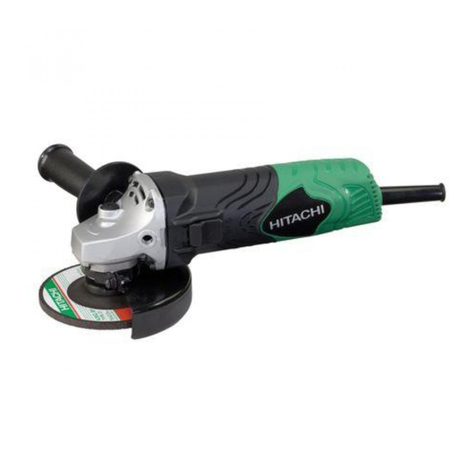
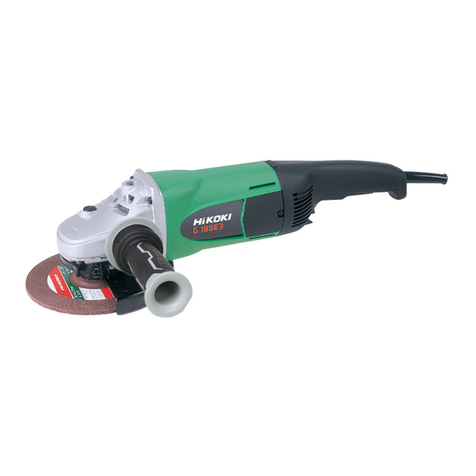
  9. HIKOKI G 10VE2 User manual

HIKOKI G 10VE2 User manual

Other manuals for G 10VE2

1

This manual suits for next models

1

Other HIKOKI Grinder manuals

HIKOKI G 23SU User manual

HIKOKI

HIKOKI G 23SU User manual

HIKOKI G 3613DA User manual

HIKOKI

HIKOKI G 3613DA User manual

HIKOKI GP 3V User manual

HIKOKI

HIKOKI GP 3V User manual

HIKOKI CV 12DA User manual

HIKOKI

HIKOKI CV 12DA User manual

HIKOKI G14DSL User manual

HIKOKI

HIKOKI G14DSL User manual

HIKOKI G 10SS2 User manual

HIKOKI

HIKOKI G 10SS2 User manual

HIKOKI GM 13Y User manual

HIKOKI

HIKOKI GM 13Y User manual

HIKOKI GP18DA User manual

HIKOKI

HIKOKI GP18DA User manual

HIKOKI GP 2S2 User manual

HIKOKI

HIKOKI GP 2S2 User manual

HIKOKI G 10SN2 User manual

HIKOKI

HIKOKI G 10SN2 User manual

HIKOKI G 12SW User manual

HIKOKI

HIKOKI G 12SW User manual

HIKOKI G 18BYE User manual

HIKOKI

HIKOKI G 18BYE User manual

HIKOKI G 23STA User manual

HIKOKI

HIKOKI G 23STA User manual

HIKOKI G 13VE2 User manual

HIKOKI

HIKOKI G 13VE2 User manual

HIKOKI GP 3V User manual

HIKOKI

HIKOKI GP 3V User manual

HIKOKI G 10BYEQ User manual

HIKOKI

HIKOKI G 10BYEQ User manual

HIKOKI G 10SQ User manual

HIKOKI

HIKOKI G 10SQ User manual

HIKOKI G 12SW User manual

HIKOKI

HIKOKI G 12SW User manual

HIKOKI G 3610DA User manual

HIKOKI

HIKOKI G 3610DA User manual

HIKOKI G 12SA3 User manual

HIKOKI

HIKOKI G 12SA3 User manual

HIKOKI G 23BYE User manual

HIKOKI

HIKOKI G 23BYE User manual

HIKOKI GP 10DL User manual

HIKOKI

HIKOKI GP 10DL User manual

HIKOKI G18MR User manual

HIKOKI

HIKOKI G18MR User manual

HIKOKI G 3610DVE User manual

HIKOKI

HIKOKI G 3610DVE User manual

Popular Grinder manuals by other brands

Parkside PWS 230 C3 Translation of the original instructions

Parkside

Parkside PWS 230 C3 Translation of the original instructions

SUHNER ABRASIVE ASC 9 Technical document

SUHNER ABRASIVE

SUHNER ABRASIVE ASC 9 Technical document

PTA P1322 Operation manual

PTA

PTA P1322 Operation manual

Crown CT13313 Original instructions

Crown

Crown CT13313 Original instructions

Parkside 280250 instructions

Parkside

Parkside 280250 instructions

Climax VM2150 Series operating manual

Climax

Climax VM2150 Series operating manual

Jet JPSG-618M1 Operating instructions and parts manual

Jet

Jet JPSG-618M1 Operating instructions and parts manual

Makita GA4030 instruction manual

Makita

Makita GA4030 instruction manual

DeWalt DWEN202 Original instructions

DeWalt

DeWalt DWEN202 Original instructions

Grizzly G2790 instruction manual

Grizzly

Grizzly G2790 instruction manual

Fein MSf843-1a Original instructions

Fein

Fein MSf843-1a Original instructions

Bosch GWS 14,4 V PROFESSIONAL operating instructions

Bosch

Bosch GWS 14,4 V PROFESSIONAL operating instructions

RAMSET CBAGR18 owner's manual

RAMSET

RAMSET CBAGR18 owner's manual

Bosch 8-115 Z Original instructions

Bosch

Bosch 8-115 Z Original instructions

STEELE PRODUCTS SP-PB008 owner's manual

STEELE PRODUCTS

STEELE PRODUCTS SP-PB008 owner's manual

MW TOOLS ME15W manual

MW TOOLS

MW TOOLS ME15W manual

Caravaggi SP 20 User & maintenance manual

Caravaggi

Caravaggi SP 20 User & maintenance manual

SUHNER ABRASIVE UWK 10-R125 Technical document

SUHNER ABRASIVE

SUHNER ABRASIVE UWK 10-R125 Technical document

manuals.online logo
manuals.online logoBrands
  • About & Mission
  • Contact us
  • Privacy Policy
  • Terms and Conditions

Copyright 2025 Manuals.Online. All Rights Reserved.

G10VE2 • G13VE2
G10VE2 G13VE2
Handling instructions
使用說明書
en
zh
en
zh
0000BookG10VE2.indb10000BookG10VE2.indb1 2023/07/1411:37:082023/07/1411:37:08
2
1
G13VE2G10VE2
2
G10VE2
G13VE2
0000BookG10VE2.indb20000BookG10VE2.indb2 2023/07/1411:37:092023/07/1411:37:09
3
3
4
G10VE2
∅16
∅20
G13VE2
0000BookG10VE2.indb30000BookG10VE2.indb3 2023/07/1411:37:112023/07/1411:37:11
4
5
G13VE2
∅16
∅20
G10VE2
6
G10VE2
∅20
∅16
G13VE2
0000BookG10VE2.indb40000BookG10VE2.indb4 2023/07/1411:37:122023/07/1411:37:12
5
78
+ + =
BBA
15°–30°
910
11
0000BookG10VE2.indb50000BookG10VE2.indb5 2023/07/1411:37:132023/07/1411:37:13
6
English
Carrying power tools with your finger on the switch
or energising power tools that have the switch on
invites accidents.
d) Remove any adjusting key or wrench before
turning the power tool on.
A wrench or a key left attached to a rotating part of
the power tool may result in personal injury.
e) Do not overreach. Keep proper footing and
balance at all times.
This enables better control of the power tool in
unexpected situations.
f) Dress properly. Do not wear loose clothing or
jewellery. Keep your hair, clothing and gloves
away from moving parts.
Loose clothes, jewellery or long hair can be caught in
moving parts.
g) If devices are provided for the connection of
dust extraction and collection facilities, ensure
these are connected and properly used.
Use of dust collection can reduce dust-related
hazards.
4) Power tool use and care
a) Do not force the power tool. Use the correct
power tool for your application.
The correct power tool will do the job better and safer
at the rate for which it was designed.
b) Do not use the power tool if the switch does not
turn it on and off.
Any power tool that cannot be controlled with the
switch is dangerous and must be repaired.
c) Disconnect the plug from the power source and/
or the battery pack from the power tool before
making any adjustments, changing accessories,
or storing power tools.
Such preventive safety measures reduce the risk of
starting the power tool accidentally.
d) Store idle power tools out of the reach of
children and do not allow persons unfamiliar
with the power tool or these instructions to
operate the power tool.
Power tools are dangerous in the hands of untrained
users.
e) Maintain power tools. Check for misalignment
or binding of moving parts, breakage of parts
and any other condition that may affect the
power toolʼs operation.
If damaged, have the power tool repaired before
use.
Many accidents are caused by poorly maintained
power tools.
f) Keep cutting tools sharp and clean.
Properly maintained cutting tools with sharp cutting
edges are less likely to bind and are easier to control.
g) Use the power tool, accessories and tool bits
etc. in accordance with these instructions,
taking into account the working conditions and
the work to be performed.
Use of the power tool for operations different from
those intended could result in a hazardous situation.
5) Service
a)
Have your power tool serviced by a qualified repair
person using only identical replacement parts.
This will ensure that the safety of the power tool is
maintained.
PRECAUTION
Keep children and infirm persons away.
When not in use, tools should be stored out of reach of
children and infirm persons.
GENERAL POWER TOOL SAFETY
WARNINGS
WARNING
Read all safety warnings and all instructions.
Failure to follow the warnings and instructions may result in
electric shock, fire and/or serious injury.
Save all warnings and instructions for future reference.
The term “power tool” in the warnings refers to your mains-
operated (corded) power tool or battery-operated (cordless)
power tool.
1) Work area safety
a) Keep work area clean and well lit.
Cluttered or dark areas invite accidents.
b) Do not operate power tools in explosive
atmospheres, such as in the presence of
flammable liquids, gases or dust.
Power tools create sparks which may ignite the dust
or fumes.
c) Keep children and bystanders away while
operating a power tool.
Distractions can cause you to lose control.
2) Electrical safety
a) Power tool plugs must match the outlet.
Never modify the plug in any way.
Do not use any adapter plugs with earthed
(grounded) power tools.
Unmodified plugs and matching outlets will reduce
risk of electric shock.
b) Avoid body contact with earthed or grounded
surfaces, such as pipes, radiators, ranges and
refrigerators.
There is an increased risk of electric shock if your
body is earthed or grounded.
c) Do not expose power tools to rain or wet
conditions.
Water entering a power tool will increase the risk of
electric shock.
d) Do not abuse the cord. Never use the cord for
carrying, pulling or unplugging the power tool.
Keep cord away from heat, oil, sharp edges or
moving parts.
Damaged or entangled cords increase the risk of
electric shock.
e) When operating a power tool outdoors, use an
extension cord suitable for outdoor use.
Use of a cord suitable for outdoor use reduces the
risk of electric shock.
f) If operating a power tool in a damp location
is unavoidable, use a residual current device
(RCD) protected supply.
Use of an RCD reduces the risk of electric shock.
3) Personal safety
a) Stay alert, watch what you are doing and use
common sense when operating a power tool.
Do not use a power tool while you are tired
or under the influence of drugs, alcohol or
medication.
A moment of inattention while operating power tools
may result in serious personal injury.
b) Use personal protective equipment. Always
wear eye protection.
Protective equipment such as dust mask, non-skid
safety shoes, hard hat, or hearing protection used for
appropriate conditions will reduce personal injuries.
c) Prevent unintentional starting. Ensure the
switch is in the offposition before connecting to
power source and/or battery pack, picking up or
carrying the tool.
0000BookG10VE2.indb60000BookG10VE2.indb6 2023/07/1411:37:142023/07/1411:37:14
7
English
SAFETY WARNINGS COMMON FOR
GRINDING OR ABRASIVE CUTTING-
OFF OPERATIONS
a) This power tool is intended to function as a
grinder or cut-offtool. Read all safety warnings,
instructions, illustrations and specifications
provided with this power tool.
Failure to follow all instructions listed below may result in
electric shock, fire and/or serious injury.
b) Operations such as sanding, wire brushing or
polishing are not recommended to be performed
with this power tool.
Operations for which the power tool was not designed
may create a hazard and cause personal injury.
c)
Do not use accessories which are not specifically
designed and recommended by the tool manufacturer.
Just because the accessory can be attached to your
power tool, it does not assure safe operation.
d)
The rated speed of the accessory must be at least equal
to the maximum speed marked on the power tool.
Accessories running faster than their rated speed can
break and fly apart.
e) The outside diameter and the thickness of your
accessory must be within the capacity rating of
your power tool.
Incorrectly sized accessories cannot be adequately
guarded or controlled.
f) Threaded mounting of accessories must match the
grinder spindle thread. For accessories mounted
by flanges, the arbour hole of the accessory must
fit the locating diameter of the flange.
Accessories that do not match the mounting hardware of
the power tool will run out of balance, vibrate excessively
and may cause loss of control.
g) Do not use a damaged accessory. Before each use
inspect the accessory such as abrasive wheels for
chips and cracks, backing pad for cracks, tear or
excess wear, wire brush for loose or cracked wires.
If power tool or accessory is dropped, inspect for
damage or install an undamaged accessory. After
inspecting and installing an accessory, position
yourself and bystanders away from the plane of
the rotating accessory and run the power tool at
maximum no-load speed for one minute.
Damaged accessories will normally break apart during
this test time.
h)
Wear personal protective equipment. Depending on
application, use face shield, safety goggles or safety
glasses. As appropriate, wear dust mask, hearing
protectors, gloves and workshop apron capable of
stopping small abrasive or workpiece fragments.
The eye protection must be capable of stopping flying
debris generated by various operations. The dust mask
or respirator must be capable of filtrating particles
generated by your operation. Prolonged exposure to
high intensity noise may cause hearing loss.
i) Keep bystanders a safe distance away from work
area. Anyone entering the work area must wear
personal protective equipment.
Fragments of workpiece or of a broken accessory may
fly away and cause injury beyond immediate area of
operation.
j) Hold the power tool by insulated gripping surfaces
only, when performing an operation where the
cutting accessory may contact hidden wiring or its
own cord.
Cutting accessory contacting a “live” wire may make
exposed metal parts of the power tool “live” and could
give the operator an electric shock.
k) Position the cord clear of the spinning accessory.
If you lose control, the cord may be cut or snagged and your
hand or arm may be pulled into the spinning accessory.
l) Never lay the power tool down until the accessory
has come to a complete stop.
The spinning accessory may grab the surface and pull
the power tool out of your control.
m)
Do not run the power tool while carrying it at your side.
Accidental contact with the spinning accessory could
snag your clothing, pulling the accessory into your body.
n) Regularly clean the power tool’s air vents.
The motor’s fan will draw the dust inside the housing and
excessive accumulation of powdered metal may cause
electrical hazards.
o)
Do not operate the power tool near flammable materials.
Sparks could ignite these materials.
p) Do not use accessories that require liquid coolants.
Using water or other liquid coolants may result in
electrocution or shock.
KICKBACK AND RELATED
WARNINGS
Kickback is a sudden reaction to a pinched or snagged
rotating wheel, backing pad, brush or any other accessory.
Pinching or snagging causes rapid stalling of the rotating
accessory which in turn causes the uncontrolled power tool
to be forced in the direction opposite of the accessory’s
rotation at the point of the binding.
For example, if an abrasive wheel is snagged or pinched by
the workpiece, the edge of the wheel that is entering into the
pinch point can dig into the surface of the material causing
the wheel to climb out or kick out. The wheel may either jump
toward or away from the operator, depending on direction of
the wheel’s movement at the point of pinching.
Abrasive wheels may also break under these conditions.
Kickback is the result of power tool misuse and/or incorrect
operating procedures or conditions and can be avoided by
taking proper precautions as given below.
a)
Maintain a firm grip on the power tool and position your
body and arm to allow you to resist kickback forces.
Always use auxiliary handle, if provided, for maximum
control over kickback or torque reaction during start-up.
The operator can control torque reactions or kickback
forces, if proper precautions are taken.
b) Never place your hand near the rotating accessory.
Accessory may kickback over your hand.
c) Do not position your body in the area where power
tool will move if kickback occurs.
Kickback will propel the tool in direction opposite to the
wheel’s movement at the point of snagging.
d) Use special care when working corners, sharp edges
etc. Avoid bouncing and snagging the accessory.
Corners, sharp edges or bouncing have a tendency to
snag the rotating accessory and cause loss of control or
kickback.
e) Do not attach a saw chain woodcarving blade or
toothed saw blade.
Such blades create frequent kickback and loss of control.
SAFETY WARNINGS SPECIFIC FOR
GRINDING AND ABRASIVE CUTTING-
OFF OPERATIONS
a) Use only wheel types that are recommended for
your power tool and the specific guard designed
for the selected wheel.
Wheels for which the power tool was not designed
cannot be adequately guarded and are unsafe.
0000BookG10VE2.indb70000BookG10VE2.indb7 2023/07/1411:37:142023/07/1411:37:14

8
English
b) The grinding surface of centre depressed wheels
must be mounted below the plane of the guard lip.
An improperly mounted wheel that projects through the
plane of the guard lip cannot be adequately protected.
c)
The guard must be securely attached to the power
tool and positioned for maximum safety, so the least
amount of wheel is exposed towards the operator.
The guard helps to protect the operator from broken
wheel fragments, accidental contact with wheel and
sparks that could ignite clothing.
d) Wheels must be used only for recommended
applications. For example: do not grind with the
side of cut-offwheel.
Abrasive cut-offwheels are intended for peripheral
grinding, side forces applied to these wheels may cause
them to shatter.
e) Always use undamaged wheel flanges that are of
correct size and shape for your selected wheel.
Proper wheel flanges support the wheel thus reducing
the possibility of wheel breakage. Flanges for cut-off
wheels may be different from grinding wheel flanges.
f) Do not use worn down wheels from larger power
tools.
Wheel intended for larger power tool is not suitable for
the higher speed of a smaller tool and may burst.
ADDITIONAL SAFETY WARNINGS
SPECIFIC FOR ABRASIVE CUTTING-
OFF OPERATIONS
a) Do not “jam” the cut-offwheel or apply excessive
pressure. Do not attempt to make an excessive
depth of cut.
Overstressing the wheel increases the loading and
susceptibility to twisting or binding of the wheel in the cut
and the possibility of kickback or wheel breakage.
b) Do not position your body in line with and behind
the rotating wheel.
When the wheel, at the point of operation, is moving
away from your body, the possible kickback may propel
the spinning wheel and the power tool directly at you.
c) When wheel is binding or when interrupting a cut
for any reason, switch offthe power tool and hold
the power tool motionless until the wheel comes to
a complete stop. Never attempt to remove the cut-
offwheel from the cut while the wheel is in motion
otherwise kickback may occur.
Investigate and take corrective action to eliminate the
cause of wheel binding.
d) Do not restart the cutting operation in the workpiece.
Let the wheel reach full speed and carefully re-enter
the cut.
The wheel may bind, walk up or kickback if the power
tool is restarted in the workpiece.
e) Support panels or any oversized workpiece to
minimize the risk of wheel pinching and kickback.
Large workpieces tend to sag under their own weight.
Supports must be placed under the workpiece near the
line of cut and near the edge of the workpiece on both
sides of the wheel.
f) Use extra caution when making a “pocket cut” into
existing walls or other blind areas.
The protruding wheel may cut gas or water pipes,
electrical wiring or objects that can cause kickback.
GENERAL SAFETY INSTRUCTIONS
FOR GRINDERS
– Check that speed marked on the wheel is equal to or
greater than the rated speed of the grinder;
– Ensure that the wheel dimensions are compatible with
the grinder;
– Abrasive wheels shall be stored and handled with care in
accordance with manufacturer’s instructions;
– Inspect the grinding wheel before use, do not use
chipped, cracked or otherwise defective products;
– Ensure that mounted wheels and points are fitted in
accordance with the manufacturer’s instructions;
– Ensure that blotters are used when they are provided
with the bonded abrasive product and when they are
required;
– Ensure that the abrasive product is correctly mounted
and tightened before use and run the tool at no-load for
30 seconds in a safe position, stop immediately if there
is considerable vibration or if other defects are detected.
If this condition occurs, check the machine to determine
the cause;
– If a guard is equipped with the tool never use the tool
without such a guard;
– <G10VE2> When using an abrasive cutting wheel, be
sure to remove the standard accessory wheel guard and
attach the wheel guard with side guard (sold separately)
(Fig. 5);
– <G13VE2> When using an abrasive cutting wheel,
be sure to attach the guard clip for cutting wheel (sold
separately) over the standard-accessory wheel guard.
(Fig. 5);
– Do not use separate reducing bushings or adapters to
adapt large hole abrasive wheels;
– For tools intended to be fitted with threaded hole wheel,
ensure that the thread in the wheel is long enough to
accept the spindle length;
– Check that the work piece is properly supported;
– Do not use cutting offwheel for side grinding;
– Ensure that sparks resulting from use do not create
a hazard e.g. do not hit persons, or ignite flammable
substances;
– Ensure that ventilation openings are kept clear when
working in dusty conditions, if it should become
necessary to clear dust, first disconnect the tool from
the mains supply (use non metallic objects) and avoid
damaging internal parts;
– Always use eye and ear protection. Other personal
protective equipment such as dust mask, gloves, helmet
and apron should be worn;
– Pay attention to the wheel that continues to rotate after
the tool is switched off.
WARNING
– When using a cutting-offwheel, be sure to attach the
cutting-offguard.
– When using a grinding wheel, be sure to attach the
grinding wheel guard.
ADDITIONAL SAFETY WARNINGS
1. Ensure that the power source to be utilized conforms
to the power requirements specified on the product
nameplate.
2. Ensure that the power switch is in the OFF position. If the
plug is connected to a receptacle while the power switch
is in the ON position, the power tool will start operating
immediately, which could cause a serious accident.
3. When the work area is removed from the power source,
use an extension cord of sufficient thickness and rated
capacity. The extension cord should be kept as short as
practicable.
0000BookG10VE2.indb80000BookG10VE2.indb8 2023/07/1411:37:142023/07/1411:37:14

9
English
4. Ensure that the depressed center wheel to be utilized is
the correct type and free of cracks or surface defects.
Also ensure that the depressed center wheel is properly
mounted and the wheel nut is securely tightened.
5. Confirm that the push button is disengaged by pushing
push button two or three times before switching the
power tool on.
6. To prolong the life of the machine and ensure a first
class finish, it is important that the machine should not
be overloaded by applying too much pressure. In most
applications, the weight of the machine alone is sufficient
for effective grinding. Too much pressure will result in
reduced rotational speed, inferior surface finish, and
overloading which could reduce the life of the machine.
7. The wheel continues to rotate after the tool is switched
off.
After switching offthe machine, do not put it down until
the depressed center wheel has come to a complete
stop. Apart from avoiding serious accidents, this
precaution will reduce the amount of dust and swarf
sucked into the machine.
8. When the machine is not use, the power source should
be disconnected.
9. Be sure to switch OFF and disconnect the attachment
plug from the receptacle to avoid a serious accident
before the depressed center wheel is assembling and
disassembling.
10. When using the tool at any value except the full speed
(Dial scale 6), the motor cannot be sufficiently cooled
due to the decreased number of revolution. This could
result in the risk of burning and damaging the motor
before an overload protective mechanism starts to
function.
Make sure that you use the tool by lightly applying it
to the surface of material when you use it at any value
except the full speed (Dial scale 6).
11. Caution when using near welding equipment
When using the grinder in the immediate vicinity of
welding equipment, the rotational speed may become
unstable. Do not use the grinder near welding equipment.
12. RCD
The use of a residual current device with a rated residual
current of 30 mA or less at all times is recommended.
13. Do not operate from a direct current power source,
booster or any other type of transformer. Doing so may
not only cause damage to the grinder, but may lead to
accidents.
14. Some mobile generators may not be usable with the
machine.
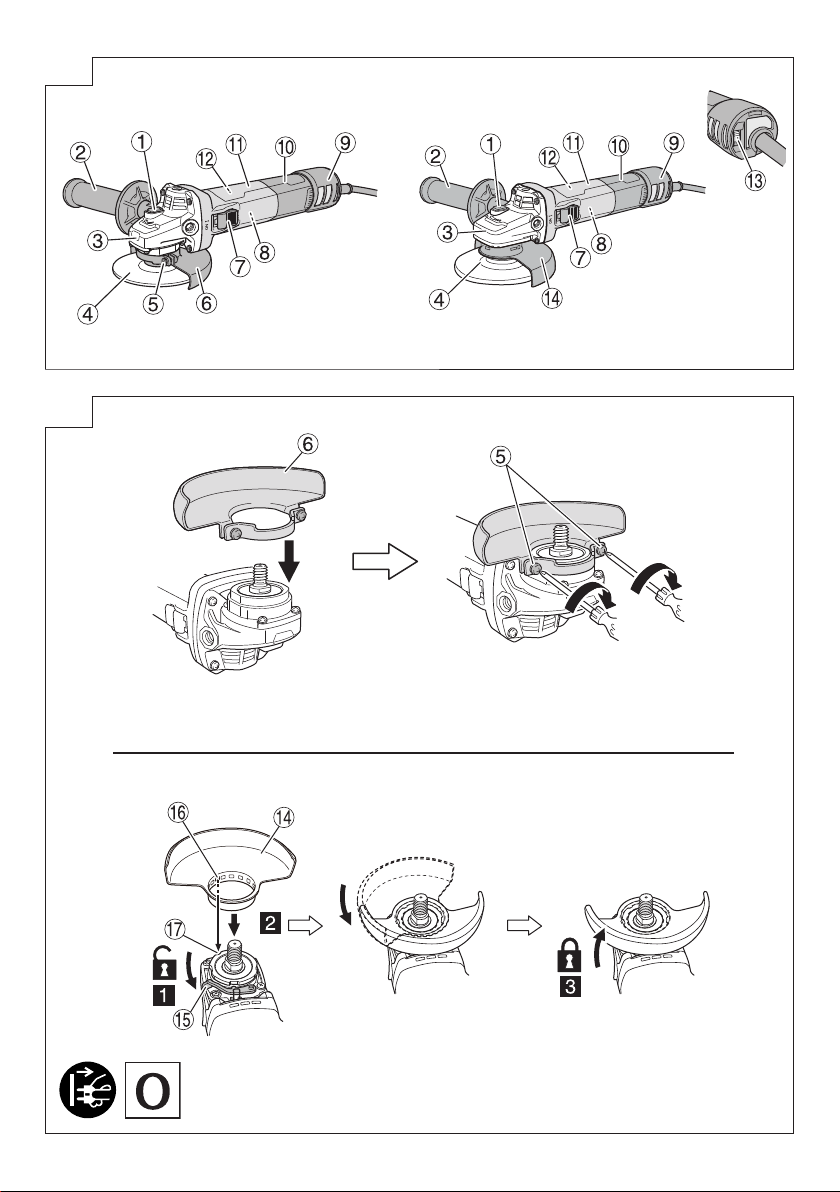
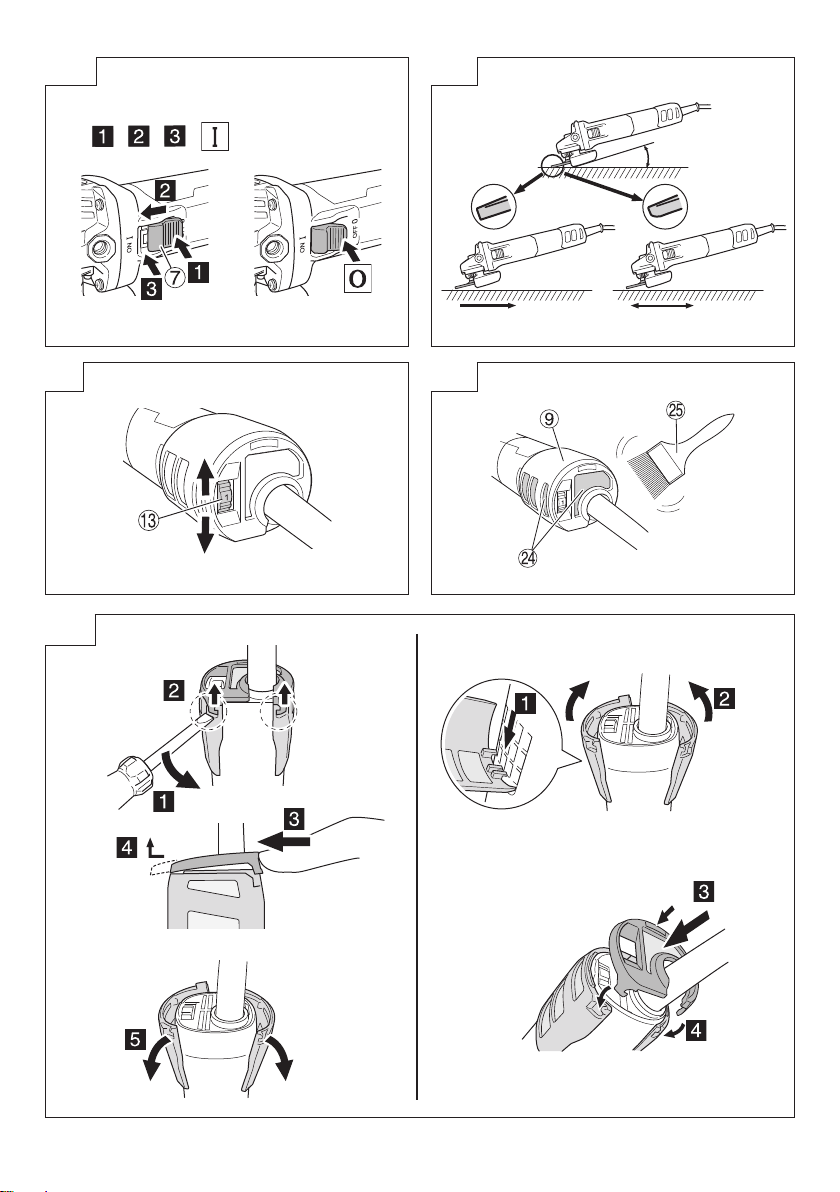
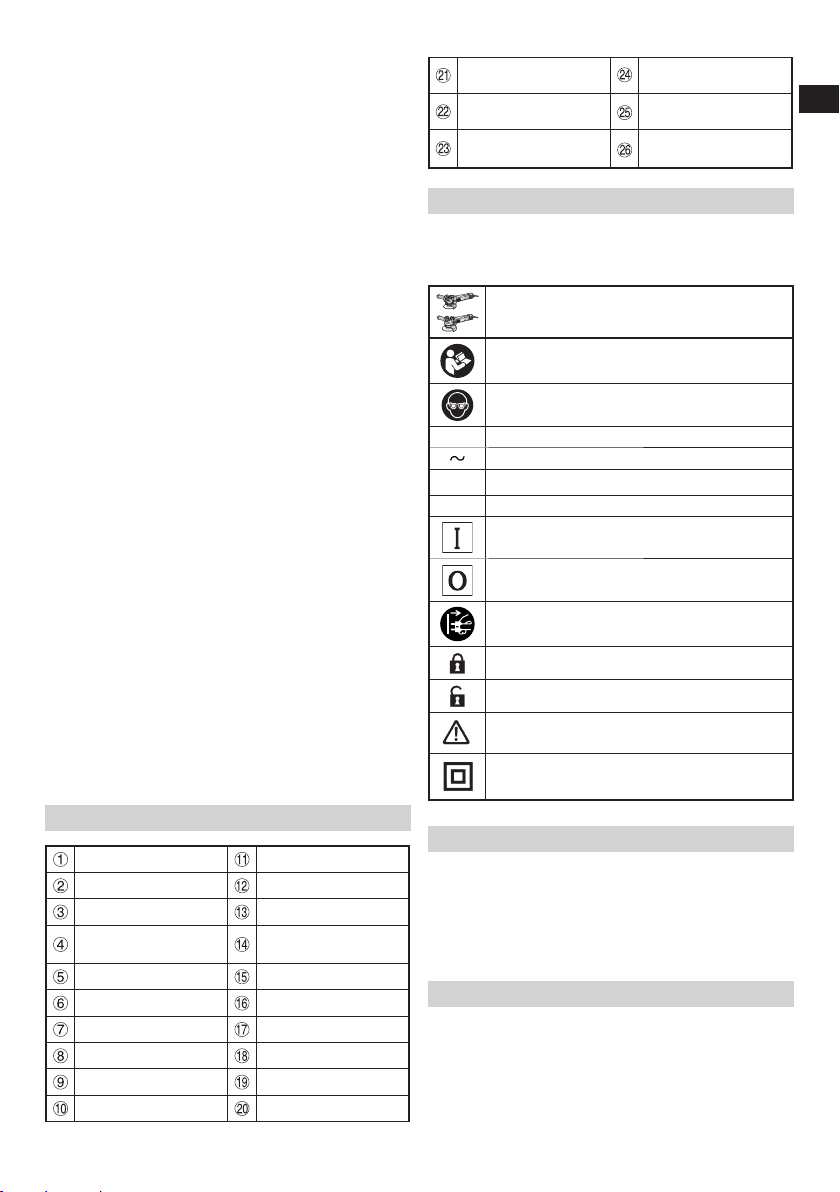
NAMES OF PARTS (Fig. 1–Fig. 11)
Push button Housing
Side handle Nameplate
Gear cover Dial
Depressed center
wheel
Tool-less wheel guard
M5 screw Lever
Wheel guard Bump
Switch Notch
Motor Wheel washer
Filter Wheel nut
Tail cover Wrench
Cutting wheel
(sold separately) Mesh
Guard clip
(sold separately) Soft brush
Diamond wheel
(sold separately)
With side guard
(sold separately)
SYMBOLS
WARNING
The following show symbols used for the machine.
Be sure that you understand their meaning before
use.
G10VE2 / G13VE2: Disc Grinder
To reduce the risk of injury, user must read
instruction manual.
Always wear eye protection.
V Rated voltage
Alternating current
nRated speed
/min Revolution or reciprocations per minute
Switching ON
Switching OFF
Disconnect mains plug from electrical outlet
Lock
Unlock
Warning
Class II tool
STANDARD ACCESSORIES
In addition to the main unit (1 unit), the package
contains the accessories listed in the below.
○Wrench .........................................................................1
○Depressed center wheel ...............................................1
○Side handle...................................................................1
Standard accessories are subject to change without notice.
APPLICATIONS
○Removal of casting fin and finishing of various types of
steel, bronze and aluminum materials and castings.
○Grinding of welded sections or sections cut by means of
a cutting torch.
○Grinding of synthetic resins, slate, brick, marble, etc.
○Cutting of synthetic concrete, stone, brick, marble, and
similar materials.
0000BookG10VE2.indb90000BookG10VE2.indb9 2023/07/1411:37:152023/07/1411:37:15
10
English
SPECIFICATIONS
Model G10VE2 G13VE2
Voltage (by areas)*1(110 V, 220 V, 230 V, 240 V)
Power Input*1
110 V: 1050 W
220 V: 1200 W
230–240 V: 1320 W
Rated speed 2800–10000 /min 2500–8500 /min
Wheel
Outer dia. 100 mm 125 mm
Hole Dia. 16 mm 22.23 mm
Thickness 6 mm
Peripheral speed 72 m/s 80 m/s
Weight
(Only main body) 1.5 kg 1.7 kg
*1 Be sure to check the nameplate on product as it is
subject to change by areas.
Electronic control
○Soft start
Reduces recoil against the operator by managing the
number of rotations during startup.
○0 Voltage Re-start Protection
The 0 voltage restart protection feature prevents the
power tool from restarting after the power has been
temporarily cut offduring operation.
○Constant speed
○Overload protection
This protection feature cuts offthe power to the motor
in the event of overloading of motor or a conspicuous
reduction in rotational speed during operation.
When the overload protection feature has been
activated, the motor may stop.
In this case, release the tool switch and eliminate causes
of overloading.
After that you can use it again.
○Rotation recovery control function
When the motor is stopped due to overloading, if the
cause is eliminated, the motor automatically resumes
operation.
During grinding, if the motor stops due to pressing too
forcefully with the grinder, gently lift the tool body to start
rotation again.
When the motor is stopped for a certain period of time,
it does not recover, for the protection of the unit and for
safety.
Turn it offonce and on again to start it.
○Overheat protection
This protection feature cuts offthe power to the motor
and stops the power tool in the event of overheating of
motor during operation.
When the overheat protection feature has been
activated, the motor may stop.
In this case, release the tool switch and cool it down in a
few minutes.
After that you can use it again.
NOTE
Due to HiKOKI’s continuing program of research and
development, the specifications herein are subject to
change without prior notice.
MOUNTING AND OPERATION
Action Figure Page
Fitting and adjusting the wheel
guard 22
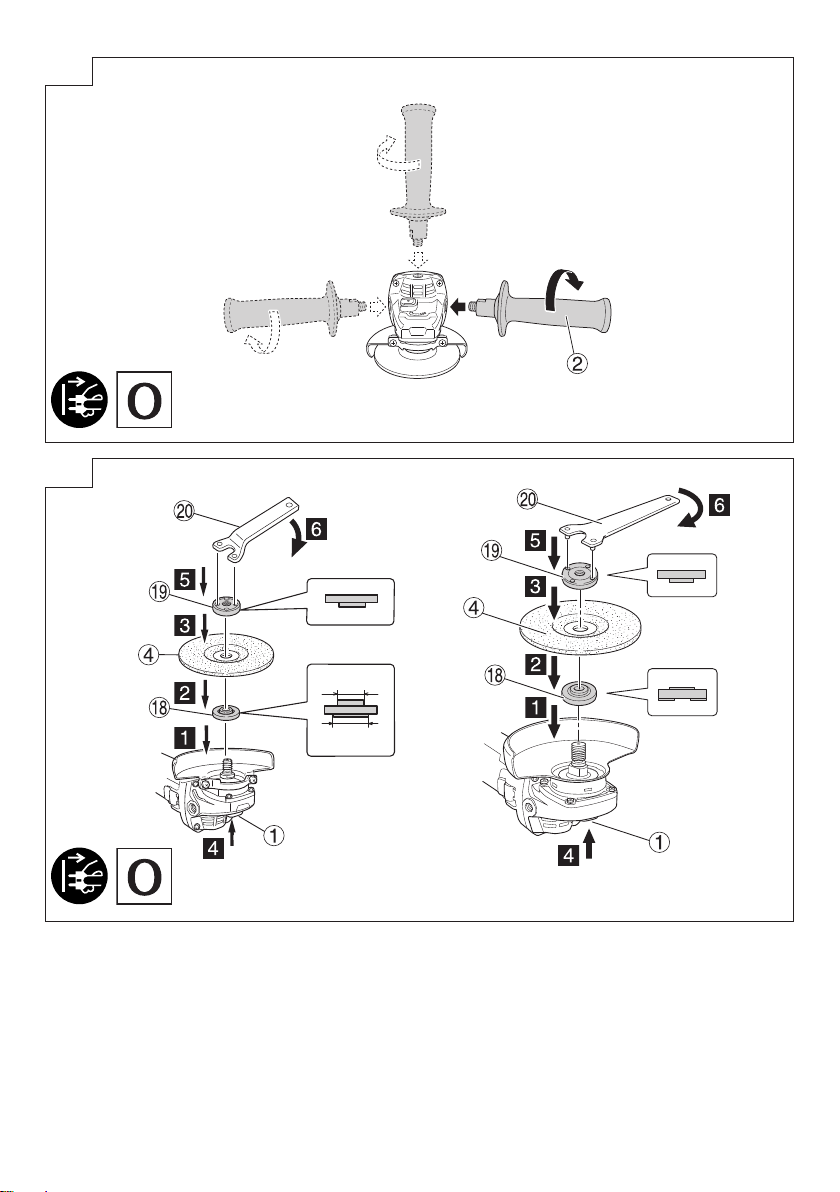
Fixing the side handle 3 3
Assembling depressed center
wheel*2 43
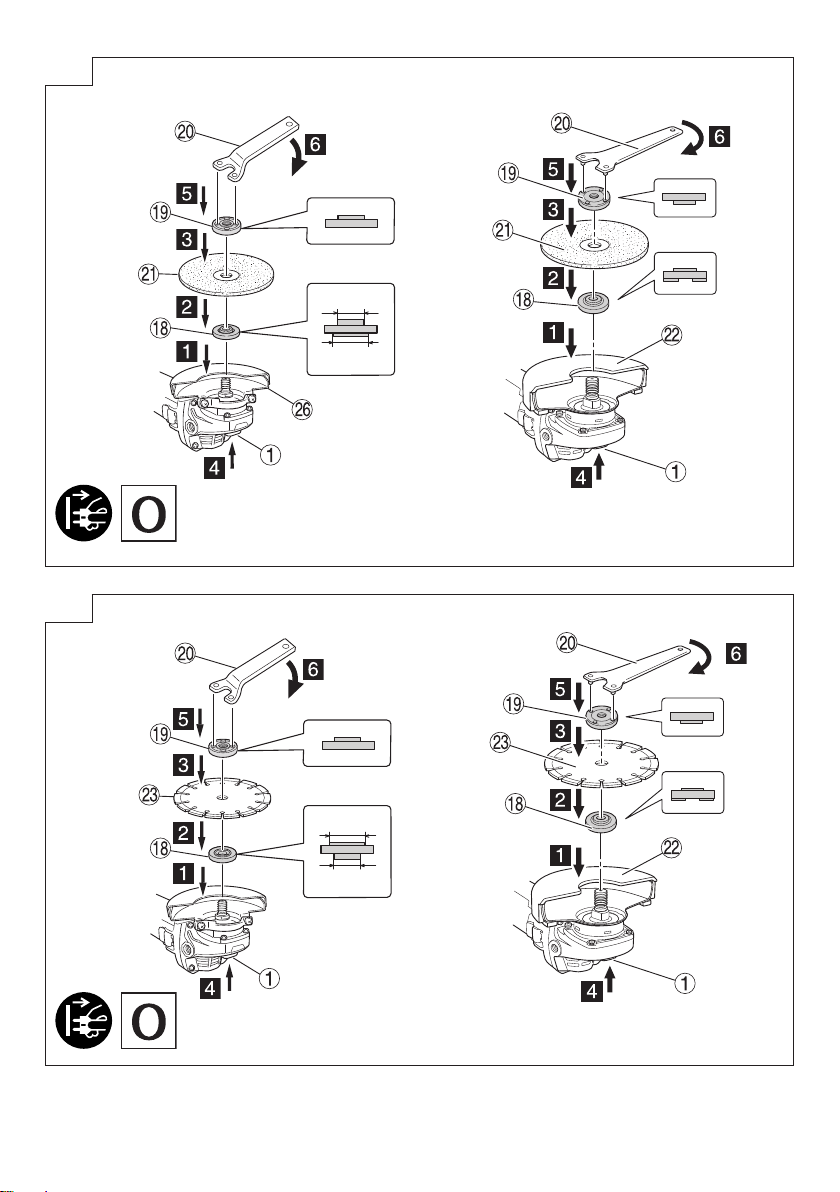
Assembling cutting wheel*1, *2 54
Assembling diamond wheel*1, *2 64
Switch operation*3 75
Grinding angle and grinding
method 85
Adjusting the number of revolution*4
95
Mounting and dismounting the
filter set
*5
11 5
Selecting accessories ―18
*1 Sold separately
*2 WARNING
Before use, be sure to tighten the wheel nut with the
included wrench.
Failure to tighten could result in the wheel nut
loosening when the brake is activated during a stop.
NOTE
The wheel washer is specifically for this product. Do
not use it for any other product.
*3 When the 0 voltage re-start protection feature has been
activated, return the power switch to the OFF position
and wait for 1 second or more before restarting the
power tool.
*4 Adjusting the number of revolution
This model is equipped with an electronic infinite-
variable-speed drive and can change the number of
revolution according to a use.
If you turn and set the dial scale (Fig. 9) to 6, the number
of revolution increases, and if you turn and set it to 1, the
number of revolution decreases.
Before use, set the number of revolution using the dial. In
so doing, refer to the following table as a rough guide.
Dial Use Tools
1 Polishing, finishing Radial grinding disc
Sanding disc
2 Removal of paint
or coat
3 Removal of rust
4 Removal of burrs
5 Grinding Depressed center wheel
6 Rough grinding
Cutting
Depressed center wheel
Diamond wheel
NOTE
○Use caution not to turn the dial scale to any value below
1 or above 6.
*5 NOTE
○When detaching the filter, be careful not to let debris
enter the tool body.
○Keep the filter set attached except during cleaning or
replacement.
0000BookG10VE2.indb100000BookG10VE2.indb10 2023/07/1411:37:162023/07/1411:37:16