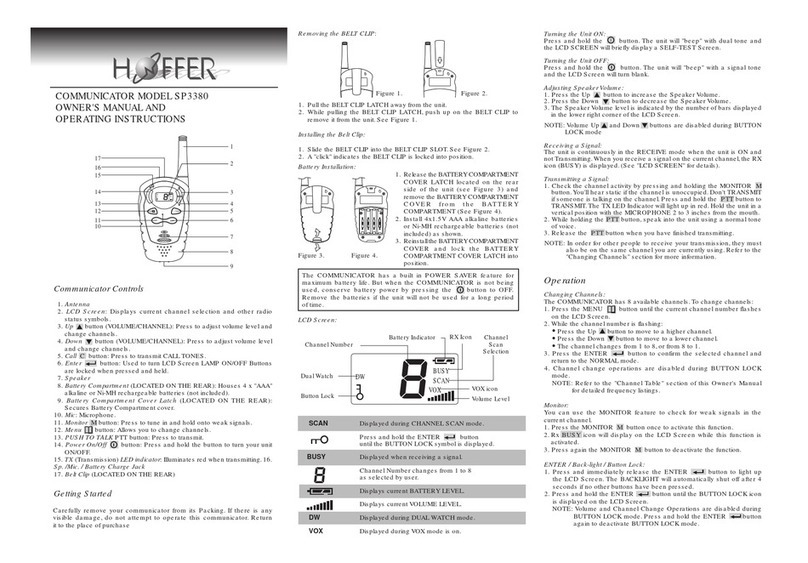
Channel Scan:
CHANNEL SCAN performs searches for active signals in an endless loop
from basic channel 1 to 8.
1. Press SCAN Sbutton to activate CHANNELSCAN.The channel number
on the LCD Screen changes rapidly until an active signal is detected.
During CHANNEL SCAN mode.
Press ENTER button to confirm the selected channel.
Press the CALL Cbutton to change to CALL function and to send
a CALL TONE on that active channel.
Press the SCAN Sbutton again to deactivate CHANNELSCAN mode.
2. When an active signal (one of 8 channels) is detected. CHANNEL
SCAN pauses,keeping the active signal broadcasted.
3. Press the PTT button to communicate through the active signal channel
and CHANNEL SCAN is deactivated.
4. When an active signal (one of 8 channels) is detected,but another
channel is desired, press the Up or Down button to bypass the
current channel and continue to search for another active channel.
Sending Call Tones
You can use CALL TONES to alert the other when you are attempting to
contact them.You can also use CALL TONES to signal the beginning or
the end of a transmission.
1. Press the CALL Cbutton,the red TX LED indicator will light up and the
CALL TONE continues for 3 seconds.
2. Release the CALL Cbutton,your CALL TONES will transmit to nearby
receivers set to the same channel.
Monitor:
You can use the MONITOR feature to check for weak signals in the current
channel.
1. Press the MONITOR Mbutton once to activate this function.
2. Rx BUSY icon will display on the LCD Screen while this function is
activated.
3. Press again the MONITOR Mbutton to deactivate the function.
ENTER / Back-light / Button Lock:
1. Press and immediately release the ENTER button to light up the
LCD Screen.The BACKLIGHT will automatically shut off after 4 seconds
if no other buttons have been pressed.
2. Press and hold the ENTER button until the BUTTON LOCK icon is
displayed on the LCD Screen.
NOTE:Volume and Channel Change Operations are disabled during
BUTTON LOCK mode.Press and hold the ENTER button again
to deactivate BUTTON LOCK mode.
NOTE: The maximum transmission range will vary depending on terrain and
environment.
Troubleshooting
Specifications:
Frequency
(Hz)
Sub
Channel Frequency
(Hz)
Sub
Channel Frequency
(Hz)
Sub
Channel
CTCSS ( Continuous Tone Coded Squelch System) Frequency Table.
Channels Available 8 Channels
CTCSS Sub-channel 38 for each Channel
Output Power (TX) 0.5W
Battery Life 30 Hours (typical)
Range About 3 Miles
CHANNEL TABLE
1
2
3
4
446.00625
446.01875
446.03125
446.04375
CHANNEL FREQUENCY (MHz) CHANNEL FREQUENCY (MHz)
5
6
7
8
446.05625
446.06875
446.08125
446.09375
SYMPTOM
No power.
Reception is
weak.
Cannot change
channels.
Range is limited.
Sound distortion
problems.
SOLUTION
=Check batteries.Ensure that the batteries are installed properly.
=The batteries may be weak.
=Replace old batteries with four (4) new "AAA" alkaline batteries
or 4.8V "AAA" Ni-MH rechargeable battery pack .
=Press the Up button to increase VOLUME.
=The receiving signal may be weak and/or out of range.
=If this happens,press the MONITOR Mbutton.
=To change channels,press the MENU button until the channel
number flashes on the LCD Screen.
=Press the Up or Down buttons to change channels.
=Batteries may be weak.
=BUTTON LOCK must be deactivated.
=BATTERIES may be weak.
=Replace with new batteries if the BATTERY LEVEL indicator is low.
=Themaximumrangewillvary depending on terrain and environment.
=Open fields provide the maximum range, while steel/concrete
structures,heavy foliage and use in buildings and in vehicles may
limit the range significantly.
=Wearing the radio close to the body,such as in a pocket or on
a belt,will decrease range; change the location of the radio.
=If you are transmitting, speak in a normal tone of voice, 2 to 3
inches away from the MICROPHONE.
=If you are receiving,lower the volume to a comfortable level.
=Radios too close.Radios must be at least 5 feet apart; increase
your distance.
=Radios too far apart. Obstacles interfere with transmission.Talk
range is up to 3 miles in clear unobstructed conditions.
To Charge The COMMUNICATOR
In the event you wish to use the unit with rechargeable battery (not included)
you will be required to use an DC adaptor - input 230 VAC 50Hz - Output 6
DC 200MA (optional)
1. Turn the unit OFF (Do not turn ON the unit during
Battery Charge Mode).
2. Install 4.8V "AAA" Ni-MH Rechargeable Battery
Pack into the battery compartment of unit.
3. Place the unit into the Charger Base.
4. Plug the adaptor into the wall outlet and insert
the round end into the Charge Jack on the rear
of the charger base.
5. The LED light on the Charger Base will turn RED
once electricity get connected.
6. Unplug the Adpator. Turn the unit ON. The Battery
Level Indicator on the LCD Screen will display the
new Battery Level.
*LED Indicator on the charger base will NOT turn
OFF automatically, except take out the unit from
the charger base and disconnect the electricity.
** It takes approximately 6 hours to fully charge the
batteries if they are at their lowest level or takes
around 14 hours to fully charge the new batteries.
Dual Watch:
You can use Dual Watch to monitor 2 channels.
To enter Dual Watch mode:
1. Press MENU button 4 times.
2. Press Up and Down buttons to select desired channel.
3. Once Dual Watch is on,automatically scan the channel that between
2 prefixed channel and the carrier stop on either activated channel
to receive.Dual Watch restarts when the carrier disppears.
4. Press MONITOR Mbutton to monitor weak signal.
5. Press ENTER ,PTT or CALL Cbutton to end the Dual Watch mode.
Internal VOX Control Function
On VOX mode,automatically transmitting and receiving signals without
pressing any button.
To turn on the VOX function:
1. Press MENU button 3 times to enter the VOX mode;
2. While the VOX icon is flashing;
3. Press Up button to select higher VOX sensitivity;
4. Press Down buttons to select lowerVOX sensitivity;
5.Press MENU button twice or button to confirm the selected
mode.
NOTE: The VOX sensitivity is indicated by the number of bars displayed
in the lower right corner of the LCD Screen.
To turn off the VOX function:
1.While the VOX icon is flashing,press Down buttons until the number
of bars disappears.
2.Press MENU button twice or button to confirm the VOX off
mode.
To activate the VOX sensitivity:
1.While the VOX mode is on, plug the connector of the headset (not
included) into SP./MIC jack of the communicator and then speak
through the microphone of the headset to activate the transmitting
mode.
2. Transmitting mode will turn on automatically and on standby mode.
3. The TX LED indicator illuminates red when transmitting.
NOTE: The VOX sensitivity is automatically activated once plug the
connector of the Headset (not included) into SP./MIC jack of the
communicator. You don't have to push the PTT button of the
communicator while transmitting.
Battery Level Indicator:
1. The BATTERY LEVELis indicated by the number of squares present inside
the BATTERY icon on the LCD Screen.
2. When the BATTERY LEVEL is low,the BATTERY icon will flash to indicate
that the batteries need to be replaced.