manuals.online logo
Brands
  1. Home
  2. •
  3. Brands
  4. •
  5. HP
  6. •
  7. Docking Station
  8. •
  9. HP Compaq Presario,Presario 2540 User instructions

HP Compaq Presario,Presario 2540 User instructions

Other HP Docking Station manuals

HP USB Media Docking Station User manual

HP

HP USB Media Docking Station User manual

HP THUNDERBOLT DOCK G4 Owner's manual

HP

HP THUNDERBOLT DOCK G4 Owner's manual

HP 2008 Docking Stations User manual

HP

HP 2008 Docking Stations User manual

HP D9Y32AA User instructions

HP

HP D9Y32AA User instructions

HP G5 User manual

HP

HP G5 User manual

HP A7E32AA User instructions

HP

HP A7E32AA User instructions

HP USB Media Port Replicator User manual

HP

HP USB Media Port Replicator User manual

HP 2013 User manual

HP

HP 2013 User manual

HP Advanced Docking Station Manual

HP

HP Advanced Docking Station Manual

HP KN744AA - Notebook QuickDock Port Replicator Specification sheet

HP

HP KN744AA - Notebook QuickDock Port Replicator Specification sheet

HP Photosmart M-series User manual

HP

HP Photosmart M-series User manual

HP TC1100 - Compaq Tablet PC User manual

HP

HP TC1100 - Compaq Tablet PC User manual

HP KN744AA - Notebook QuickDock Port Replicator Specification sheet

HP

HP KN744AA - Notebook QuickDock Port Replicator Specification sheet

HP QuickDock Manual

HP

HP QuickDock Manual

HP Pro Portable Tablet Dock Specification sheet

HP

HP Pro Portable Tablet Dock Specification sheet

HP C8907A - Photosmart M-series Dock Digital Camera Docking... User manual

HP

HP C8907A - Photosmart M-series Dock Digital Camera Docking... User manual

HP 2012 Docking Stations User manual

HP

HP 2012 Docking Stations User manual

HP VB041AA Series User instructions

HP

HP VB041AA Series User instructions

HP DK985A User instructions

HP

HP DK985A User instructions

HP 82718A User manual

HP

HP 82718A User manual

HP R-series User manual

HP

HP R-series User manual

HP QuickDock Manual

HP

HP QuickDock Manual

HP HP OmniBook 900 User manual

HP

HP HP OmniBook 900 User manual

HP DC367B - Compaq Basic Port Replicator 1.2 User manual

HP

HP DC367B - Compaq Basic Port Replicator 1.2 User manual

Popular Docking Station manuals by other brands

Durr Dental VISTACAM2 Installation and operating instructions

Durr Dental

Durr Dental VISTACAM2 Installation and operating instructions

DLO TransDock Direct user manual

DLO

DLO TransDock Direct user manual

Lenovo USB-C Mini Dock user manual

Lenovo

Lenovo USB-C Mini Dock user manual

Sony Dream Machine XDR-DS12iP user manual

Sony

Sony Dream Machine XDR-DS12iP user manual

ATEN UC-2000 user manual

ATEN

ATEN UC-2000 user manual

Xcellon HDD-202 user manual

Xcellon

Xcellon HDD-202 user manual

Dok CR09 user guide

Dok

Dok CR09 user guide

Philips BTM630/12 quick start guide

Philips

Philips BTM630/12 quick start guide

IOGear Travel Pro GUD3C09 quick start guide

IOGear

IOGear Travel Pro GUD3C09 quick start guide

iHome iP15 instruction manual

iHome

iHome iP15 instruction manual

VITURE ONE MOBILE DOCK quick start guide

VITURE ONE

VITURE ONE MOBILE DOCK quick start guide

CipherLab 8001 quick guide

CipherLab

CipherLab 8001 quick guide

Pyle PIPDSP2 owner's manual

Pyle

Pyle PIPDSP2 owner's manual

Targus DOCK315EUZ user guide

Targus

Targus DOCK315EUZ user guide

Philips DC190/79 user manual

Philips

Philips DC190/79 user manual

Akasa DuoDockX3 AK-DK08U3-BK user manual

Akasa

Akasa DuoDockX3 AK-DK08U3-BK user manual

Sirius Satellite Radio SUBX2082808a Installation and user guide

Sirius Satellite Radio

Sirius Satellite Radio SUBX2082808a Installation and user guide

OWC Thunderbolt Dock user guide

OWC

OWC Thunderbolt Dock user guide

manuals.online logo
manuals.online logoBrands
  • About & Mission
  • Contact us
  • Privacy Policy
  • Terms and Conditions

Copyright 2025 Manuals.Online. All Rights Reserved.

Introduction
IntroductionIntroduction
Introduction
HP provides a portfolio of professional-grade accessories that deliver an ideal mobile office designed to help you achieve your
business goals, increase productivity and lower your costs. All HP accessories go through rigorous testing and are certified to work
seamlessly with your HP Business Notebook. They are backed up by HP's world-class support.
HP docking solutions include a range of convenient expansion solutions that easily connect to your HP Business Notebook or Tablet
PC. Create an ideal desktop computing environment using docking stations and stands that provide port replication and cable
management, as well as enable future expandability.
HP is committed to delivering the optimal mobile computing experience by offering industry-leading accessories for every mobile
user, whether you are a frequent traveler or rarely leave your desk. Enjoy return on investment from these easy-to-use, easy-to-
deploy, and easy-to-manage expansion solutions.
Models
ModelsModels
Models
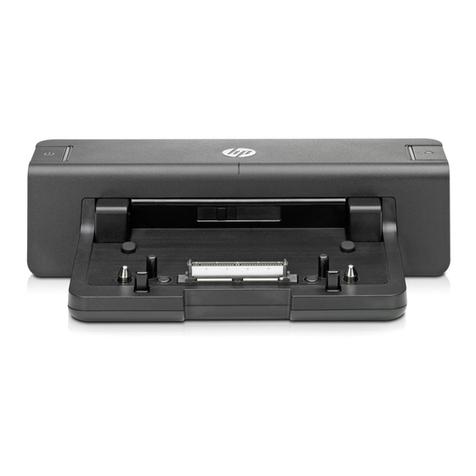
HP 2540 Docking Station
VU895AA
HP Docking Station Cable Lock
AU656AA#XXX
HP 2540 Docking Station Front Components
HP 2540 Docking Station Front ComponentsHP 2540 Docking Station Front Components
HP 2540 Docking Station Front Components
1.
Docking posts
5.
Docking connector
2.
Computer connect/release mechanisms
6.
Connect button
3.
Power button
7.
Connect light
4.
Computer power light
HP 2540 Docking Station Rear/Right-Side Components
HP 2540 Docking Station Rear/Right-Side ComponentsHP 2540 Docking Station Rear/Right-Side Components
HP 2540 Docking Station Rear/Right-Side Components
QuickSpecs
HP 2540 Docking Station
HP 2540 Docking StationHP 2540 Docking Station
HP 2540 Docking Station
Overview
DA - 13634 Worldwide — Version 4 — April 13, 2011
Page 1
1.
HP Lock (Lock not included)
8.
eSATA port
2.
Powered USB 2.0 port
9.
USB 2.0 ports (3)
3.
Security lock slot
10.
DisplayPort
4.
HP Lock slot
11.
Line-in jack
5.
LAN/Ethernet jack
12.
Line-out jack
6.
VGA port
13.
Power connector
7.
Monitor stand port
14.
Power in LED (indicates docking station is plugged in)
Key Benefits
Key BenefitsKey Benefits
Key Benefits
Full port replication and cable management in a space-saving design, the HP 2540 Docking Station is compatible with the HP
EliteBook 2540p Notebook PC.
Easy docking system provides port replication and cable management in one location
Four USB ports allow you to connect more peripherals to make you more productive
Features the new HP Lock slot. Help secure your docking station or notebook and docking station against theft with a security
cable and HP's simple "one key turn"
Features new DisplayPort and eSATA ports
Compatible with the HP Adjustable Notebook Stand and HP Monitor Stand to create an optimized desktop computing experience.
AC adapter included
AC adapter includedAC adapter included
AC adapter included
The HP 2540 Docking Station features an energy-efficient 65W Smart AC adapter that guards against power fluctuations with
integrated surge protection.
QuickSpecs
HP 2540 Docking Station
HP 2540 Docking StationHP 2540 Docking Station
HP 2540 Docking Station
Overview
DA - 13634 Worldwide — Version 4 — April 13, 2011
Page 2
Standard Features
Standard FeaturesStandard Features
Standard Features
Front Components
Front ComponentsFront Components
Front Components
2 docking posts
2 docking posts2 docking posts
2 docking posts
Align and secure the computer for proper connection to the docking station
2 computer connect/
2 computer connect/2 computer connect/
2 computer connect/
release mechanisms
release mechanismsrelease mechanisms
release mechanisms
Connect and release the computer when you press the connect button
Power button
Power buttonPower button
Power button
Turns on the power to the computer
Computer power light
Computer power lightComputer power light
Computer power light
Light on: docked computer is turned on
Light blinking: docked computer is in standby mode
Docking connector
Docking connectorDocking connector
Docking connector
Connects the computer to the docking station
Connect button
Connect buttonConnect button
Connect button
Secures and releases the computer
Slide in to secure the computer
Slide out to release the computer
Connect light
Connect lightConnect light
Connect light
On: a computer is fully docked
Rear/Right-Side Components
Rear/Right-Side ComponentsRear/Right-Side Components
Rear/Right-Side Components
Powered USB port
Powered USB portPowered USB port
Powered USB port
Allows you to connect to select USB devices
Integrated cable lock slot
Integrated cable lock slotIntegrated cable lock slot
Integrated cable lock slot
Supports the HP Docking Station Cable Lock with a simplified locking mechanism. Gives you two
security options: lock the docking station only (which also prevents access to the Station drive bay); or
lock both the docking station and your notebook for additional security.
Also supports an industry standard notebook lock.
Network connectors
Network connectorsNetwork connectors
Network connectors
Ethernet ports
USB ports
USB portsUSB ports
USB ports
4 USB 2.0 ports (1 powered)
Audio connectors
Audio connectorsAudio connectors
Audio connectors
Audio in, audio out (does not support mic out)
Other connectors
Other connectorsOther connectors
Other connectors
Monitor Stand, External VGA monitors, DisplayPort, eSATA
Compatibility
CompatibilityCompatibility
Compatibility
The HP 2540 Docking Station is compatible with the HP EliteBook 2540p Notebook PC, and the HP
Docking Station Cable Lock.
Service and Support
Service and SupportService and Support
Service and Support
One-year limited warranty. Additional support is available 24 hours a day, seven days a week by phone
as well as online support forms.
NOTE:
NOTE:NOTE:
NOTE:
Certain restrictions and exclusions apply. Consult the HP Customer Support Center for details.
QuickSpecs
HP 2540 Docking Station
HP 2540 Docking StationHP 2540 Docking Station
HP 2540 Docking Station
Overview
DA - 13634 Worldwide — Version 4 — April 13, 2011
Page 3

Dimensions
DimensionsDimensions
Dimensions
(H x W
(H x W(H x W
(H x W
x D)
x D)x D)
x D)
33.655 x 12.065 x 5.08 cm (13.25 x 4.75 x 2.0 in)
Weight
WeightWeight
Weight
1.95 lb (0.88 kg)
Stand-alone power
Stand-alone powerStand-alone power
Stand-alone power
requirements
requirementsrequirements
requirements
Normal Operating
Voltage
18.5 V
Average Operating Power
18.5 W
Max Operating Power
< 65 W
Temperature
TemperatureTemperature
Temperature
Operating
32° to 95° F (0° to 35° C)
Non-operating
4° to 140° F (–20° to 60° C)
Relative humidity
Relative humidityRelative humidity
Relative humidity
Operating
10% to 90%, non-condensing
Non-operating
5% to 95%, 101.6° F (38.7° C) maximum wet bulb temperature
Altitude
AltitudeAltitude
Altitude
Operating
–50 to 10,000 ft (–15.24 to 3,048 m)
Non-operating
–50 to 40,000 ft (–15.24 to 12,192 m)
Shock
ShockShock
Shock
Operating
125 G, 2 ms, half-sine
Non-operating
200 G, 2 ms, half-sine
Random vibration
Random vibrationRandom vibration
Random vibration
Operating
0.75 grms
Non-operating
1.50 grms
Option Kit Contents
Option Kit ContentsOption Kit Contents
Option Kit Contents
HP 2540 Docking Station, AC power adapter documentation
© Copyright 2011 Hewlett-Packard Development Company, L.P.
The information contained herein is subject to change without notice.
The only warranties for HP products and services are set forth in the express warranty statements accompanying such products and
services. Nothing herein should be construed as constituting an additional warranty. HP shall not be liable for technical or editorial
errors or omissions contained herein.
QuickSpecs
HP 2540 Docking Station
HP 2540 Docking StationHP 2540 Docking Station
HP 2540 Docking Station
Technical Specifications
DA - 13634 Worldwide — Version 4 — April 13, 2011
Page 4