IP Wireless Node B User manual

Node B Installation Guide
Version 5.0.0 Page 1of 15
Node B V2
Installation Guide

Node B Installation Guide
Version 5.0.0 Page 2of 15
Information in this document and the products described are subject to change
without notice.
2000-2003 IPWireless, Inc. All rights reserved.
Reproduction, alteration, or distribution in any manner whatsover without the written
permission of IPWireless Inc, is strictly forbidden.
Trademarks used in this text: the IPWireless logo, icon and IPWireless Broadband Modeem
are trademarks of IPWireless, Inc.; Microsoft, Windows, and Windows NT are registered
trademarks of Microsoft Corporation.
Other trademarks and trade names may be used in this document to refer to either the
entities claiming the marks and names or their products, IPWireless, Inc., disclaims any
proprietary interest in trademarks and trade names other than its own.
February 2003 Part No. IPW-0463

Node B Installation Guide
Version 5.0.0 Page 3of 15
Table of Contents
1. Release Version ..............................................................................................5
2. Safety Precautions..........................................................................................6
3. General Warnings ...........................................................................................6
4. Overview..........................................................................................................7
5. General Specifications....................................................................................8
6. Installation.....................................................................................................10
Step 1-Pre-Installation.....................................................................................10
Step 2 –Parts Shipped & Tools Required.......................................................11
Step 3 Site Preparations for Node B Installation............................................13
Step 4 Mounting Bracket Installations............................................................15
Step 5 Conduit Installation & Cabling................... Error! Bookmark not defined.
Step 6 Node B Installation onto Mounting Bracket ............Error! Bookmark not
defined.
Step 7 Ground Installation ..................................... Error! Bookmark not defined.
Step 8 Service Cover Access................................. Error! Bookmark not defined.
Step 9 DC Power Connection................................. Error! Bookmark not defined.
Step 10 Backhaul Connections (Iub) to INC.......... Error! Bookmark not defined.
Step 12 Antenna Cabling -Installation.................. Error! Bookmark not defined.
Step 13 Alarm Connections ................................... Error! Bookmark not defined.
Step 14 GPS Installation & Operation ................... Error! Bookmark not defined.
Step 15 Solar Shield Installation............................ Error! Bookmark not defined.
7. APPENDIX............................................................ Error! Bookmark not defined.
Appendix A -Installation Check Card................... Error! Bookmark not defined.
Appendix B -Glossary ........................................... Error! Bookmark not defined.

Node B Installation Guide
Version 5.0.0 Page 4of 15
Table of Tables
Table 2-1 : Safety Sumbols......................................................................................................6
Table 5-1 : Specifications.........................................................................................................8
Table 5-2 : Node B Model Types .............................................................................................9
Table 6-1 : Packing List..........................................................................................................11
Table 6-2: Tools Required.....................................................................................................12
Table 6-3 : Materials Required...............................................................................................12
Table 6-4 : Site Preparation Checklist ...................................................................................13
Table 6-5 : T1/E1 Pin-outs.......................................................Error! Bookmark not defined.
Table of Figures
Figure 5-1 : Node B Physical Dimensions ...............................................................................8
Figure 5-2 : General Description..............................................................................................9
Figure 6-1 : Unpacking Sequence ......................................................................................11
Figure 6-2 : Node B -Positioning Clearance .........................................................................14
Figure 6-3 : Mounting Bracket................................................................................................15
Figure 6-4: Drill template.......................................................Error! Bookmark not defined.
Figure 6-5 : Bracket Fixing to Wall -Wall.................................Error! Bookmark not defined.
Figure 6-6: Node B Securing to Uneven Wall..........................Error! Bookmark not defined.
Figure 6-7 : Pole Mounting using Unistrut systems.................Error! Bookmark not defined.
Figure 6-8 : Node B -Rack Mounted .......................................Error! Bookmark not defined.
Figure 6-9: Flexible Conduit.....................................................Error! Bookmark not defined.
Figure 6-10: Node B onto Mounting Bracket............................Error! Bookmark not defined.
Figure 6-11 : Earth Connection................................................Error! Bookmark not defined.
Figure 6-12 : Service Access...................................................Error! Bookmark not defined.
Figure 6-13 : Service Area Description....................................Error! Bookmark not defined.
Figure 6-14 : Power Connections ............................................Error! Bookmark not defined.
Figure 6-15 : Backhaul Connections........................................Error! Bookmark not defined.
Figure 6-16 : Ethernet Pin-outs using RJ45.............................Error! Bookmark not defined.
Figure 6-17 : Ethernet Pin-outs using RJ45.............................Error! Bookmark not defined.
Figure 6-18 : Antenna Connections .....................................Error! Bookmark not defined.
Figure 6-19 : Alarm Outputs & Inputs ......................................Error! Bookmark not defined.
Figure 6-20 : GPS Antenna......................................................Error! Bookmark not defined.
Figure 6-21 : Solar Shield Fitting .............................................Error! Bookmark not defined.
Figure 6-22 : Solar Shield Securing.........................................Error! Bookmark not defined.
Figure 6-23 : Solar Shield Hooked on Node B.........................Error! Bookmark not defined.

Node B Installation Guide
Version 5.0.0 Page 5of 15
1. Release Version
Date Version
Author Reason For Change Issue
8th April 2003 5.0.0 L.Mujegu Initial Version

Node B Installation Guide
Version 5.0.0 Page 6of 15
2. Safety Precautions
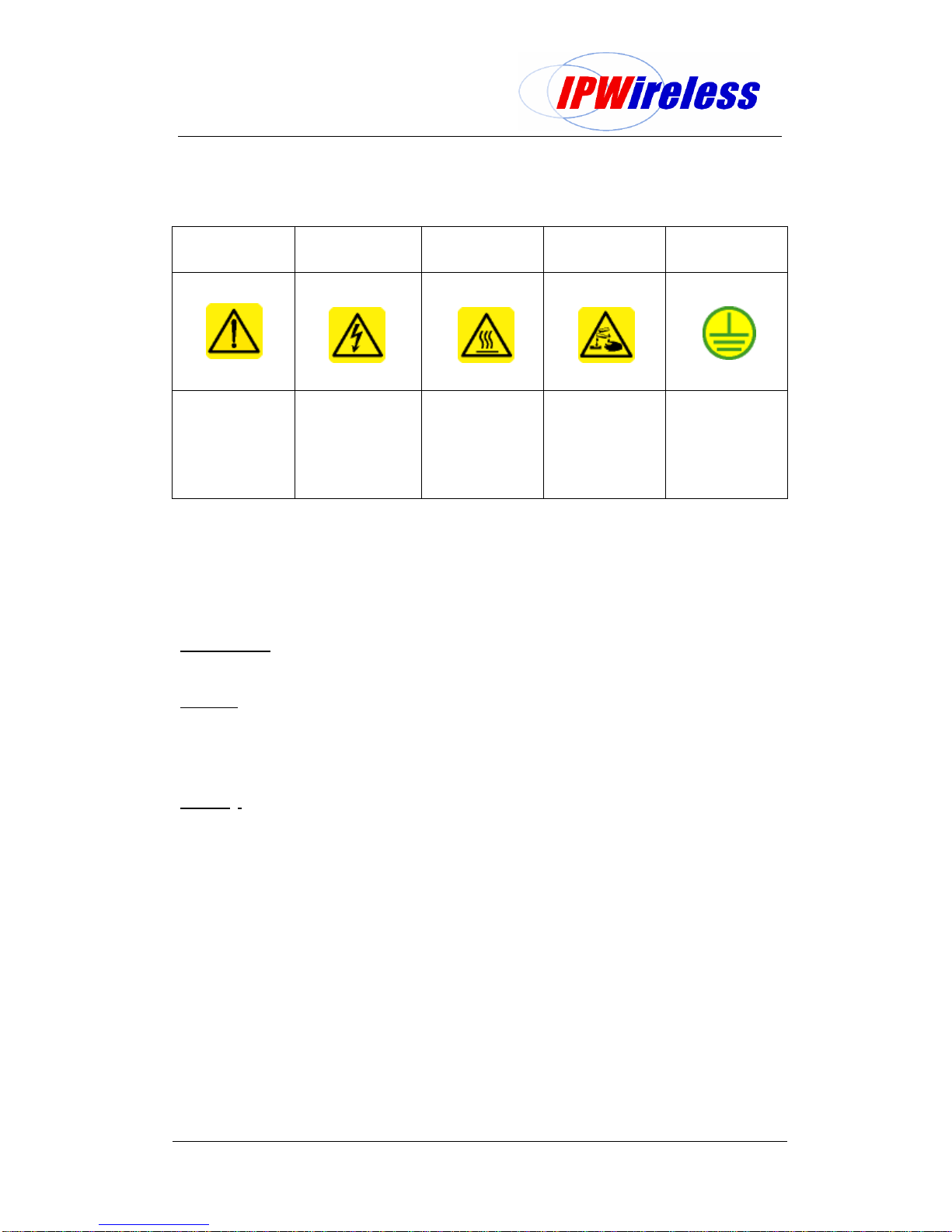
Table 2-1: Safety Sumbols
GENERAL
WARNING ELECTRICAL
HAZARD BURN/HEAT
HAZARD CORROSIVE
MATERIALS GROUND
GENERAL
SAFETY
PRECAUTION
VOLTAGE:
Direct contact with
these areas could
result in severe
physical harm and
property damage
HEAT:
Direct contact with
this surface will
result in severe
burns
CORROSIVE:
Direct contact with
this surface will
result in chemical
burns.
NOT USED
GROUND:
Site for grounding
equipment
These cautionary signs are used on the physical equipment and throughout this manual.
For safety of personnel and protection of equipment observe these precautions when
installing, operating or servicing the equipment and surrounding areas.
3. General Warnings
Electrical
Power Supply –cord fitted for AC or DC. DO NOT adapt to a different configuration.
Power supply circuits carry high voltages. Remove rings, watches, and other jewellery
before working with this type of equipment.
Batteries –Certain installation of this equipment require working with lead acid batteries,
batteries present chemical, electric and gaseous hazards. Batteries are not supplied by
IPWireless for the Node B equipment although UPS systems may be coupled with the
device in order to provide back up power in case of power outages.
Physical
Weight –Each Node B weighs 25kgs (55 pounds). Precautions should be taken, depending
on the installation site conditions, in lifting and hoisting the device.
Environmental
There are different precautions to take within each environment. Specific precautions are
listed in the installation section for that environment.
Site Location
The NodeB basestation is designed to be installed in restricted access locations only. The
site locations are accessible by suitably trained service/installation personnel only.
Network Connections
The NodeB basestation is not suitable for direct connection to Public Switched Networks.
This means that the Node B is not suitable for direct connection to TNV circuits

Node B Installation Guide
Version 5.0.0 Page 7of 15
4. Overview
Node B is the European Technical Standards Institute’s (ETSI) name for the radio base
station. The basic function of the Node B is to convert 100 Base T packet data into the
UTRAN TD-CDMA air interface used between the Node B and the 3G Modem. The Node B
can be configured to operate in configurations ranging from a single sector or omni mode, up
to a 6 sector arrangement. One Node B is required for each sector of coverage, in the case
of an omni configuration one Node B will be required. The Node B is controlled by an INC
(Integrated network Controller) Generally co located at the site in a separate cabinet.
The Node B supports both 768 mega chips (10MHz) and 385 mega chips (5MHz) without
any hardware modification.
Scope
This document covers the physical installation and mountint of the NodeB using bracketry
supplied. It does not detail custom or specialised installations or applications.
Additionally, antenna rigging/mounting, lightning protection, tower work, feeder installation /
termination are all considered to be outside the scope of this document.
If in any doubt about the suitability of this document to successfully install at the proposed
location, then please consult IPWireless technical support for assistance.

Node B Installation Guide
Version 5.0.0 Page 8of 15
5. General Specifications
Table 5-1: Specifications
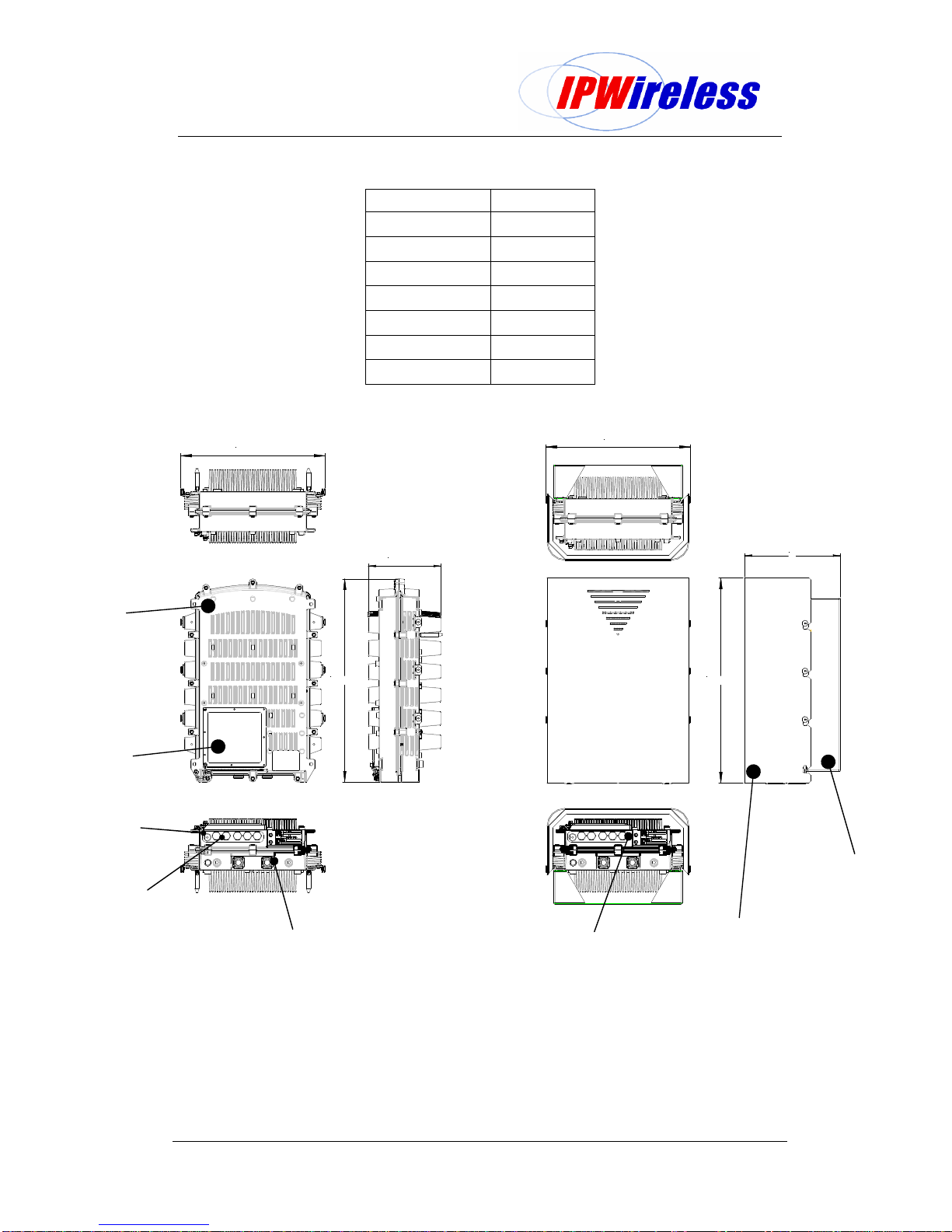
Figure 5-1: Node B Physical Dimensions
10"
406mm
406mm
202mm
560mm 560mm
Unit Specification
Measurements 566 H x 380 W x 202 D mm
22.5 H x 15 W x 8 D inch
Measurements with Solar Shield attached 566 H x 380 W x 294 D mm
22.5 H x 15 W x 11.5 D inch
Node B Weight 25Kgs / 55 lbs
Node B Weight with solar shield and mounting
Bracket 30Kgs / 66 lbs
Power Consumption 200 Watts max
Input Power -48 V DC
Input Range -36V to -72V DC
Ambient Operational Temp Range -40ºC to +55ºC
Cooling Passive
Operating Frequencies
MMDS 2500 MHz –2700 MHz
UMTS 1900MHz –2100MHz
Node B without
Solar shield or Bracket
Node B with
Solar shield & Bracket

Node B Installation Guide
Version 5.0.0 Page 9of 15
Table 5-2: Node B Model Types
Node B FrequencyModel Number
1900-1905 MHz Model GM
1905-1910 MHz Model GN
1910-1915 MHz Model GP
1915-1920 MHz Model GQ
2053-2082 MHz Model HV
2010-2015 MHz Model JG
2500-2686 MHz Model HZ
Figure 5-2: General Description
10"
406mm
406mm
202mm
560mm 560mm
ACCESS
COVER
CABLE
GLANDS
SOLAR
SHIELD
MOUNTING
BRACKET
NODE B
UNIT
EXTERNAL
STATUS LEDS
RF ANTENNA
CONNECTIONS
GPS ANTENNA
CONNECTIONS

Node B Installation Guide
Version 5.0.0 Page 10 of 15
6. Installation
This section describes the steps to be followed to physically install the Node B.
Step 1-Pre-Installation
This section describes the initial checks that should be carried out to ensure that preparation
for the installation is complete.
For Installation Check Card please see Appendix A at the back of this manual.
1. Review site construction drawings to determine if site was constructed
according to the drawings.
2. Review drawings and actual installation to determine location of Node B
installation.
3. Check availability of electrical, grounding and antenna connections.
4. Complete site survey.
5. Check structural strength of wall, pole or mounting frame to support Node B
weight of 25Kgs (55lbs).
Table of contents