Gasoline
Alcohol
Acetone
To save battery, Pedometer will enter into sleep mode if there is no operation for a while. It can be showed
by 4 situations as follows:
- Once paried successful for first time, B.T Pedometer will enter into sleep mode after 30 minutes no operation
- If there is any data in pedometer, B.T Pedometer will enter into sleep mode after 12 minutes no operation.
- If there is no data stored in pedometer, B.T Pedometer will enter into sleep mode after 20s no operation.
- After synchronizing data with APP, B.T Pedometer will immediately enter into the sleep mode.
- Once your P118 enters into sleep mode, there is no display until it is shock to wake up.
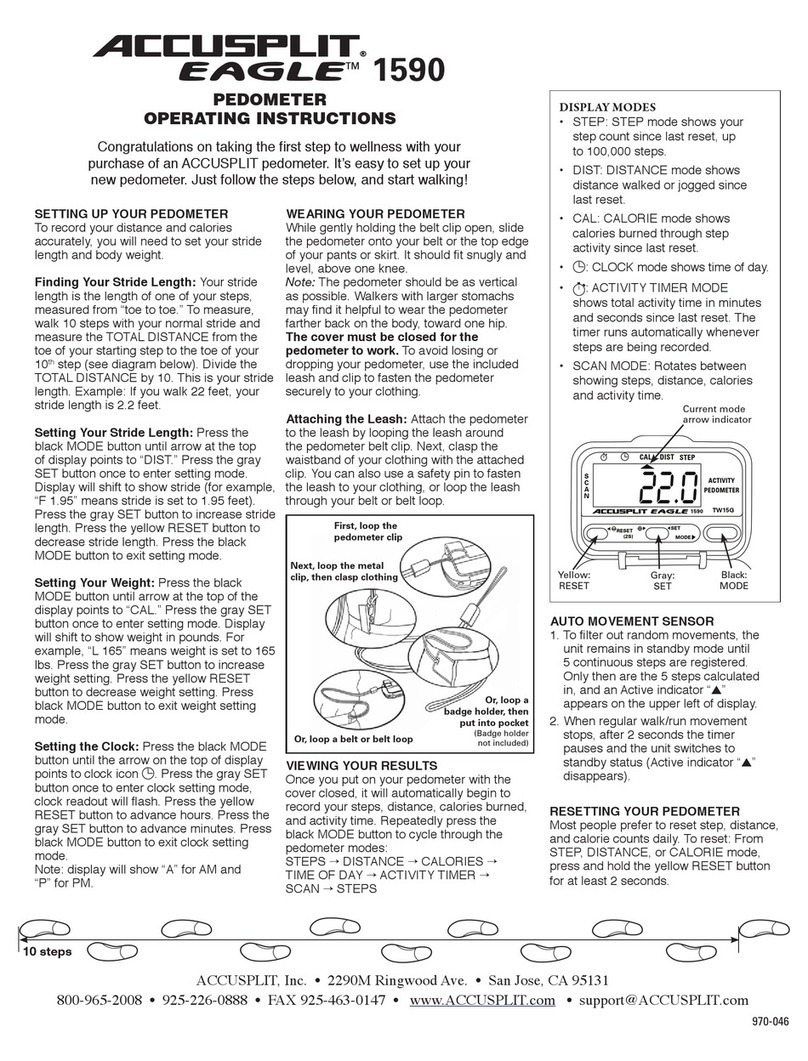
Please wear the pedometer while walking so that it can track your movement.
The best wearing positions include: Wrist, shirt pocket, bra, pants pocket, belt or waistband.
A clip which can hold pedometer on your clothing and pants is included.
A watchband which can turn your pedometer into a watch is also provided as an accesories.
Please try and find out the most comfortable and secure wearing position for yourself.
Place in your pocket
Battery life
Data storage
Pedometer will automatically record intraday data each 30 minutes, and will display the data for the past 15
days. It will be deleted the earliest data and display the newest one when the storage has full 15 days' data.
The exercise data will be uploaded on APP when Pedometer connecting successfully with it, at the same time,
the intraday data will be deleted. You could check daily exercise data on APP.
Note:
Pedometer will automatic reset your progress of completed target and other daily data at 12:00 P.M. Your exercise data will not be
deleted when automatic reset. Only when it is uploaded on APP, user can delete it. The time of automatic reset is same with your
mobile devices.
Attentions
It can prevent sweat, rainwater and spill-resistant, please don’t use when swimming.
Normal operating temperature: 30°~104°F (0°~40℃)
Extremity operating temperature: 0°~130°F (-17.7°~54.4℃)
Relative humidity: 0%-100%
Largest work height: 30000 feet (9144 meters)
Care and Maintenance
- Never attempt to disassemble service your pedometer
- Keep clear frequently when use, please use a light moistened cloth to wipe the dirt on the pedometer. Do not
expose the unit to strong chemicals such as gasoline, clean solvents, acetone, alcohol, insect repellents, as
they may damage the unit's seal, case and finish.
- Protect the unit from extreme heat, shocks and exposure to direct sunlight long time.
- Do not swing the pedometer.
- Please take out the battery when id you don't use it (more than 3 months).
- Keep the pedometer out of reach of children. If swallowed by mistake, please contact the doctor
immediately.
- Do not drop the pedometer in the water or other liquid;
put the unit in dry, ventilated, non-corrosive substances indoor.
- Do not discarded the waste battery casually
Place on
trousers pocket
Wristband Place on your belt
Frequence(Step/min)
130≤Step<150
150≤Step<160
160≤Step<170
170≤Step<175
175≤Step<180
BAR
1 Step 90<
2
3
4
5
6
7
8
90≤Step<110
110≤Step<130
9 180≤Step
Screen display content
4.Instruction
- When Android device display is opened, then can automatically synchronize data; If your Android
device display screen is closed, you will not be able to synchronous data automatically.
- Manual sync: if you want to get the latest data, you also can manually synchronize the data. Open the APP,
click right side gear icon sign on the APP to enter setup interface, click the upper left corner of the icon
that can be manually sync data.
How to wear
The Time mode
with 12 h/24 h,
and display hour,
minute in two ways
Step Calories Burning Distance
12 Hour System
Goal completion symbol.
There are 10 bars in total
and each stands
for 10% of target steps.
Goal Symbol. Set a goal,
the sign appear ;
After completion of target,
the sign flashing show.
Exercise intensity remind symbol. Refresh every 5 seconds, display conditions as the following table:
Low electrical indication signl.
When the battery is less than 20%,
the sign appear. we sugget to
replace battery immediately
when it appears.
Bluetooth connection.
When synchronous data,
the sign appears.
Clip on the collar
- Battery included: CR2025 x 1 PC Battery life: 3 months
- Sign Low Voltage” SIGN” displayed indicate that the level of battery is below 20% . Please
Synchronize the data with main device(PC/Cell phone) shortly, or it might gone
automatically.
- Please replace with a new CR2025 according to “BATTERY REPLACEMENT” when the low
voltage sign displayed.
- You could check the battery consumption on the APP. It is on the upper right corner of the ”personal
information setting” interface.
- Sign Low Voltage "SIGN "displayed indicate that the level of battery is below 20%. Please
Synchronize the data with main device (PC/Cell phone) shortly, or it might gone automatically.
Tips:
This device complies with Part 15 of the FCC Rules. Operation is subject to the following two conditions: (1) this
device may not cause harmful interference, and (2) this device must accept any interference received,
including interference that may cause undesired operation.
changes or modifications not expressly approved by the party responsible for compliance could void the
user’s authority to operate the equipment.
This equipment has been tested and found to comply with the limits for a Class B digital device, pursuant to
Part 15 of the FCC Rules. These limits are designed to provide reasonable protection against harmful
interference in a residential installation. This equipment generates, uses and can radiate radio frequency
energy and, if not installed and used in accordance with the instructions, may cause harmful interference to
radio communications. However, there is no guarantee that interference will not occur in a particular
installation.
If this equipment does cause harmful interference to radio or television reception, which can be determined
by turning the equipment off and on, the user is encouraged to try to correct the interference by one or more of
the following measures:
-- Reorient or relocate the receiving antenna.
-- Increase the separation between the equipment and receiver.
-- Connect the equipment into an outlet on a circuit different from that to which the receiver is connected.
-- Consult the dealer or an experienced radio/TV technician for help.
This device complies with Industry Canada license-exempt RSS standard(s). Operation is subject to the
following two conditions: (1) this device may not cause interference, and (2) this device must accept any
interference, including interference that may cause undesired operation of the device.
Le présent appareil est conforme aux CNR d'Industrie Canada applicables aux appareils radio exempts de
licence. L'exploitation est autorisée aux deux conditions suivantes : (1) l'appareil ne doit pas produire de
brouillage, et (2) l'utilisateur de l'appareil doit accepter tout brouillage radioélectrique subi, même si le
brouillage est susceptible d'en compromettre le fonctionnement.