manuals.online logo
Brands
  1. Home
  2. •
  3. Brands
  4. •
  5. J-TECH
  6. •
  7. Accessories
  8. •
  9. J-TECH IntelFlex Controller Assembly instructions

J-TECH IntelFlex Controller Assembly instructions

Other manuals for IntelFlex Controller

1

Popular Accessories manuals by other brands

Quincy lab 140AE-1 operating manual

Quincy lab

Quincy lab 140AE-1 operating manual

HomePro ZIR000 user manual

HomePro

HomePro ZIR000 user manual

DOL 20SCR Technical user guide

DOL

DOL 20SCR Technical user guide

RAB Smart Task installation manual

RAB

RAB Smart Task installation manual

Kemppi KMS 300 quick guide

Kemppi

Kemppi KMS 300 quick guide

Stearns 57,500 Series Installation and service instructions

Stearns

Stearns 57,500 Series Installation and service instructions

iGuzzini TWILIGHT COPENAGHEN manual

iGuzzini

iGuzzini TWILIGHT COPENAGHEN manual

Adelaide Annexe & Canvas Avan Deluxe installation guide

Adelaide Annexe & Canvas

Adelaide Annexe & Canvas Avan Deluxe installation guide

OHAUS 5000 instruction manual

OHAUS

OHAUS 5000 instruction manual

HOME8 WLS1300 quick start guide

HOME8

HOME8 WLS1300 quick start guide

MAXBOTIX MaxSonar quick start guide

MAXBOTIX

MAXBOTIX MaxSonar quick start guide

ioSmart iSmart56 Installation and user guide

ioSmart

ioSmart iSmart56 Installation and user guide

Focusrite Scarlett 18i8 user guide

Focusrite

Focusrite Scarlett 18i8 user guide

Velleman ED38105 user manual

Velleman

Velleman ED38105 user manual

JumpSport SkyBounce user manual

JumpSport

JumpSport SkyBounce user manual

Prima-Temp PRIYA Instructions for use

Prima-Temp

Prima-Temp PRIYA Instructions for use

Tefcold BC85I-BC85I W user manual

Tefcold

Tefcold BC85I-BC85I W user manual

Vaisala WMS302 user guide

Vaisala

Vaisala WMS302 user guide

manuals.online logo
manuals.online logoBrands
  • About & Mission
  • Contact us
  • Privacy Policy
  • Terms and Conditions

Copyright 2025 Manuals.Online. All Rights Reserved.

1
Installation, Programming and Operator Guide
Part Number 320XXXC
IntelFlex TM Controller
oBase Station
2
Introduction:
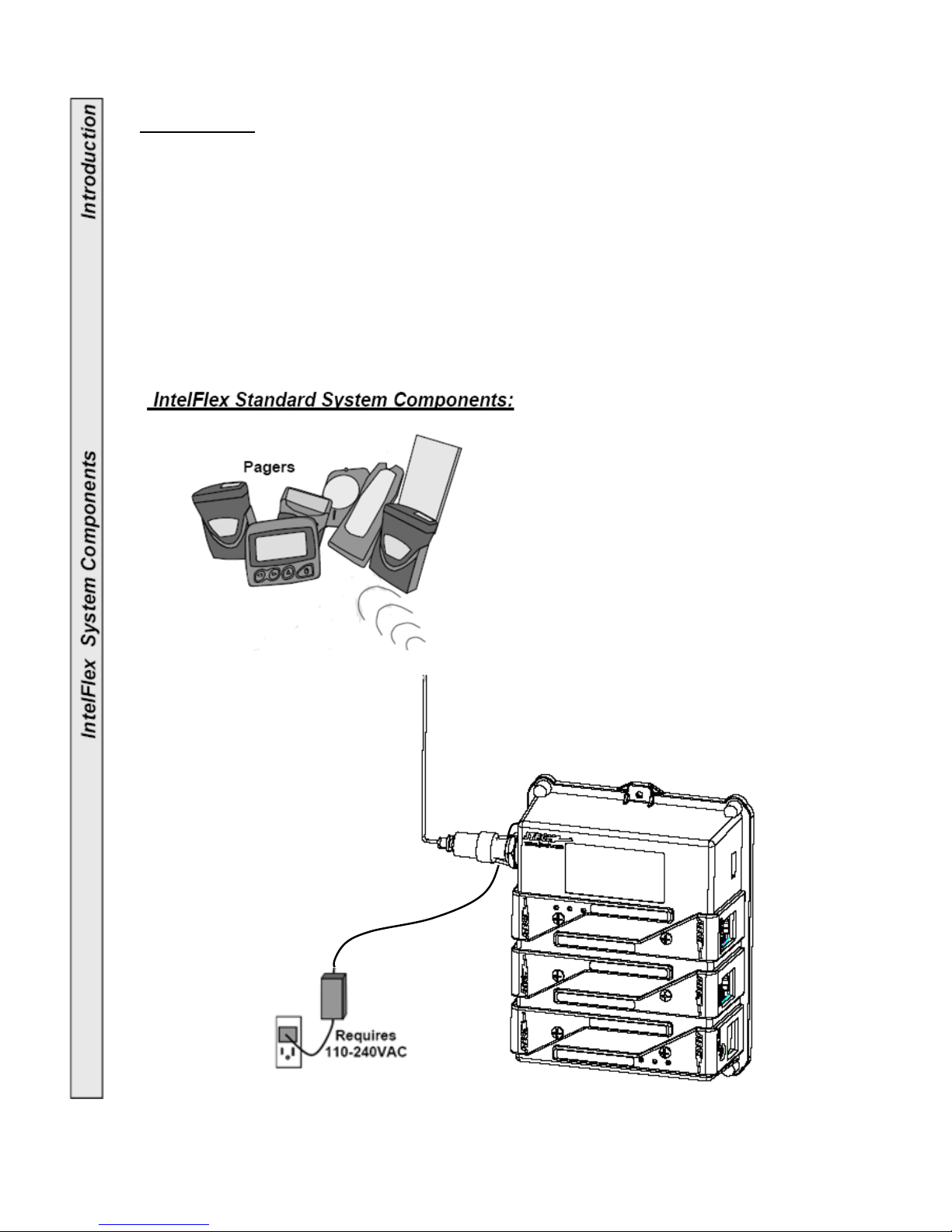
Congratulations on your purchase of a JTECH Message System containing the IntelFlex
Controller. Please take a few minutes to review this manual prior to installing and
operating your system.
Please inspect the System upon receipt. If the contents appear to be damaged, notify
the shipper immediately to file a claim and notify JTECH Customer Care. If components
are missing, contact JTECH Customer Care.
If you have any questions or need assistance, please call JTECH Customer Care at 800-
321-6221 or 561-997-0772, option 6.
IntelFlex TM Controller
Base Station
3
4
5
6
7
General Specifications (Includes Optional Expansion Modules):
DC Operating Voltage: 13.5VDC 2.4A
Power Adaptor: 110-240VAC 50-60Hz power adaptor
Controller RF Power Output: 0.1-2 Watts - adjustable using 5 levels
Modulation: FSK 512BPS
Protocol: POCSAG
Transmit: 512, 1200, 2400 Baud
Maximum Expansion Modules: 6 (Any combination; RS232, Telco or Contacts)
RS232 Module (Optional): 1200 Baud, No parity, 8 Data bits, 1 Stop bit
(for JTECH protocol and up to 115,200 Baud for TAP)
Telco Module (Optional): REN=0
Contact Module (Optional): NC/NO 4 Pair. 100Ft Maximum wire length.
Antenna Port: 50 Ohm BNC
Gain of antenna: 2.0dBi max.
Antenna type: Monopole antenna
Operating Frequency: UHF synthesized 435-470MHz
Temperature Stability: -22° to 122°F (-30 to 50°C) at better than 5 ppm
Weight: 1.95-2.25 Lbs (0.89-1.02kg) – Depending on options
Base Station Dimensions
113.7mm
137.5mm
46mm
8
IntelFlex Controller Highlights:
•Built in transmitter for paging Vibe/ Tone/ Flash, Numeric and Alphanumeric
Pagers.
•Send canned and user defined messages to Alphanumeric and Numeric Pagers.
•Adjustable RF power settings from 0.1-2.0 Watts.
•Time stamped events and an exportable Log (.txt format) are available.
•6 expansion slots allow for increasing capabilities.
•“Monitor Before Transmit” eliminates missed pages caused by surrounding
equipment.
•Queues up to 32 messages with priority.
•Supports past and present JTECH Transmitter functions and more:
•Out-of-Range: Warn when the Pager is moved out of transmission range.
• Range Test: Measure, establish and adjust transmitter range.
• Search Mode: Find lost Pagers.
• Group and Dynamic Group Paging: Page several Pagers with a single entry.
• Call4Sure: Cell phone paging.
• Replace Pager: Change Pager numbers as needed.
• Pager Voice: Turns Pagers voice alerts ON or OFF.
• Change alert vibration settings.
Range:
•Maximum transmitter range is 1.5- 2 miles (2.4 – 3.2km).
• Range will vary, depending on the equipment location and surrounding
environment.
• Increase range with an optional Magnetic Mount Antenna, 6ft Antenna or
Extended Range Kit (FCC license required).
USB and Ethernet Connection:
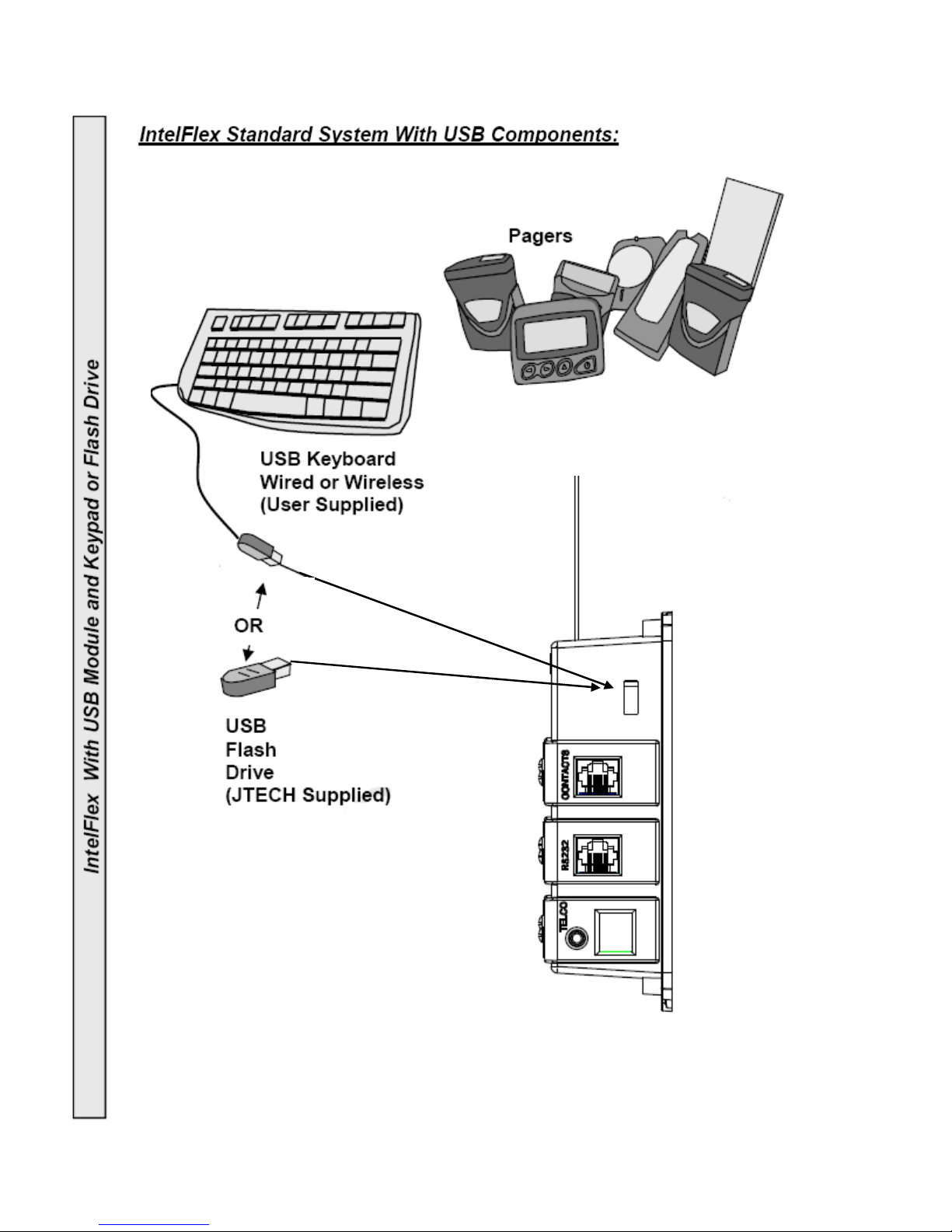
•USB 2.0 port for Flash Drive software upgrades or keyboard support.
• IP addressable Ethernet port for paging support “online” and software upgrades.

9
Optional Expansion Modules:
RS232 (Communications):
• Supports existing JTECH RS232 Interfaces including
Smart Alert Transmitters.
• Receives TAP (Telocator Alphanumeric Protocol) at
various baud rates.
• Receives data input at up to 115,200 Baud.
• Connect to a computer to send page information to
Vibe/Tone, Numeric and Alphanumeric Pagers.
• Connect to a Thermal Printer to print Call4Sure
receipts and phone lists.
• Develop special applications (User software and interface
development may be required).
• Includes a RJ45/RS232 adapter cable.
CONTACTS (Contact Closure):
• Each Module supports up to 4 buttons/contacts.
• SPDT Connections
• Normally Open (NO) or Normally Closed (NC) programmable
contacts.
• 25 feet (7.6m) of Cable and Contact Breakout Box included.
Call4Sure:
• Use with Call4Sure functions to send messages to cellular
phones.
• Requires a dedicated analog phone/fax line for each TELCO
Module installed.
• Outgoing calls will queue.
• Customize voice messages and monitor calls using the included
Headset with Mic.
10
6
’
(1.8m)
M
agneti
c
M
ount
Antenna Choices to Extend Range
(Requires FCC licensing)
---- current Desktop controller is for indoor use.
Outdoor antenna function is not considered at this time
• 3 Ft (0.9m) Magnetic Mount Antenna with
12ft (3.6m) Cable: All metal indoor/outdoor
Antenna with a magnetized base for mounting to
steel or iron. Wall mounting hardware included for
wall mounting to non magnetic surfaces.
•
6ft (1.8m) Antenna and 25ft (7.6m) Cable:
Fiberglass indoor/outdoor Antenna which can mount
to any stable surface. Wall mounting hardware included.
•
Extended Range Antenna Kit:
Includes a 6ft (1.8m) fiberglass indoor/ outdoor Antenna,
35watt Power Amplifier, Power Supply and 50ft (15m) or
100ft (30m) Cable. Increases the output of the IntelFlex’s
Controller to 35 Watts and range of up to 5 miles (8km).