Mounting & Installation
The diagram below shows a typical
mounting procedure into a fiberglass panel.
A mounting template is included to aid
in measuring and marking the mounting
surface before cutting or drilling.
Make sure to carefully plan the routing of
the remote’s connection cables prior to
cutting or drilling any panels.
1. Press along the perforation to remove the
center section of the mounting template.
(Discard the center section.) The template
can be used to verify there is sufficient flat
surface area for mounting and as a guide
for cutting the opening. Tape the template
to the mounting location and mark the
surface for cutting the opening and drilling
pilot holes.
2. Use a jigsaw or rotary tool to cut an
opening in the mounting surface. If
necessary, use a file or sandpaper to
adjust the opening for proper fitment and
smooth the edges.
3. Place the MMR-40 into the opening and
check that the mounting holes remain
aligned with the pilot hole marks taken
from the template. If not, adjust and mark
new holes as necessary.
MMR40-MAN 080918 • Printed in China
2-Year Limited Warranty (U.S.A.)
Visit www.jlaudio.com for warranty details.
For Service Information in the U.S.A. please call JL Audio customer service:
(954) 443-1100 during normal business hours (Eastern Time)
JL Audio, Inc • 10369 N Commerce Parkway, Miramar, FL 33025
International Warranties:
Products purchased outside the United States of America are covered only by that
country’s distributor and not by JL Audio, Inc.
Connections
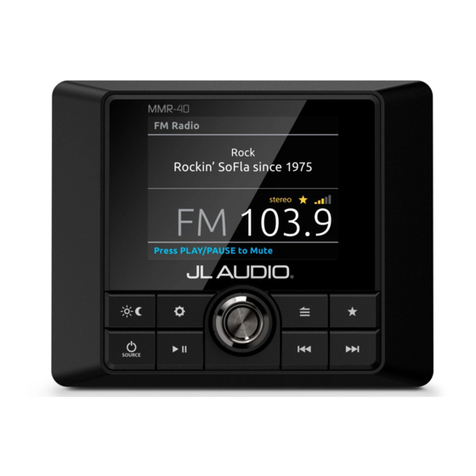
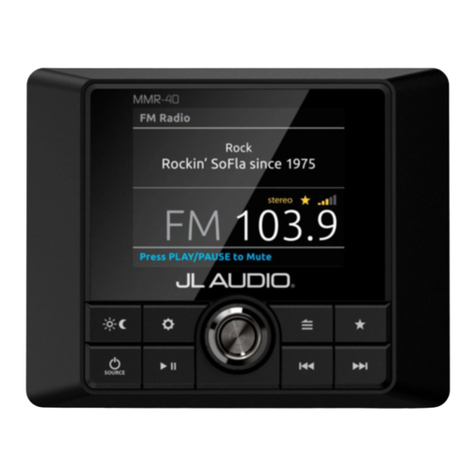
The MMR-40 is equipped with a NMEA 2000®
Micro-C connector and can connect to a
host MediaMaster® source unit in the two
methods shown below. The USB connector is
used for future software updates.
• Direct interface with a vessel’s NMEA 2000®
network using applicable NMEA 2000®
cables and connectors (not included).
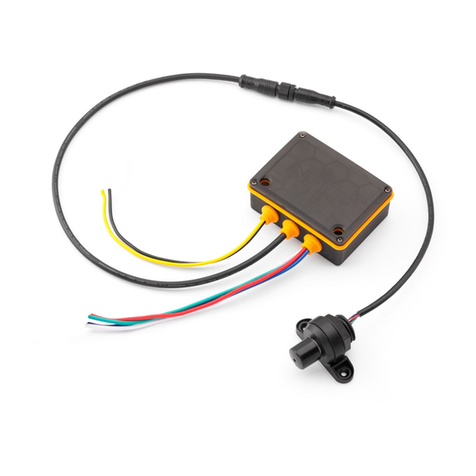
• Direct connection of one MMR-40 with
one host MediaMaster® source unit using
JL AUDIO® MMC-PN2K powered network
cables (sold separately) to simulate an
isolated, stand-alone NMEA 2000® network.
Note: JL Audio® Powered Network Cables support a maximum of two NMEA
2000® devices. For systems with additional NMEA 2000® devices, a genuine
NMEA 2000® network must be assembled, which does not support JL Audio®
Powered Network Cables.
4. Remove the MMR-40 and drill four (4) pilot
holes in the mounting surface at the pilot
hole marks.
5. Peel the adhesive backing from the
mounting gasket and affix to the rear of
the bezel. Connect all wiring and place the
MMR-40 into the opening.
6. Secure the MMR-40 using the four (4)
mounting screws. Press the trim ring onto
the front of the MMR-40.
SOURCE UNIT
SOURCE UNIT
COMPATIBLE
MULTI-FUNCTION
DISPLAY
To applicable
network
components
(not shown)
To applicable
network
components
(not shown)
Use the MMR-40 for MediaMaster® remote command functionality
via your vessel’s existing NMEA 2000® network (cables sold separately).
Use the MMR-40 for MediaMaster® remote command functionality
via JL Audio® Powered Network Cables
(MMC-PN2K-6 & MMC-PN2K-25, sold separately).
SOURCE UNIT
Use JL Audio® Powered Network Cables for MediaMaster® remote command functionality
via MMR-40 NMEA 2000® Network Controller.
[GROUND]
[SHIELD]
[+12V]
[GROUND]
[SHIELD]
[+12V]
SOURCE UNIT
[GROUND]
[SHIELD]
[+12V]
Note: JL Audio® Powered Network Cables support a maximum of two NMEA 2000® devices.
For systems with additional NMEA 2000® devices, a genuine NMEA 2000® network
must be assembled, which does not support JL Audio® Powered Network Cables.
Note: JL Audio® Powered Network Cables support a maximum of two NMEA 2000® devices.
For systems with additional NMEA 2000® devices, a genuine NMEA 2000® network
must be assembled, which does not support JL Audio® Powered Network Cables.
Note: JL Audio® Powered Network Cables support a maximum of two NMEA 2000® devices.
For systems with additional NMEA 2000® devices, a genuine NMEA 2000® network
must be assembled, which does not support JL Audio® Powered Network Cables.
Use JL Audio® Powered Network Cables for MediaMaster® remote command functionality
via MMR-40 NMEA 2000® Network Controller.
SOURCE UNIT
SOURCE UNIT
COMPATIBLE
MULTI-FUNCTION
DISPLAY
To applicable
network
components
(not shown)
To applicable
network
components
(not shown)
Use the MMR-40 for MediaMaster® remote command functionality
via your vessel’s existing NMEA 2000® network (cables sold separately).
Use the MMR-40 for MediaMaster® remote command functionality
via JL Audio® Powered Network Cables
(MMC-PN2K-6 & MMC-PN2K-25, sold separately).
SOURCE UNIT
Use JL Audio® Powered Network Cables for MediaMaster® remote command functionality
via MMR-40 NMEA 2000® Network Controller.
[GROUND]
[SHIELD]
[+12V]
[GROUND]
[SHIELD]
[+12V]
SOURCE UNIT
[GROUND]
[SHIELD]
[+12V]
Note: JL Audio® Powered Network Cables support a maximum of two NMEA 2000® devices.
For systems with additional NMEA 2000® devices, a genuine NMEA 2000® network
must be assembled, which does not support JL Audio® Powered Network Cables.
Note: JL Audio® Powered Network Cables support a maximum of two NMEA 2000® devices.
For systems with additional NMEA 2000® devices, a genuine NMEA 2000® network
must be assembled, which does not support JL Audio® Powered Network Cables.
Note: JL Audio® Powered Network Cables support a maximum of two NMEA 2000® devices.
For systems with additional NMEA 2000® devices, a genuine NMEA 2000® network
must be assembled, which does not support JL Audio® Powered Network Cables.
Use JL Audio® Powered Network Cables for MediaMaster® remote command functionality
via MMR-40 NMEA 2000® Network Controller.
To applicable
network
components
(not shown)
To applicable
network
components
(not shown)