EM-1000 Series Meter Quickstart Guide QS - 3
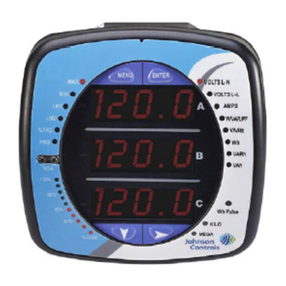
10.Press the ENTER button to go to the Connection setting screen (Cnct). The current
setting is shown in the second line. Press the DOWN ARROW to choose another
value. You can choose 3 EL (element) WYE, 2 Ct del (Delta), or 2.5 EL WYE.
11.Press the ENTER button to go to the meter Address setting screen (Adr). The
meter’s current address is shown in the second line. To change the setting, press
the DOWN ARROW until the value you want is displayed. Then press the RIGHT
ARROW to move to the next digit. Repeat until the setting is done. Valid address-
es are from 001 through 247.
12.Press the ENTER button to go to the meter Baud Rate setting screen (bAUd). The
meter’s current Baud Rate is shown in the second line. Press the DOWN ARROW
to choose another Baud Rate. If you have the RS485 Option, choose 9600.
13.Press the ENTER button to go to the meter Protocol setting screen (Prot). The
meter’s current Protocol is shown in the second and third lines. Press the DOWN
ARROW to choose another communication Protocol. If you have the RS485 Option,
choose Mod rtU (Modbus RTU).
14.Press the ENTER button to go to the Scroll setting screen (SCrL). The current
setting is shown in the second line. Press the DOWN ARROW to choose another
setting. You can choose YES (the meter readings will scroll on the display) or no
(the meter readings will not scroll on the display).
15.Press the MENU button twice. You will see the Store Settings screen (Stor ALL?)
The default setting is YES. To save the settings you’ve made, press the ENTER
button. You will see the confirmation screen (Stor ALL done) and then the meter
resets.
NOTE: If you do not want to save your settings, press the RIGHT ARROW. YES
changes to no. Press the ENTER button.
Example CT Settings:
200/5 Amps: set the Ct-n value as 200, Ct-S value as 1.
800/5Amps: set the Ct-n value as 800, Ct-S value as 1.
2000/5 Amps: set the Ct-n value as 2000, Ct-S value as 1
10,000/5 Amps: set the Ct-n value as 1000, Ct-S value as 10.
Example PT Settings:
14400/120 Volts: set the Pt-n value as 14400, Pt-d value as 120, Pt-S value as 10.
138000/69 Volts: set the Pt-n value as 1380, Pt-d value as 69, Pt-S value as 100.
345000/115 Volts: set the Pt-n value as 3450, Pt-d value as 115, Pt-S value as 100.
345000/69 Volts: set the Pt-n value as 345, Pt-d value as 69, Pt-S value as 1000.
Refer to the EM-1000/EM-2000 Series Meters’ Installation and Operation Manual (LIT-12011867) for
important product application information. Also refer to the manual for additional wiring options and
programming information. The manual is on the enclosed CD.
A
B
C
-
-
-
MENU ENTER
A
B
C
-
-
-
MENU ENTER
A
B
C
-
-
-
MENU ENTER
A
B
C
-
-
-
MENU ENTER
A
B
C
-
-
-
MENU ENTER
A
B
C
-
-
-
MENU ENTER