E-3
CAUTION: TO REDUCE THE RISK OF ELECTRIC SHOCK,
DO NOT REMOVE COVER (OR BACK).
NO USER SERVICEABLE PARTS INSIDE.
REFER SERVICING TO QUALIFIED SERVICE
PERSONNEL.
Information for USA
This device complies with Part 15 of the FCC Rules.
Changes or modifications not approved by JVC could
void the user’s authority to operate the equipment.
The lightning flash with arrowhead symbol,
within an equilateral triangle is intended to
alert the user to the presence of uninsulated
“dangerous voltage” within the product’s en-
closure that may be of sufficient magnitude
to constitute a risk of electric shock to per-
sons.
The exclamation point within an equilateral
triangle is intended to alert the user to the
presence of important operating and main-
tenance (servicing) instructions in the litera-
ture accompanying the appliance.
WARNING:
TO REDUCE THE RISK OF FIRE OR ELEC-
TRIC SHOCK, DO NOT EXPOSETHIS APPLI-
ANCE TO RAIN OR MOISTURE.
This unit should be used with 12V DC only.
CAUTION:
To prevent electric shocks and fire hazards, do NOT use
any other power source.
Changes or modifications not approved by JVC could void
the user’s authority to operate the equipment.
This unit is designed for professional use only.
INFORMATION (FOR CANADA)
RENSEIGNEMENT (POUR CANADA)
●
This Class B digital apparatus complies with Canadian
ICES-003.
●Cet appareil numérique de la classe B est conforme à
la norme NMB-003 du Canada.
SAFETY PRECAUTIONS
CAUTION
RISK OF ELECTRIC SHOCK
DO NOT OPEN
FOR USA AND CANADA
CAUTION:
To prevent electric shock, do not open the cabinet. No
user serviceable parts inside. Refer servicing to qualified
service personnel.
Due to design modifications, data given in this in-
struction book are subject to possible change with-
out prior notice.
●This unit converts video signals from KY-F70/KY-F70B Dig-
ital cameras into 7.5 frames/sec. to 75 frames/sec. signals
so that high-resolution semi-movie signals can be displayed
on an SXGA-compatible monitor.
●Some features on KY-F70/KY-F70B Digital cameras can be
controlled remotely using this KM-F700 unit. (FREEZE,
AUTO WHITE BALANCE and SEND operations).
●The Camera Remote connection function is distributed to
the connector on the rear panel, so as to be used as the
terminal box for the camera control.
FEATURES
●Thank you for purchasing this JVC product.
Before operating this unit, please read the instructions
carefully to ensure the best possible performance.
●When this unit is not used for an extended period of
time, make sure that the system power is turned off in
order to save energy.
●These instructions are for KM-F700U.
1. CONTROLS, INDICATORS AND CONNECTORS
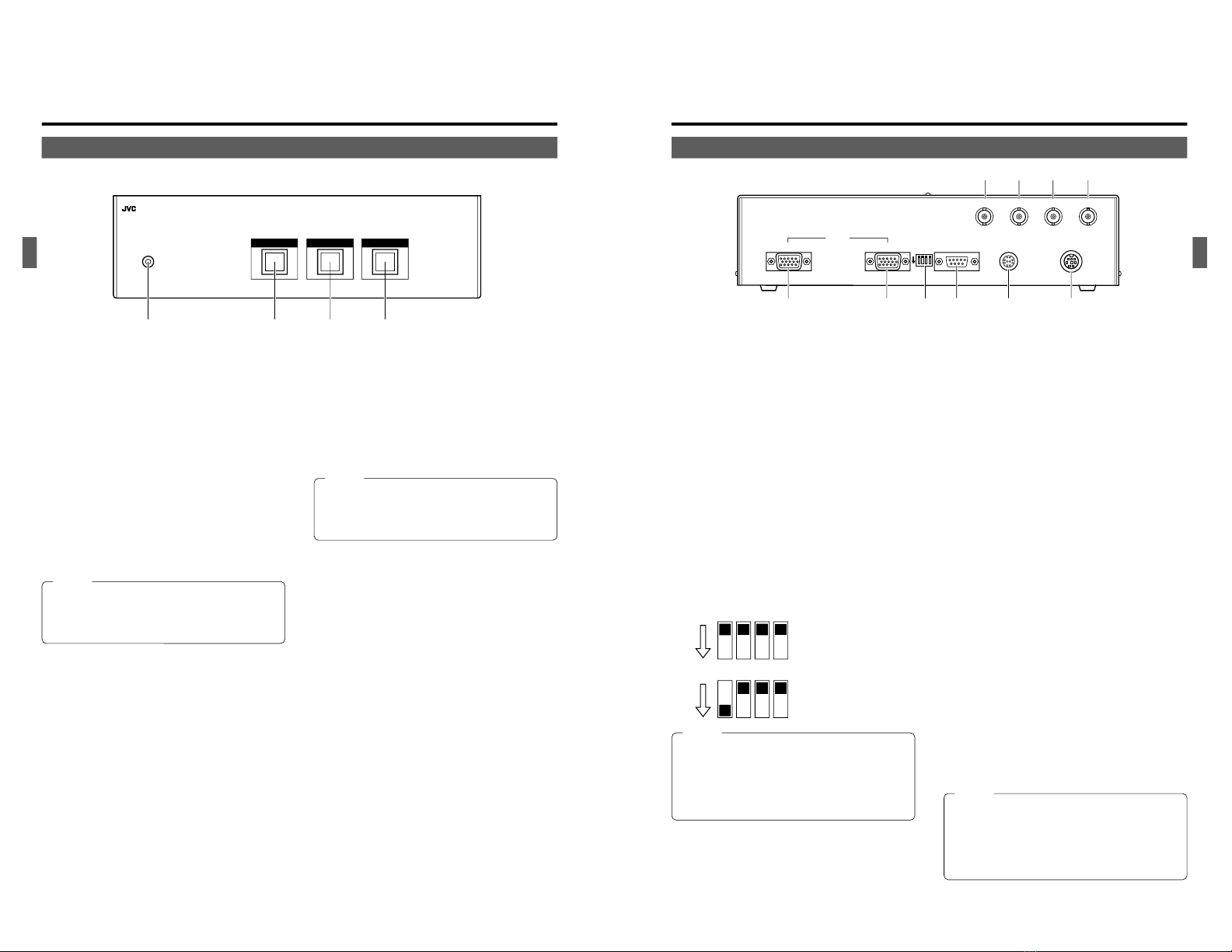
1-1 Front Panel .............................................................. 4
1-2 Rear Panel ............................................................... 5
2. CONNECTION EXAMPLES AND OPERATIONS
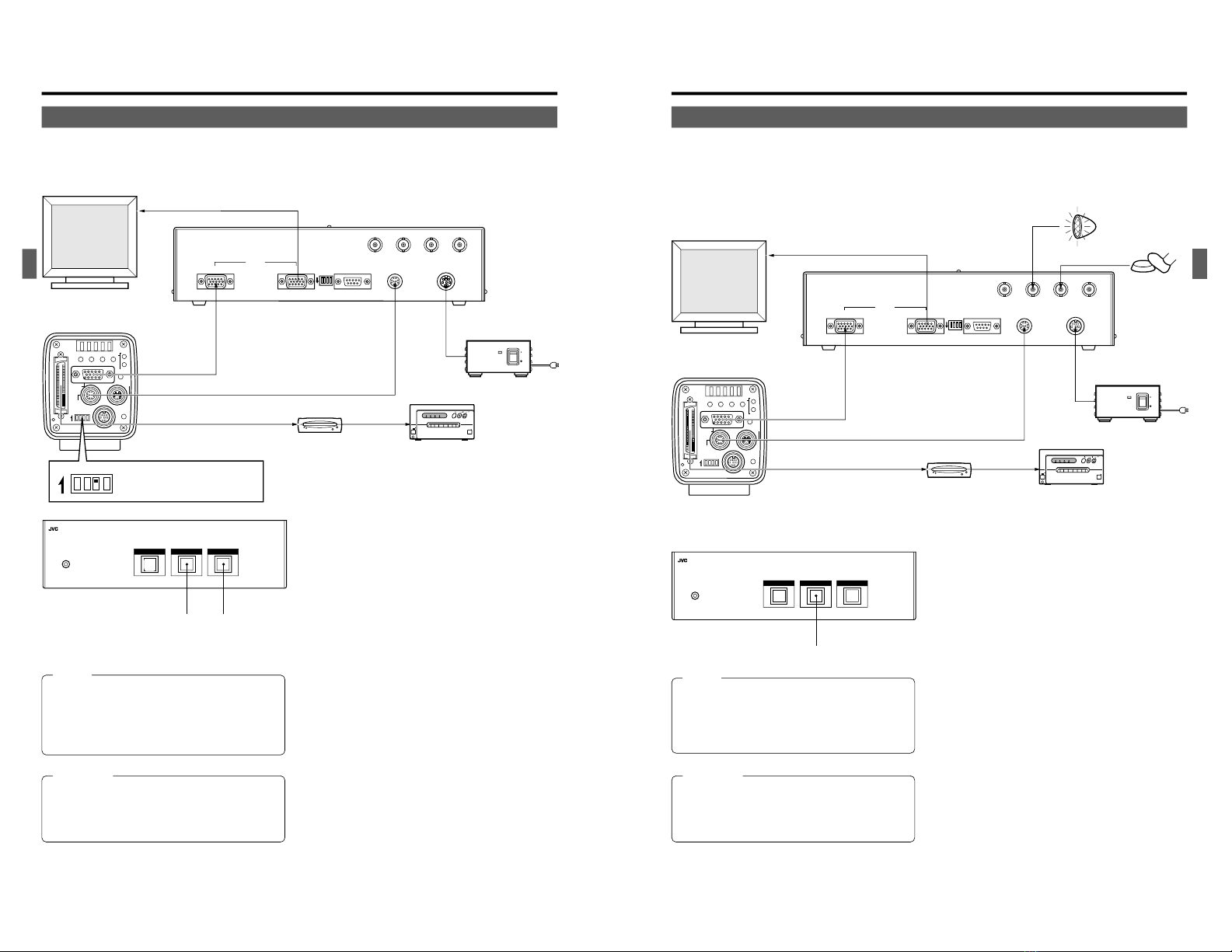
2-1 To Input Camera Images.......................................... 6
2-2 To Shoot Using an External Switch .......................... 7
2-3 To Extend the Camera Cable (KY-F70B only).......... 8
CONTENTS
3. OTHERS
3-1 Pin Configuration ..................................................... 9
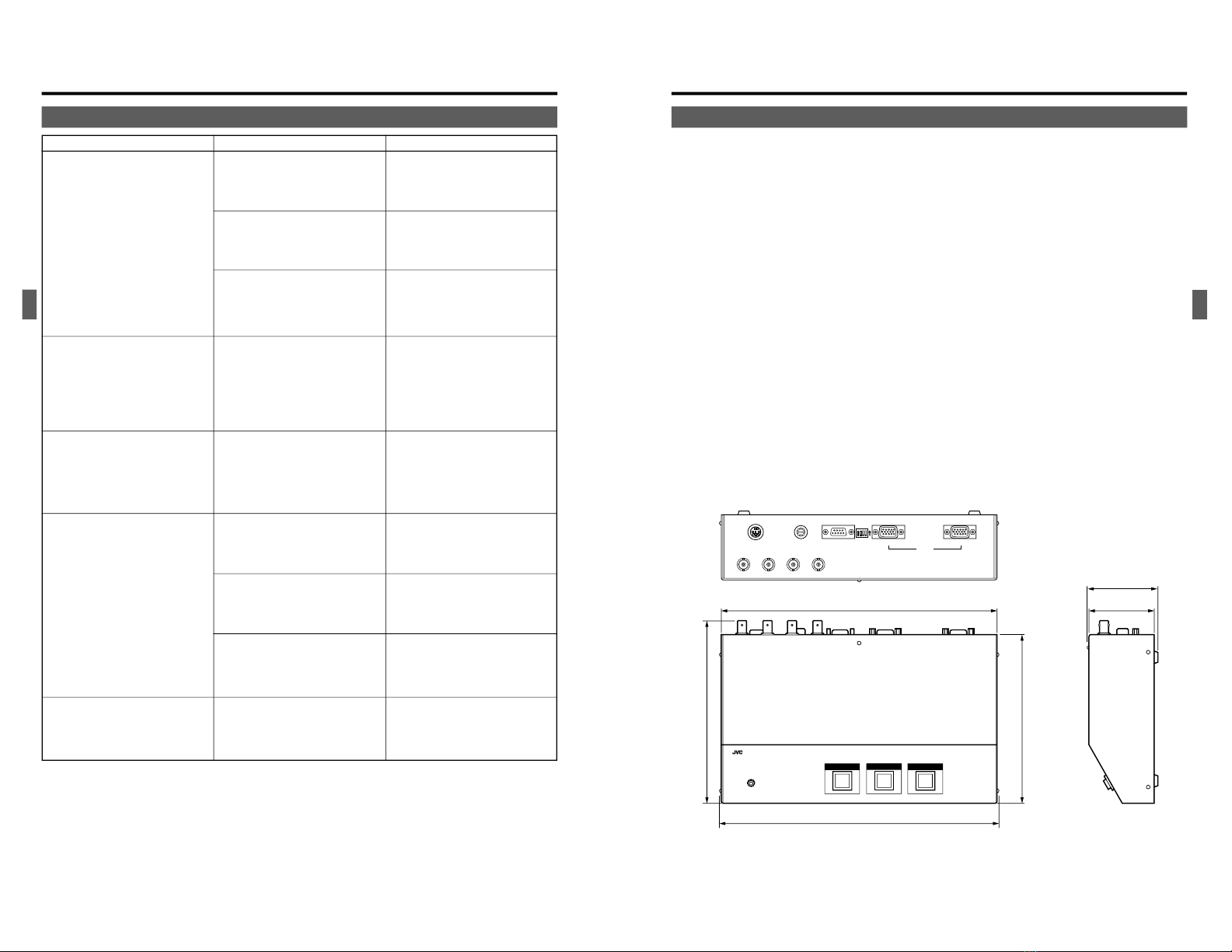
3-2 Troubleshooting ..................................................... 10
3-3 Specifications .......................................................... 11
Characters and symbols used in this INSTRUCTION MANUAL
CAUTION .......... Cautionary notes concerning operation of the unit.
MEMO ............... Reference such as restrictions of featuers, etc.
..................... Reference page or item.
E-2
1. Read all of these instructions.
2. Save these instructions for later use.
3. All warnings on the product and in the operating instructions should be adhered to.
4. Unplug this appliance system from the wall outlet before cleaning. Do not use liquid cleaners or aerosol cleaners. Use a
damp cloth for cleaning.
5. Do not use attachments not recommended by the appliance manufacturer as they may cause hazards.
6. Do not use this appliance near water – for example, near a bathtub, washbowl, kitchen sink, or laundry tub, in a wet
basement, or near a swimming pool, etc.
PORTABLE CART WARNING
(symbol provided by RETAC)
S3126A
IMPORTANT SAFEGUARDS
7. Do not place this appliance on an unstable cart, stand, or table. The appliance may fall, causing
serious injury to a child or adult, and serious damage to the appliance.
Use only with a cart or stand recommended by the manufacturer, or sold with the appliance. Wall or
shelf mounting should follow the manufacturer’s instructions, and should use a mounting kit
approved by the manufacturer.
An appliance and cart combination should be moved with care. Quick stops, excessive force, and
uneven surfaces may cause the appliance and cart combination to overturn.
8. Slots and openings in the cabinet and the back or bottom are provided for ventilation, and to insure reliable operation of the
appliance and to protect it from overheating, these openings must not be blocked or covered. The openings should never be
blocked by placing the appliance on a bed, sofa, rug, or other similar surface. This appliance should never be placed near or
over a radiator or heat register. This appliance should not be placed in a built-in installation such as a bookcase unless proper
ventilation is provided.
9. This appliance should be operated only from the type of power source indicated on the marking label. If you are not sure of
the type of power supplied to your home, consult your dealer or local power company. For appliance designed to operate
from battery power, refer to the operating instructions.
10. This appliance system is equipped with a 3-wire grounding type plug (a plug having a third (grounding) pin). This plug will only
fit into a grounding-type power outlet. This is a safety feature. If you are unable to insert the plug into the outlet, contact your
electrician to replace your obsolete outlet. Do not defeat the safety purpose of the grounding plug.
11. For added protection for this product during a lightning storm, or when it is left unattended and unused for long periods of
time, unplug it from the wall outlet and disconnect the antenna or cable system. This will prevent damage to the product due
to lightning and power-line surges.
12. Do not allow anything to rest on the power cord. Do not locate this appliance where the cord will be abused by persons
walking on it.
13. Follow all warnings and instructions marked on the appliance.
14. Do not overload wall outlets and extension cords as this can result in fire or electric shock.
15. Never push objects of any kind into this appliance through cabinet slots as they may touch dangerous voltage points or short
out parts that could result in a fire or electric shock. Never spill liquid of any kind on the appliance.
16. Do not attempt to service this appliance yourself as opening or removing covers may expose you to dangerous voltage or
other hazards. Refer all servicing to qualified service personnel.
17. Unplug this appliance from the wall outlet and refer servicing to qualified service personnel under the following conditions:
a. When the power cord or plug is damaged or frayed.
b. If liquid has been spilled into the appliance.
c. If the appliance has been exposed to rain or water.
d. If the appliance does not operate normally by following the operating instructions. Adjust only those controls that are
covered by the operating instructions as improper adjustment of other controls may result in damage and will often require
extensive work by a qualified technician to restore the appliance to normal operation.
e. If the appliance has been dropped or the cabinet has been damaged.
f. When the appliance exhibits a distinct change in performance – this indicates a need for service.
18. When replacement parts are required, be sure the service technician has used replacement parts specified by the manufac-
turer that have the same characteristics as the original part. Unauthorized substitutions may result in fire, electric shock, or
other hazards.
19. Upon completion of any service or repairs to this appliance, ask the service technician to perform routine safety checks to
determine that the appliance is in safe operating condition.
Downloaded from: https://www.usersmanualguide.com/