Conrming the Charging Current
Make sure to know the maximum charging current of the battery before charging, never use excessive current to charge to
damage your battery, which will result in over heat even explosion during the charging process. The charging and discharging
rate of battery is usually marked with C value. Multiplying the charging C value and battery capacity equals to the maximum
charging current supported by the battery. For example, for a 5000 mAh battery with a charging rate of 1C, the maximum
charging current would be 5000*1= 5000 mA; therefore, the maximum charging current is 5A.
For a lithium battery, if it is impossible to conrm the supported charging C value, please set the charging current below 1C, for
the sake of its (lithium battery) safety (the same applies to NiMH/NiCd batteries; no more than 0.1C for Pb batteries).
Battery Standard Parameters
LiPo LiIon LiFe LiHV NiCd NiMH Pb
Nominal
Voltage 3.7 V/cell 3.6 V/cell 3.3 V/cell 3,7 V/cell 1.2 V/cell 1.2 V/cell 2.0 V/cell
Max. Charge
Voltage 4.2 V/cell 4.1 V/cell 3.6 V/cell 4,35 V/cell 1.5 V/cell 1.5 V/cell Type specic*
Storage
Voltage 3.8 V/cell 3.7 V/cell 3.3 V/cell 3,9 V/ cell Store fully
discharged
Store fully
charged
Store fully
charged
Min.
Discharge
Voltage
3.0 V/cell 3.0 V/cell 2.8 V/cell 3,1 V/ cell 0.8 V/cell 1.0 V/cell 1.8 V/cell
Max. Charge
Current
≤1C or
more** ≤1C ≤4-5C (A123) ≤1C 1-2C 1-2C ≤0.4C
*) Sealed (gas tight) gel PB batteries up to 2.27-2.30 V/cell. Classic lead-acid („car battery“) and valve-regulated lead-acid batteries
up to 2.46 V/cell.
**) Some LiPo batteries may be charged at 5C or even higher rate – always follow the battery manufacturer’s recommendation.
TASK SETTINGS
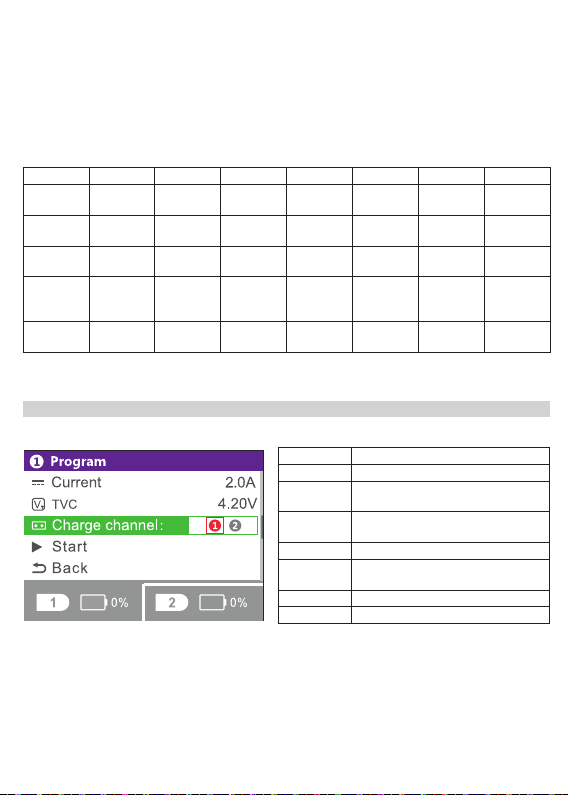
Power on the charger and connect a battery; the charger will enter into the standby page. Short press the roller wheel to
activate the program setting menu Program setting menu. The items in this menu are as follows:
4
Battery Battery Type Selection
Cells Select number of cells in the battery pack
Mode Working Mode: Charge, Discharge, Storage
(lithium batteries only)
Current Select desired charge/discharge current:
0.1-10.0 A
TVC Terminal voltage control setting
Charge Channel Allows simultaneous charging of identical
pack in both two channels
Start Start charging/discharging program
Back Return to previous screen or function
Charging Channel: This setting is convenient for charging multiple identical batteries (same type and number of cells, same
capacity). You can select the channel to be started. Red indicates selected, and gray indicates not selected.
For example: When identical batteries are connected to the both two channels, you can set both 1 and 2 to red; the charger will
charge both packs simultaneously with the same setting.
Note: If the batteries are not identical (same type and number of cells, same capacity) you to select the corresponding channel
to set and start the charging separately for each battery.
Connecting the Battery
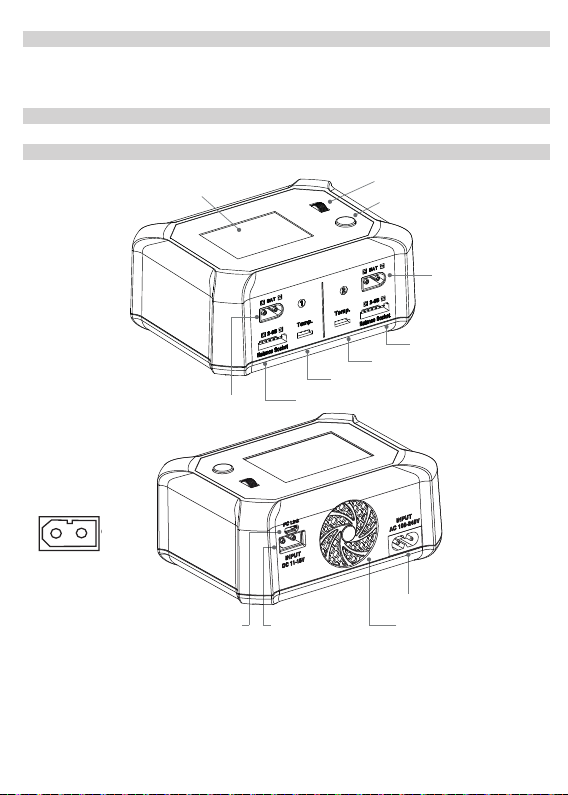
Connect the charging leads to the respective XT60 output socket (CH1 or CH2) observing the correct polarity: (+) red cable, (-)
black cable. For lithium packs, it is highly recommended to ALWAYS connect the balance leads and utilize balanced charging to
ensure that the charger can accurately monitor the voltage of each cell.