10
o During the minimum 10 minute disinfection, wipe again the outer surfaces of the display
and video adapter using a fresh Super Sani-Cloth wipe, paying careful attention to the
on/off button, purple gasket, and slider crevices.
o During the minimum 10 minute disinfection, remove the video adapter and wipe the
display stem and the video adapter. Ensure that the outer ledges on either side of the
battery compartment are thoroughly disinfected, taking care to avoid the batteries and
their contacts. Wipe along the bottom of the purple gasket and the top of the video
adapter cup and inside rim. Concentrate on the inside rim of the battery compartment
and inside the video adapter cup out to a depth of about 2 cm. NOTE: Take care to avoid
getting fluid inside the opening at the bottom of the battery compartment.
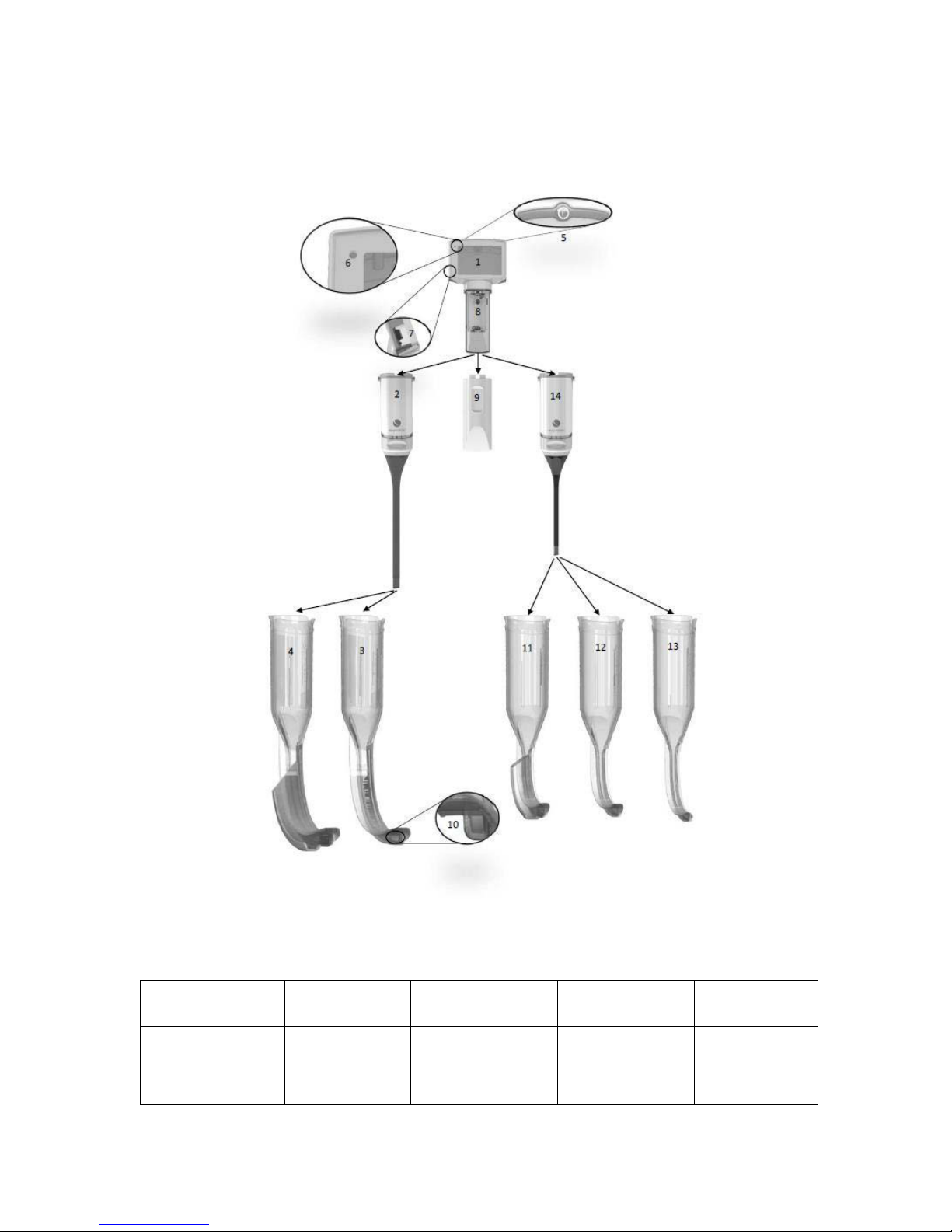
o If the video-out port (Fig. 1, #7) was used, be sure to disinfect the video port cover and
cable.
Allow the video adapter to thoroughly air dry.
After the video adapter is dry, use sterile gauze moistened with sterile water to thoroughly wipe
the display stem, the outer ledges on either side of the battery compartment, the bottom of the
purple gasket and the top of the video adapter cup and inside rim until no evidence of disinfectant
remains.
Allow the articles to air dry completely.
After the articles are dry, reconnect the video adapter to the display to close the battery
compartment.
Use sterile gauze moistened with sterile water to thoroughly wipe the display and attached video
adapter until no evidence of disinfectant remains.
Allow the articles to air dry completely.
Clean camera head with an alcohol wipe or alcohol moistened gauze if you notice the image is not
clear.
Store the King Vision Display and Video Adapter in the supplied storage case or other similar clean
pouch, bag or tray to protect from the environment until it is used again.
Note: The King Vision Display and Video Adapter materials are also compatible with 70% isopropyl alcohol,
Cidex®, Cidex Plus® or Cidex OPA®. When using these disinfectants, follow the disinfectant manufacturer’s
instructions for proper contact conditions and time of exposure. Do not submerge the display. Use
wipes/gauze to apply the disinfectant to the surface of the King Vision Display and Video Adapter for the
time required. Use wipes/gauze moistened with sterile water to remove residue and allow to air dry after
disinfection.
Note:
Use proper cleaning and disinfection technique described above. Do not autoclave, immerse this device in
any liquid or expose to ETO or any other sterilization method. These actions will damage the King Vision
Display and Video Adapter and void the warranty.
Product Identification PART NUMBERS
Display and Video Adapter:
KVIS01VA34 1 each –King Vision Display
1 each –King Vision Size 3/4 Video Adapter
1 each –Protective Case for the Display
3 each –AAA Batteries
KVIS01VA1234 1 each –King Vision Display
1 each –King Vision Size 3/4 Video Adapter
1 each –King Vision Size 1/2 Video Adapter
1 each –Protective Case for the Display
3 each –AAA Batteries
aBlade Kit: