Sprühen beendet wird.
2. Resetting the spray counts
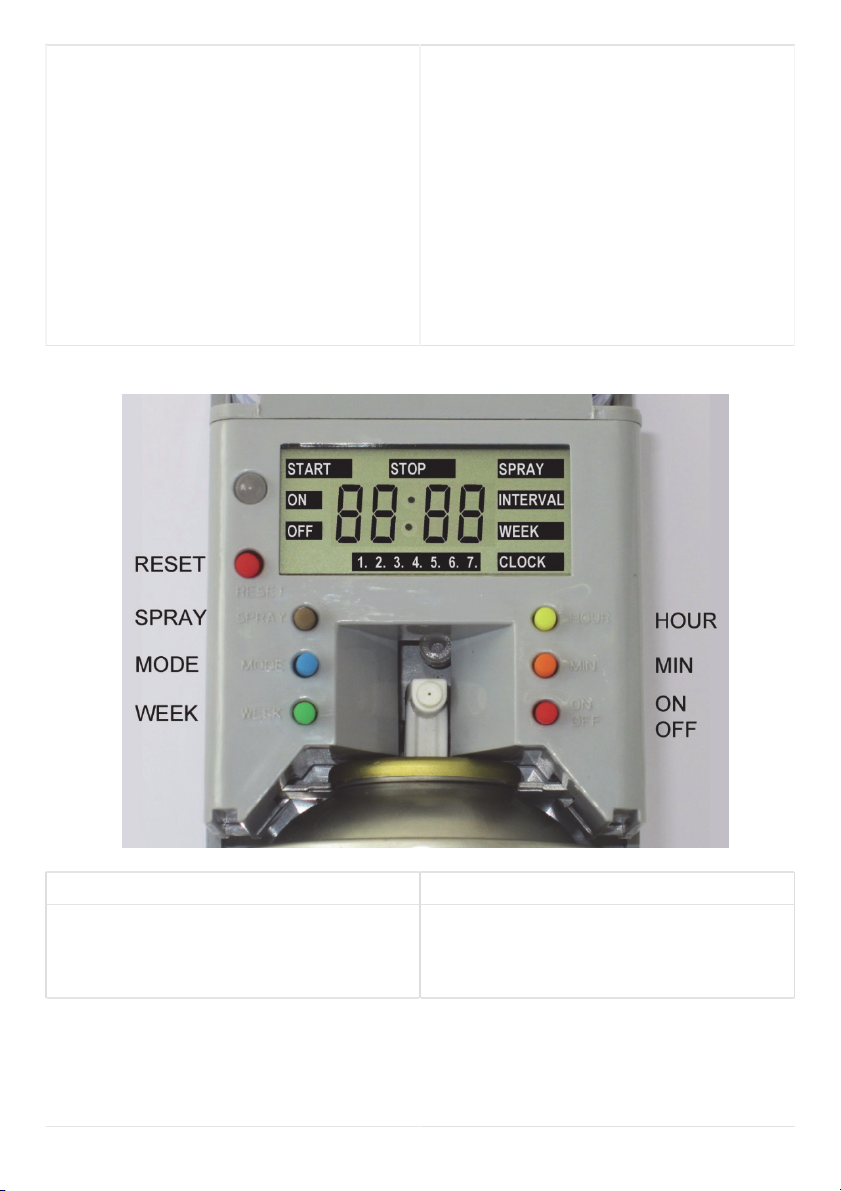
Press ‘MODE’ until the LCD shows
“SPRAY”, here are shown how many
sprays have been used. A new refill
can spray about 3000 times. If the
ON/OFF button is pressed twice, the
number will be reset.
2. Den Sprühzähler zurücksetzen
So oft auf ‘MODE’ drücken, bis das
Display ‘SPRAY’ anzeigt. Hier sehen
Sie, wie oft bereits gesprüht wurde.
Eine Nachfülldose kann etwa 3000-mal
sprühen. Bei zweimaligem Drücken der
‘ON/OFF’-Taste wird die Anzahl der
Sprühvorgänge auf ‘0’ zurückgesetzt.
3. Setting the spray interval
Press ‘MODE’ until the LCD shows
“INTERVAL”, than press “MIN” to set
the interval time (1-60 minutes).
3. Einstellen des Sprüh-Intervalls
So oft auf ‘MODE’ drücken, bis das
Display ‘INTERVAL’ anzeigt. Dann auf
‘MIN’ drücken, um das Intervall
einzustellen (1-60 Minuten).
4. Setting a weekly work mode
Press ‘MODE’ until the LCD shows
“WEEK”, than press “WEEK” to choose
the right setting. There are 3 settings to
choose from:
1. Monday till Friday (1-5)
2. Monday till Saturday (1-6)
3. Monday till Sunday (1-7)
4. Einstellen der Arbeitstage
So oft auf ‘MODE’ drücken, bis das
Display ‘WEEK’ anzeigt. Dann auf
‘WEEK’ drücken, um die gewünschte
Einstellung zu erreichen. Es gibt drei
Einstellungen:
1. Montag bis Freitag (1-5)
2. Montag bis Samstag (1-6)
3. Montag bis Sonntag (1-7)
5. Setting the time
Press ‘MODE’ until the LCD shows
“CLOCK”, than press “HOUR” and
“MIN” to set the time. Then press
“WEEK” to set the day of the week.
‘1‘= Monday; ‘2‘ = Tuesday…
5. Einstellen der Zeit
So oft auf ‘MODE’ drücken, bis das
Display ‘CLOCK’ anzeigt. Dann ‘HOUR’
und ‘MIN’ drücken, um die Zeit
einzustellen. Dann ‘WEEK’ drücken,
um den Tag einzustellen. ‘1‘= Montag;
‘2‘ = Dienstag usw.
Fabdec Ltd, Ellesmere, SY12 9DG, United Kingdom
Fabdec GmbH, 45892 Gelsenkirchen, Deutschland
www.fabdec.com
Produktinformation nur zur Orientierung. Änderungen vorbehalten.
Product information is for general guidance only and may be altered or amended without notice.