www.kita.com.tw
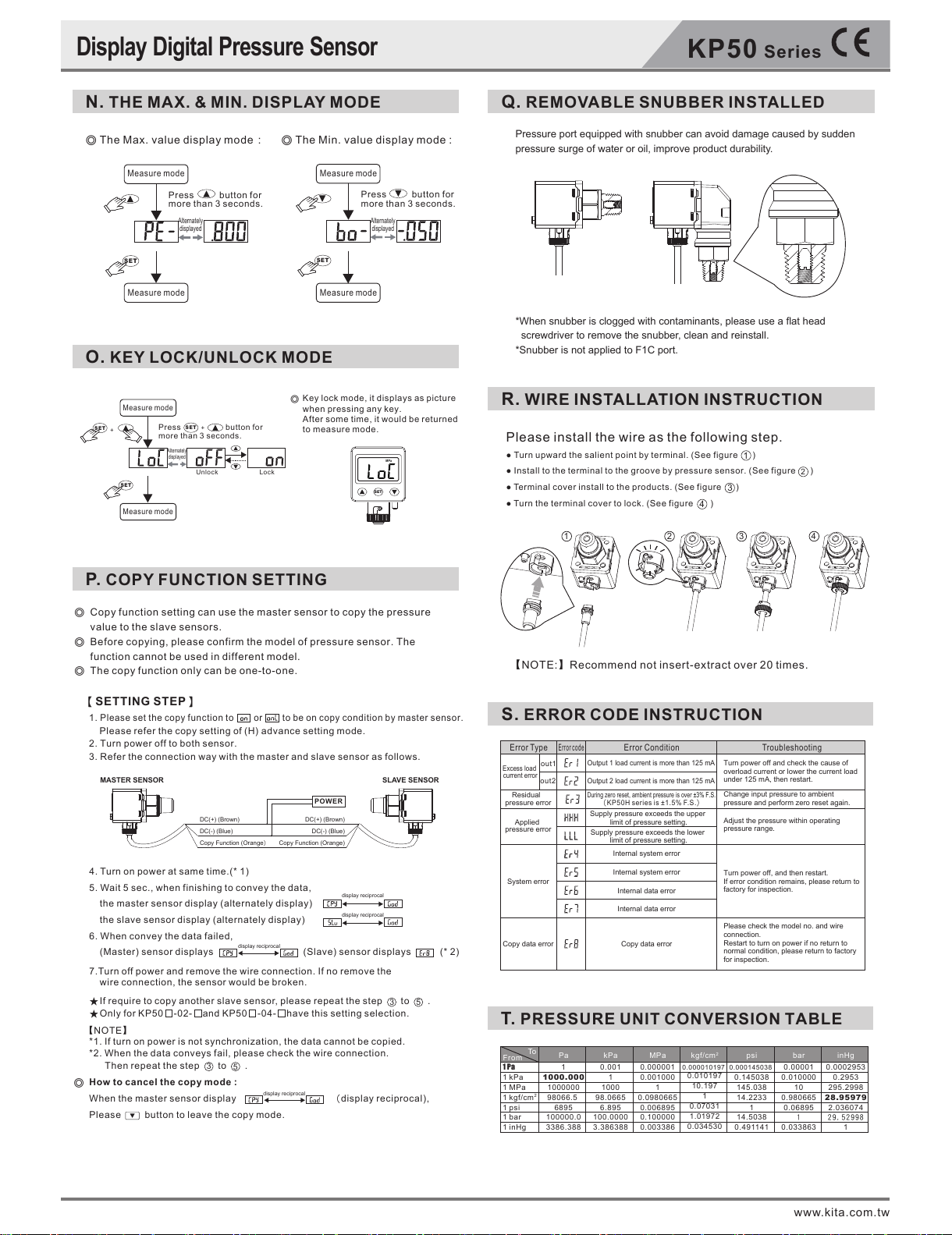
P. COPY FUNCTION SETTING
S. ERROR CODE INSTRUCTION
T. PRESSURE UNIT CONVERSION TABLE
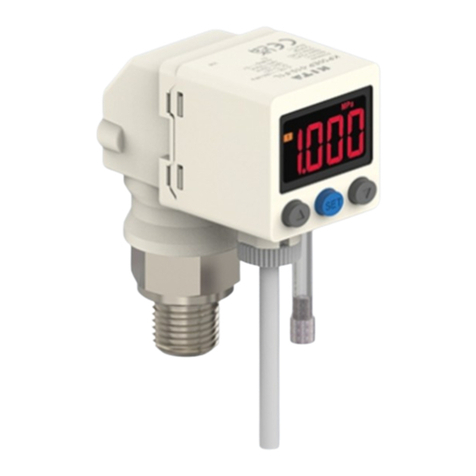
Display Digital Pressure Sensor
N. THE MAX. & MIN. DISPLAY MODE
O. KEY LOCK/UNLOCK MODE
Q. REMOVABLE SNUBBER INSTALLED
R. WIRE INSTALLATION INSTRUCTION
Measure mode
Measure mode
Copy function setting can use the master sensor to copy the pressure
value to the slave sensors.
Before copying, please confirm the model of pressure sensor. The
function cannot be used in different model.
The copy function only can be one-to-one.
◎
◎
◎
◎
【SETTING STEP】
1.
Please set the copy function to or to be on copy condition by master sensor.
Please refer the copy setting of (H) advance setting mode.
2. Turn power off to both sensor.
3. Refer the connection way with the master and slave sensor as follows.
SLAVE SENSOR
POWER
MASTER SENSOR
DC(+) (Brown)
DC(-) (Blue)
Copy Function (Orange)
DC(+) (Brown)
DC(-) (Blue)
Copy Function (Orange)
4. Turn on power at same time.(* 1)
5. Wait 5 sec., when finishing to convey the data,
the master sensor display (alternately display)
the slave sensor display (alternately display)
6. When convey the data failed,
(Master) sensor displays (Slave) sensor displays (* 2)
7.Turn off power and remove the wire connection. If no remove the
wire connection, the sensor would be broken.
★If require to copy another slave sensor, please repeat the step to .
★Only for KP50 -02- and KP50 -04- have this setting selection.
*1. If turn on power is not synchronization, the data cannot be copied.
*2. When the data conveys fail, please check the wire connection.
Then repeat the step to .
How to cancel the copy mode :
When the master sensor display (display reciprocal),
Please button to leave the copy mode.
display reciprocal
display reciprocal
display reciprocal
display reciprocal
35
35
【NOTE】
Press button for
more than 3 seconds.
LockUnlock
Key lock mode, it displays as picture
when pressing any key.
After some time, it would be returned
to measure mode.
◎
Alternately
displayed
Measure mode
Measure mode
Press button for
more than 3 seconds.
SET
Alternately
displayed
◎ The Max. value display mode:
Alternately
displayed
Press button for
more than 3 seconds.
Measure mode
Measure mode
SET
◎The Min. value display mode :
Please install the wire as the following step.
● Turn upward the salient point by terminal. (See figure )
● Install to the terminal to the groove by pressure sensor. (Seefigure )
● Ter minal cover install to the products.(See figure )
● Turn the terminal cover to lock. (See figure )
1
2
3
4
【NOTE:】Recommend not insert-extract over 20 times.
SET
SET
+
SET
+
SET
MPa
KP50
Series
1342
Pressure port equipped with snubber can avoid damage caused by sudden
pressure surge of water or oil, improve product durability.
*When snubber is clogged with contaminants, please use a flat head
screwdriver to remove the snubber, clean and reinstall.
*Snubber is not applied to F1C port.
out1
out2
Error Type
Error code
Error Condition Troubleshooting
Excess load
current error
Residual
pressure error
Applied
pressure error
System error
Copy data error
Output 1 load current is more than 125 mA
Output 2 load current is more than 125 mA
(
KP50H series is ±1.5% F.S.
)
During zero reset, ambient pressure is over ±3% F.S.
Supply pressure exceeds the upper
limit of pressure setting.
Supply pressure exceeds the lower
limit of pressure setting.
Internal system error
Internal system error
Internal data error
Internal data error
Turn power off and check the cause of
overload current or lower the current load
under 125 mA, then restart.
Change input pressure to ambient
pressure and perform zero reset again.
Adjust the pressure within operating
pressure range.
Turn power off, and then restart.
If error condition remains, please return to
factory for inspection.
Please check the model no. and wire
connection.
Restart to turn on power if no return to
normal condition, please return to factory
for inspection.
Copy data error
From To
1 kPa
1 MPa
1 Pa
1000.000
1000000
1
98066.5
6895 6.895 0.006895 0.07031 10.06895 2.036074
0.2953
295.2998
0.0002953
0.010000
10
0.00001
0.145038
145.038
0.000145038
0.010197
10.197
0.000010197
0.001000
1
0.000001
1
1000
0.001
100000.0 100.0000 0.100000 1.01972 14.5038 129.52998
28.959790.98066514.2233
1
0.098066598.0665
3386.388 3.386388 0.003386 0.034530 0.491141 0.033863 1
1 kgf/cm2
1 psi
1 bar
1 inHg
Pa kPa MPa kgf/cm2psi bar inHg