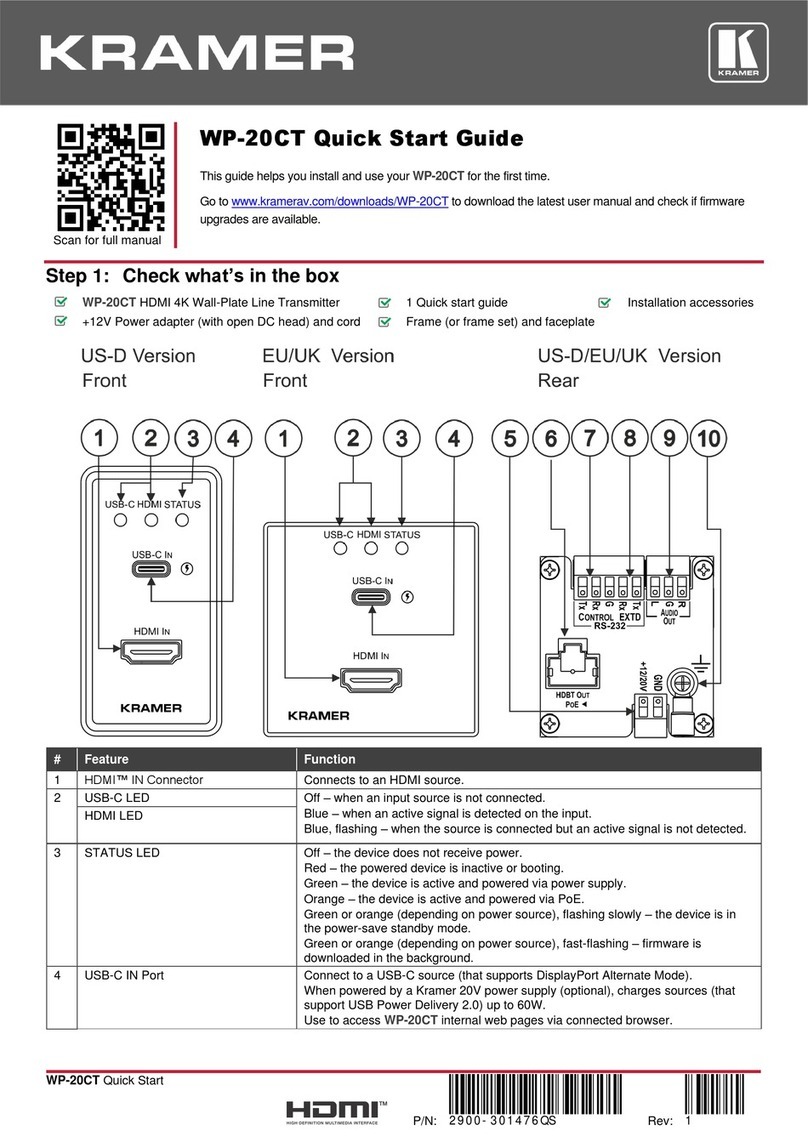
# Feature Function
REMOTE SELECTOR (1-4, G) Terminal Block
Connects to external contact closure input switches
22 SETUP DIP-switches (1-8) N/A
23 Power Connector with Fuse 100-240V AC connector, enabling power supply to the unit
Step 3: Install the VS-41H2
Attach the rubber feet and place on a table or mount the VS-41H2 in a rack using the included rack ears.
Step 4: Connect the inputs and outputs
Always switch OFF the power on each device before connecting it to your VS-41H2.
For optimum range and performance, use the recommended Kramer cables available at www.kramerav.com/product/VS-41H2
Connect the audio output:
For the Ethernet and HDBaseT connectors, use the
wiring diagram:
To a balanced stereo audio
acceptor:
To a unbalanced stereo
audio acceptor:
Step 5: Connect the power
Connect the power cord to the VS-41H2 and plug it into the mains electricity.
Safety Instructions
There are no operator serviceable parts inside the unit.
Use only the power cord that is supplied with the unit.
Do not open the unit. High voltages can cause electrical shock! Servicing by qualified personnel only.
Disconnect the power and unplug the unit from the wall before installing.
See www.KramerAV.com for updated safety information.
Step 6: Operating the VS-41H2
Switch an input to an output:
•Press an input button (1 to 4) to switch that input to the output.
Generate a test pattern:
For diagnostic purposes, you can generate up to four test patterns:
•Press PATTERN.
•Press any of the input buttons to select a test pattern.
The selected test pattern appears on the outputs.
•To exit the test pattern, press PATTERN once again.