EN
03/2016Universal electronic driver type KRED for solenoid operated proportional valves
UNIVERSAL ELECTRONIC DRIVER TYPE KRED
fOR SOLENOID OPERATED PROPORTIONAL VALVES
KEY fEATURES
• Microcontrollerdesign
• Independentadjustments(rampup-rampdown)
• 4digitleddisplay
• Displayandadjustactualvalues(current&voltage)
• Easyaccesstothemenusetup
• Wideramptimerange
• Simplecontrolwithanaloginput,locallysuppliedreferencevoltage
• Noheatsinkrequired
• Electroniclimitingcircuit/shortcircuitproof
• Reversepolarity,commandinputprotection
• Loadcanbeconnectedanddisconnectedlive
1 DESCRIPTION 2 TEChNICAL DATA
Thedrivercontrolsonesolenoidofaproportionalvalve.
Hisconstructionpermitsaneasyassemblydirectlyonthe
DINrailoftheelctriccabinet.Bytheuseoftwoselectors
itispossibletoeasilycongurealltheparameterswithout
theneedofspecialtoolsorprogrammingdevices.
A4digitleddisplayshowsallthenecessariesinformations.
Versions:
KRED-Sisforsinglesolenoidproportionalvalves
KRED-Disfordoublesolenoidproportionalvalves
Operating voltage: 9-36VDC
Maximum output current: 3,00A
Input signal: 0-5V;0-10V;4-20mA
Maximum ramp time: 99,5s
Linearity: 40-450Hz
Operating Temperature: -40..80°C
Mounting:DINrail(open)
3 SET-UP PROCEDURE
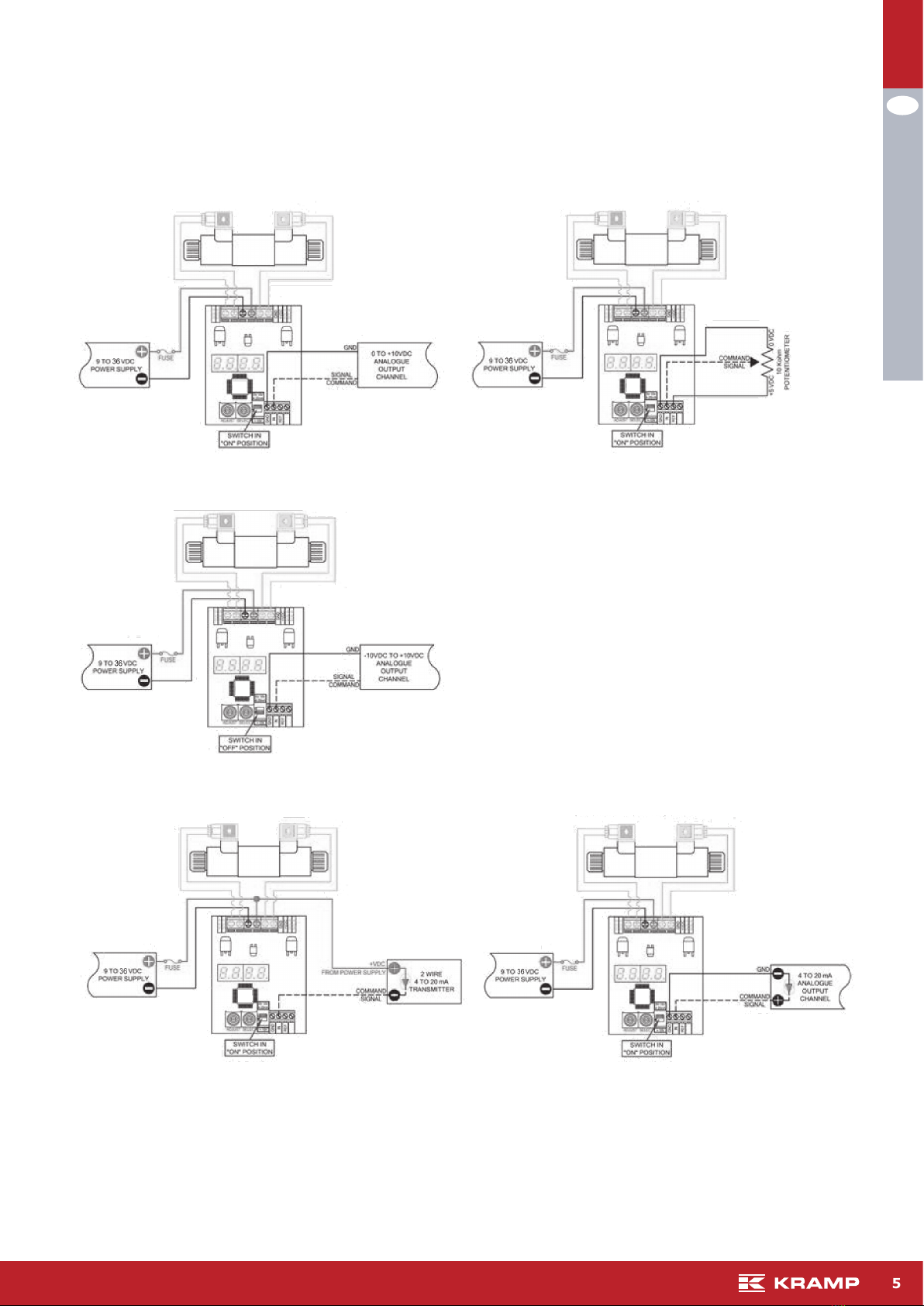
Available input selection KRED-S Available input selection KRED-D
DIPSwitchinON/UPposition
"in":10-->(0to10V)**default "in":10-->(0to10V)**default
"in":5-->(0to5V) "in":5-->(0to5V)
"in":420-->(4to20mA) "in":420-->(4to20mA)
DIPSwitchinOFF/Downposition
"in":-10-->(-10to10V)
1. Atpowerup,thedisplaywillshoweithertheoutputcurrentsignalortheinputsignal(Defaultdisplaysettingshowsthe
outputsignal).Thedecimalpointwillbeashing.
2. RotateSELECTtoentertheset-upmode.Parameterabbreviationisindicatedonthedisplay
3. Whenyoureachthesettingyouwanttomodify,rotateADJUSTupordowntothedesiredvalue.
4. Tomodifyanothersetting,rotateSELECTagainandrepeat.
5. TheDriverisfullyfunctionalduringtheset-upprocedurewithanyadjustmentseffectiveimmediately.
6. Inordertowritethenewsettingsinthememoryandreturntonormalmodeofoperation,rotate„SELECT“untilthe
displayshows„SR“andthenrotate„ADJUST“from0to1orwaitfor100seconds.
7. Ifyoudonotwanttosavethenewsettingsyouhavejustmodied,youmustdisconnecttheDriverfromthepowersupply
beforetheendofthe100secondstorestoreprecioussettings.
8. Aftersavingparameterstomemory,thedecimalpointwillbeashingandtheDriverdisplaywillbebackshowingeither
theoutputcurrentsignalorinputsignaldependingonyour„di“selection.
9. Tostartovercompletely,youcanrestorethefactorysettingsbyrotatingSELECTtorFPandthenrotateADJUSTuppast
10forthedisplaytoreset(NOTEforStep9:youmayhavetoadjustyourInputSignalSettingagainifyouresettofactory
settings.)