____________________________________________________ _________________________________________________
LA-VST (V.1.1 2011) LA-VST (V.1.1 2011)
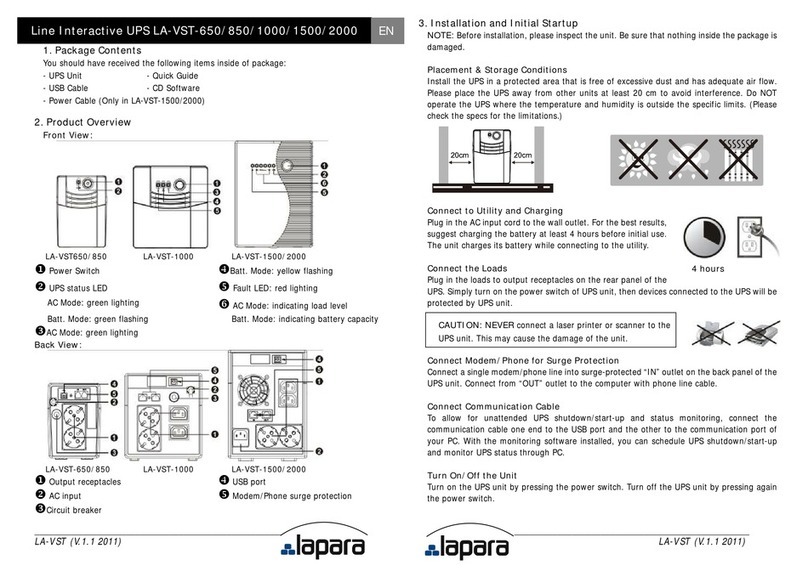
4. Important Safety Warn ng (SAVE THESE INSTRUCTIONS)
CAUTION! To prevent the risk of fire or electric shock, install the UPS in a temperature and
humidity controlled indoor area, free of conductive contaminants. (See specifications for
acceptable temperature and humidity ranges.)
CAUTION! To reduce the risk of overheating the UPS, do not cover the UPS' cooling vents
and avoid exposing it to direct sunlight or installing it near heat emitting appliances, such as
space heaters or furnaces.
CAUTION! Do not attach to UPS non-computer-related items, such as medical equipment,
life-support equipment, microwave ovens, or vacuum cleaners.
CAUTION! Do not plug the UPS input into its own output.
CAUTION! Do not allow liquids or any foreign object to enter the UPS. Do not place
beverages or any other liquid-containing vessels on or near the unit.
CAUTION! In case of an emergency, press the OFF button and disconnect the power cord
from the AC power supply to properly disable the UPS.
CAUTION! Do not attach a power strip or surge suppressor to the UPS.
CAUTION! With the installation of this equipment, it should be prevented that the sum of
the leakage current of the UPS to the connected consumer exceeds 3.5mA.
Attent on hazardous through electric shock. Even disconnecting this unit from the mains,
hazardous voltage still may be accessible through supply from battery. The battery supply
should be therefore disconnected in the plus and minus pole at the quick connectors of the
battery when maintenance or service work inside the UPS is necessary.
CAUTION! Servicing of batteries should be performed or supervised by people
knowledgeable of batteries and the required precautions. Keep unauthorized personnel away
from batteries.
CAUTION! When replacing the batteries, use the same number and type of batteries.
CAUTION! Internal battery voltage is 12VDC. Sealed, lead-acid, 6-cell battery.
CAUTION! Do not dispose of batteries in a fire. The battery may explode. Do not open or
mutilate the battery or batteries. Released electrolyte is harmful to the skin and eyes.
CAUTION! Unplug the UPS prior to cleaning and do not use liquid or spray detergent.
CAUTION! A battery can present a risk of electric shock and high short circuit current. The
following precaution should be observed before replacing batteries:
1) Remove watches, rings, or other metal objects.
2) Use tools with insulated handles.
3) Wear rubber gloves and boots.
4) Do not lay tools or metal parts on top of batteries.
5) Disconnect charging source prior to connecting or disconnecting batteries terminal.
5. Software Download & Installat on (Only for the model w th
commun cat on port)
Please follow steps below to download and nstall mon tor ng software:
1. Insert supplied CD or go to the website http://www.power-software-download.com
2. Click ViewPower software icon and then choose your required OS to download the
software.
3. Follow the on-screen instructions to install the software.
4. When your computer restarts, the monitoring software will appear as an orange plug icon
located in the system tray, near the clock.
6. Trouble Shoot ng
Use the table below to solve minor problems.
the front panel.
Replace the battery with the same
type of battery.
The UPS is not turned on.
Press the power switch again to turn
on the UPS.
continuously when
the
mains is normal.
Remove some loads first. Before
reconnecting them
the load matches the UPS capability.
back-up time is too
short
Remove some critical load.
Battery voltage is too low.
Battery defect. It might be
due to high temperature
operation environment, or
improper operation to
battery.
Replace the battery with the same
type of battery.
The mains is normal
But the unit is on
battery mode.
ect the power cord properly.