logo
Brands
  1. Home
  2. •
  3. Brands
  4. •
  5. LevelOne
  6. •
  7. Switch
  8. •
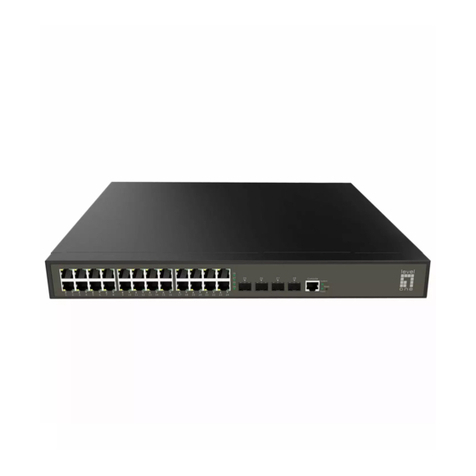
  9. LevelOne FEP-2401 Series User manual

LevelOne FEP-2401 Series User manual

Other LevelOne Switch manuals
LevelOne GEL-2060 Quick guide

LevelOne

LevelOne GEL-2060 Quick guide

LevelOne FGP-1000 User manual

LevelOne

LevelOne FGP-1000 User manual

LevelOne IGP-0501 User manual

LevelOne

LevelOne IGP-0501 User manual

LevelOne GSW-0503T User manual

LevelOne

LevelOne GSW-0503T User manual

LevelOne GEP-2650 User manual

LevelOne

LevelOne GEP-2650 User manual

LevelOne GTP-5271 User manual

LevelOne

LevelOne GTP-5271 User manual

LevelOne IGP-1271 User manual

LevelOne

LevelOne IGP-1271 User manual

LevelOne IGP-1061 User manual

LevelOne

LevelOne IGP-1061 User manual

LevelOne Infinity IES-0510 User manual
LevelOne

LevelOne Infinity IES-0510 User manual

LevelOne GES-2451 User manual

LevelOne

LevelOne GES-2451 User manual

LevelOne GEL-2060 Quick guide

LevelOne

LevelOne GEL-2060 Quick guide

LevelOne ProCon GSW-2693 User manual

LevelOne

LevelOne ProCon GSW-2693 User manual

LevelOne FSW-2208TX User manual

LevelOne

LevelOne FSW-2208TX User manual

LevelOne INFINITY IES-0520 User manual

LevelOne

LevelOne INFINITY IES-0520 User manual

LevelOne GEL-2060 Quick guide

LevelOne

LevelOne GEL-2060 Quick guide

LevelOne GTP-5281 User manual

LevelOne

LevelOne GTP-5281 User manual

LevelOne FSW-1610TX User manual

LevelOne

LevelOne FSW-1610TX User manual

LevelOne GEP-2841 Programming manual

LevelOne

LevelOne GEP-2841 Programming manual

LevelOne GSW-2650 User manual

LevelOne

LevelOne GSW-2650 User manual

LevelOne GEP-1022 User manual

LevelOne

LevelOne GEP-1022 User manual
LevelOne EHU-0507T User manual

LevelOne

LevelOne EHU-0507T User manual

LevelOne IGP-0401 User manual

LevelOne

LevelOne IGP-0401 User manual

LevelOne FEP-2402 Series User manual

LevelOne

LevelOne FEP-2402 Series User manual

LevelOne FSW-0512 User manual

LevelOne

LevelOne FSW-0512 User manual

Popular Switch manuals by other brands

TRENDnet TK-401R null

TRENDnet

TRENDnet TK-401R null

TRENDnet TK-200K null

TRENDnet

TRENDnet TK-200K null

TRENDnet TE100-S8 null

TRENDnet

TRENDnet TE100-S8 null

URC Total Control MFS-8 installation manual

URC

URC Total Control MFS-8 installation manual

Azbil HPQ-D11 user manual

Azbil

Azbil HPQ-D11 user manual

Sony DFS-900M operating instructions

Sony

Sony DFS-900M operating instructions

SICK i17S operating instructions

SICK

SICK i17S operating instructions

F&F SZR-277 quick start guide

F&F

F&F SZR-277 quick start guide

Shure UAMS/BK user guide

Shure

Shure UAMS/BK user guide

Dräger X-zone Switch Off Instructions for use

Dräger

Dräger X-zone Switch Off Instructions for use

Asco Joucomatic 349 Series manual

Asco

Asco Joucomatic 349 Series manual

BT Mini Hub user guide

BT

BT Mini Hub user guide

D-Link DES-1226G manual

D-Link

D-Link DES-1226G manual

Johnson Controls FS80-C installation instructions

Johnson Controls

Johnson Controls FS80-C installation instructions

MicroNet SP1200A user manual

MicroNet

MicroNet SP1200A user manual

Ruijie RG-PF2920 Series Hardware  installation and reference guide

Ruijie

Ruijie RG-PF2920 Series Hardware installation and reference guide

Altinex DA1914SX user guide

Altinex

Altinex DA1914SX user guide

RJM MASTERMIND PBC/6X user manual

RJM

RJM MASTERMIND PBC/6X user manual

https://manuals.online logo
https://manuals.online logoBrands
  • About & Mission
  • Contact us
  • Privacy Policy
  • Terms and Conditions

Copyright 2026 Manuals.Online. All Rights Reserved.

1
FEP-2401 Series
24-Port Fast Ethernet PoE Switch, 802.3at/af PoE
User Manual
2
1. Introductions
Thank you for purchasing the PoE Switch.
The PoE Switch, is a 24-port 10M/100M PoE + 2-port 10M/100M/1000M(UTP) Switch with PoE
On/Off control capability. With 24 dip switches, each PoE port can be manually set for On-Off
control. 24-Port PoE Switch supports up to 30W on each LAN port when the corresponding port
DIP switch is set ON. The Gigabit ports are supporting 10/100/1000M as uplink port connecting
NVR or other edge switch via either UTP port.
The PoE Switch supports power protections as OVP (Over Voltage Protection), OCP (Over
Current Protection), robust short-circuit protection (SCP) and surge protection. You may also make
use of PoE repeater to extend another 100 meters or several 100 meters distance if multiple PoE
repeaters are cascaded.
2. Application
PoE Switch Connects with PoE PD Devices
3. Packing Contents
Inside the package you shall find:
(1) One PoE Switch
(2) One AC input port (100~240V)
(3) One User Manual
Please check if the packing is damaged or any component is missing. If so, please contact your
distributor.
3
4. Technical Specifications
Standards
IEEE 802.3/u 10/100/1000BaseT/TX
IEEE 802.3x Flow Control
IEEE 802.3at/af PoE compliant
midspan PoE compliant
Features
MAC Address: 8K
Buffer Memory: 512KB
Transmission Method: Store and Forward
Filtering/Forwarding Rates
1000Mbps port –1,488,000pps
100Mbps port - 148,800pps
10Mbps port - 14,880pps
Transmission Media
10BaseT Cat. 3, 4, 5 UTP
100/1000BaseTX Cat. 5 UTP/SFP
PoE on each Port
30W
Output PoE Pin
4, 5, 7, 8
LED Indicators
Port 1~24: 10/100M, PoE ON/OFF
Power, Port 25, 26: 10/100/1000M
Power Adaptor
Input: 100-240VAC, 50~60Hz
Output: 56VDC
Dimensions
480 × 118 × 40 mm (L x W x H)
Weight
2.5 kgs
Operating Temperature
0 to 40℃
Humidity
10 to 90% RH (non-condensing)
Certifications
FCC Class A, CE
4
5. LED Indicators
POWER: “Green On”indicates power is on and normal.
Port 1~24 LAN:“Green On”indicates each Ethernet LAN port is in connection.
GbE Port 25, 26: “Green On”indicates Gigabit LAN port is in connection.
“Yellow On”indicates Fast Ethernet LAN port is in connection.
PoE: “Green On”indicates Power over Ethernet function is enabled for each port.
“OFF”indicates the PoE is disabled, and it becomes a regular LAN port.
6. Dip Switch Settings vs Power over Ethernet
Note that the dip switches can be switched ON and OFF anytime. However, it is
suggested that the dip switches be set ready before the PoE port is connected for
power management.
The device will be re-started if the overall PoE power consumption is over the
power budget. Please make less PoE ports enabled when over the power budget.
.
1 ~ 24 ports DIP ON
Per PoE Port
30 Watts Injected
Maximum
PoE Power
150/250/380/500/630 Watts