LGE MobileComm U.S.A., Inc.
10101 Old Grove Rd., San Diego, CA 92131
Customer Service: (800) 793-8896
www.lg.com
All materials in this datasheet including, without limitation, the design, the text, and any marks are the property of LG Electronics, Inc. Copyright ©2010 1LG Electronics, Inc. ALL RIGHTS RESERVED. LG is a registered trademark of LG Electronics, Inc. Optimus C
is a trademark of LG Electronics, Inc. Google and the Google logo are trademarks of Google Inc. Android is a trademark of Google Inc. microSD™ is a trademark of SanDisk. The Bluetooth® word mark and logos are registered trademarks owned by Bluetooth SIG,
Inc. Other trademarks and trade names are those of their respective owners. Unless otherwise specified herein, all accessories referenced herein are sold separately. Certain features are subject to service provider availability. Additional charges may apply. All features,
functionality and other product specifications are subject to change. Screen shots are simulated and subject to change.
ENHANCED USER EXPERIENCE
Android 2.2 Platform
Home Screens – customize either 5 or 7
screens with shortcuts to apps, favorites,
and widgets
Virtual QWERTY Keyboard with Swype®
Google™ Integration – preloaded popular
Google apps
Exchange Support – support for Exchange
calendars in the Calendar application, auto-
discovery for easy setup and syncing of an
Exchange account*, and Global Address Lists
lookup in the Email application
Proximity Sensor – locks the touchscreen and
buttons while talking on the phone
USB Charging via Computer
Airplane Mode (RF Off)
*Available for Exchange 2007 and higher.
DESIGN
Sleek and Stylish Design
Large 3.2" Capacitive Touchscreen – durable
tempered glass with fast and accurate response
Live Wallpaper – dynamic, animated backgrounds
Touch Vibration for Tactile Feedback*
Accelerometer
Micro USB Charging Port
*Only available on certain interactions with the touchscreen.
MOBILE MEDIA
Android Market™ – browse and download
thousands of free and paid apps from around
the world
Cricket® Storefront – download ringback tones,
ringtones, graphics, and applications
Full HTML Web Browser with Google Search
Connect to Social Networks – send quick
updates to Twitter®, Facebook®, MySpace™*,
or added social networks
Mobile Instant Messaging – Google Talk™,
AIM®*, and Yahoo!® Messenger*
Gmail™ and Email – mobile personal and
corporate email†
Text, Picture, Video, and Voice Messaging†
*Applications downloaded from Android Market.
CAMERA/ IDEO
3.2 Megapixel Autofocus Camera and
Camcorder
Camera Resolutions: 2048 x 1536 (default),
1600 x 1200, 1280 x 960, 640 x 480,
320 x 240 pixels
Camera and Video Zoom: up to 4x
Macro Mode – take detailed pictures up close
Image Editor: rotate and crop images
Scene Modes*: Auto, Portrait, Landscape,
Sports, Night, Sunset
Image Quality – set camera to capture Normal,
Fine, or Super Fine
Customizable White Balance*, File Quality*,
Color Effect*, ISO, Brightness*, Timer, Shot
Mode, Shutter Sounds
Tag Location – add geographic data to images
Video Resolutions: 640 x 480 (default),
320 x 240, 176 x 144 pixels
Video Quality – set camcorder to record
Normal, Fine, or Super Fine
Video Recording Time: Normal (up to 120
minutes)** or MMS (up to 30 seconds)
Audio Recording – record video with or without
sound (mute)
*Available in both video and camera modes.
**Depends on available memory.
MULTIMEDIA
DivX® Video Playback
Video Player for WMV, MP4, 3GP, and
3G2 Formats
Music Player for MP3, WMA, Unprotected AAC,
and Unprotected AAC+ Formats
Stereo Sound via wired or Bluetooth Headset
Multitask While Playing Music in the Background
Music Library – organized by artist, album,
song, and playlist
Repeat and Shuffle Music Playback Modes
USB Mass Storage – transfer files between
microSD card and PC*
*USB cable and microSD card required (both included).
BLUETOOTH®
Version: 2.1 + EDR (Enhanced Data Rate)
Save up to 100 Bluetooth Pairings*
Supported Profiles: headset, hands-free, object
push, advanced audio distribution (stereo),
audio/video remote control, file transfer, phone
book access
Listen to Music with Optional Stereo
Bluetooth Headset**
Send User-Generated Pictures ( PEG) and
Videos via Bluetooth
*Depends on available memory.
**Accessories sold separately.
TOOLS & DATA
Preloaded Android Apps: Home Screen Tips,
Calculator, Calendar (Corporate or Google),
Camera, Clock, Contacts, Email, Gallery, Maps,
Market, Messaging, Music, Phone, Settings, Talk,
Voice Dialer, Voice Recorder
Widgets and Google Applications: Gmail,
Google Latitude, Google Maps, Google Places™,
Google Talk, Google Search (including Google
Voice Search)
Google Maps Navigation – spoken turn-by-turn
directions showing real time traffic and 360º
views of the destination
Wi-Fi® Connectivity – IEEE 802.11b/g
Phone Book – unlimited fields for numbers*,
email addresses, physical addresses,
organization names, IM screen names, web
addresses, anniversaries, and limited fields
for notes, a nickname, and a picture ID**
S-GPS Support for Enhanced Location Accuracy
*Depends on available memory.
**Dependent on photos stored in your gallery.
OICE/AUDIO
One-Touch Speakerphone*
Speaker-Independent Voice Commands
T
ext to Speech & Google Voice Search
MP3 Music Ringer Support (clips from hit songs)†
43 Unique Ringtones + Vibrate and Silent Modes
TTY/TDD Support
Hearing Aid Compatible (M4/T4 Rating)
*Only available during a call.
SPECIFICATIONS
Technology: CDMA
Frequencies: 1.9 GHz CDMA PCS, 800 MHz
CDMA, 1.7/2.1 GHz AWS
Data Transmission: EVDO†Rev. A
Dimensions: 4.57" (H) x 2.22" (W) x 0.625" (D)
Weight: 5.39 oz.
Display: 262K Color TFT, 480 x 320 Pixels, 3.2"
Standard Battery: 1,500 mAh
Talk Time: Up to 7 Hours & 30 Minutes*
Standby Time: Up to 14 Days & 1 Hour*
microSD Memory Slot: Supports up to a 32GB
memory card**
*Certain features may use more power and cause actual standby
and usage time to vary.
**2GB microSD card included. Additional memory cards sold
separately.
ACCESSORIES
Standard Battery*
Travel Charger and USB Cable*
2GB microSD Memory Card*
Vehicle Power Charger
Headset
Bluetooth Headset (HBM-235)
Bluetooth Headset (HBM-570)
Bluetooth Headset with Charging Cradle
(HBM-585)
Bluetooth Headset with Speakerphone and
Solar Charging Cradle (HBM-810)
Bluetooth Stereo Headset (HBS-700)
*Included with phone.
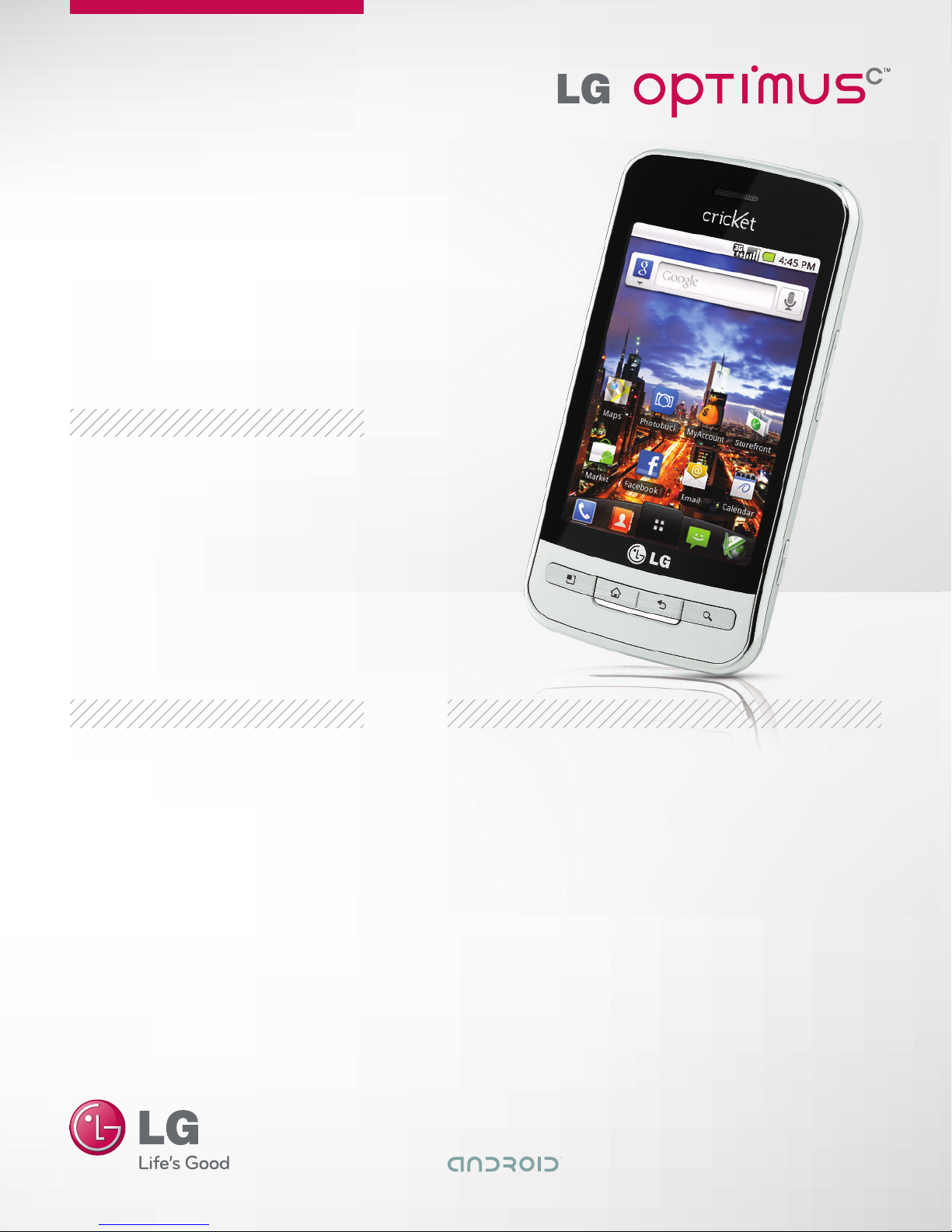
ANDROID™ 2.2-POWERED SMARTPHONE (FROYO) 5 OR 7 CUSTOMIZABLE HOME SCREENS WI-FI® CONNECTI ITY LARGE TEMPERED
GLASS TOUCHSCREEN IRTUAL QWERTY KEYBOARD WITH SWYPE® 3.2 MP AUTOFOCUS CAMERA AND CAMCORDER GOOGLE MAPS™
NA IGATION MUSIC PLAYER WITH 32GB MICROSD™ CARD SLOT BLUETOOTH® CONNECTI ITY
†Cricket Wireless® service required. Product features subject to change. Features based on carrier program availability. Additional charges may apply.
E D U CAT I O N AL L IN K