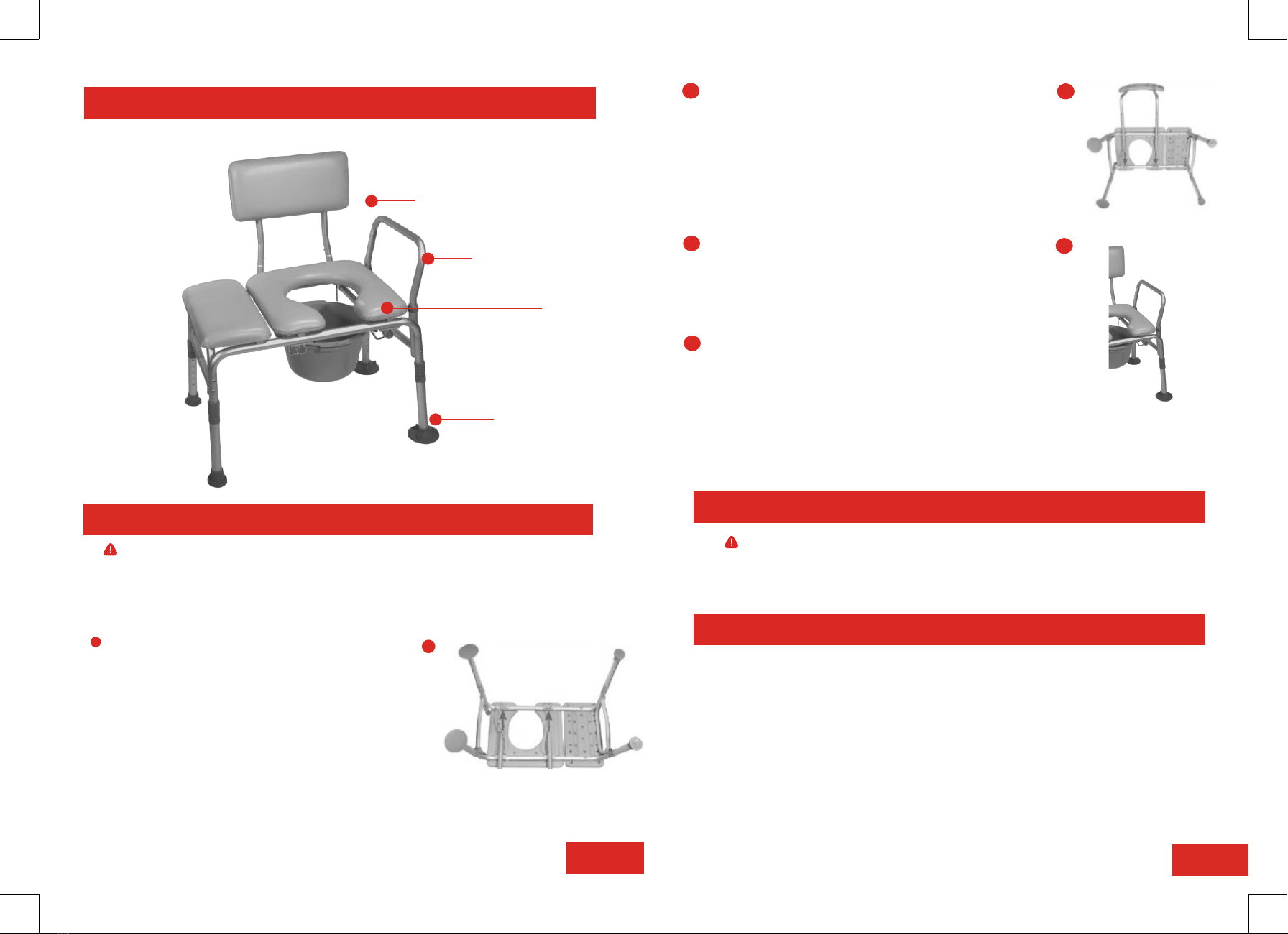
GENERAL EXPLANATION OF TRANSFER BENCH
2
Handle
Seat
Adjustable
Legs
Back
3
Bench Assembly
SET UP
Prior to use, please read all instructions and keep this user guide for
future reference.
LIFESTYLE LIMITED WARRANTY
Your Lifestyle Mobility Aids product is warranted to be free of defects in materials and workmanship for
the lifetime of the original consumer purchaser. This device was built to exacting standards and carefully
inspected prior to shipment.
This Lifetime Limited Warranty is an expression of our confidence in the materials and workmanship of
our products and our assurance to the consumer of years of dependable service.
In the event of a defect covered by this warranty, we will, at our option, repair or replace the device.
This warranty does notcover device failure due to owner misuse or negligence, or normal wear and tear.
The warranty does not extend to non-durable components, such as rubber accessories, casters, and
grips, which are subject to normal wear and need periodic replacement.
Should you have any questions regarding your Lifestyle Mobility Aids product or warranty please call your
local provicer or contact us directly.
CLEANING
Do not use high pressure cleaners, steam cleaners or harsh, caustic chemicals for cleaning.
> Use a non-abrasive detergent or household cleaner with warm water.
> Rinse with warm water and wipe dry.
> DO NOT USE AN ABRASIVE CLEANER OR CLOTH with this product, as damage may ensue.
Turn the bench on its side and insert the backrest
extensions into the four tubing slots under the seat.
Depress the chrome button on the backrest
extensions and ensure that the chrome buttons click
and lock into position from the top tubing slots. The
backrest can slide on either side of the bench
depending on the direction the you will be sitting
[B].
Place the bench upright so that it is resting evenly
on all four legs and insert the seat handle into the
seat handle slots. Depress both chrome buttons on
each side of the handle and push down until the
chrome buttons click and lock into position [C].
To adjust the legs and seat height, depress the
chrome button on the legs and slide each leg to a
desired height. Be sure all four legs are level, stable,
and all push buttons are fully locked into position
before using. The two legs with large suction tips
should be used inside of the shower.
A
1
1
2
Place the bench with the seat facing down on
a level surface. Insert the two legs with large
suction tips into the end of the frame that
has the seat handle slots. Depress the
chrome button at the top of the leg and push
the leg into the frame. Ensure that the
chrome button clicks and locks into position.
Following the same procedure, insert the two
legs with small suction tips at the other end
of the bench [A].
3
4
2BBBB
BC