HN-DR4PN2U User Manual
1
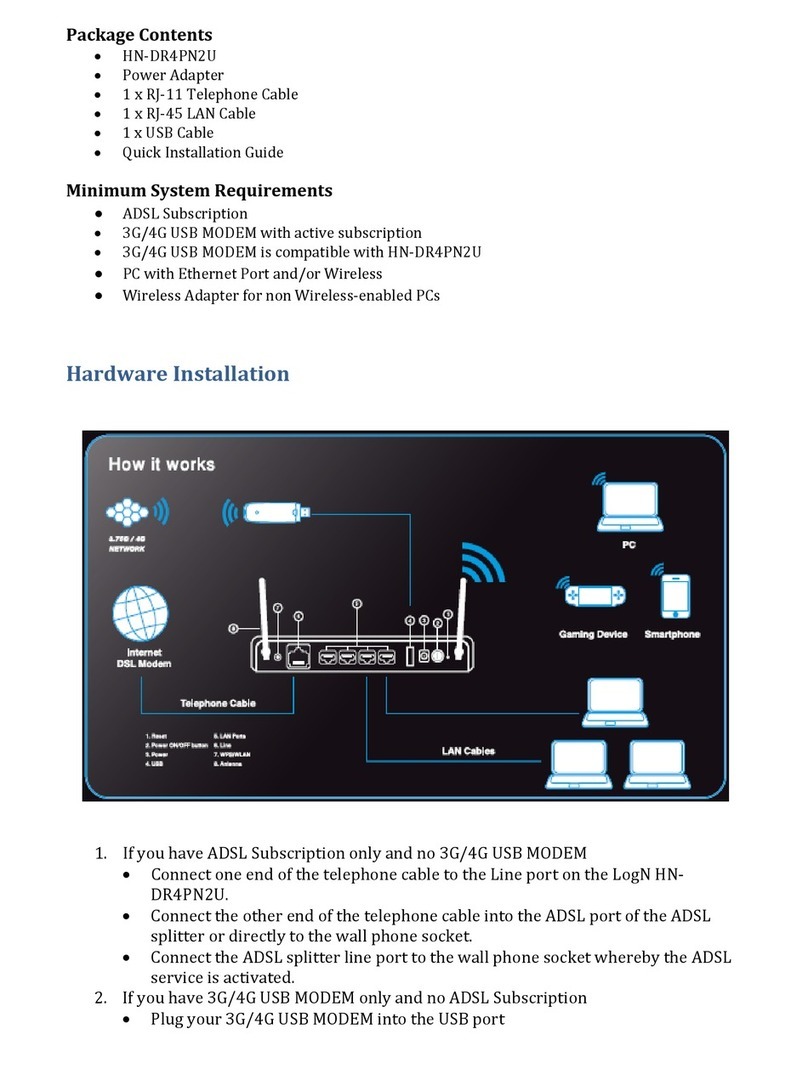
3 Hardware Installation
3.1 Choosing the Best Location for Wireless Operation
Keep the numbers of walls and ceilings to the minimum.
Consider the direct line between access points and workstations.
Building materials make difference.
Position the antenna for best reception.
Keep your product away (at least 1~2 meters) from electrical devices.
Keep wireless devices away from electrical devices that generate RF noise
such as microwave ovens, monitors, and electric motors.
3.2 Connecting the ADSL Router
Step 1 Connect the ADSL interface of the router to the MODEM interface of the
splitter through a telephone cable. Connect the phone to the PHONE
interface of the splitter through a cable. Connect the incoming line to the
LINE interface of the splitter.
The splitter has three interfaces:
LINE: Connect to a wall phone jack (RJ-11 jack).
MODEM: Connect to the ADSL jack of the device.
PHONE: Connect to a telephone set.
Step 2 Connect the LAN interface of the router to the network interface card
(NIC) of the PC through an Ethernet cable (MDI/MDIX).
Note:
Use the twisted-pair cables to connect with the hub or switch.
Step 3 Plug one end of the power adapter to the wall outlet and connect the
other end to the Power interface of the router.
The following figure shows the connection of the Router, PC, and telephones.