Human Machine Interface Installation Guide
eXP20-TTA/DC,eXP30-TTA/DC
eXP30-TTE/DC,eXP40-TTA/DC
eXP40-TTE/DC,eXP40-TTB/DC
eXP60-TTA/DC, eXP60-TTB/DC
This installation guide provides simple function information of HMI control. Please read
carefully this data sheet and manuals before using products. Especially read safety
precautions and handle the products properly.
ȿMeaning of warning and caution inscription
WARNING WARNING indicates a potentially hazardous situation which,
if not avoided, could result in death or serious injury
CAUTION
CAUTION indicates a potentially hazardous situation which,
if not avoided, may result in minor or moderate injury.
It may also be used to alert against unsafe practices
WARNING
£Do not contact the terminals while the power is applied.
¤Protect the product from being gone into by foreign metallic matter.
¥Do not manipulate the battery.(Charge, disassemble, hitting, short, soldering)
CAUTION
£Be sure to check the rated voltage and terminal arrangement before wiring.
¤When wiring, tighten the screw of terminal block with the specified torque rage.
¥Do not install the flammable things on surroundings.
¦Do not use the HMI in the environment of direct vibration.
§Except expert A/S staff, do not disassemble or fix or modify the product.
¨Use the HMI in an environment that meets the general specifications contained
in this datasheet.
©Be sure that external load does not exceed the rating of output module.
ªWhen disposing of HMI and battery, treat it as industrial waste.
2Use of Environment
ȿTo install, observe the below conditions.
No Item Specification Standard
1 Ambient temp. 050-
2 Storage temp -2060-
3 Ambient humidity 1085%RH, non-condensing -
4 Storage humidity 1085%RH, non-condensing -
5Vibration
Resistance
Occasional vibration - -
Frequency Acceleration Amplitude Count
IEC 61131-2
5f<9ภ-3.5mm
10 times
in each
direction
for
X, Y, Z
9f150ภ9.8ุ(1g) -
Continuous vibration
Frequency Acceleration Amplitude
5f<9ภ-1.75mm
9f150ภ4.9ุ(0.5g) -
3Applicable Version
ȿFor system configuration, the following version is necessary.
Windows CE : V1.00 above
XP-Runtime/ XP-Builder : V2.03/V2.03(B) above
ȿCheck the battery attached in the XGT Panel.
Use : Operating RTC when power Off
Standard : CR2032
ȿCheck the mounting Brackets in the box
Bracket Quantity : 1 set(four for eXP20/30/40, Six for eXP60)
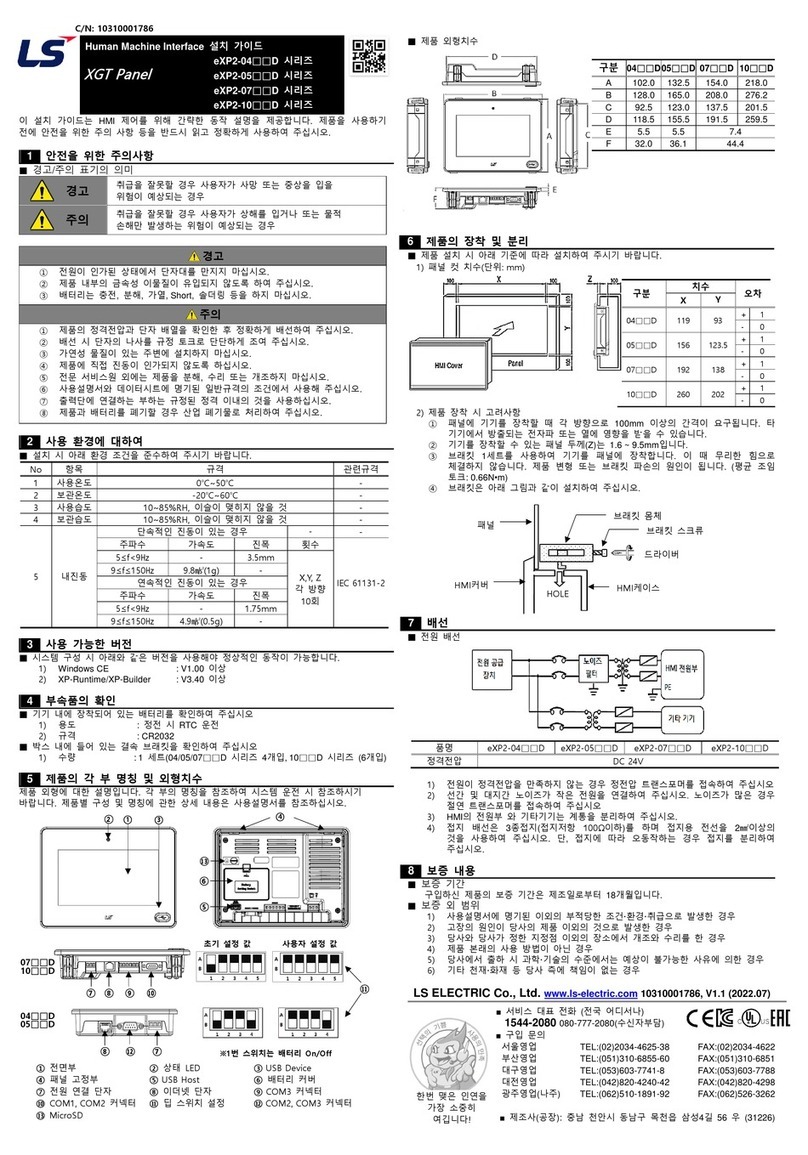
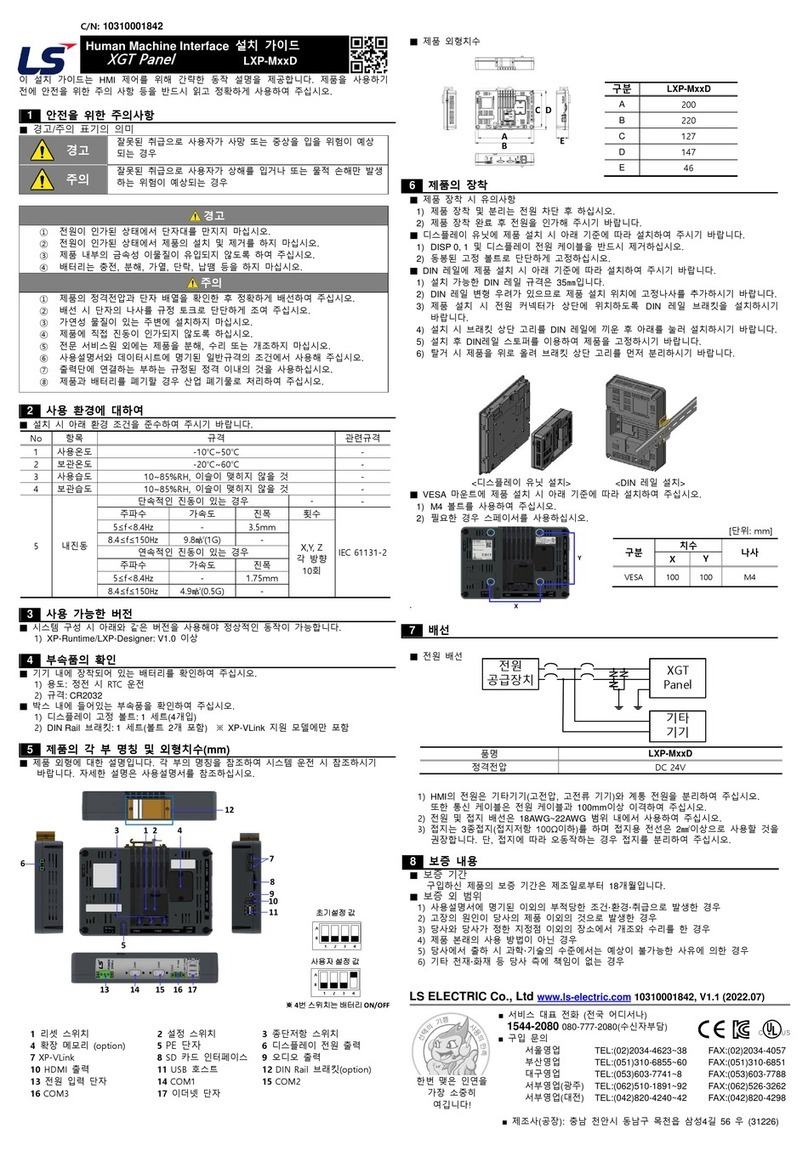
ȿThis is appearance of the eXP. Refer to each name when driving the system. For more
information, refer to user manual.
ȿDimension >8QLWPP@
+VGO eXP20 eXP30 eXP40 eXP60
A 102.0 132.5 154.0 218.0
B 128.0 165.0 208.0 276.2
C 92.5 123.0 137.5 201.5
D 118.5 155.5 191.5 259.5
E 5.5 5.5 7.4
F 32.0 36.1 44.4
6Installation
ȿWhen you install the XGT Panel, a panel, designed to mount the XGT Panel inside should
be specified and allowed for.
1) Panel Cut Dimensions (Unit: mm)
+VGO &KOGPUKQP 6QN GTCPEG
:;
H;3
H;3
H;3
H;3
2) Mounting XGT Panel
£Ensure that there is 100mm clearance around all sides of the panel to be affected
at a minimum by the electromagnetic wave or heat.
¤The panel thickness (Z) should be 1.6 ~ 9.5mm.
ྛInsert the mounting brackets into the eXP insertion slots. Tightening the screws with
too much force can damage the product. (The recommend torque is 0.66Nืm)
¦Use screwdriver to tighten brackets screw as illustration shown.
7Wiring
ȿPower wiring
In case that the power is out of rated voltage, connect constant voltage transformer.
Connect the power having the small noise between cables or between earths.
In case of having lots of noise, connect the insulation transformer or noise filter.
Separate the XGT Panel power supply cable from the main circuit cable.
(high voltage and current) and input/output cable. Maintain a minimum.
separation of 100mm between cables.
8Warranty
ȿWarranty period
LSIS provides an 18-month-warranty from the date of the production.
ȿScope of Warranty
The troubles caused by improper condition, environment or treatment except the
instructions of LSIS.
The troubles caused by external devices.
The troubles caused by remodeling or repairing based on the user’s own discretion.
The troubles caused by improper usage of the product.
The troubles caused by the reason which exceeded the expectation from science
and technology level when LSIS manufactured the product.
The troubles caused by natural disaster.
LS ELECTRIC Co., Ltd. www.lselectric.co.kr 10310001448 V1.4 (2020.4)
xE-mail: automation@lselectric.co.kr
xHeadquarter/Seoul Office Tel: 82-2-2034-4033,4888,4703
xLS ELECTRIC Shanghai Office (China) Tel: 86-21-5237-9977
xLS ELECTRIC (Wuxi) Co., Ltd. (Wuxi, China) Tel: 86-510-6851-6666
xLS-ELECTRIC Vietnam Co., Ltd. (Hanoi, Vietnam) Tel: 84-93-631-4099
xLS ELECTRIC Middle East FZE (Dubai, U.A.E.) Tel: 971-4-886-5360
xLS ELECTRIC Europe B.V. (Hoofddorf, Netherlands) Tel: 31-20-654-1424
xLS ELECTRIC Japan Co., Ltd. (Tokyo, Japan) Tel: 81-3-6268-8241
xLS ELECTRIC America Inc. (Chicago, USA) Tel: 1-800-891-2941
xFactory: 56, Samseong 4-gil, Mokcheon-eup, Dongnam-gu, Cheonan-si, Chungcheongnam-
do, 31226, Korea
1Safety Precautions
4Accessory
5Parts name and Dimension
ɂ
E
AFront Part Aɂ
E
AStatus LED Aɂ
E
AUSB Device(eXP30/40/60)
Aɂ
E
AInsertion Slots Aɂ
E
AUSB Host Aɂ
E
ABattery Cover
Aɂ
E
APower Terminal Aɂ
E
AEthernet Terminal Aɂ
E
ACOM3 Connector
Aɂ
EACOM1,COM2 Connector Aɂ
EADip Switch Settings Aɂ
E
A&20&20&RQQHFWRU
,WHP H;3 H;3 H;3 H;3
5DWHGYROWDJH '&9
.
3
¨ © ª «
&GHCWNV5GVVKPIU 7UGT5GVVKPIU
ȉ0Q$CVVGT[QPQHH
¬
G:2
G:2
©¨
G:2
G:2
%0
Panel
HMI
Driver
Bracket Screw
Bracket Body
HMI Case
HOLE