
Lubeworks 1813351 User manual

Instruction Manual
REV 06/23/16
WARNING: Read carefully and understand all INSTRUCTIONS before operating. Failure
to follow the safety rules and other basic safety precautions may result in serious personal
injury.
Save these instructions in a safe place and on hand so that they can be read when required.
Keep these instructions to assist in future servicing.
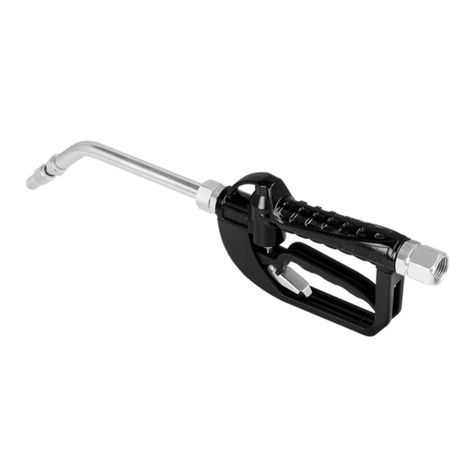
Oil Dispense Valve

GENERAL SAFETY REGULATIONS
WARNING: The warnings, cautions, and instructions
discussed in this instruction manual cannot cover all
possible conditions or situations that could occur. It
must be understood by the operator that common
sense and caution are factors that cannot be built into
this product, but must be supplied by the operator.
WORK AREA
• Keep work area clean, free of clutter and well lit. Cluttered and dark work
areas can cause accidents.
• Do not use your meter where there is a risk of causing a fire or an
explosion; e.g. in the presence of flammable liquids, gasses, or dust. Power
tools create sparks, which may ignite the dust or fumes.
• Keep children and bystanders away while operating this meter. Distractions
can cause you to lose control, so visitors should remain at a safe distance
from the work area.
• Be aware of all power lines, electrical circuits, water pipes and other
mechanical hazards in your work area, particularly those hazards below the
work surface hidden from the operator’s view that may be unintentionally
contacted and may cause personal harm or property damage.
• Be alert of your surroundings. Using tools in confined work areas may put
you in danger.
PERSONAL SAFETY
• Stay alert, watch what you are doing and use common sense when operating
this meter. Do not use this meter while you are tired or under the influence of
drugs, alcohol or medication. A moment of inattention while operating this
meter may result in serious personal injury.
•Dress properly. Do not wear loose clothing, dangling objects, or jewelry.
Keep your hair, clothing and gloves away from moving parts. Loose clothes,
jewelry or long hair can be caught in moving parts. Air vents often cover
moving parts and should be avoided.
• Use safety apparel and equipment. Use safety goggles or safety glasses
with side shields which comply with current national standards, or when
needed, a face shield. This applies to all persons in the work area. Also use
non-skid safety shoes, hardhat, gloves, dust collection systems, and hearing
protection when appropriate.
• Do not overreach. Keep proper footing and balance at all times.
• The meter is for professional use only.
• Read all instructions, tags, and labels before operating the meter.
• Use the meter only for its intended purpose.
• Do NOT stop or deflect leaks with hands, body, gloves, or rags.
• Do NOT dispense valves toward any person or any part of the body.
• Do NOT place hands or fingers over the end of or into the dispense valve.

INTENDED USE
Oil preset meter can be used to dispense motor oil. With the pre-selected function, the nozzle
automatically closes the valve and stops dispensing.
TECHNICAL DETAILS
* Tested with DTE-25 motor oil at ambient temperature. Min.-Max. flow range will vary with fluid viscosity.
FACTORY SETTINGS
• Each meter is preprogrammed and calibrated at the factory. Unless otherwise specified at the
time of order, each meter is programmed in quarts for use with motor oil as standard. The
meter is shipped in the Manual Mode.
• The factory preset cannot be changed; if special requirements are needed, please contact an
authorized service center.
TOOL USE
• DO NOT modify or alter the meter.
• DO NOT leave the meter unattended while dispensing.
• Check the meter daily. Worn or damaged parts should be repaired or replaced immediately.
• DO NOT exceed the maximum working pressure level of the lowest rates system component.
• Use only extensions and nozzles that are compatible with this meter.
• Use only fluids and solvents that are compatible with the equipment. Notice the warnings for
fluids and solvents.
• Tighten all fluid connections before operating the meter.
• Comply with all local, state, and federal fire, electrical and safety regulations.
• Use of the product in a manner other than specified in this manual may result in bodily injury
or impaired operation or damage to the meter.
Item No.
Flow Range
Operating Pressure Range
Operating Temperature
Accuracy
Viscosity
5-Digital LCD Display (3/8"H x 3/16"W)
Inlet Connection
Power Source
0.3-9.2 GPM
7-1000 PSI
Max. 140°F
±0.5%
8-5000 mPas
Quart, Pint, Gallon, Liter
1/2"
1 Alkaline cell 9V
1813351
E1
TECHNICAL
DETAILS INTENDED USE
FACTORY
SETTINGS
TOOL USE
EXPLODED AND
PARTS LIST OPERATION
TROUBLE
SHOOTING GUIDE

OPERATION
The Digital Meter requires 1 Alkaline cell 9V batteries to operate (batteries included). For
battery replacement, refer to Section D, Battery Replacement elsewhere in this manual.
1. Keypad Buttons
Press to enter the quantity to be dispensed.
AUTO
Press to enter and exit the AUTO Mode.
RESET
Press in Manual or AUTO Mode to clear
the previously programmed batch and to
reset the meter.
OK/STOP
Press to confirm the Valve and to stop the
flow through a mechanical override.
2. INSTALLATION
A. Pre-installation Procedure
1) Relieve the system pressure
a) Turn off the power supply to the pump or close the shutoff valve.
b) Dispense any fluid in the system into a waste container by opening the dispense valve.
c) Open all bleed-type master air and fluid drain valve in the system.
d) Leave the drain valve open until ready to pressurize the system.
2) Close the shutoff valve.
3) Ground hoses and reels:
Grounding reduces the risk of static sparking; ground all system components according to
local, state, and federal codes. Consult the user’s manual on the pump and other system
components to ground the following:
a) Pump: follow manufacturer’s recommendations.
b) Air and fluid hoses: use only grounded hoses.
c) Air compressor: follow manufacturer’s recommendations.
d) Fluid supply container: follow the local code.
WARNING: Do not use Teflon tape on pipe joints; it may cause a loss of grounding
across the joint.
B. Apply meter to hose
Close the drain valve before starting this procedure.
1. Attach swivel to meter .Apply thread seaiant to themale
end of the hose .Roconmmended sealant .
TECHNICAL
DETAILS INTENDED USE
FACTORY
SETTINGS
TOOL USE
EXPLODED AND
PARTS LIST OPERATION
TROUBLE
SHOOTING GUIDE
E2
10 1 0.1
AUTO
RESET
OK/STOP

Apply nozzle to meter
Attach the hose
2. Insert zhe metal end of the hose into zhe swivel. Tigthen completely with an open ende
adjustable wrench.
NOTE:The threaded end of the meter always has female threads .the meter end of the hose
must have male threads.apply thrad sealant, anaerobic adhesive or equivalents,to the male
end .the inlet and outlet swvel connections are 1/2” npt 1/2”bsp, depending on meter model.
1. On the opposlte end ,apply sealant to the end of the nozzle
2. Thread the nozzle onto the meter .screw it in tigtly with an ,
open ended ,adjustable wrench.
3. Open all dispense position shut-offvalves . start the pump to
pressurize system.
4. Before use ,to ensure accuracy.purge all air from the fluid
lines and dispense valve(s).
3. OPERATING THE METER
WARNING
After using the manual anti-drip valve, it is important to discharge the pressure
between the chambers (1) and the manual valve (2) of the spout. First, the pump
must be switched off. Then, unscrew the tip of the valve (2). During this
discharging operation, do not use the trigger (3).
E3
TECHNICAL
DETAILS INTENDED USE
FACTORY
SETTINGS
TOOL USE
EXPLODED AND
PARTS LIST OPERATION
TROUBLE
SHOOTING GUIDE
Attach the hose

To access the various customizing functions and to select the desired options, two different
actions are indicated on the keys.
• This symbol indicates that it is necessary to press briefly, and afterwards release it.
• This symbol indicates that it is necessary to press and hold on the key for a few
seconds.
To exit from the customization menu, independent of the activity in progress, press .
The settings displayed at that moment immediately become operational.
WARNING
The stored value total is set as a default in the factory and cannot be changed. If
you need to change it, please contact an authorized service center.
TECHNICAL
DETAILS INTENDED USE
FACTORY
SETTINGS
TOOL USE
EXPLODED AND
PARTS LIST OPERATION
TROUBLE
SHOOTING GUIDE
E4
AUTO
RESET
OK/STOP
RESET RESET
RESET
RESET
RESET
RESET
62.50
3087
L
Lit
TOTAL
00.00
3087
L
Lit
TOTAL
RESETABLE
A. Display Mode
Start up the Meter by selecting
The Meter displays:
Last amount dispensed
Stored value Total
Press and hold until the counter
reads zero.
The Meter displays:
Reset Batch Total
Stored value Total
Pull the trigger to dispense.
Release the trigger to stop dispensing.
00.00
0
L
Lit
TOTAL
RESET
RESET
B. Operation Mode
B-1. Manual Mode
Program the Meter to Manual Mode by
selecting
The Meter displays:
Manual Mode
Pull the trigger to begin the flow. When the
desired amount has been pumped, Press
to stop the flow.
Press to reset counter display to zero.
OK/STOP

E5
TECHNICAL
DETAILS INTENDED USE
FACTORY
SETTINGS
TOOL USE
EXPLODED AND
PARTS LIST OPERATION
TROUBLE
SHOOTING GUIDE
RESET
AUTO
B-2. AUTO Mode
Meter stores:
1-2-3-4-last: Five different PRESET values
which are frequently used.
Start up the Meter by selecting
Press as many times as necessary to
reach the desired values and the values are
repeated.
Blinking message will be:
To confirm a PRESET value, press and hold
until the Meter displays:
AUTO message
not blinking
Reset Batch Total
AUTO
62.50
L
Lit
TOTAL
AUTO
LASE
62.50
L
Lit
TOTAL
AUTO
4
62.50
L
Lit
TOTAL
AUTO
3
62.50
L
Lit
TOTAL
AUTO
2
AUTO
AUTO
AUTO
AUTO
62.50
L
Lit
TOTAL
AUTO
00.00
308.70
L
Lit
AUTO
OK/STOP
To start dispensing, pull the trigger
completely, then release.
The trigger thus remains locked in open
position. Now dispensing can continue
in AUTO mode.
Automatic stop
The flow automatically stops when the
preset value is reached.
NOTE: If you want to stop dispensing
before the preset value is reached,
just press to stop.
WARNING In all cases the
operator must attend to the Meter
while dispensing in AUTO mode
in order to avoid any oil spillage.
OK/STOP

TECHNICAL
DETAILS INTENDED USE
FACTORY
SETTINGS
TOOL USE
EXPLODED AND
PARTS LIST OPERATION
TROUBLE
SHOOTING GUIDE
E6
RESET
5000
3087
L
Lit
TOTAL
AUTO
12.3
lase
L
Lit
B-3. User Mode
If the Meter is off, press to re-start it.
The value is last amount dispensed, the
Meter will display:
Stored Value Total
To select a new PRESET value (for example,
12.3), press the numeric keys as many times
as needed; this value will be LAST mode
automatically.
The Meter displays:
Select value
Press and hold until the counter
turns to zero.
Reset Batch Total
Selected value
To start dispensing, pull the trigger
completely, then release. The flow
automatically stops when the preset value is
reached.
NOTE: If you want to stop dispensing
before the preset value is reached, just
press to stop.
B-4. Use The Trigger
Fig A: Pull the trigger completely to start
dispensing and the trigger will lock, when the
desired amount has been pumped, press the
OK/STOP button to release the trigger to stop
the flow.
Fig B: If there is only one indicator for the
battery left, you need to pull back the trigger
manually to stop the oil dispensing
10 1 0.1
12.3
00.00
12.30
L
Lit
AUTO
OK/STOP
OK/STOP
OK/STOP
OK/STOP
OK/STOP
A
B
10 1 0.1
AUTO
RESET
C. Preset Values Setting
C-1. Numeric Function
Press and hold on to set the
function
Selective key
Numeric keys
Confirm and quit key
Press and hold on to set the
function: it contains Value setting (C-2), Unit
setting (C-3), Decimal Digits setting (C-4),
Reset setting (C-5), Auto reset setting (C-6)
and Calibrating setting (C-7).
OK/STOP
OK/STOP

E7
TECHNICAL
DETAILS INTENDED USE
FACTORY
SETTINGS
TOOL USE
EXPLODED AND
PARTS LIST OPERATION
TROUBLE
SHOOTING GUIDE
RESET
RESET
RESET
AUTO
AUTO
AUTO
C-2. Value Setting
The Meter allows the Operator to store 5
different PRESET values (AUTO 1...AUTO
4), which can be recalled without having to
set them each time with the numeric keys.
Press and hold once to set the
function.
The Meter will display:
Blinking
Index of the PRESET value AUTO 1
When the value is blinking, press to
select preset 1-4, then press the numeric
buttons to set the value.
Blinking message will be:
Press to confirm the value and quit
the setting mode, the setting value will be
stored.
By holding on the keys the value continues
to vary.
RESET
RESET
AUTO
AUTO
C-3. Unit Setting
The Meter allows the user to select one of
the following measurement Units:
• QTS = QUARTS
• PTS = PINTS
• LIT = LITERS
• GAL = GALLONS (U.S. Gallons)
Press and hold two times to set
the function.
The Meter displays:
When the unit is blinking, press to
select unit L, GAL, PT or QT.
Press to confirm the value and quit
the setting mode, the setting value will be
stored.
NOTE:
The above mentioned measurement
units refer to the Batch total indicators.
• If you select the unit LITERS,
the TOTALS
will be displayed in LITERS.
• If you select the unit GALLONS, PINTS or
QUARTS,
the TOTALS will be displayed
in GALLONS.
• The modification of the measurement unit
does NOT require a new calibration.
• If the TOTAL indicates a value other than
zero, this value is automatically converted
from one unit to another unit.
62.50
L
Lit
TOTAL
AUTO
62.50
L
Lit
TOTAL
AUTO
4see
62.50
L
Lit
TOTAL
AUTO
3see
AUTO
AUTO
AUTO
00.00
2see
L
Lit
AUTO
see
Lit
Blinking
see
Gal
PT
QT
Lit
OK/STOP
OK/STOP
OK/STOP
OK/STOP
OK/STOP
Attention: In order to preserve the unit setting,
must be hold for 2s after
accomplishing setting and programme will be
saved until the start of next function setting.
If it is necessary to preserve the setting in
flash in case of power-off, wait for 30s without
operation until the screen disappears and the
setting will be written in flash then.
OK/STOP

TECHNICAL
DETAILS INTENDED USE
FACTORY
SETTINGS
TOOL USE
EXPLODED AND
PARTS LIST OPERATION
TROUBLE
SHOOTING GUIDE
E8
C-6. Auto Reset Setting
The function described in this paragraph concerns
only those who want to obtain the
maximum dispensing stop precision in AUTO mode.
If a slight excess of the pre-set value (a few hundredths of a quart) does not cause any
problem,
the following paragraphs can be ignored.
The Meter in AUTO mode allows the user to obtain a highly precise stop, thus dispensing
exactly the pre-set amount without exceeding the PRESET value.
To guarantee this high stop precision, especially
when the unit operates at the maximum
allowed flow rates, dispensing does not stop when the PRESET value is reached, but
instead when the PRESET value reaches a few Unit hundredths.
To guarantee the stop precision,
this pre-stop value must not be fixed
, but is dependent on
the flow rate used. To allow the operator to obtain the highest stop precision, the unit is
equipped with a Stop Precision factor, called PS factor.
The operator can customize the Meter to
select a PS factor between ZERO and FOUR.
C-4. Decimal Digits Setting
Press and hold three times to
set the function.
The Meter will display:
Blinking point
When the number point is blinking, press
to select location of the point to
confirm the number of decimal digits
setting.
Press to confirm the value and quit
the setting mode. The setting value will be
stored.
NOTE:
•
The Meter displays the FLOATING
POINT Batch total dispensed.
• Independent of the selection carried out
(two or three decimal digits), as soon as
the amount dispensed exceeds 10 units,
the Meter displays only
two decimal
digits.
• As soon as the amount dispensed
exceeds 99 units, the Meter displays only
one decimal digit.
RESET
RESET
AUTO
AUTO
C-5. Reset Setting
Press and hold four times to set
the function.
The Meter displays:
Blinking
When YES is blinking, press to
select YES or No. If YES the batch total will
be set to
zero after hold button for 10
seconds, NO to cancel.
Press to confirm the value and quit
the setting mode. The setting value will be
stored.
NOTE:
Independent of the selection carried
out,
the Batch Total supplied is never reset
if the dispensing operation has been
carried out in AUTO mode.
00.00
L
Lit
TOTAL
0
OK/STOP OK/STOP
OK/STOP
yes
1see
AUTO
Table of contents
Other Lubeworks Control Unit manuals
Popular Control Unit manuals by other brands

Festo
Festo Compact Performance CP-FB6-E Brief description

Elo TouchSystems
Elo TouchSystems DMS-SA19P-EXTME Quick installation guide

JS Automation
JS Automation MPC3034A user manual

JAUDT
JAUDT SW GII 6406 Series Translation of the original operating instructions

Spektrum
Spektrum Air Module System manual

BOC Edwards
BOC Edwards Q Series instruction manual

KHADAS
KHADAS BT Magic quick start

Etherma
Etherma eNEXHO-IL Assembly and operating instructions

PMFoundations
PMFoundations Attenuverter Assembly guide

GEA
GEA VARIVENT Operating instruction

Walther Systemtechnik
Walther Systemtechnik VMS-05 Assembly instructions

Altronix
Altronix LINQ8PD Installation and programming manual





