Installing C/CS-Mount Lens
Notes
Before mounting a lens, please check whether it is a C-mount or
CS-mount lens.
The back focus is set for the CS-mount lens at the factory.
Mounting a CS-Mount Lens
After removing the protecting cap, attach the lens into the camera
by turning clockwise.
. Use the lens under the specification as shown. Otherwise the
lens can damage the camera or abnormal fixing may result.
. A heavy lens may disturb the balance with the camera and
possibly result in damage. Don't use a lens heavier than 450g.
.
It is recommended to set the lens ALC mode to Av mode(Average).
Pk mode can be occurred hunting.
C-mount lens : 10mm or less
CS-mount lens : 5mm or less
Day & Night Color Camera
Day & Night Color Camera
3
xDigital Zoom
3
xDigital Zoom
1. Attach the C-Mount lens adapter by turning clockwise.
2. Attach the lens to the camera by turning clockwise.
Mounting a C-Mount Lens
3
COLOR VIDEO CAMERA
2COLOR VIDEO CAMERA
5
COLOR VIDEO CAMERA
4COLOR VIDEO CAMERA
7
COLOR VIDEO CAMERA
6COLOR VIDEO CAMERA
11
COLOR VIDEO CAMERA
10 COLOR VIDEO CAMERA
13
COLOR VIDEO CAMERA
12 COLOR VIDEO CAMERA
15
COLOR VIDEO CAMERA
14 COLOR VIDEO CAMERA
9
COLOR VIDEO CAMERA
8COLOR VIDEO CAMERA
DCVIDEO
ELC
VIDEO OUT
RS485 UTP OUT
AC 24V
/
DC 12V
Class 2 Only
() ()
T()
W()
MENU
ΘLens Selection Switch
Used to choose DC or VIDEO or ELC according to the type of your Lens.
ΚRemote Jack (See page 21)
Used to connect remote plug.
ΛPOWER Input Terminal
Used to connect an AC 24V or DC 12V power source.
Used to connect a DC 12V power source.
Used to connect an AC 100V~AC 240V power source.
ΙV.PHASE Adjustment V.R (AC 24V / DC 12V Input Model)
If the camera is to be used in LineLock mode, the vertical phase may
require adjustment to synchronize the vertical phase of the camera with
other camera in the system. Make this adjustment when the vertical phase
of the camera does not match with other cameras or systems. For correct
adjustment, use a multi-channel oscilloscope. The V.PHASE adjustment
can be readjusted.
ΜVIDEO OUT Jack
Used to connect an external video monitor in jack.
ΝUTP Video Output Terminal
These terminals provide a composite video output signal which may be
transmitted over a twisted-pair connection to furnished with a suitable receiver.
ΗFunction Setup Button
Functions can be setup using 5 buttons on the camera's rear panel.
MENU Buttons : Used to access menu mode.
Also used to essape menu mode.
UP/DOWN Buttons : Used to choose the desired
menu item. It also moves the cursor up or down
in the menu screen.
LEFT/RIGHT Buttons: Used to change the parameter
of the selected menu item. It also moves the cursor
the left of right in the menu screen.
MENU
() ()
T()
W()
UTP Transmission Model
ΗFunction
Setup Button
ΛPower Input
Terminal
ΜVideo Out Jack
ΘLens Selection
Swicth
ΝUTP Video
Output Terminal
WDR
WDR
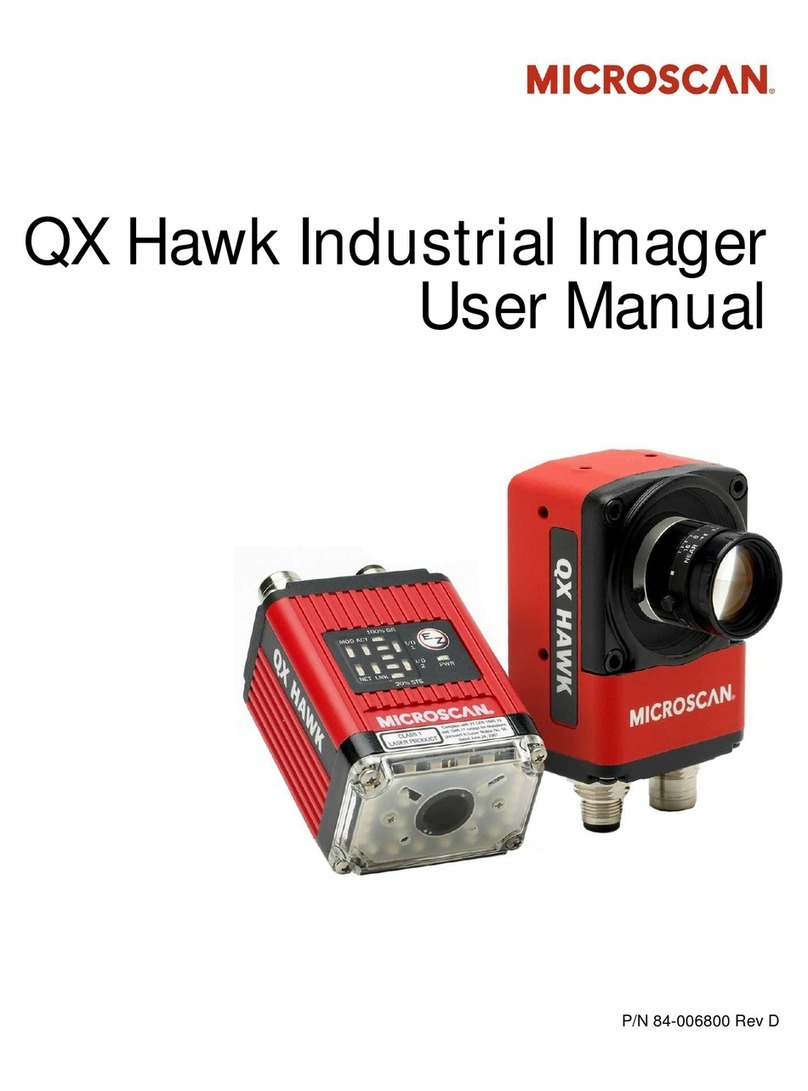
OWNER'S MANUAL
DIGITAL CAMERA SERIES
COLOR VIDEO CAMERA
P/N : 3810-0023L
(Ver.0609E) Color Video Camera Series
Design and specifications
are subject to
change without notice.
On-Screen Display
•
W
D
R
(
W
i
d
e
D
y
n
a
m
i
c
R
a
n
g
e
)
•
O
S
D
(
O
n
S
c
r
e
e
n
D
i
s
p
l
a
y
)
•
D
i
g
i
t
a
l
S
l
o
w
S
h
u
t
t
e
r
•
P
r
i
v
a
c
y
Z
o
n
e
480
TVL
Resolution
High
High
High
High
High
High
High
High
High
High
High
High
High
High
High
High
Signal System
DAY&NIGHT
NTSC
PAL
NTSC
PAL
NTSC
PAL
NTSC
PAL
NTSC
PAL
NTSC
PAL
NTSC
PAL
NTSC
PAL
0
0
0
0
0
0
0
0
X
X
X
X
X
X
X
X
WDR
Power Input
0
0
0
0
0
0
0
0
0
0
0
0
0
0
0
0
DC 12V
DC 12V
AC 24V / DC 12V
AC 24V / DC 12V
AC 24V / DC 12V
AC 24V / DC 12V
AC 100V
~
AC 240V
AC 100V
~
AC 240V
DC 12V
DC 12V
AC 24V / DC 12V
AC 24V / DC 12V
AC 24V / DC 12V
AC 24V / DC 12V
AC 100V
~
AC 240V
AC 100V
~
AC 240V
UTP
X
X
X
X
0
0
X
X
X
X
X
X
0
0
X
X
When using AC 24V/DC 12V, make sure use the adaptor over
0.5A for AC 24V, over 1A for DC 12V.
Before operating the camera, confirm that you have the right
camera model and proper power voltage.
In order to help you understand this manual, we'll introduce
our model's description.
Thank you for purchasing this COLOR VIDEO CAMERA.
1. Model Description. Contents
Model Description
Precautions
Composition
Features
Name and Function
Connection
Remote Controller Operation
Communication Protocol
Operating Camera
Specifications
Troubleshooting
1.
2.
3.
4.
5.
6.
7.
8.
9.
10.
11.
5
6
7
8
9
12
22
24
26
36
42
5.Name and Function
CS-Mount Holding Screw
Used to readjust back focus of the camera. There are two back
focus lock screws. These must be loosened before the camera
may be back focused.
Loosen the lock screws to turn the CS-mount lens adaptor, and
tighten the lock screws after adjustment.
Tripod Mounting Hole
Used to install the camera on an optional tripod. The tripod
must be equipped with the screw specified as shown below.
Auto Iris Lens Connector
Used to connect Auto Iris Lens plug.
C-Mount Lens Adapter
Used to attach C-mount lens.
CS-Mount Lens Adapter
Used to attach CS-mount lens.
1/4"- 20 UNC (20 THREAD)
L : 4.5mm±0.2mm (ISO standard),
or 0.197" (ASA standard)
L
1. Wide Dynamic Range (WDR)
4. Fine Picture Condition Under Very Low Illumination (Sense up)
1/3 high density CCD and digital processor permit high quality pictures
to be captured in very low light condition.
SS-II DSP chip built-in SONY allows the camera to find the best picture
conditions in any environment and automatically gives a necessary
light level compensation, so you can always obtain the clear picture,
the finest detail and perfect light contrast.
5. VIDEO/ MANUAL/ DC Lens Selectable
The camera accepts 3 types of lenses (VIDEO/ MANUAL/ DC) and is
set with the VIDEO/ ELC/ DC selection switch.
6. Electronic Iris
The electronic iris shutter is automatically controlled at the speed of
1/60~1/10,000sec (NTSC Models), 1/50~1/10,000sec (PAL Models)
7. Controlled by OSD menu and RS-485
8. Privacy Zone
You can control the camera using OSD menu and RS-485 jack at a remote place.
3. High Resolution
The horizontal resolution of 480TV lines at Color mode can be achieved
by using a high density CCD having Double Speed 410,000 pixels
SONY CCD, which provides clean, noiseless and reliable pictures.
2. Day & Night
The camera provides automatic mode changeover by sensing day or
night conditions. It can change color mode in the day condition for
optimal color and BW mode in night condition for clear identification.
4.Features
MENU
() ()
T()
W()
DCVIDEO
ELC
CONTROL
VIDEO OUT
Class 2 Only
DC 12V
CONTROL
MENU
() ()
T()
W()
DCVIDEO
ELC
V.PHASE
AC 24V
/
DC 12V
FG
VIDEO OUT
Class 2 Only
CONTROL
MENU
() ()
T()
W()
DCVIDEO
ELC
POWER INLET
VIDEO OUT
AC 24V/DC 12V Input Model
ΙV.PHASE
Adjustment V.R
ΗFunction
Setup Button
ΜVideo Out Jack
ΚRemote Jack
ΘLens Selection
Swicth
ΛPower Input
Terminal
Left( ):Internal
Right( ):
External
DC 12V Input Model
ΗFunction
Setup Button
ΜVideo Out Jack
ΚRemote Jack
ΘLens Selection
Swicth
ΛPower Input
Terminal
AC 100V~AC 240V Input Model
ΗFunction
Setup Button
ΛPowerACIN
ΜVideo Out Jack
ΚRemote Jack
ΘLens Selection
Swicth
Notes
The lens is not supplied with this camera. Purchase a lens suitable
for your environment. This camera accepts the auto iris lens and
both C-and CS-mount lens.
1. Peel approximately 8mm from the end of the lens cable outer
cover.
2. Peel approximately 2mm from the end of the cable inner cover.
Installing Auto Iris Lens
. If the lens is marked with fingerprints or other marks, the
image quality might be poor.
. It is recommended to use a high quality lens to improve the
image quality under low illumination.
. For using main functions it is recommended to use
Auto Iris Lens with DC type.
6. Connection
LENS
8mm
2mm
3. Remove the cover from the iris lens plug supplied, and solder the lens
cable to the plug as shown below.
4. Remove the protective cap, and attach the lens to the camera by turning
clockwise.
5. Connect the lens plug to the auto iris connector on the right side of the
camera.
6. Set the VIDEO/ ELC/ DC selection switch to VIDEO or ELC or DC according
to the type of the lens.
No. 3 Pin
No. 1 Pin connector
Lens cable
No. 4 Pin
No. 2 Pin
Pin.No. VID E O T Y P E
1
2
3
4
RED (Power Source)
N.C
WHITE (Video Signal)
BLACK (GND)
DC TYPE
--- Damping
-
--- Damping +
--- Drive +
--- Drive
-
CONTROL
MENU
() ()
T()
W()
DCVIDEO
ELC
V.PHASE
AC24V
/
DC12V
FG
VIDEO OUT
Class 2 Only
Do use the camera under conditions where temperatures are within
-10¶Cto45¶C. Especially be careful for ventilation under high temperature.
Do not install the camera in extreme temperature conditions.
Do not install or use the camera in an environment where the
humidity is high.
It can cause the image quality to be poor.
Do not install the camera under unstable lighting conditions.
Severe lighting change or flicker can cause the camera to work improperly.
Never use the camera close to a gas or oil leak.
It can cause malfunctions to occur.
Do not disassemble the camera.
There are no user-serviceable parts inside it.
It can cause malfunctions to occur.
Do not drop the camera or subject them to physical shocks.
Never keep the camera face to strong light directly.
It can damage CCD.
Do not expose the camera to rain or spill beverage on it.
If it gets wet, wipe it dry immediately. Liquids can contain minerals that
corrode the electronic components.
Note
When this camera is installed near wireless communication
devices that emits strong electromagnetic field, irregularity
such as noise on the monitor may appear.
2. Precautions
.User Information
CAUTION!
TO REDUCE THE RISK OF ELECTRIC SHOCK,
DO NOT REMOVE COVER (OR BACK).
NO USER-SERVICEABLE PARTS INSIDE.
REFER SERVICING TO QUALIFIED
SERVICE PERSONNEL.
CAUTION
RISK OF ELECTRIC SHOCK
DO NOT OPEN
Explanation of two Symbols
The lightning flash with arrowhead symbol,
within an equilateral triangle, is intended to
alert the user to the presence of un-insulated
"dangerous voltage" within the product's
The exclamation point within an equilateral
triangle is intended to alert the user to the
presence of important operating and
maintenance-(servicing) instructions in the
THE GRAPHIC SYMBOLS WITH SUPPLEMENTAL MARKING ARE
ON THE BOTTOM OF THE SYSTEM.
"WARNING-TO PREVENT FIRE OR SHOCK HAZARD, DO NOT
EXPOSE THE UNIT TO RAIN OR MOISTURE"
enclosure that may be of sufficient magnitude to constitute a
risk of electric shock to persons.
literature accompanying the appliance.
INFORMATION
This equipment has been tested and found to comply with limits for a
Class A digital device, pursuant to part 15 of the FCC Rules.
These limits are designed to provide reasonable protection against
harmful interference when the equipment is operated in a commercial
environment.
This equipment generates, uses, and can radiate radio frequency energy
and, if not installed and used in accordance with the instruction manual,
may cause harmful interference to radio communications.
Operation of this equipment in a residential area is likely to cause
harmful interference in which case the user will be required to correct
the interference at their own expense.
WARNING
The manufacturer could void the user's authority to operate the
equipment.
CAUTION - To prevent electric shock and risk of fire hazards:
Do NOT use power sources except for that specified.
Do NOT expose this appliance to rain or moisture.
This installation should be made by a qualified service person
and should abide to all local codes.
1. WDR Color Video Camera .................
2. Auto Iris Lens Plug ..................
3. Remote Plug ....................
5. C-Mount Adapter ....................
6. Owner's Manual ................
3. Composition
Day&Night Color Camera
Day& Night Co lor Camera
3
x
Digital Zoom
3
x
Digital Zoom
WDR
WDR
OWNER'SMANUAL
DIGITALCAMERASERIES
COLORVIDEOCAMERA
On-ScreenDisplay
•
W
D
R
(
W
i
d
e
D
y
n
a
m
i
c
R
a
n
g
e
)
•
O
S
D
(
O
n
S
c
r
e
e
n
D
i
s
p
l
a
y
)
•
D
i
g
i
t
a
l
S
l
o
w
S
h
u
t
t
e
r
•
P
r
i
v
a
c
y
Z
o
n
e
480
TVL