manuals.online logo
Brands
  1. Home
  2. •
  3. Brands
  4. •
  5. LXE
  6. •
  7. Headset
  8. •
  9. LXE HX3602HEADSET User manual

LXE HX3602HEADSET User manual

Other LXE Headset manuals

LXE HX3601HEADSET User manual

LXE

LXE HX3601HEADSET User manual

LXE HX1502HEADSET User manual

LXE

LXE HX1502HEADSET User manual

LXE HX1501HEADSET User manual

LXE

LXE HX1501HEADSET User manual

Popular Headset manuals by other brands

Sony WI-SP510 Help guide

Sony

Sony WI-SP510 Help guide

LYSAR INDUSTRIES EQ1 manual

LYSAR INDUSTRIES

LYSAR INDUSTRIES EQ1 manual

Nacon RIG 500 PRO Series user guide

Nacon

Nacon RIG 500 PRO Series user guide

HUHD HW-933M instruction manual

HUHD

HUHD HW-933M instruction manual

H2O Audio Natalie Coughlin Signature Series iSH2-5A1 user guide

H2O Audio

H2O Audio Natalie Coughlin Signature Series iSH2-5A1 user guide

Bose IN-EAR HEADPHONES owner's guide

Bose

Bose IN-EAR HEADPHONES owner's guide

Intaride S-3 manual

Intaride

Intaride S-3 manual

Jabra Elite 7 Pro How do

Jabra

Jabra Elite 7 Pro How do

Sena SMH10 quick start guide

Sena

Sena SMH10 quick start guide

IASUS Stealth  IA-NT4-BASIC-BT manual

IASUS

IASUS Stealth IA-NT4-BASIC-BT manual

Sennheiser EPOS ADAPT 230 user guide

Sennheiser

Sennheiser EPOS ADAPT 230 user guide

Anycom PAROS-10 user manual

Anycom

Anycom PAROS-10 user manual

GE 98971 datasheet

GE

GE 98971 datasheet

Jabra PRO 9460 - PRO 9460-DUO user manual

Jabra

Jabra PRO 9460 - PRO 9460-DUO user manual

Hama 00184070 quick start guide

Hama

Hama 00184070 quick start guide

Plantronics Blackwire 3200 Series user guide

Plantronics

Plantronics Blackwire 3200 Series user guide

Blue Tiger Advantage PLUS user manual

Blue Tiger

Blue Tiger Advantage PLUS user manual

Jabra FR 20 user guide

Jabra

Jabra FR 20 user guide

manuals.online logo
manuals.online logoBrands
  • About & Mission
  • Contact us
  • Privacy Policy
  • Terms and Conditions

Copyright 2025 Manuals.Online. All Rights Reserved.

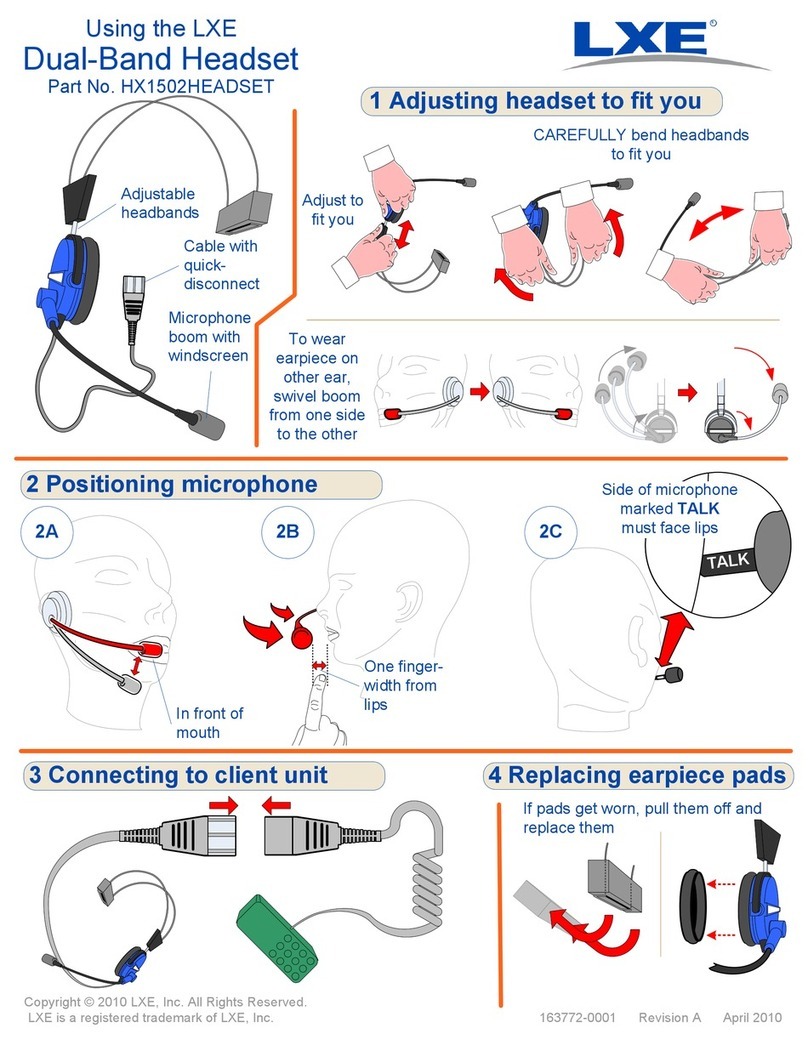
Using the LXE
Ruggedized Headset
Part No. HX3602HEADSET 1 Adjusting headset to fit you
Copyright © 2010 LXE, Inc. All Rights Reserved.
LXE is a registered trademark of LXE, Inc.
Adjust to
fit you
CAREFULLY bend headbands to fit you
163774-0001 Revision A April 2010
Cable with
quick-disconnect
Adjustable
headbands Microphone
boom with
windscreen
3 Positioning microphone
TALK
Side of microphone
marked TALK
must face lips
2C
In front
of mouth
2A 2B
One finger-
width from lips
2 Connecting to client unit
To wear earpiece on other ear,
swivel boom from one side to the other...
...and swivel earpiece to fit
R
OR
OR
4 hrs
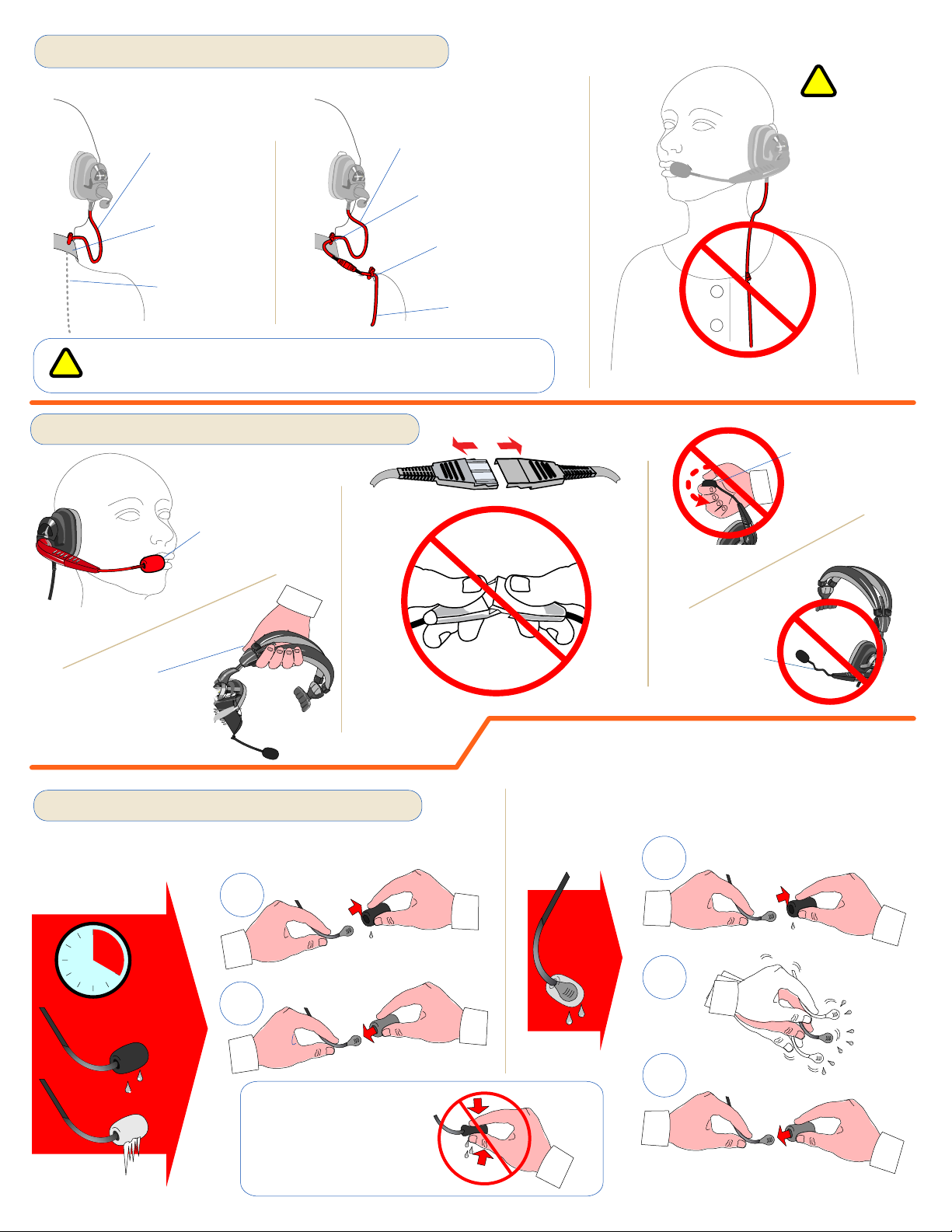
6 In freezer environments
Every four hours, or when windscreen gets moist or
frozen, replace windscreen
If the microphone stops working, it might be too
wet. Try removing the windscreen, shaking
moisture out of the microphone, and replacing the
windscreen with a dry one
Do not squeeze
wet windscreen
while on boom
Do not
wear cable
in front
of body
Attach cables securely to clothing so they let you work
without restriction and cannot get tangled in something.
!
!
1
2
3
2
1
4 Wearing audio cable
Leave loop
so head
can turn
Wear cable
inside
clothing
UNDER CLOTHING
(recommended)
OVER CLOTHING
(with cable in back)
OR
Leave loop so head
can turn
Clip headset cable
to clothing
Clip lower audio
cable to clothing
Wear cable
across back
Clip to
clothing
bend
boom too
much
Carry
headset by
headband,
not boom
Do not twist
microphone
too much
Always use
windscreen
5 Caring for the headset
Do not