
MadRabbit Trip Wireless Pro User manual

Trip Wireless Pro

Model :
Headphone Type :
Water Resistant :
Bluetooth :
Bluetooth Range :
Frequency Range :
Impedance :
Speaker Size :
Battery Capacity :
Charging Time:
Music Time :
Standby Time :
Charging Port :
Input :
MadRabbit Trip Wireless Pro
In - Ear
IPX5
V5.0
10 m
20 Hz - 20 KHz
16Ω
10 mm
600 mAh
1 h
65 h
620 h
Type-C
5 V 500mA
Specification

What’s in the Box?
Product Information
User Guide
1. Neck Line
2. ABS Plastic Front and Back of the Metal Cavity
3. TPE Cable
4. LED / MIC
5. Turn On / Turn Off / Answer /
End Call / Reject Call / Play / Pause
6. Type-C Connector
7. Volume Down / Previous Track
8. Volume Up / Next Track
MadRabbit Trip Wireless Pro
Charging Cable
Eartips Catalogue
M
S
L

How to Pair?
How to Reset?
1. Press and Hold the '+' Button and '-' Button simultaneously for 3 secs.
2. The White and Red indicator will flash.
In case of no prior connection history
The neckband will automatically enter into pairing mode once you separate the
magnetic earbuds, Red and White light will blink.
While the neckband is in pairing mode, Turn ON the Bluetooth and search for
'MadRabbbit Trip Wireless Plus' and Click to 'Connect'.
In case of active connection history
Turn ON Bluetooth on your device.
Search for 'MadRabbit Trip Wireless Plus' in the Bluetooth connection list.
Click to 'Connect'.
A voice prompt "Connected" will be heard when successfully connected.

How to Use?
Power ON
The Neckband will turn on when you separate
the earbuds.
Power OFF
The Neckband will turn off when you join
the earbuds.
To Increase Volume
Press the Volume '+' Button.
To Reduce Volume
Press the Volume '-' Button.
For Previous Music Track
Press and Hold the Volume '-' Button for
2 secs.
For Next Music Track
Press and Hold the Volume '+' Button
for 2 secs.
Answer/Hang Up Calls
Press the Multifunction Button once.
Decline Calls
Press and Hold the Multifunction Button
for 2 secs.
Volume Adjustment
Control Music Tracks
Control Phone Calls
Play and Pause Music
Press the Multifunction Button once.
Dual Pairing
(To Connect ‘MadRabbit Trip Wireless Pro’
to two devices simultaneously)
Connect the Neckband to one of the devices.
Switch OFF the Bluetooth of the Neckband and
the device.
Connect the Neckband to the second device and
then Switch ON the Bluetooth of the first device.
The Neckband gets connected to both devices.
If not, Connect the first device manually once to
activate dual pairing.
Voice Assistant
Press and Hold the Voice Assistant Button
for 2 secs.
Call Vibration Alert
The smart call vibration alert that keeps
you updated.
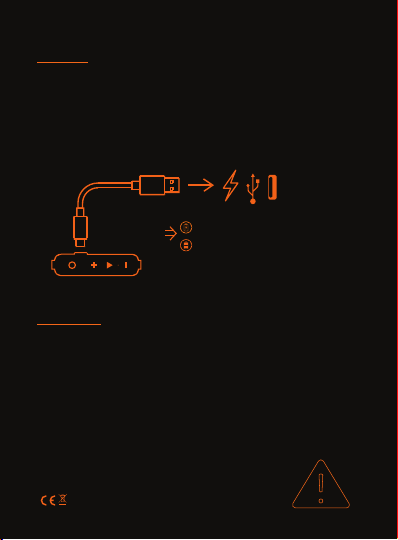
Charge
Red LED turns on when charging
White LED turns on when fully charged
Warning
1. Never dismantle or alter this product by yourself to avoid damages and fire hazards.
2. Do not store this product in extreme temperatures (below 0 °C or above 60 °C). Working
temperature: 0 °C - 45 °C.
3. Do not use this product in thunderstorm weather in case of product malfunctions and
electric shock.
4. Children below 6 years should be under adult supervision while using this product.
5. For your safety, please do not use it while riding a motorcycle / bike, driving, or crossing
the road. For health reasons, avoid listening at a high volume for an extended period. The symbol
on the device, batteries (if included), and / or the packaging, indicates that the device and its
electrical accessories (for example, an earphone, adapter or cable), and batteries (if included)
should not be disposed as household garbage.
MADE IN CHINA
1. Connect your Neckband to a power source using the included Type-C Charging Cable.
2. A voice prompt “Battery Low” will be heard and the Red LED indicator will flash once every
second when the battery runs low (playtime less than 10 mins or voltage lower than 5V DC).
3. The Red LED indicator will remain on while charging (the Neckband can’t be turned on
during charge).
4. The White LED indicator will remain on once fully charged.

Trademarks
word mark and logo are registered trademarks of Redster Commerce Pvt. Ltd.
Reproduction in whole or in part without written permission is strictly prohibited. Other companies
and products mentioned herein are trademarks of their respective owners.
MadRabbit Warranty
The device is warranty for 12 months from the date of purchase. Repair and maintenance
service are free during this period.
The warranty limitation:
Service Information
Man-made damage.
Beyond the warranty period.
Accessories damage due to improper use and maintenance.
Disassembling the device without the authority of the manufacturer.
MadRabbit Website : www.madrabbit.in
MadRabbit
TM

Scan To Register A Warranty.

Scan For A Video Guide.
Table of contents

















