12 13
EN EN
Checklist …
To ensure the optimum safety of your child, check after installation to make sure that…
• The seat belts are as tight as possible and not twisted.
• If the car kit is used, it is attached properly and not twisted.
• The tethers are not twisted, are properly secured, and as tight as possible.
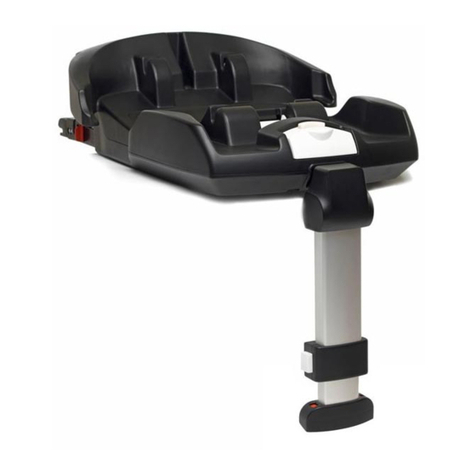
• If the Mobi (XP) is installed on the back seat, the support leg is folded out as far as possible, locked and
supported against the floor of the car.
• The entire Mobi (XP) is installed securely and firmly in the car (check by pulling on the seat).
2.2 Removing the Mobi (XP)
38 • Restore the support leg to its start position by pressing the control button and moving the support leg
upwards (38).
39 • Push the support leg into its folded-up position against the plastic base (39).
40 • Secure the support leg by closing the Velcro strips (40).
41 • Loosen the tethers by pushing the silver button (41,1), pushing the part with the silver button upward
(41,2) and pulling on the belt with the hook attached (41,3) (keep silver button pushed in).
TIP: First push the car seat down to lighten the tension of the tethers.
• Release the tether-hooks from the anchor points. (Possibly roll them up and bind them together with an
elastic band.)
42 • Loosen the car seat belt and remove it from between the plastic base and steel frame (42).
•
IMPORTANT! If the Mobi (XP) is installed on the back seat, hold onto it while uninstalling to make sure it
does not tip over.
• Remove the Mobi (XP) from the car.
3. Placing and securing your child
3.1 Use of the harness system: closing and tightening the harness
Once the shoulder belts are adjusted to the proper height as described in section 2.1, Step 1 and your
child has been placed in the seat, you can now secure your child in the seat.
• Slide the buckle sections together and “click” them into the belt buckle (43).
43 • IMPORTANT! Position the lap belt part of the harness system as low as possible in order to safely
44 support your child’s hips (44).
45 • Pull the shoulder belts tight (45,1) and remove any remaining slack from the harness system by pulling
the belts tightly using the adjuster belt (45,2).
46 • IMPORTANT! Make sure you can fit only one finger between the harnesses and your child (46). The
tighter the belts are around your child, the better the protection.
•
IMPORTANT! Make sure the belt pads are positioned properly against your child’s shoulders.
•
IMPORTANT! Make sure the belts are not twisted.
• If you are unable to click the buckle sections into the buckle, release the buckle by pressing the red
button and try again.
If you are unable to fasten the harness belts properly or pull them tight, contact your supplier immedi-
ately and do not use the Mobi (XP) under any circumstances.
Always use the belt pads, as they are essential to your child’s safety.
Instruct your child to never play with the belt buckle.
3.2 Seat positions (adjusting the seat into sitting and reclining positions)
47 The Mobi (XP) can be adjusted to 4 different positions (47).
48 • Pull the positioning handle under the front of the seat upwards, and then pull or push the seat forwards
or backwards (48).
• Release the positioning handle in the desired position and push until you hear a “click”.
•
IMPORTANT! Check to make sure the Mobi (XP) is securely locked in the desired position by pulling
on it.
Step 3: Installation of the Mobi (XP)
•
IMPORTANT! On some seats, the belts are fitted so far forward that proper installation is not possible. If
this is the case, try another seat.
•
IMPORTANT! In some cases, the buckle of the car belt may be too long and therefore sit too high against
the base of the Mobi (XP). If this is the case, the Mobi (XP) cannot be installed securely and you’ll have
to choose another position in the car. If you have any questions, please contact the manufacturer.
• Place the Mobi (XP) on the seat and, using the dashboard supports, lean it against the:
20 a) Dashboard, if installed on the front seat (20).
21 22 b) Front seat(s) if installed on the left/right (21) and middle (22) of the back seat.
23 24 25 • IMPORTANT! Place the Mobi (XP) as far as possible with the front to the back of the seat (23) and
make sure the marking on the plastic base is aligned with the end of the seat of the car (24). If necessary,
slide the passenger seat forward or backward until the marking is aligned with the end of the seat (25).
• Place the Mobi (XP) in the sitting position (see section 4.2: Seat positions).
17 19 • Attach the tethers; Do not tighten until after Step 4; Positioning the support leg (17/19).
Step 4: Positioning the support leg
• IMPORTANT! When installing on the back seat, always use the support leg to ensure the safe use of
the Mobi (XP). The support leg does not need to be used when installing on the passenger seat (leaning
against the dashboard).
26 • IMPORTANT! If the Mobi (XP) is installed on the back seat, slide the passenger seat forward in order to
create enough space for the support leg of the Mobi (XP) (26).
27 • Fold out the support leg by opening the Velcro strips (27).
28 • IMPORTANT! Make sure the support leg is folded out as far as possible. The belt portion of the support
leg should now be tight (28).
29 • Hold onto the support leg under the control button and press the control button with your thumb (29).
• Keep the button pressed and move the support leg downwards until it reaches the floor of the car.
30 • Release the control button and “click” the support leg into the locked position (30).
• Check to make sure the support leg is securely locked and stays in position by trying to move it up or
down without pressing the control button.
31 • Slide the passenger seat backwards again to create enough room for the legs of the passenger on the
front seat (31).
Step 5: Tightening the tethers
26 • IMPORTANT! Slide the passenger seat to the front to make it possible to tighten the tethers (26).
32 • Pull the tethers as tightly as possible first on the side most far from the door by pulling the tether with
the loop downwards as hard as you can (32). Then tighten the other side (32,2) and give extra tightness
by strapping it down with your foot (32,3).
• Check to make sure the Mobi (XP) is securely and firmly installed in the car by pulling on the seat.
Step 6: Safety belt installation
• The Mobi (XP) can be installed with a dynamic 3-point or a static 2-point safety belt:
33 34
a) If you’re installing the Mobi (XP) with a dynamic 3-point safety belt, hold the lap and shoulder
belt (33),
35 thread them between the steel frame and the plastic base (34) and click the seat belt into the
car seat buckle (35). Also see the blue markings for proper belt routing.
33 34
b) If you’re installing the Mobi (XP) with a static 2-point safety belt, hold the lap belt (33),thread it between
36
the steel frame and the plastic base (34) and click the seat belt into the car seat buckle (36).
Also see the blue markings for proper belt routing.
•
IMPORTANT! Make sure the seat belts are not twisted.
37 • Using the shoulder belt, pull everything to the front of the Mobi (XP) as tightly as possible (37). Make sure
the arrow continues to be aligned with the end of the car seat.