manuals.online logo
Brands
  1. Home
  2. •
  3. Brands
  4. •
  5. Microchip Technology
  6. •
  7. Computer Accessories
  8. •
  9. Microchip Technology MPLAB ICD 4 User manual

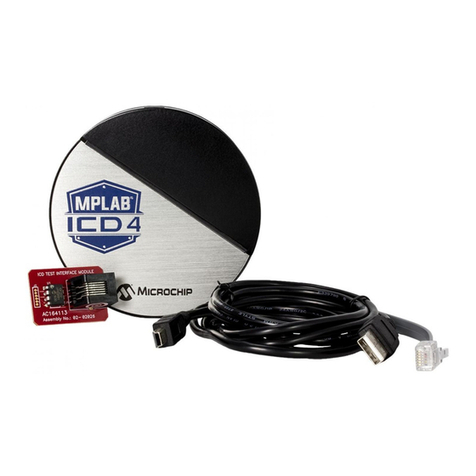
Microchip Technology MPLAB ICD 4 User manual

Other manuals for MPLAB ICD 4

1

This manual suits for next models

1

Other Microchip Technology Computer Accessories manuals

Microchip Technology MPLAB ICD 3 User manual

Microchip Technology

Microchip Technology MPLAB ICD 3 User manual

Microchip Technology MPLAB ICD 4 User manual

Microchip Technology

Microchip Technology MPLAB ICD 4 User manual

Microchip Technology Atmel-ICE User manual

Microchip Technology

Microchip Technology Atmel-ICE User manual

Microchip Technology PICkit 3 User manual

Microchip Technology

Microchip Technology PICkit 3 User manual

Microchip Technology MPLAB ICD 3 User manual

Microchip Technology

Microchip Technology MPLAB ICD 3 User manual

Microchip Technology MPLAB Snap Manual

Microchip Technology

Microchip Technology MPLAB Snap Manual

Microchip Technology MPLAB PICkit 4 User manual

Microchip Technology

Microchip Technology MPLAB PICkit 4 User manual

Popular Computer Accessories manuals by other brands

Netstor NA255A user manual

Netstor

Netstor NA255A user manual

perixx PERIDUO-610 user manual

perixx

perixx PERIDUO-610 user manual

Cherry PURE JD-0100 operating manual

Cherry

Cherry PURE JD-0100 operating manual

Cool-Icam DICK II user manual

Cool-Icam

Cool-Icam DICK II user manual

Motorola ATRIX user guide

Motorola

Motorola ATRIX user guide

HP USB Media Docking Station specification

HP

HP USB Media Docking Station specification

Cherry B.UNLIMITED 3.0 user manual

Cherry

Cherry B.UNLIMITED 3.0 user manual

Bartec TC 7 Series user guide

Bartec

Bartec TC 7 Series user guide

Philips SPC3540 Specifications

Philips

Philips SPC3540 Specifications

Logitech mk220 user manual

Logitech

Logitech mk220 user manual

Vivo MOUNT-KB05-4DW instruction manual

Vivo

Vivo MOUNT-KB05-4DW instruction manual

SilverStone LC02 manual

SilverStone

SilverStone LC02 manual

Flexispot ML2B installation guide

Flexispot

Flexispot ML2B installation guide

Hamlet UNIVERSAL COVER 101 KBT2 user manual

Hamlet

Hamlet UNIVERSAL COVER 101 KBT2 user manual

Adam Equipment RS-485 manual 

Adam Equipment

Adam Equipment RS-485 manual 

Sven Base 305 сombo instructions

Sven

Sven Base 305 сombo instructions

Hama 108310 Operating	 instruction

Hama

Hama 108310 Operating instruction

SpeechWare FlexyMike FMK03 user manual

SpeechWare

SpeechWare FlexyMike FMK03 user manual

manuals.online logo
manuals.online logoBrands
  • About & Mission
  • Contact us
  • Privacy Policy
  • Terms and Conditions

Copyright 2025 Manuals.Online. All Rights Reserved.

QUICK START GUIDE
MPLAB®ICD 4 In-Circuit Debugger
GETTING STARTED
Install the Latest Software
Download the MPLAB X IDE software from www.microchip.com/mplabx and install onto your computer. The installer
automatically loads the USB drivers. Launch MPLAB X IDE.
Connect to Target Device
1. Connect the MPLAB ICD 4 to the computer
using the USB cable.
2. Connect external power either to the target
board or debugger.
1
2
www.microchip.com/icd4
C: 80 M: 45 Y: 0 K: 55 PMS: 7694C
Create, Build and Run Project
1. Refer to the MPLAB X IDE User's Guide or online help
for instructions to install language tools, create or
open a project, and congure project properties.
2. Check that the conguration bits in your code match
the Recommended Settings below.
3. To execute your code in Debug mode, perform a
debug run (Debug>Debug Project). To execute
your code in Non-Debug (release) mode, perform
a run (Run>Run Project). To hold a device in Reset
after programming, use the Hold in Reset icon
in the toolbar.
Recommended Settings
Component Setting
Oscillator • OSC bits set properly
• Running
Power Supplied by target
WDT Disabled (device dependent)
Code-Protect Disabled
Table Read Protect Disabled
LVP Disabled
BOD Vdd > BOD Vdd min.
JTAG Disabled
AVdd and AVss Must be connected
PGCx/PGDx Proper channel selected, if applicable
Programming Vdd voltage levels meet programming spec
Note: See MPLAB ICD 4 In-Circuit Debugger online help for more information.
Reserved Resources
For information on reserved resources used by the debug-
ger, see the MPLAB ICD 4 In-Circuit Debugger online help.
3
*Microchip Power Supply (AC002014) not included. Available at
www.microchipDIRECT.com.
**External target board power supply provided by user.
Typical Conguration
(With On-Board Debug Circuitry)
Debugger
Target Board
Target Device
Device with on-board
ICE circuitry
External Target Board
Power Supply**
External Microchip
Power Supply (AC002018)*
USB
OR
Alternative Conguration (Without Loss of Pins)
Debugger
Target Board
Transition Socket
Device-ICE
Header
Standard
Adapter
Processor Extension Pak
OR
Device-ICE
ICD Header
External Target Board
Power Supply**
US
B
External Microchip
Power Supply (AC002018)*
www.microchip.com/icd4
ADDITIONAL INFORMATION
Target Circuit Design Precautions
• Do not use greater than 100 µF capacitance on Vdd: Depending on the overall load, it will
prevent the target from powering quickly when MPLAB ICD 4 is the source of power.
• Do not use capacitors on MCLR: They will prevent fast transitions of Vpp.
• Do not use multiplexing on PGC/PGD: They are dedicated for communications to
MPLAB ICD 4.
• Do not use capacitors on PGC/PGD: They will prevent fast transitions on data and
clock lines during programming and debug communications.
• Do not use diodes on PGC/PGD: They will prevent bidirectional communication
between MPLAB ICD 4 and the target PIC®MCU.
• Do not exceed recommended cable lengths: Refer to the Hardware Specication of
the MPLAB ICD 4 online help or user's guide for cable lengths.
2
1
5
4
3
Target VDD (tVDD)
Target Application PC Board
VDD
PGC
PGD
VSS
AVDD**
AVSS**
XTAL*
Incorrect
VPP /MCLR
Target Application
Device
V
Circuitry and Connector Pinouts
2
1
5
4
3
Target VDD (tVDD)
50 kΩ
Typical
Target Application PC Board
VDD
PGC
PGD
VSS
AVDD**
AVSS**
XTAL* tVDD
MPLAB®ICD 4
Internal Circuitry (simplified)
VPP
Correct
VPP /MCLR
Target VDD
(tVDD) is used
to power the
input/output
drivers in the
MPLAB ICD 4
debugger
tVDD
tVDD
tVDD
tVDD
Typical cable length is 6 inches
Target Application
Device
* MPLAB ICD 4 is controlled by a 32-bit MCU with an Arm®Cortex®-M7 core.
** Target device must be running with an oscillator for the debugger to function
as a debugger.
*** If the device has AVdd and AVss lines, they must be connected for the
debugger to operate.
RJ-11 to RJ-45 Pinouts
Pin RJ-11 Function Pin RJ-45
JTAG Test Mode Select 1 TMs
1 Reserved 2
2 PGC (ICSPCLK) Standard Com Clock/
TCK (JTAG Test Clock) 3 PGC (ICSPCLK)
3 PGD (ICSPDAT) Standard Com Data/
TDO (JTAG Test Data Output) 4 PGD (ICSPDAT)
4 GND Ground 5 GND
5 Vdd_TGT Power On Target 6 Vdd_TGT
6 Vpp Power 7 Vpp
JTAG Test Data Input 8 TDI
The modular cable with the
RJ-11 connector attaches
to the RJ-45 socket on the
MPLAB ICD 4.
RJ-11 Connector/Cable RJ-45 Socket
123456
12345678
Standard Connection
At Target
Bottom View
Of Target Board
2 4 6
1 3 5
www.microchip.com/icd4
The Microchip name and logo, the Microchip logo, MPLAB and PIC are registered trademarks of Microchip Technology Incorporated in the U.S.A. and other countries. Arm and Cortex are registered
trademarks of ARM Limited in the EU and other countries. All other trademarks mentioned herein are property of their respective companies.
© 2019, Microchip Technology Incorporated. All Rights Reserved. 2/19 DS50002538B
ADDITIONAL INFORMATION
Verify the Debugger is Functioning Properly
Refer to instructions in the MPLAB ICD 4 documenta-
tion for using the ICD Test Interface Board to verify the
unit is operating properly.
ICD Te st
Interface Boar
d
USB Cable
to Computer
Modular Cable
MPLAB
®
ICD 4
Power from the computer via USB cable
or external Microchip power supply
Pinouts for Debug Interfaces
MPLAB®ICD 4 DEBUG
Connector
Pin # Pin Name ICSP
(MCHP)
MIPS
EJTAG
CORTEX®
SWD JTAG DW(IRES) UPDI PDI AW AVR®_ISP TPI
8 TTDI TTDI TDI MOsI
7 TVPP MCLR MCLR MCLR
6 TVDD VDD VIO_REF VTG VTG VTG VTG VTG VTG VTG VTG
5 GND GND GND GND GND GND GND GND GND GND GND
4 PGD DAT TDO SWO TDO DAT DAT DATA MISO DAT
3 PGC CLK TCK SWCLK TCK SCK CLK
2 TAUX AUX TAUX RESET SW-DAT CLK RESET RST
1 TTMS TTMS SWDIO TMS
RJ-11 Connector/Cable RJ-45 Socket
123456
12345678
Pinouts for Data Stream Interfaces
MPLAB®ICD 4 DATA STREAM
Pin # DMCI/DGI U(S)ART/CDC DGI SPI
8TX MOsI
7
6 VTG VTG
5 GND GND
4 MISO
3 SCK
2(SCK)
1 RX SS