manuals.online logo
Brands
  1. Home
  2. •
  3. Brands
  4. •
  5. Microtest
  6. •
  7. Diagnostic Equipment
  8. •
  9. Microtest OMNIScanner User manual

Microtest OMNIScanner User manual

Other manuals for OMNIScanner

1

Popular Diagnostic Equipment manuals by other brands

Mindray Zonare ZS3KP Elite Service manual

Mindray

Mindray Zonare ZS3KP Elite Service manual

Snap-On VERDICT D7 user manual

Snap-On

Snap-On VERDICT D7 user manual

Mindray M7Vet Operation note

Mindray

Mindray M7Vet Operation note

TEXA TMD2 installation manual

TEXA

TEXA TMD2 installation manual

Autel MaxiIM IM608 manual

Autel

Autel MaxiIM IM608 manual

Sealey BT2012 instructions

Sealey

Sealey BT2012 instructions

Diagnoptics Age Reader Instructions for use

Diagnoptics

Diagnoptics Age Reader Instructions for use

LAUNCH TECH X-431 PRO5 user manual

LAUNCH TECH

LAUNCH TECH X-431 PRO5 user manual

Hella Gutmann Mega macs X quick start guide

Hella Gutmann

Hella Gutmann Mega macs X quick start guide

Foxwell I80TS manual

Foxwell

Foxwell I80TS manual

KaVo 3D eXam Operator's manual

KaVo

KaVo 3D eXam Operator's manual

Qiagen QIAcube Connect MDx user manual

Qiagen

Qiagen QIAcube Connect MDx user manual

Alber BDSU installation guide

Alber

Alber BDSU installation guide

St. Jude Medical QUANTIEN Instructions for use

St. Jude Medical

St. Jude Medical QUANTIEN Instructions for use

Bosch DCU 100 Original instructions

Bosch

Bosch DCU 100 Original instructions

Launch CNC-602A user manual

Launch

Launch CNC-602A user manual

Innova 3568 user manual

Innova

Innova 3568 user manual

ADC Diagnostix ADSTATION instruction manual

ADC

ADC Diagnostix ADSTATION instruction manual

manuals.online logo
manuals.online logoBrands
  • About & Mission
  • Contact us
  • Privacy Policy
  • Terms and Conditions

Copyright 2025 Manuals.Online. All Rights Reserved.

ENGLISH - 1
OMNIScanner User Guide
OMNIScanner TM
2950-4500-03E Rev. 01 12/98
Fluke Microtest OMNIScanner Specs
Provided by www.AAATesters.com
OMNIScanner User Guide
2 - ENGLISH
ENGLISH - 3
OMNIScanner User Guide
OMNIScanner TM
USER GUIDE
ENGLISH
A Guide to using the Microtest OMNIScanner to install,
manage, and troubleshoot high performance cabling systems.
OMNIScanner verifies installed links against all common
cabling and network standards including Category 6/Class E
and Gigabit Ethernet.
OMNIScanner User Guide
4 - ENGLISH
Contents
Chapter 1 - Introduction ............................................... 9
The Digital Solution...................................................................................... 9
The Graphical User Interface and Accompanying Software ....................... 9
OMNIRemote .............................................................................................. 9
OMNIScanners Display ............................................................................. 9
OMNIScanners Keypad ............................................................................ 11
OMNIRemotes LED Indicators.................................................................. 13
When To Use OMNIRemote ...................................................................... 13
Connecting OMNIScanner and OMNIRemote ........................................... 14
Editing With OMNIScanner........................................................................ 15
Predefined Lists ................................................................................... 15
Editing Numeric Fields with the Spin Control ....................................... 15
Editing Alphanumeric Fields ................................................................ 16
Technical Support ..................................................................................... 16
Product Versions ....................................................................................... 17
Chapter 2 - Getting Started ........................................ 19
Charging OMNIScanners Battery ............................................................ 19
OMNIScanners Project Screen ................................................................ 19
Certification of Network Installations ........................................................ 20
Setting the Reference ............................................................................... 21
Project Selection ....................................................................................... 22
Running an Autotest ................................................................................. 23
Saving an Autotest .................................................................................... 24
Viewing Autotest Results .......................................................................... 25
Typical Test Configurations ........................................................................ 28
Basic Link ............................................................................................ 28
Basic Link with 110 Block and Modular 8 Jack ................................... 28
Full Channel with Modular 8 Jacks ........................................................... 29
Chapter 4 - Measurements......................................... 31
Performing Individual Measurements with OMNIScanner ........................ 31
General Information .................................................................................. 32
Wiremap ................................................................................................... 33
Length/Delay.............................................................................................. 33
NEXT ........................................................................................................ 34
ENGLISH - 5
OMNIScanner User Guide
Attenuation................................................................................................. 35
Return Loss ............................................................................................... 36
ELFEXT ..................................................................................................... 37
ACR/Bandwidth ........................................................................................ 37
Resistance ................................................................................................. 38
Power Sum NEXT ...................................................................................... 39
Power Sum ELFEXT .................................................................................. 39
Power Sum ACR ........................................................................................ 40
Office Locator ............................................................................................ 41
Chapter 5 - Results .................................................... 43
Autotest Results......................................................................................... 43
Viewing Autotest Results ........................................................................... 44
Chapter 6 - Uploading and Printing ............................ 47
Microtest Utilities........................................................................................ 47
Chapter 7 - Updating Scanner Software ................... 48
Downloading Software from the Microtest WWW .................................... 48
Updating OMNIScanner Software from the PC ......................................... 48
Updating OMNIRemote Software from the PC .......................................... 49
Appendix A - Technical Specifications........................ 51
Physical Characteristics ............................................................................ 51
User Interface ............................................................................................ 51
Power ........................................................................................................ 51
Environmental ........................................................................................... 52
Measurement Port (Test Interface) ........................................................... 52
High Voltage Input Protection ................................................................... 52
Serial Port ................................................................................................. 52
Memory ..................................................................................................... 52
Autotest Functions .................................................................................... 52
Test Functions........................................................................................... 53
Transmission Performance Measurement Method ................................... 53
Transmission Performance Measurement Parameters ............................. 53
Wire Map .................................................................................................. 54
NEXT ........................................................................................................ 54
Return Loss .............................................................................................. 54
Attenuation................................................................................................ 54
ELFEXT (Equal Level FEXT) .................................................................... 55
ACR (Attenuation to Crosstalk Ratio) ....................................................... 55
Bandwidth ................................................................................................. 55

OMNIScanner User Guide
6 - ENGLISH
Length ....................................................................................................... 55
Resistance ................................................................................................ 55

Power Sum NEXT, ACR and ELFEXT ...................................................... 55

High Voltage Input Protection ................................................................... 56
Appendix B - NiCd Batteries ...................................... 57
Batteries..................................................................................................... 57
Battery Charging ........................................................................................ 58
NiCd Battery Tips ...................................................................................... 59
Appendix C - Cable Pin-Outs ..................................... 61
Serial Cable DB-9 Female to DB-9 Male Pin-outs.................................... 61
Serial Cable DB-9 Female to DB-25 Male Pin-outs.................................. 61
Serial Cable DB-25 Female to DB-25 Male Pin-outs................................ 62
Cable Pin-Out Signals .............................................................................. 62
ENGLISH - 7
OMNIScanner User Guide
8 - ENGLISH
ENGLISH - 9
OMNIScanner User Guide
Chapter 1 - Introduction
The Digital Solution
OMNIScanner is the most advanced hand-held certification and diagnostic
tool for Category 7, 6, 5E (Enhanced), 5 and ISO Class F, E, D, and C
links. With an extended frequency range of 300 MHz, OMNIScanner
provides full software compliance with TIA and ISO/IEC requirements for
measurement reporting and analysis (including Length, Delay, ACR, NEXT,
ELFEXT, Return Loss. Resistance, PSNEXT, PSACR, PSELFEXT and
Attenuation).
The Graphical User Interface and Accompanying
Software
OMNIScanners graphical user interface consists of a backlit LCD display,
quick access menus, arrow keys, and descriptive menu options that guide
you through certifying or troubleshooting cabling systems. PC-based
software expands the user interface and aids with the management of
projects.
OMNIRemote
For test and certification of twisted pair cabling, the OMNIScanner requires
the OMNIRemote unit at the opposite end of the cabling link under test.
OMNIScanner communicates with OMNIRemote to obtain status and
perform measurements from both ends of the link. OMNIRemote is
equipped with a speaker to generate tones, and several colored LEDs to
indicate overall test results and status.
OMNIScanners Display
Scanner Display Function
1-2 or 12/36: The paired numbers in the display indicate wire
pairs. For example, 1-2 indicates the wire pair of
pins 1 and 2. 12/36 indicates two wire pairs tested,
the first pair of pins 1 and 2, and the second pair of
pins 3 and 6.
OMNIScanner User Guide
10 - ENGLISH
Pop-up lists: Pop-up lists are available by pressing ENTER when
the cursor is located on user definable fields. A
selection list will appear, and the rest of the display
will be inactive.
Spin Control: The spin control is available on editable fields that
allow for increasing or decreasing numeric values by
depressing the éor êkeys.
Scrollbars: Use the éand êkeys on the keypad to move up
and down in a scrollable screen.
Graph: Use the çor èto move the graph cursor on the
frequency axis. Use the éor êto zoom in and out
of graphs.
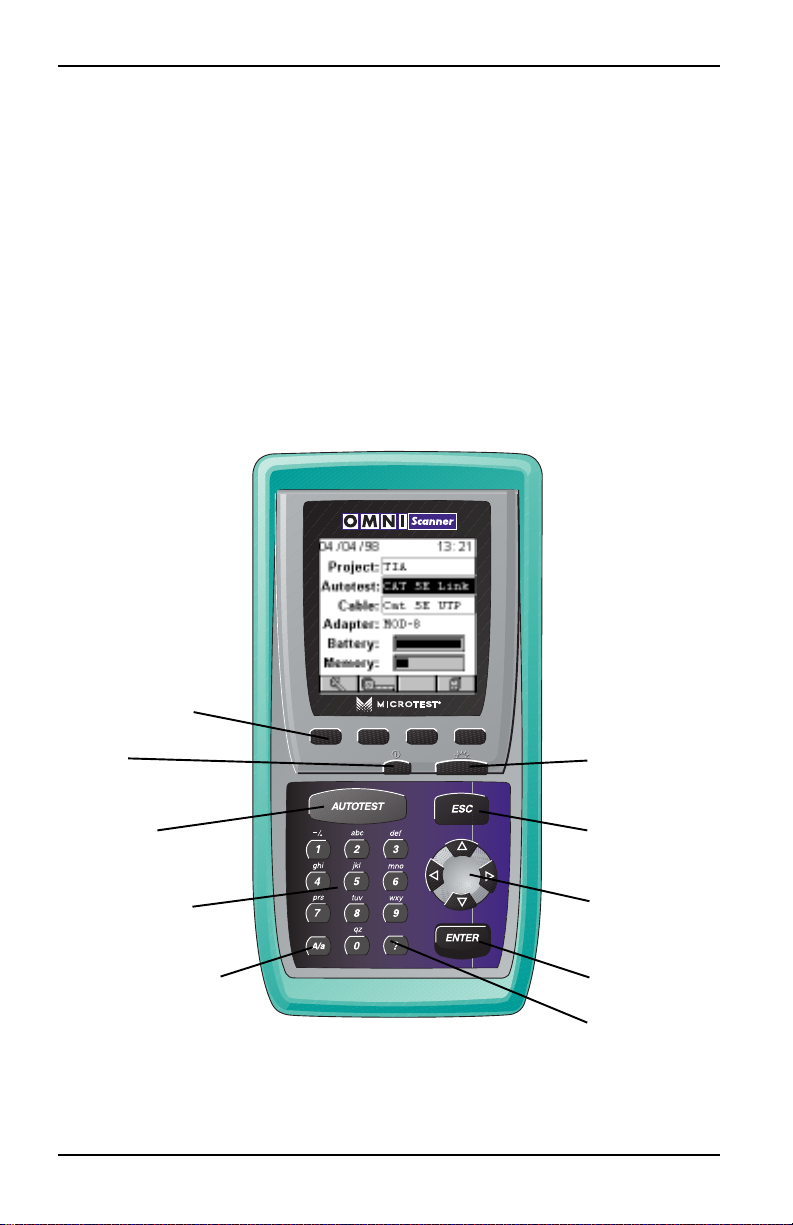
FUNCTION KEYS
ON/OFF BACKLIGHT
AUTOTEST ESCAPE
ALPHANUMERIC ARROW KEYS
KEYS
UPPER/LOWER CASE
ENTER
SWITCH KEY
HELP KEY