8 GB/IE
Preparing for use/Troubleshooting/Cleaning
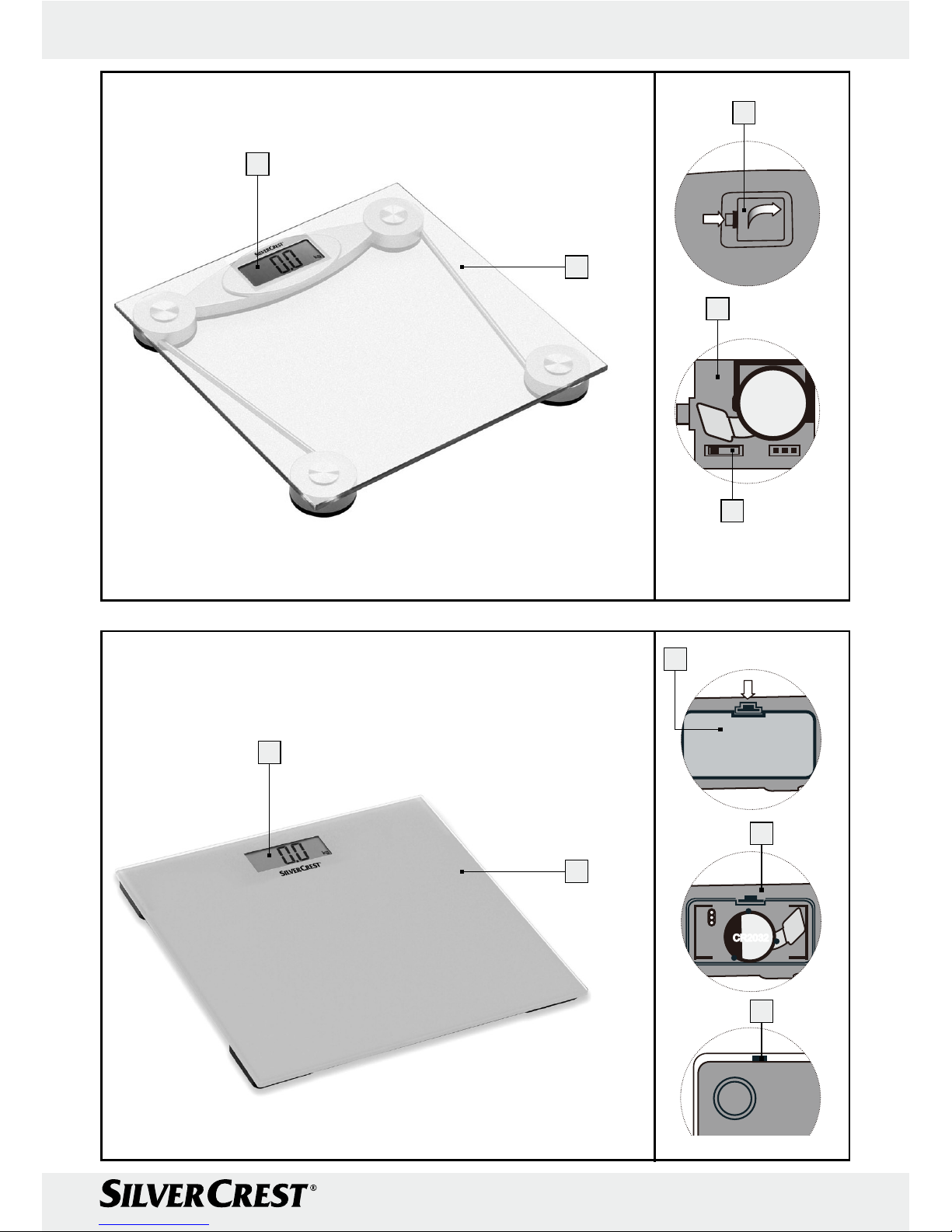
play 1shows “Lo” (see Fig. D) and the scales
switch off automatically.
jIf you see this message, replace the exhausted
battery with a new battery of the same type.
jWhen you insert the battery, make sure that the
contacts do not get bent.
Q
Setting the units of weight (Fig. E)
Note: the standard unit of weight is kilogram (kg).
The factory default setting for the scales as supplied
is “kg”.
jSlide the conversion switch 5to select the unit
of weight.
Switch in position 1: kilogram (kg)
Switch in position 2: stone (st:lb)
Switch in position 3: pound (lb)
Q Switching on your scales/
measuring your weight
Tip: Weigh yourself at the same time of day
(preferably in the morning) after visiting the toilet,
with an empty stomach and without clothing to
ensure that your results are compatible.
jPlace the scales down on a solid, flat horizontal
surface.
jDo not place the scales on a carpet, otherwise
this may influence the results. If necessary you
can place a board on the carpet and place the
scales upon this. A solid floor covering is required
in order to achieve correct weight measurements.
jSwitch on the scales by treading briefly, briskly
and audibly on the platform 2of the scales.
Note: First, four zeros appear: the display
elements move around each individual zero,
as shown in Fig. A. This activates the vibration
sensor in the scales.
Note: Then the display shows “0.0”, as in
Fig. B.
The scales are ready to measure your weight.
jStep on to the scales.
jPlace even weight on each leg.
jIf at all possible stand on the same areas of the
platform 2each time and do not move.
Moving during the weighing process can lead
to discrepancies in the results.
The scales will start to measure immediately. Af-
ter blinking three times, the weight display will
display the result, as shown in, for example, Fig. C.
Note: If the scales show “Err” (see Fig. F), it sig-
nals that the scales are overloaded. Observe the
maximum capacity of 150kg /330lbs /24st.
jStep off the platform 2. The scales switch off
automatically after about 10 seconds.
Until then the weight measurement remains visible.
Tip: Always switch on the scales first when you
wish to weigh yourself. Wait until the display
shows “0.0” (Fig. B) before you step on the
scales.
Q Troubleshooting
-
This appliance has delicate electronic components.
This means that if it is placed near an object that
transmits radio signals, it could cause interference.
This could be, for example, mobile telephones,
walkie talkies, CB radios, remote controls and
microwaves. If the display indicates a problem,
move such objects away from it.
- Electrostatic charge can lead to the appliance
failing. In cases of the appliance failing to work
remove the batteries for a short while and then
replace them.
Q Cleaning
JDo not use chemical cleaners or scouring
agents for cleaning the device.
jClean the device using a slightly moist cloth.
For more stubborn dirt you can also apply a
weak soap solution to the cloth.
j
Never immerse the device in water or other liquids.
Ignoring this advice may damage the device.
jEnsure that no water enters the device. If this
does occur, then wait until the device has dried
out fully before you use it again.