QUICK SETUP
CONNECTING THE AIR COMPRESSOR TO THE LIQUEFIER:
1. Connect Air Hose from Air Compressor to Liquefier; hand tighten only
2. Connect Air Compressor Data Cable from the Air Compressor to the Liquefier
3. Connect both Power Cables from Air Compressor and Liquefier to suitable wall outlets
4. Turn on Air Compressor and Liquefier
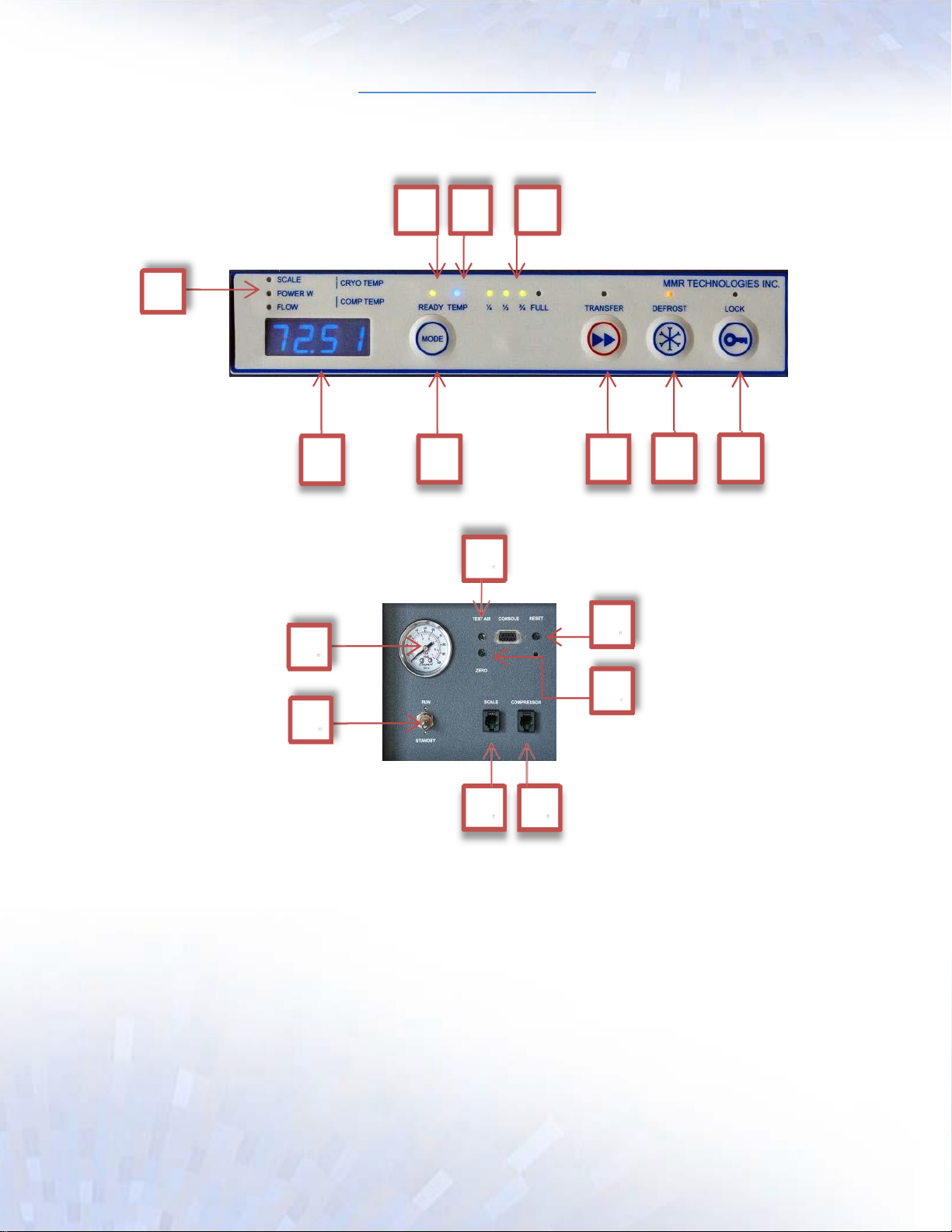
5. Switch the device to “RUN” 11
SETTING THE CLOCK (IF NECESSARY): The clock is factory set, and is displayed when the unit powers
up, followed by the day. Press “RESET” 13 to view the clock at any time. See page 8 if the time or date
are incorrect. The clock is used for automatic maintenance, which takes place at 9pm every Saturday
night.
TESTING THE AIR SUPPLY: With the unit running, press and hold the “Test Air Pressure” button 14 on
the rear of the unit. Over a period of 30 seconds, the “Pressure” 10 should rise to a minimum of 90PSI.
if it doesn’t reach 90PSI, check the Air Hose connections for leaks.
DEFROST: Each time the unit starts up following installation, a power failure, or resetting of the unit, a
90 minute defrost is commenced. This can be cancelled at any time by pressing the “DEFROST” 8
button on the front panel. Subsequent defrosts can be started if required by pressing and holding the
“DEFROST” button for 2-3 seconds.
VIEWING SENSOR VALUES: When the system is not defrosting pressing the “MODE” button 6 will
toggle the sensor value as indicated by the lights 1.
COOLDOWN: Once defrosting has completed, the refrigeration system will become active and will
begin to cool down the Liquefier. This can be monitored by watching the “Cryo Temp”. See Viewing
Sensor Values. When the temperature has reached 77K, cool down is complete and production will
begin. This should take about 30 minutes.
LOCKING AND UNLOCKING: The “LOCK” feature 9 is a security device to stop unwanted dispensing. If
the system is unlocked and the Dewar is in place, dispensing is enabled indicated by the “Ready” light
2. To unlock the Liquefier, first hold down the “LOCK” button 9. While holding the “LOCK” button,
press and hold the “MODE” button 6 simultaneously until the LOCK light goes out. To relock, simply
hold the “LOCK” button 9 until the LOCK light comes on. Note: When locked, the system will produce
internally and stay in the Dewar; it will maintain a full level in the Liquefier until the device is unlocked.
Unlocking can only take place in normal operation.
PAGE 7