Connect unit for Permanent use (cable not provided)
• Unit is for indoor use only, choose an
appropriate mounting location.
• Orientation: Unit can be mounted in any
direction.
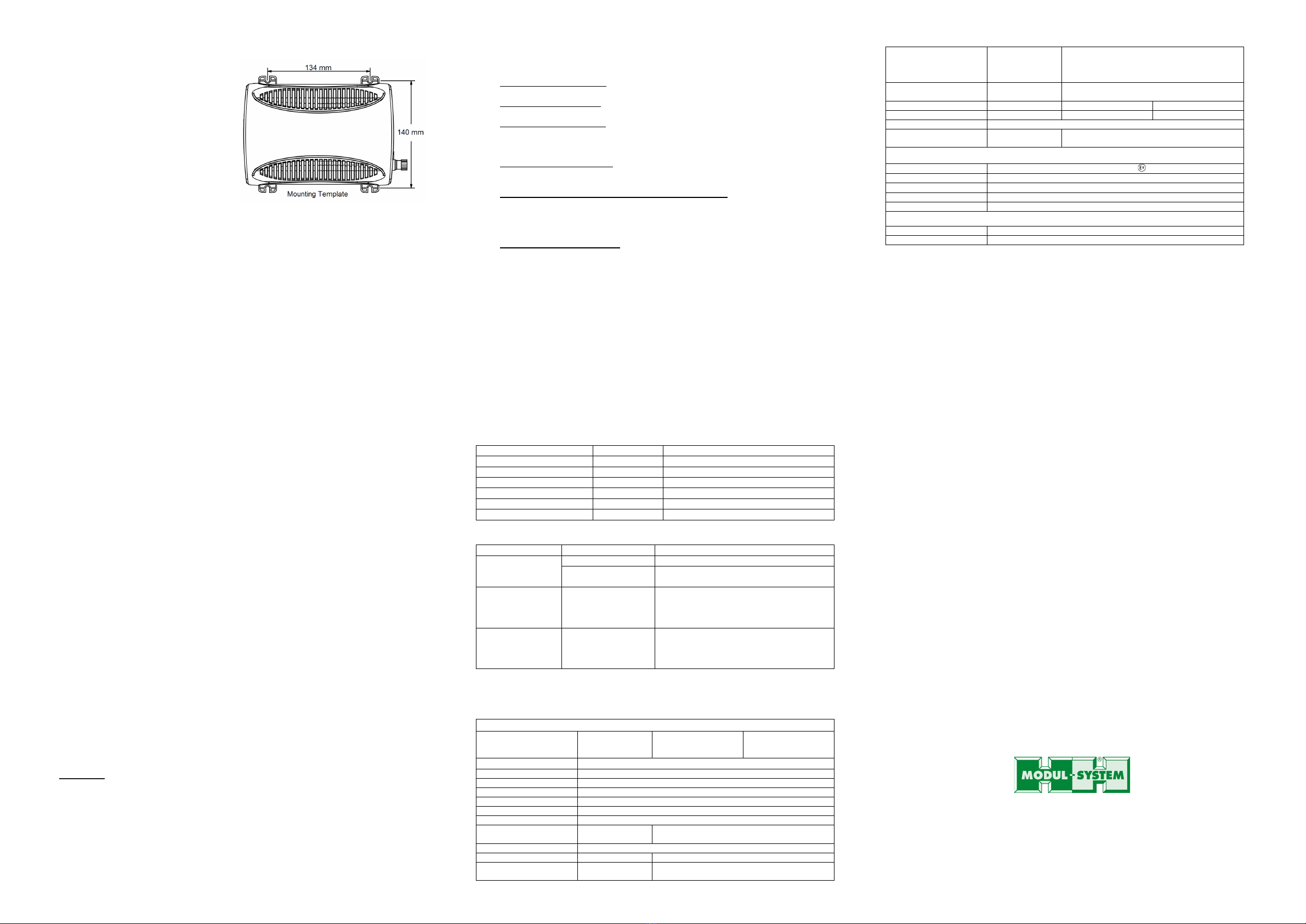
• Use mounting template below to mark
the positions of the mounting screws.
Drill the 4 mounting holes and place the
inverter in position and fasten the
inverter to the mounting surface.
• Use of low resistance cable is required
for all the DC connections between the
inverter and the battery bank.
• Use minimum 10mm2 cable with
maximum cable length of 3 m for the
Inverter system.
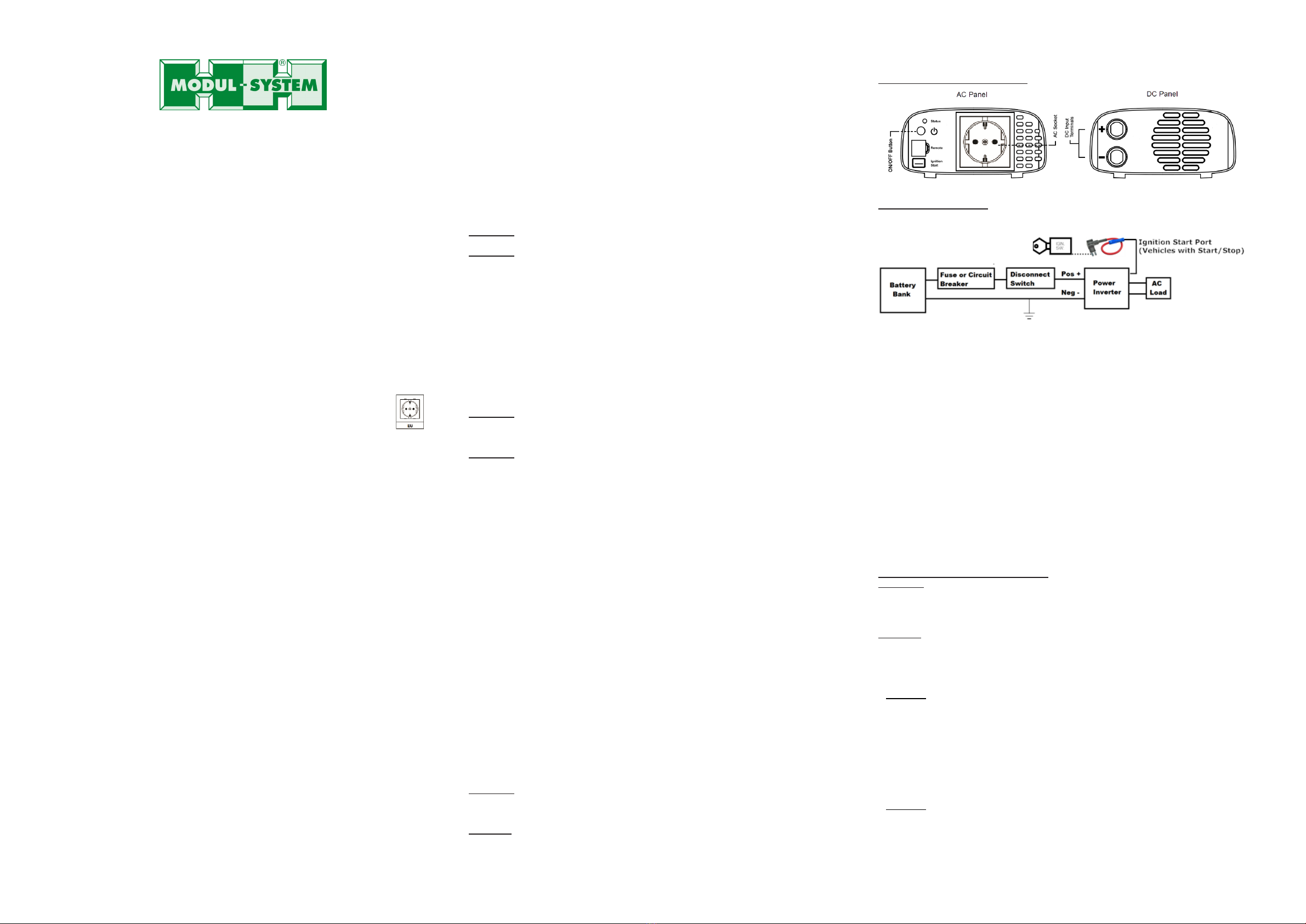
• Connect one end of the negative DC input cable to the Power Inverter DC negative (black)
M6 terminal.
• Connect the other end of the negative DC input cable to the battery negative terminal or
suitable chassis earth point.
• Make sure the Disconnect Switch is in the OFF position.
• Connect one end of the positive DC input cable to the Inverter DC positive (red) M6
terminal.
• Connect the other end of the positive DC input cable to one of the terminals of the
Disconnect Switch.
• Connect a DC input cable between the other terminal of the Disconnect Switch and one
side of the terminal of the fuse holder.
• Connect a DC input cable between the other terminal of the fuse holder and the battery
positive terminal.
• Install the selected fuse to the fuse holder.
• Turn Disconnect Switch to ON position.
Power Inverter Test after installation:
• Press and hold the green ‘On/Off’ button on the unit to turn ON the unit.
• Check that the ‘Status’ indicator turns to solid green.
• Plug in a small AC load like a 40W table lamp to the AC socket to verify AC is available.
• The unit is successfully installed and functioning properly.
Remote Switch (optional) Connection:
• The unit comes with a Remote port and an optional Modul-System ‘Remote Switch’
accessory (21000-03) can be used to turn unit ON and OFF remotely. To install the
‘Remote Switch’, just connect the switch’s RJ12 plug to the RJ12 ‘Remote’ port located at
the Front AC panel of the Power inverter. Please note polarity when connecting the plug.
• The Power On/Off push button on the remote shares the same function as the green
‘On/Off’ button on the main unit.
Use of the Ignition Start Function on unit:
For use with vehicles equipped with Start/Stop modes.
•An ‘Ignition Start’ port is located at the front AC Panel of the Inverter. This port is used
for turning the unit ON and OFF using a +12V signal. An insulated female spade terminal
(width 6.3 mm) is required to connect to the port.
•The ‘Ignition Start’ port must be used when fitting this Inverter to vehicles with
Start/Stop functionality. It shall be wired using an ignition jumper to obtain the +12v
signal from the vehicle’s OEM fuse box.
•When the Inverter is switched on via the ‘Ignition Start’ port (or Remote Port), the
Under Voltage Alarm is disabled (switched off) so it will not operate (sound) when
the vehicle is in Start/Stop mode with a low automatic cranking battery voltage.
•Connecting to +12V will turn ON the unit and removing the +12V signal will turn it OFF.
•This +12V connection should be fused at its source with a 2A fuse minimum.
•The inverter low battery warning alarm and under voltage cut-outs operate differently
when the inverter is turned ON via the ‘Ignition Start’ port or the Remote port.
Power Inverter Test after installation with Ignition Start Function or the Remote port:
• Turn on the vehicle ignition to turn ON the unit.
• Check that the ‘Status’ indicator turns to solid green.
• Plug in a small AC load like a 40W table lamp to the AC socket to verify AC is available.
• The unit is successfully installed and functioning properly.
4. UNIT OPERATION
WARNING: RISK OF EQUIPMENT DAMAGE
Do not connect an AC power source like utility power or generator to the AC outlets of the
unit.
Turn ON and OFF the unit
• Press and hold the green ‘On/Off’ button for about a second to turn ON the unit.
• ‘Status’ indicator in green color indicates AC Output power is available.
• Press again the green ‘On/Off’ button to turn OFF the unit and the ‘Status’ indicator will
turn off.
Understanding the ‘Status’ indicator and the unit warning and fault alarm
‘Status’ indicator:
• Illuminated in green indicates unit is ON. AC is available at the AC Output Socket.
• Illuminated in green and alarm is beeping once every 2 second indicates a warning
signal from the unit. The unit is close to shutdown with one or more of the following
warning conditions:
Over Temperature Warning: Unit internal temperature is high. Unit requires better
ventilation.
DC Over Voltage Warning: DC Input Voltage is high and close to the unit over voltage
shutdown limit. Checking the battery voltage.
DC Under Voltage Warning: DC Input Voltage is low and is close to the unit under
voltage shutdown limit. Checking on battery voltage or battery connection is required.
• Illuminated in red and alarm is beeping once every second indicates AC Output has shut
down due to the following conditions:
Over Temperature Shutdown: Reduce the AC load connected to the unit and provide
more ventilation to the unit. AC Output will automatically restart when the internal
temperature cools down.
DC Over Voltage Shutdown / DC Under Voltage Shutdown: Check the battery voltage.
On the first 30 seconds, AC Output will resume when battery voltage is corrected to
the unit operating range. If the battery voltage shutdown condition is ignored, the unit
will latch OFF completely after 30 seconds and restart the unit using green ‘On/Off’
button is required after the battery voltage is corrected.
AC Output Overload Shutdown: Check AC Load connected to the unit. AC Output is
short circuited or AC Power draw by the load is beyond the unit’s limit. The indicator
and alarm will beep for about 30 seconds before it is latched OFF completely.
Restarting the unit using the green ‘On/Off’button is required after the AC Load
condition is corrected.
Understanding the Fan Operation
The fan on the unit is internal temperature activated. It will automatically turn on when AC
output power exceeds the pre-set values (~ 200W) and turn off when AC output power is
reduced to 150W. It will also automatically turn on when it senses the internal components
have reached to around 80°C and turn off when temperature drops to below 60°C.
AC Load on Power Inverter
Although the Power Inverter can provide high surge power up to two times the rated output
power, some appliances may still trigger on the unit protection system during start up or
surge period. A higher power inverter is required for those appliances.
Estimated Run time on Load
Following run time is an estimate based on using a 12V-120AH battery bank. Actual runtime
may vary.
Small Freezer (8.8 cu. ft.)
Not applicable (start-up surge too high)
5. TROUBLESHOOTING
‘Status’ light is
Check fuse or if the Disconnect switch (if
installed) is either blown or turned OFF
is in green (alarm
beeps every 2
warning and is going
to shutdown
Verify the warning condition and make
adjustment. See “Understanding the
‘Status’ indicator and the unit warning
and fault alarm in this manual
is in red (alarm
beeps every
down
Check unit condition and make correction.
See “Understanding the ‘Status’
indicator and the unit warning and fault
6. SPECIFICATIONS
Note: Specifications are subject to change without notices.
Revision 1.3 Specifications
power switch on
applying power to
applying power to
Nominal DC
Operating Range
11.7-15.9 VDC UVSD threshold charge 10.5-15.9 VDC
Under Voltage Alarm
Recovery
12.5 VDC Off
Under Voltage
Shutdown 11.7 VDC
Software coded so that when the DC input drops
to the Under Voltage Shutdown threshold (10.5V),
it will wait for 10 seconds before it triggers on the
Under voltage Recovery 13.2 VDC
Non-latching 'Fault' Automatically switched back
on 13.2 VDC
Unit Start Up Voltage
UVR 13.2V <10.5V for more than 10 seconds
Safety and Environmental
Up to 2000 m above sea level
7. WARRANTY
Two Year Limited Warranty
The limited warranty program is the only one that applies to this unit, and it sets forth all the
responsibilities of Modul-System. There is no other warranty, other than those described
herein. Any implied warranty of merchantability of fitness for a particular purpose on this unit is
limited in duration to the duration of this warranty.
This unit is warranted, to the original purchaser only, to be free of defects in materials and
workmanship for two years from the date of purchase without additional charge. The warranty
does not extend to subsequent purchasers or users.
Manufacturer will not be responsible for any amount of damage in excess of the retail
purchase price of the unit under any circumstances. Incidental and consequential damages are
specifically excluded from coverage under this warranty.
This warranty does not apply to damage to units from misuse or incorrect
installation/connection. Misuse includes wiring or connecting to improper polarity power
sources.
Return/Repair Policy:
If you are experiencing any problems with your unit, please contact our customer service
department at info@modul-system.com or phone +46 31 746 87 00 before returning product.
After speaking to a customer service representative, if products are deemed non- working or
malfunctioning, the product may be returned to Modul-System within 30 days of original
purchase. Any defective unit that is returned to manufacturer within 30 days of the date of
purchase will be replaced free of charge.
If such a unit is returned more than 30 days but less than two years from the purchase date,
manufacturer will repair the unit or, at its option, replace it, free of charge. If the unit is repaired,
new or reconditioned replacement parts may be used, at manufacturer’s option. A unit may be
replaced with a new or reconditioned unit of the same or comparable design. The repaired or
replaced unit will then be warranted under these terms for the remainder of the warranty period.
The customer is responsible for the shipping charges on all returned items.
Limitations:
This warranty does not cover accessories, such as adapters and batteries, damage or defects
result from normal wear and tear (including chips, scratches, abrasions, discoloration or fading
due to usage or exposure to sunlight), accidents, damage during shipping to our service facility,
alterations, unauthorized use or repair, neglect, misuse, abuse, failure to follow instructions for
care and maintenance, fire and flood.
If your problem is not covered by his warranty, contact our Customer Service Department at
Service Contact Information
Email: info@modul-system.com
Phone: +46 31 746 87 00
www.modul-system.com