manuals.online logo
Brands
  1. Home
  2. •
  3. Brands
  4. •
  5. NARDA
  6. •
  7. Control Unit
  8. •
  9. NARDA PMM SB-10 User manual

NARDA PMM SB-10 User manual

Popular Control Unit manuals by other brands

Seitz 14A80 user manual

Seitz

Seitz 14A80 user manual

Wilo RS485 Installation and operating instructions

Wilo

Wilo RS485 Installation and operating instructions

Becker CentralControl CC41 Commissioning Instruction

Becker

Becker CentralControl CC41 Commissioning Instruction

SICK CDB650 operating instructions

SICK

SICK CDB650 operating instructions

Panduit NetKey NKP5E88M Series installation instructions

Panduit

Panduit NetKey NKP5E88M Series installation instructions

MX Options Concentric Petite Fitting instructions

MX

MX Options Concentric Petite Fitting instructions

Clean Water Systems Fleck 2510 Installation & start?up guide

Clean Water Systems

Clean Water Systems Fleck 2510 Installation & start?up guide

Fairchild FSB44104A user guide

Fairchild

Fairchild FSB44104A user guide

LEGRAND Wattstopper LMIN-104 installation instructions

LEGRAND

LEGRAND Wattstopper LMIN-104 installation instructions

PMK ATT10BNCS instruction manual

PMK

PMK ATT10BNCS instruction manual

Tektronix TDS3FFT user manual

Tektronix

Tektronix TDS3FFT user manual

Woodward easYgen Technical manual

Woodward

Woodward easYgen Technical manual

Balluff BNI EIP-502-105-R015 user guide

Balluff

Balluff BNI EIP-502-105-R015 user guide

NXP Semiconductors TWR-LS1021A Getting started

NXP Semiconductors

NXP Semiconductors TWR-LS1021A Getting started

Advantech PCM-3117 Startup manual

Advantech

Advantech PCM-3117 Startup manual

Danfoss MCO 101 manual

Danfoss

Danfoss MCO 101 manual

Moons' Lin Engineering R701P user manual

Moons'

Moons' Lin Engineering R701P user manual

Aventics RV1 operating instructions

Aventics

Aventics RV1 operating instructions

manuals.online logo
manuals.online logoBrands
  • About & Mission
  • Contact us
  • Privacy Policy
  • Terms and Conditions

Copyright 2025 Manuals.Online. All Rights Reserved.

NARDA
Safety
Test
Solutions
S.r.l. Socio Unico
Sales & Support:
Via Leonardo da Vinci, 21/23
20090 Segrate (MI) - ITALY
Tel.: +39 02 2699871
Fax: +39 02 26998700
Manufacturing Plant:
Via Benessea, 29/B
17035 Cisano sul Neva (SV)
Tel.: +39 0182 58641
Fax: +39 0182 586400
http://www.narda-sts.it
SERIAL NUMBER OF THE INSTRUMENT
You can find the Serial Number in a side of the box.
Serial Number is in the form : 0000X00000.
The first four digits and the letter are the Serial Number prefix, the last five digits are
the Serial Number suffix. The prefix is the same for identical instruments, it changes
only when a configuration change is made to the instrument.
The suffix is different for each instrument.
Document SB10EN-30406-1.00 – Copyright © NARDA 2013
User’s Manual
PMM SB-10
SWITCHING CONTROL BOX
Provided by: www.atecorp.com
(800) 404-ATEC
Advanced Test
Equipment Rentals
®
II Note and symbols
NOTE:
If the instrument is used in any other way than as described in this Users Manual, it may become unsafe
Before using this product, the related documentation must be read with great care and fully understood to
familiarize with all the safety prescriptions.
To ensure the correct use and the maximum safety level, the User shall know all the instructions and
recommendations contained in this document.
This product is a Safety Class III instrument according to IEC classification and has been designed to
meet the requirements of EN61010-1 (Safety Requirements for Electrical Equipment for Measurement,
Control and Laboratory Use).
In accordance with the IEC classification, the power supply of this product meets requirements Safety
Class II and Installation Category II (having double insulation and able to carry out mono-phase power
supply operations).
This product has a Pollution Degree II normally only non-conductive pollution occurs. Occasionally,
however, a temporary conductivity caused by condensation must be expected.
The information contained in this document is subject to change without notice.
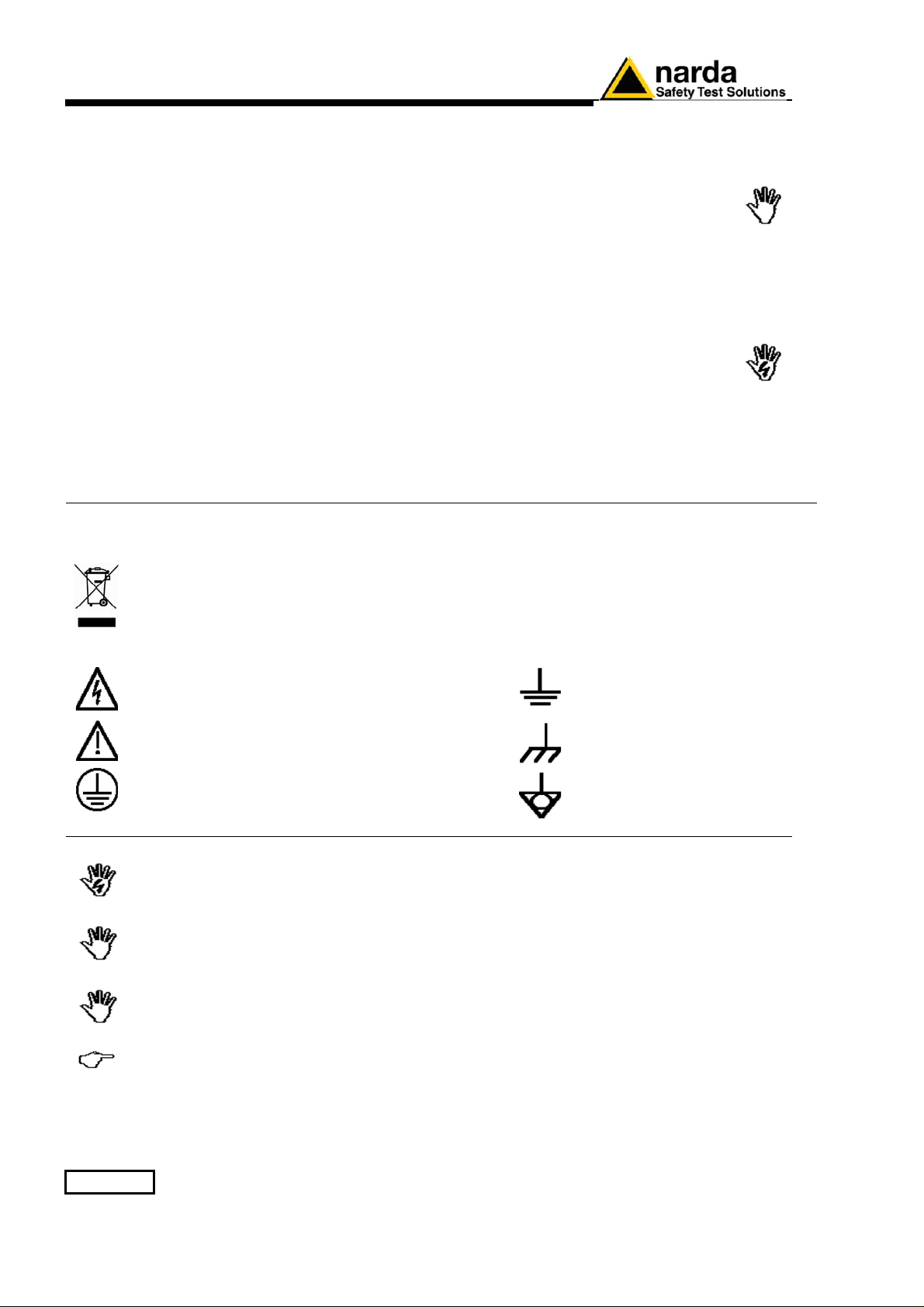
KEY TO THE ELECTRIC AND SAFETY SYMBOLS:
You now own a high-quality instrument that will give you many years of reliable service.
Nevertheless, even this product will eventually become obsolete. When that time
comes, please remember that electronic equipment must be disposed of in accordance
with local regulations. This product conforms to the WEEE Directive of the European
Union (2002/96/EC) and belongs to Category 9 (Monitoring and Control Instruments).
You can return the instrument to us free of charge for proper environment friendly
disposal. You can obtain further information from your local NARDA Sales Partner or
by visiting our website at www.narda-sts.it .
Warning, danger of electric shock
Earth
Read carefully the Operating Manual and its
instructions, pay attention to the safety symbols.
Unit Earth Connection
Earth Protection
Equipotential
KEY TO THE SYMBOLS USED IN THIS DOCUMENT:
DANGER The DANGER sign draws attention to a potential risk to a person’s
safety. All the precautions must be fully understood and applied before
proceeding.
WARNING The WARNING sign draws attention to a potential risk of damage to the
apparatus or loss of data. All the precautions must be fully understood
and applied before proceeding.
CAUTION The CAUTION sign draws attention against unsafe practices for the
apparatus functionality.
NOTE: The NOTE draw attention to important information.

Contents III
Contents
Page
Safety requirements and instructions…………………………….. V
EC Conformity certificate……………………………………………. VI
1 General information Page
1.1 Documentation…....................................................................... 1-1
1.2 Introduction to the PMM SB-10…………................................... 1-1
1.3 Standard Accessories………………………………………………. 1-1
1.4 Main specification…................................................................... 1-2
1.5 Optional Accessories…………….......……................................ 1-2
1.6 Front Panel……………………….…........................................... 1-3
1.7 Rear Panel…………………………............................................. 1-3
2 Installation and use Page
2.1 Introduction................................................................................. 2-1
2.2 Initial inspection.......................................................................... 2-1
2.3 Environment……………………………………………………..….. 2-1
2.4 Return for service.….................................................................. 2-1
2.5 Equipment cleaning……............................................................ 2-1
2.6 PMM SB-10 Installation and use......…...................................... 2-2
2.7 External DC supply…..……………………………………….……. 2-3
2.8 Installation…….……………………………………………………… 2-3
3 PMM SET ADDRESS Instructions for use Page
3.1 Introduction................................................................................ 3-1
3.2 Hardware requirements............................................................. 3-1
3.3 Hardware installation….……………………………………………. 3-2
3.4 To lunch the program................................................................. 3-2
3.5 To start the program……..........….............................................
3.5.1 Main window………………………………………………………
3.5.2 Version…………………………………………………………….
3.5.3 Address……………………………………………………………
3.5.4 Device……………………………………………………………..
3.5.5 Reading version…………………………………………………..
3.5.6 Serial port………………………………………………………….
3-2
3-3
3-3
3-3
3-3
3-3
3-3
3.6 To use the software……………........….................................... 3-4
IV Contents
Figures
Figure Page
1-1 PMM SB-10 front panel…….........…................................. 1-3
1-2 PMM SB-10 rear panel……………................................... 1-3
2-1 Single SB-10 installation example…………………………. 2-2
2-2 Multiple SB-10 installation example……………………….. 2-2
Tables
Table Page
1-1 PMM SB-10 Technical specifications............................... 1-2
Safety consideration V
SAFETY RECOMMENDATIONS AND INSTRUCTIONS
This product has been designed, produced and tested in Italy, and it left the factory in conditions fully
complying with the current safety standards. To maintain it in safe conditions and ensure correct use,
these general instructions must be fully understood and applied before the product is used.
When the device must be connected permanently, first provide effective grounding;
If the device must be connected to other equipment or accessories, make sure they are all safely
grounded;
In case of devices permanently connected to the power supply, and lacking any fuses or other
devices of mains protection, the power line must be equipped with adequate protection
commensurate to the consumption of all the devices connected to it;
In case of connection of the device to the power mains, make sure before connection that the
voltage selected on the voltage switch and the fuses are adequate for the voltage of the actual
mains;
Devices in Safety Class I, equipped with connection to the power mains by means of cord and plug,
can only be plugged into a socket equipped with a ground wire;
Any interruption or loosening of the ground wire or of a connecting power cable, inside or outside the
device, will cause a potential risk for the safety of the personnel;
Ground connections must not be interrupted intentionally;
To prevent the possible danger of electrocution, do not remove any covers, panels or guards
installed on the device, and refer only to NARDA Service Centers if maintenance should be
necessary;
To maintain adequate protection from fire hazards, replace fuses only with others of the same type
and rating;
Follow the safety regulations and any additional instructions in this manual to prevent accidents and
damages.
VI EC Conformity
EC Conformity Certificate
(in accordance with the directives: EMC 89/336/EEC and low voltage 73/23/EEC)
This is to certify that the product: PMM SB-10 Switching Control Box
Produced by: Narda Safety Test Solutions S.r.l.
Via Benessea 29/B
17035 Cisano sul Neva (SV) - ITALY
complies with the following European Standards
Safety: CEI EN 60950 - CEI EN 60950/A4 – CEI EN 60950/A11
EMC: EN 61326-1 - EN 61326/A1
This product complies with the requirements of the Low Voltage Directive 73/23/EEC, amended
by 93/68/EEC, and the EMC Directive 89/336/EEC amended by 92/31/EEC, 93/68/EEC,
93/97/EEC.
NARDA S.r.l.
General Information
1-1
1 - General Information
1.1 Documentation
Enclosed with this manual are:
•
a service questionnaire to send back to NARDA in case of equipment
service is needed
•
an accessories check list to verify all accessories enclosed in the
packaging.
1.2 Introduction to
PMM SB-10
The PMM SB-10 Switch Control Box is a versatile and expandable
accessory for the electric and magnetic fields and electrosmog
measurement devices family.
Either the OR-03 Optical Repeater with all their field probes and the EP60X
series are supported. The EHP-50, EHP-50A, EPH-50B, EHP-50C, EHP-
50D and EHP-50E are not supported.
One PMM SB-10 allows to take field measurement with up to 10 measuring
devices connected at the same time, either placed in different measuring
points a
nd/or working on different frequency and full scale ranges. it is
possible to have a chain up to five SB-
10 to connect up to 50 remote
devices.
The PMM SB-
10 is powered by an External DC supply or by a PC with
apposite USB A or B type cable. With the USB i
s possible to supply only up
to three SB-10 (30 remote devices).
One PMM SB-
10 allows to connect up to ten devices via optical fiber to the
Personal Computer by a single RS232 interface connection. Besides, using
one free USB port, you can connect another SB-10 with low consumption.
1.3 Standard accessories
The standard accessories included with PMM SB-10 are:
•External DC supply (DC 12 V, 1.25 A)
•USB cable, type A-B (1.8 m long);
•RS232 serial cable with 9/25 pin adapter (2 m long);
•SB-10 to SB-10 Expansion cable (20 cm long);
•Optical connectors protection caps (20 pcs)
•Operating Manual;
•Certificate of Compliance;
•Return for Repair Form.
Document SB10EN-30406-1.00 - © NARDA 2013
1-2
General Information
1.4 Main specifications
The following Table list the PMM SB-10 performance specifications.
The following conditions apply to all specifications:
•The ambient temperature shall be -10° to 40° C.
TABLE 1-1 PMM SB-10 Technical specifications
Compatibility
with all filed probe via OR-03 optical repeater
External DC supply
DC, 12 V, I = 1.25 A or connect or PC USB (A or B type) port.
Optical fiber connection
up to 80 m long
Connections
Up to ten devices connected via optical fiber, expandable up to
five PMM SB-10 for a total of 50 measuring devices
connected.
Via RS-232 serial port for remote operation and firmware
update.
Operating temperature
-10 to +40°C
Storage temperature
-20 to +70°C
Dimensions (H x W x D)
Metal case (HxWxD) 37 x 280 x 219 mm
Weight
1300 g
1.5 Optional
accessories
The following accessories can be ordered as options:
Electric Field Probe EP-105 (100 KHz – 1000 MHz) 0.05 – 50 V/m
Electric Field Probe EP-300 (10 kHz - 3 GHz) 0,1 - 300 V/m
Electric Field Probe EP-330 (100 kHz - 3 GHz) 0,3 - 300 V/m
Electric Field Probe EP-301 (100 kHz – 3 GHz) 1 – 1000 V/m
Electric Field Probe EP-333 (100 kHz – 3.6 GHz) 0.15 – 300 V/m
Electric Field Probe EP-183 (1 MHz – 18 GHz) 0.8 – 800 V/m
Electric Field Probe EP-408 (1 MHz – 40 GHz) 0.8 – 800 V/m
Electric Field Probe EP-44M (100 kHz – 800 MHz) 0.25 – 250 V/m
Electric Field Probe EP-33M (700 MHz – 3 GHz) 0.3 – 300 V/m
Electric Field Probe EP-33A (925 MHz - 960 MHz) 0,03 - 30 V/m
Electric Field Probe EP-33B (1805 MHz - 1880 MHz) 0,03 - 30 V/m
Electric Field Probe EP-33C (2110 MHz - 2170 MHz) 0,03 - 30 V/m
Electric Field Probe EP-201 (60 MHz - 12 GHz) 3 - 500 V/m
Electric Field Probe EP-600 (100 kHz – 9.25 GHz) 0.14 - 140 V/m
Electric Field Probe EP-601 (10 kHz – 9.25 GHz) 0.5 - 500 V/m
Electric Field Probe EP-602 (5 kHz – 9.25 GHz) 1.5 - 1500 V/m
Electric Field Probe EP-603 (300 kHz - 18 GHz) 0.17 - 170 V/m
Electric Field Probe EP-645 (100 kHz – 6.5 GHz) 0.35 - 450 V/m
Electric Field Probe EP-745 (100 kHz - 7 GHz) 0.35 - 450 V/m
Magnetic Field Probe HP-032 (0.1 – 30 MHz) 0.01 – 20 A/m
Magnetic Field Probe HP-102 (30 MHz – 1000 MHz) 0.01 – 20 A/m
Magnetic field Probe HP-050 (10 Hz – 5 kHz) 10 nT – 40μT
Magnetic field Probe HP-051 (10 Hz – 5 kHz) 50 nT – 200μT
FO-8053/10 Fiber Optic Cable (10m)
FO-8053/20 Fiber Optic Cable (20m)
FO-8053/40 Fiber Optic Cable (40m)
FO-8053/80 Fiber Optic Cable (80m)
OR-03 Programmable Optical Repeater
General Information
1-3
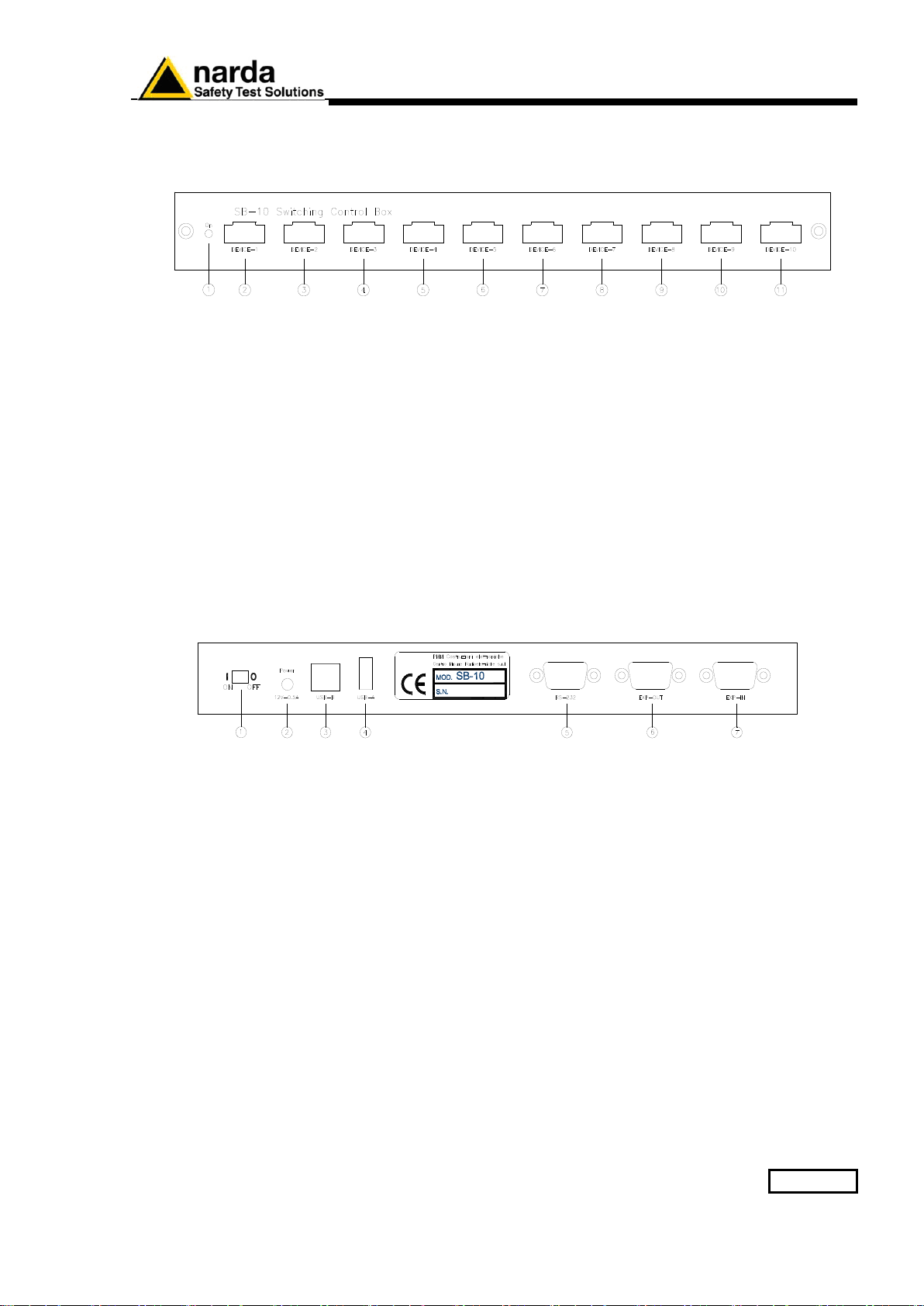
1.6 Front panels
Fig. 1-1 Front panel
Legend:
1. On Led ;
2. Device-1 Fiber optic connector;
3. Device-2 Fiber optic connector;
4. Device-3 Fiber optic connector;
5. Device-4 Fiber optic connector;
6. Device-5 Fiber optic connector;
7. Device-6 Fiber optic connector;
8. Device-7 Fiber optic connector;
9. Device-8 Fiber optic connector;
10.Device-9 Fiber optic connector;
11.Device-10 Fiber optic connector.
1.7 Rear panels
Fig. 1-2 Rear panel
Legend:
1. Power On/Off push-button;
2. External DC supply connector
3. USB type B connector;
4. USB type A connector;
5. RS 232 Connector
6. Expansion out connector;
7. Expansion in connector.
1-4
General Information
This page has been left blank intentionally