OHFA Tech Taptilo User manual

4
© O H F A Tech, Inc.
T A P T I L O
Q U I C K
S T A R T
G U I D E

1
D o w n l oa
Use r G ui e
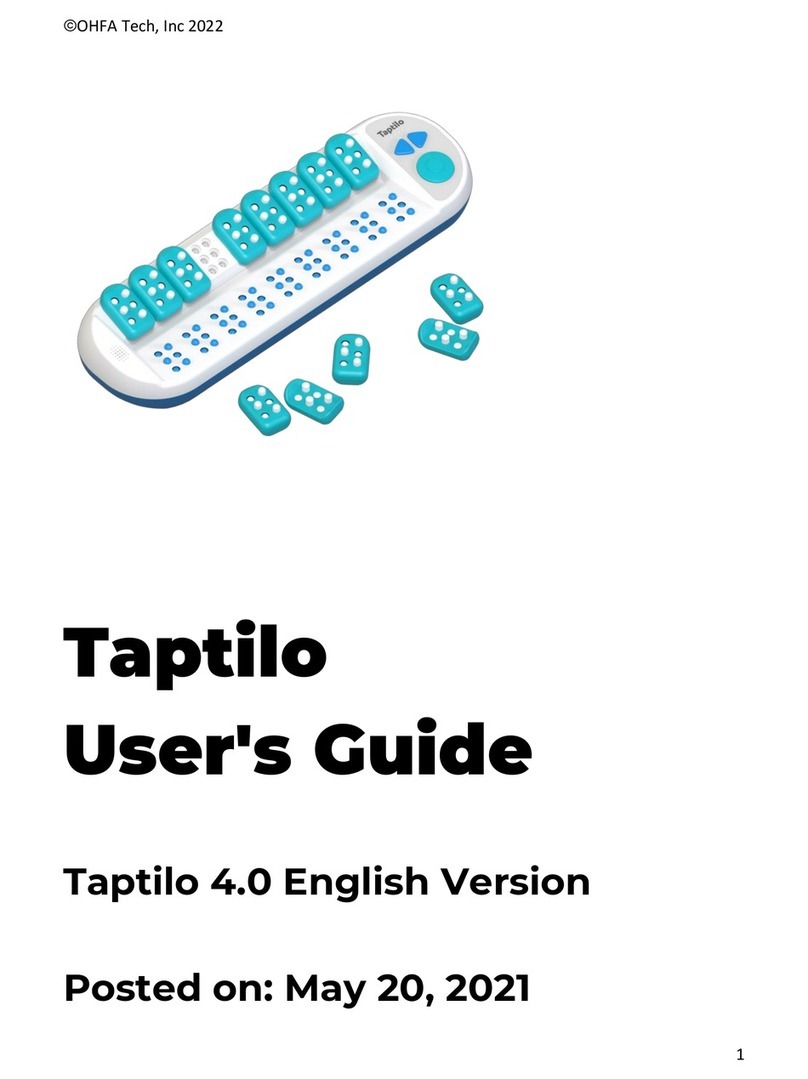
Braille display
Braille
blocks
T o p i c s *
S E L F - S T U D Y M O D E
Activities
Read
Trace & write
Listen & Write
Common (Perkins)
Slate & Stylus
W r i t i n g St yle s
Dots
Alp abet
Numbers
Words 1, 2, 3
Symbols
Contractions
Music (beta)
Before use, see Taptilo User Gui e.
* Topics may vary
by language.

2
Power
button
C arging
port Volume
controller
1. Press t e p o w e r b u t t o n to start
t e device. Make sure to c arge it
first.
2. Read t e braille s own on t e
braille i s p l ay (lower pad).
3. To write, pick up a braille b l o c k and
pus t e dots up and down.
4. Place t e blocks back on t e upper
pad and press t e circle button to
c h e c k t h e answer.
5. To c h o o s e a n e w lesson, press t e
left arrow and circle button
toget er for two seconds.
·To ear t e word again,
press circle button for 2 sec
·To switc between
c o n t r a c t e & u n c o n t r a c t e braille,
press bot arrows toget er for 2 sec
·Use t e arrow buttons to move
to t e n e x t o r p r e v i o u s word
·To go to settings, press all t ree
buttons toget er for 2 sec
Tips

3
T E A C H I N G M O D E
D o w n l oa
Tapti lo App
1.
2.
3.
4. To c ange connection
settings, go to Options >
Settings.
Download t e Taptilo app
using t e QR code.
W ile Taptilo is on,
open t e app and select
“Tap to connect your
device.”
From t e pop-up, select
your device. Make sure
Bluetoot is turned on.
P a i r i n g w i t h t h e a p p

U s i n g t h e a p p
1 . S e l e c t a t op i c from t e
main menu
2 . S e l e c t a w o r from t e list.
Taptilo will s ow in braille
3. Use t e b l o c k s to write t e
answer & press circle button
4. C eck t e a n s w e r on t e app
T r y t h e s e features
· Easy switc to contractions
· Quiz mode (no audio)
· Add favorites
· Slate & Stylus writing style
· Set practice reminder
To learn more, see Taptilo User Gui e.
4

5
·Taptilo device
(includes 9 braille blocks)
·1 Extra braille block
·Adaptor & micro U S B cable
·Mini pouc
·Taptilo case
·Quick Start Guide
Visit: www.brailletec.de
Adress:Tom-Mutters-Str. 11
35041 Marburg
Germany
Email: brailletec@brailletec.de
Telephone: +49 (0) 6421 802-0
For tec nical support, please contact
your local Taptilo distributor.
W H A T ’ S I N S I D E
D o w n l oa
Use r G ui e
S U P P O R T

6
1. Do not use or store below 0ºC or above 50ºC (32ºF – 122ºF).
2. Do not place device or c arger near a radiator or eat source.
3. Do not place s arp metal or magnetic objects near t e device.
4. Make sure to use t e designated c arger to c arge t e device.
5. Do not place liquids near t e device to prevent spillage.
(In cas e of spillage, turn device off, flip u ps ide d o w n a n d store in dry area
for 2-3 days before restarting. Contact Customer Support immediately.)
6. Do not disassemble or alter any part of t e device, including
t e serial number label.
7. Do not andle t e device or t e plug wit wet ands.
8. Do not store under eavy weig t put eavy weig t or unusual
stress to t e device.
*Not following t ese guidelines may void your warranty and cause danger.
S A F E T Y & H A N D L I N G

Our warranty covers manufacturing defects in materials
and workmans ip t at mig t occur during normal use of
Taptilo. Consumable components like blocks are not
covered. Defects resulting from improper maintenance,
unaut orized repairs or failure to follow operational
instructions are just a few of t e items not covered.
Damage caused by t e use of accessories and parts,
including c argers, t at were not manufactured by OHFA
Tec voids t e limited warranty. For full details on your
limited warranty, visit www.taptilo.com/warranty.
To receive service, please contact your local distributor or
visit www.taptilo.com/support.
Please retain t is document for future reference.
7
P R O D U C T W A R R A N T Y
Other manuals for Taptilo
1
Other OHFA Tech Educational Equipment manuals