3
Warning: Remove batteries when not use to prevent battery leakage (Out of warranty) and
power consumption.
OPERATION:
1. For each operation, make sure you are using fresh batteries, same brand, same power of
batteries is required, and otherwise meter shows erratic readings or leakage. Warranty is void if
not follow the notices. (Note:remove batteries when not use!)
2. You may use an optional AC/DC adaptor to operate supply power to operate the meter.
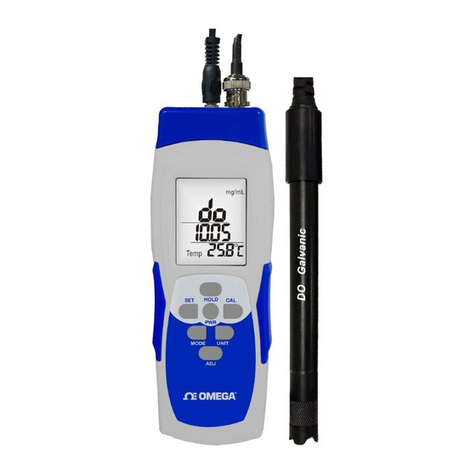
3. Make sure sensor probe and meter are well connected, meter shows “00000” (O2sensor is warming
up) on each display.
4. Don’t attempt to detach sensor probe from meter while in operation or during datalogging. Meter
shows erratic readings and might damage sensor or working fan.
PROBE LED INDICATION:
Color Description
Cable connected to meter and meter is powered on.
Fan is in working conditon. When the fan is inactivated, red light is always on.
When the fan is activated, red light is flashing.
POWER:
NOTE: Make sure you have connected the probe to the meter before power on.
Momentarily press PWR button to turn on the meter, press and hold PWRbutton to turn off meter.
There are two ways to provide power: (a) AAA batteries x 6pcs, or (b) AC/DC adaptor 9V.
(a) Battery icon shows up when power is weak, replace with new batteries immediately as the
readings now on LCD are incorrect due to weak power.
(b) For short time measurement, you may power on by batteries. For datalogging or long time using, you
must connect with an AC/DC adaptor.
AUTO POWER OFF:
Meter will turn off automatically in 15 minutes when no use, todisable Auto
Power Offfunction by press HOLD and PWR button when meter is OFF, LCD
shows “n”, then turns to normal measurement mode. When the power is weak,
battery icon displays on screen and O2reading might not correct, strongly
recommend replacing with new batteries, DO NOT try to use used batteries to
operate.
MEASUREMENT:
Press PWRbutton, meter shows full screen (icons) in one second, and after warming up for few minutes,
meter goes to normal measurement mode, green LED turns on and electric fan in probe is working, now you
get current O2, Temperature and RH% readings.
4
The electric fan is always on to make sure meter is in measurement status until you turn off the meter.
If you think ambient is stable enough or you don’t operation in few minutes, you may turn off the fan by short
pressing SET button.
MAX/MIN: Press the button to review maximum or minimum readings since powered on. To clear maximum
and minimum readings, long press MAX/MIN button, “Clr” shows at the button of LCD. Once temperature,
humidity or concentration of gas exceeds current min or max values, readings will be updated.
UNIT: Press button to switch units °C or °F of Temp., DP and WB.
TEMPERATURE & HUMIDITY: Press MODE button momentarily to toggle Temperature, Humidity, Dew
Point (DP), Wet Bulb (WB) temperature.
O2ALARM SETTING (Low alarm):
Long press SET button more than 2 seconds to enter O2alarm setting mode. The default of O2is 15.0%, the
setting range of O2is from 5.0% to 30.0%. Press SETagain tosave the changes.
HOLD: increase value
BKLT: decrease value
MODE: move to left digit
MAX/MIN: move to right digit
When meter enter setting mode, the electric fan willturn off automatically, when you leave setting mode,
the electric fan will turn on automatically again.
SELF-CALIBRATION O2:
Power on the meter, long press MODE buttons for 6 seconds to enter calibration mode, the first layer of LCD
shows “21.0”, which means O2should be calibrated to 21.0%; the second layer of LCD shows “17.0”, which
means current input (Do not adjust current value, or it will be inaccurate); “CAL” is flashing and shows
at the bottom of the screen around 30 seconds, when calibration finished, it will show “End” to let user know
the calibration has done.
NOTE: Oxygen makes up 21.0% of the air; user can do calibration under normal environment.
Temperature, Humidity Offset:
The meter is designed with precision and free maintenance capacitor humidity sensor and thermistor
temperature sensor. For long time usage, or special accurate purpose, user may do the offset function to
adjust Temperature and Humidity per standard value.
WARNING: DO NOT USE THIS FUNCTION WITHOUT STANDARD INSTRUMENT.
NOTE: Under power off condition. press and hold MODE+BKLT buttons by left fingers, press and hold
MAX+PWR button by right fingers, LCD shows 0.0C and SET, now release all fingers, to add the value by
pressing HOLDbutton, to reduce value by pressing BKLT button. If you want to escape temperature
adjustment to RH%, short press SETbutton, and follow the same steps. Long press SET button to save the
adjustment value, LCD shows SAVE in 2 seconds, then power off the meter, the offset function is completed
and values are adjusted.