3
Installation Guide
AT-HDR-SW-52ED
HDMI 1
HDMI 2
HDMI 3
HDMI 4
HDMI 5
VOLUME
AT-HDR-SW-52ED
POWER INPUT
S/PDIF OUT
LANFW DC 48V
+
-
1 2 3 4 5
HDMI IN HDMI OUT
L R
++
RX TX
RS-232
OUT
IR
IN
S SP
HDBaseT OUT
AUDIO
Rear Panel Descriptions
1 63 5 8 10
2 4 97
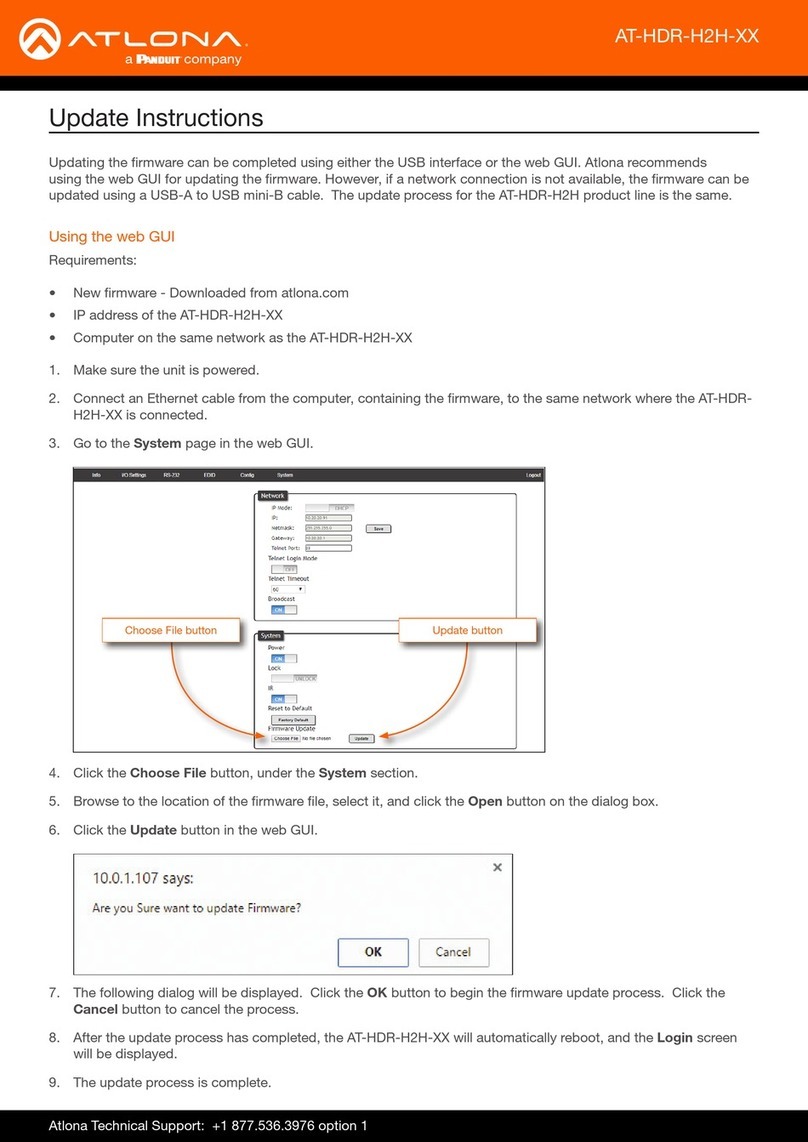
1 HDMI IN
Connect an HDMI cable from each of
these ports to an HDMI source.
2 L/R
Connect an analog audio output device to
this port using the included captive screw
block. Refer to Audio (page 5) for
information on wiring.
3 HDMI OUT
Connect an HDMI cable from this port to
an HDMI display.
4 S/PDIF OUT
Connect an RCA-type cable from this port
to the S/PDIF audio input port on an A/V
receiver or other audio output device.
5 HDBaseT OUT
Connect a category cable from this port
to a the HDBaseT IN port of a compatible
receiver unit.
6 FW
Connect a USB-to-mini USB cable to
this port from a computer for rmware
updates.
IR IN/OUT
Connect an IR emitter to the OUT (S,
GND) pins to control a display using IR.
Connect a control system to the IN (P, S,
GND) pins. A 5-pin captive screw block
is included. Refer to IR (page 6) for
information on wiring.
7 LAN
Connect an Ethernet cable from this port
to the Local Area Network (LAN). The
AT-HDR-SW-52ED includes a built-in web
server, which can be used to manage and
congure the product.
8 RS-232
Connect the included captive screw block
to an RS-232 controller to control the AT-
HDR-SW-52ED. Refer to RS-232 (page
4) for more information on wiring.
9 DC 48V
Connect the included 48 V DC power
supply from this power receptacle to an
available AC electrical outlet. Refer to
Power (page 4) for more information
on wiring.