manuals.online logo
Brands
  1. Home
  2. •
  3. Brands
  4. •
  5. Philips
  6. •
  7. Telephone
  8. •
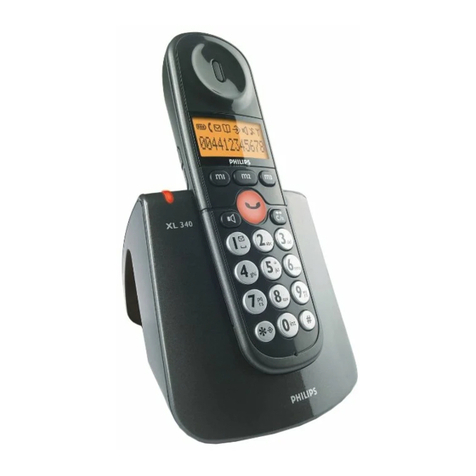
  9. Philips TD6120/SS051P User manual

Philips TD6120/SS051P User manual

This manual suits for next models

31

Other Philips Telephone manuals

Philips ThinkLink SE8881B/38 User manual

Philips

Philips ThinkLink SE8881B/38 User manual

Philips Kala 200 User manual

Philips

Philips Kala 200 User manual

Philips D126 Operator's manual

Philips

Philips D126 Operator's manual

Philips xenium x806 User manual

Philips

Philips xenium x806 User manual

Philips AT 9500 User manual

Philips

Philips AT 9500 User manual

Philips DECT2254S/05 User manual

Philips

Philips DECT2254S/05 User manual

Philips VOIP3211S/90 User manual

Philips

Philips VOIP3211S/90 User manual

Philips D131 Product information sheet

Philips

Philips D131 Product information sheet

Philips VOIP8410B/05B User manual

Philips

Philips VOIP8410B/05B User manual

Philips M330 User manual

Philips

Philips M330 User manual

Philips M335 Operator's manual

Philips

Philips M335 Operator's manual

Philips D125 User manual

Philips

Philips D125 User manual

Philips Onis 300 User manual

Philips

Philips Onis 300 User manual

Philips D1201WA Operator's manual

Philips

Philips D1201WA Operator's manual

Philips VOIP4331S/01 User manual

Philips

Philips VOIP4331S/01 User manual

Philips ITI User manual

Philips

Philips ITI User manual

Philips TU5352/BA071P User manual

Philips

Philips TU5352/BA071P User manual

Philips TD6726/BG051P User manual

Philips

Philips TD6726/BG051P User manual

Philips CD191 User manual

Philips

Philips CD191 User manual

Philips TU7372/SS071P User manual

Philips

Philips TU7372/SS071P User manual

Philips M345 Product information sheet

Philips

Philips M345 Product information sheet

Philips Onis 300 User manual

Philips

Philips Onis 300 User manual

Philips M350 Product information sheet

Philips

Philips M350 Product information sheet

Philips DCTG6921S User manual

Philips

Philips DCTG6921S User manual

Popular Telephone manuals by other brands

V-tech i6772 user guide

V-tech

V-tech i6772 user guide

BT FREELANCE XD 5100 quick start guide

BT

BT FREELANCE XD 5100 quick start guide

Uniden 1360 user guide

Uniden

Uniden 1360 user guide

Fanvil D800 user manual

Fanvil

Fanvil D800 user manual

Avaya IP500 user guide

Avaya

Avaya IP500 user guide

NEC Univerge SV9100 installation manual

NEC

NEC Univerge SV9100 installation manual

Amanda MiniSOHO Installation and programming manual

Amanda

Amanda MiniSOHO Installation and programming manual

Hitachi SelecSet 900 Series user guide

Hitachi

Hitachi SelecSet 900 Series user guide

mPTech HAMMER BS21 quick start guide

mPTech

mPTech HAMMER BS21 quick start guide

NEC 2000IVX user guide

NEC

NEC 2000IVX user guide

ooma Phone Genie quick start guide

ooma

ooma Phone Genie quick start guide

Siemens Gigaset S450 user guide

Siemens

Siemens Gigaset S450 user guide

Clarity RC100 operating instructions

Clarity

Clarity RC100 operating instructions

GE 2-9480 user guide

GE

GE 2-9480 user guide

Geemarc PHOTOPHONE 155 user guide

Geemarc

Geemarc PHOTOPHONE 155 user guide

Interquartz Gemini IQ333 operating instructions

Interquartz

Interquartz Gemini IQ333 operating instructions

SSS Siedle HT 840-0 operating instructions

SSS Siedle

SSS Siedle HT 840-0 operating instructions

Motorola TITANIUM manual

Motorola

Motorola TITANIUM manual

manuals.online logo
manuals.online logoBrands
  • About & Mission
  • Contact us
  • Privacy Policy
  • Terms and Conditions

Copyright 2025 Manuals.Online. All Rights Reserved.

ILLUSTRATION
1
Base station
Mains power supply /
line LED
Memory key
On/Off line key
Dialling keypad
Recall and
Programming key
Microphone
Earpiece
Display
SOS key
Redial key
Internal call /
music on hold key
Colour clip
Telephone cable 2 extra colour clips Mains Adapter
AA batteries
User guide
Earpiece volume key
ang6120.qxd 31/05/99 15:36 Page 1
2
Your telephone has all the advantages of the latest technological advances which make it even
simpler and easier to use.
SAFETY INFORMATION
This equipment is not designed for making emergency telephone calls
when the power fails. Alternative arrangements should be made for
access to emergency services.
This product may be used legally only in a country where the appropriate authority has given its
specific authorisation. This authorisation appears on a label under the base station.
The marking on the product certifies its conformity to the technical regulations for user
safety and electromagnetic disturbance which were applicable on the date of approval in
accordance with European Union directive No. N°73/23/EEC, 89/336/EEC, 91/263/EEC and
93/68/EEC.
POWER REQUIREMENTS
This product requires an electrical supply of 220-240 volts, alternating monophased current,
excluding IT installations defined in standard EN 60-950.
WARNING!
The electrical network is classified as dangerous according to criteria in the standard EN60-950.
The only way to power down this product is by unplugging the power cable from the electrical
outlet. Ensure the electrical outlet is located close to the apparatus and is always easily accessible.
To be able to make calls in the event of a power cut, it is recommended that this telephone be
used as a complement to another telephone which does not require mains power.
TELEPHONE CONNECTION:
The voltage on the network is classified as TNV-3 (Telecommunication Network Voltages, as
defined in the standard EN 60-950).
SAFETY PRECAUTIONS:
Do not allow the handset to come into contact with water.
Do not open the handset or the base station. This could expose you to high voltages. Contact
our after-sales service for all repairs.
Do not allow the charging contacts or the battery to come into contact with conductive
materials such as keys, paper clips, rings, bracelets, etc.
Make sure you insert the batteries with their polarities in the correct position.
ENVIRONMENTAL CARE
Your telephone has been manufactured at a site certified ISO 14001 - the international standard
for environmental management systems.
Your telephone has also benefited from the Philips EcoDesign program - Environmental
Conscious Product Design - which considers the environmental impact of a product during its
entire life cycle.
ang6120.qxd 31/05/99 15:36 Page 2

3
INSTALLING YOUR TELEPHONE
CHOOSING THE POSITION FOR THE BASE STATION
To reduce any risks of interference, avoid placing the base station less than 1 metre from another
electrical device (telephone, television, computer, etc.). The base station must be placed on a flat
surface.
Avoid placing the base station:
- in a damp room,
- near a heat source,
-near obstacles like thick walls or metal structures.
INSERTING / REPLACING THE BATTERIES
Your handset is powered by 2 rechargeable AA/R6

batteries. If you need to replace them you should use
PHILIPS RC NC-P or Saft RC6 batteries.
1ðPress the top of the battery cover and slide it
downwards.
2ðInsert the batteries, taking care to respect the
marked polarities.
3ðClose the cover.
The batteries contain cadmium and should be disposed of in accordance with
the regulations in force concerning the disposal of waste.
Never use non-rechargeable batteries. The manufacturer disclaims all
responsibility if these recommendations are not respected.
CONNECTING THE TELEPHONE
At the back of the base station:
1ðConnect the mains adapter cable to the base station, then plug
the mains adapter into the wall socket.
2ðConnect the telephone cable to the base station and then to the
wall socket.
ðPlace the telephone handset on the base station and allow the
batteries to charge for at least 12 hours.
Only use the cables supplied with the product.
FITTING THE COLOUR CLIP
1ðInsert the clip from the top first.
2ðFirmly press on the clips (in the arrow direction) until they
lock.
3ð
To remove the colour clip, pull it out from the Philips 
marking.
12
Cd
ang6120.qxd 31/05/99 15:36 Page 3
DESCRIPTION
HANDSET DISPLAY
4
Numerical
characters
Telephone
icons
Displayed
Blinking
Displayed
Blinking
Displayed
Displayed
Blinking
Displayed
Blinking
Displayed
Not displayed
Blinking
Batteries charged.
Batteries low.
Handset being charged.
Programming activated.
Waiting for an answer from the base station (in the
context of registration).
Memories in use (consultation, programming).
External call in progress.
External call arriving.
Internal call in progress.
Internal call arriving.
Handset in receiving mode (connected to the base
station).
Handset out of range of the base station.
Base station not connected to power supply.
Handset not registered with the base station.
ICON STATE DESCRIPTION
ang6120.qxd 31/05/99 15:36 Page 4
DESCRIPTION
TELEPHONE LEDS
The base station has a green LED:
- Lit, when the base station is powered.
- Blinking, when:
.receiving a call,
.the line is connected or the answering machine is replying.
- Unlit, when the base station is not connected to the power supply.
AUDIBLE SIGNALS
Your telephone emits:
-1 short beep =when you press a key.
-1 long beep =when these is no contact between the handset and the base station
any other problem occurs (if you make a mistake).
= to indicate that the handset needs to be recharged
-2 beeps =when you place the handset on the base station.
= confirming the programming you have entered.
-3 beeps =in the programming phase, inviting you to continue with the
procedure.
RINGER EQUIVALENCE NUMBER OR REN (UK ONLY)
Your has a Ringer Equivalence Number (REN) of 1.0. To determine the maximum
number of telephones that can be connected to your line, add together the individual RENs of all
the apparatus you wish to connect. If this total exceeds four, one or all of your telephones may
not ring correctly.
5
ang6120.qxd 31/05/99 15:36 Page 5
6
USING YOUR TELEPHONE
Your Philips telephone is GAP certified, nevertheless we cannot guarantee its use with DECT
products made by other manufacturers.
You can register 4 handsets with 1 base station and 1 handset with 2 base stations.
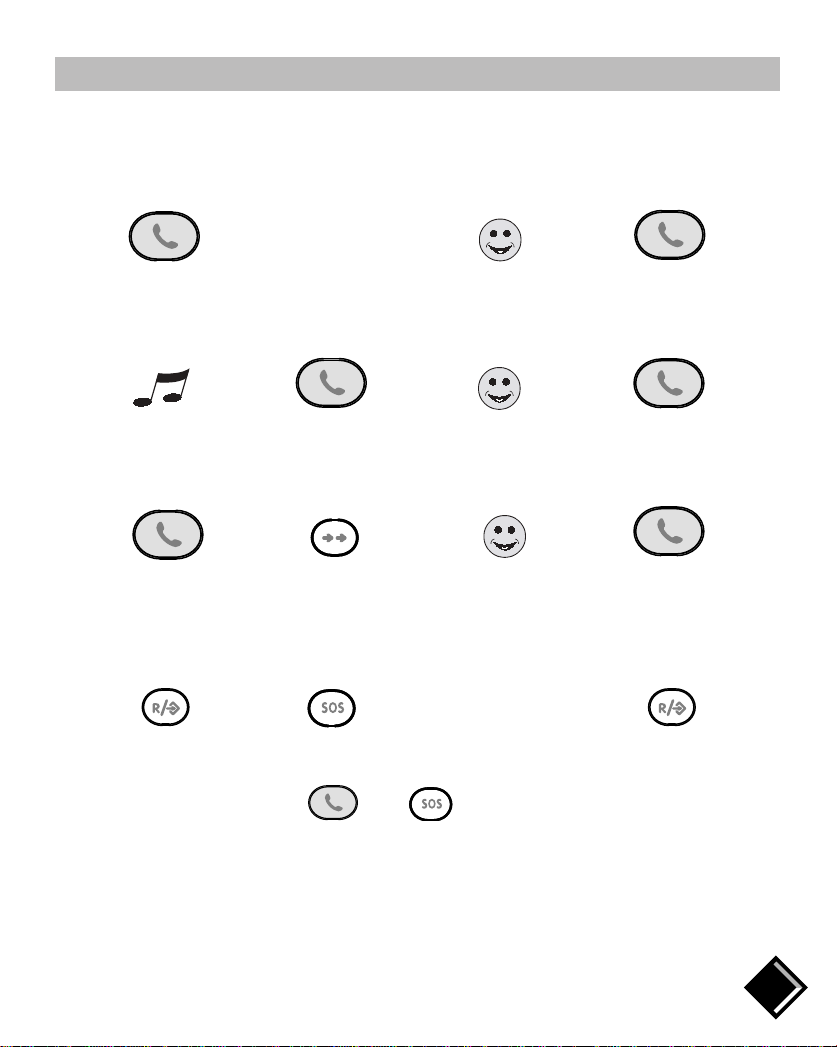
TO MAKE A CALL
Connect the line Speak Hang up
The duration of the call is displayed.
TO ANSWER A CALL
Your telephone rings Conned the line Speak Hang up
The duration of the call is displayed.
TO REDIAL THE LAST NUMBER
Connect the line Press the Speak Hang up
Redial key*
* The last telephone number dialled is displayed and the call made.
TO PROGRAMME A NUMBER FOR THE SOS KEY
To dial the 'SOS' number, press then , the number is dialled automatically.
ðDial the
number ðð
ðð ð
ðð ð
ðð
Dial the
number you
want to
register
ð
6
Programme Press Confirm
ang6120.qxd 31/05/99 15:36 Page 6
USING YOUR TELEPHONE
TO ADJUST THE EARPIECE VOLUME
Your telephones handset is equipped with adjustable earpiece volume (3 levels).
During a call:
Low Mid
High
TO PUT ON HOLD OR TRANSFER AN EXTERNAL CALL
During an external call:
If you have no additional handset, when you press the call is put on hold with music:
Press Caller on hold Call resumed
listening to music
If you have several handsets registered to the same base station, when you press you can
transfer the external call to another handset:
On handset n° 1* All the other On another handset,
handsets ring ** take the call or hang up
*Your correspondent can hear the music.
** If there is no reply, you can press again to return to the external call.
To make an internal call, press , pick up from another receiver or hang up with .
7
ð
ðð
ÇÃ
ðð
ang6120.qxd 31/05/99 15:36 Page 7
USING YOUR TELEPHONE
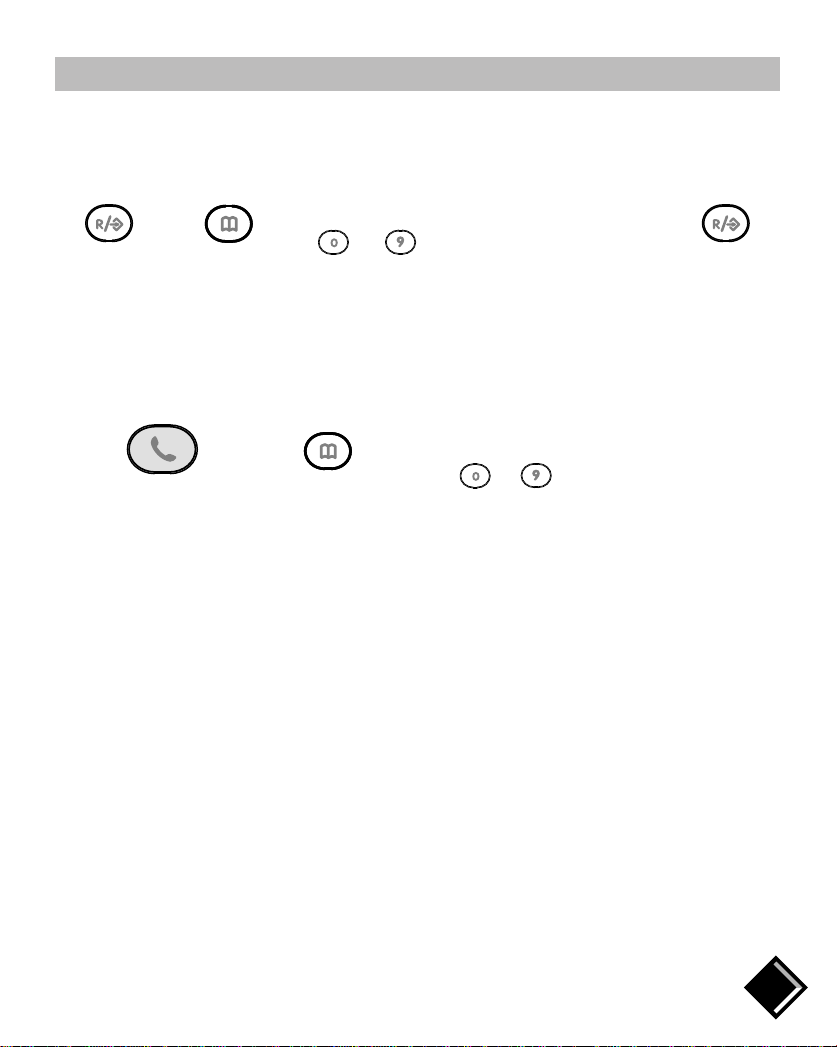
TO PROGRAMME A NUMBER IN THE MEMORY
You can programme 10 telephone numbers in the memories. Using this function, you can dial the
numbers you call regularly automatically.
* This digit corresponds to the number of the memory chosen.
If your handset does not emit the two confirmation "beeps", repeat the whole programming
operation.
TO CALL A NUMBER FROM THE MEMORY
8
ð ð
select a digit*
from ðBeepsð
Dial the
number to
be
programmed ð
Confirm
to
ðð ð The number is
dialled
Digit associated with
the number you want
to dial
to
Connect the line Memory
Programme
Memory
ang6120.qxd 31/05/99 15:36 Page 8
PROGRAMMING YOUR TELEPHONE
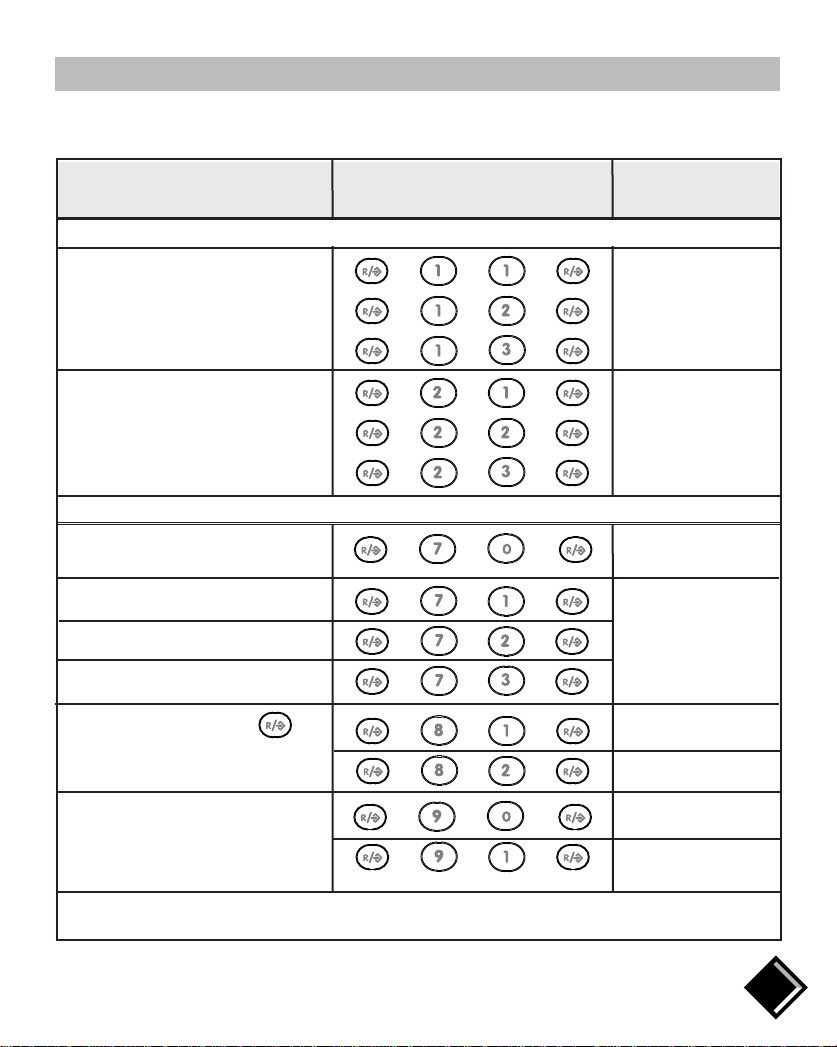
Your telephone has programmable functions. To change the settings, refer to the table below. The
options you choose will be saved even if there is a power cut. A beep confirms programming
changes.
9
KEY
FUNCTIONS COMBINATIONS COMMENTS
ACOUSTIC FUNCTIONS
++ +
+ + +
+ + +
Option no. 1
Option no. 2
Option no. 3
uMelodies
++ +
+ + +
+ + +
Low
Mid
High
uHandset melody volume
ADVANCED FUNCTIONS
Residential network
uSelect type of network
For selecting the
network when your
telephone is
connected to a
PABX
uPABX 1*
uPABX 2*
uPABX 3*
Short flash
Long flash
uChange type of flash **
(for use behind a PABX)
No pause
Pause after the first
digit dialled
uInsert an automatic pause
(for use behind a PABX)
* You may have to try several settings.
** Only for Singapore.
++ +
++ +
+ + +
+ + +
++ +
+ + +
++ +
+ + +
ang6120.qxd 31/05/99 15:36 Page 9