Session Choices, Relax:
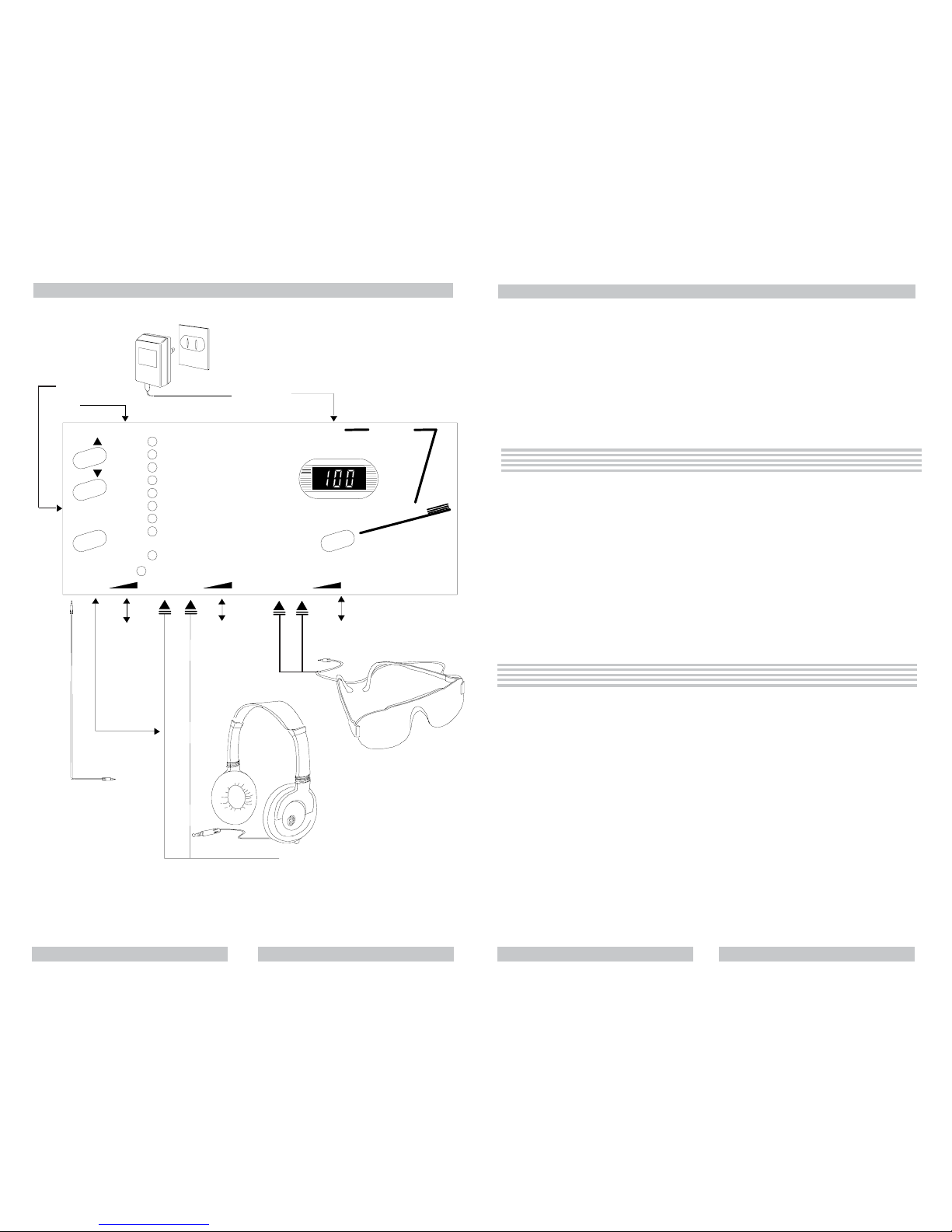
TIME
TONE
FREQ1
PITCH1
DUTY/PHASE
OPTIONS
SESSIONS
FUNCTIONS
FREQ2
PITCH2
RELAX
MEDITATE
SLEEP
LEARN
ENERGIZE
VISUALIZE
ENTER TAINMENT
SPECIAL
DISPLAY
1. Relax Break1. Relax Break
1. Relax Break1. Relax Break
1. Relax Break 15 min, pulsed surf, 5-21 Hz15 min, pulsed surf, 5-21 Hz
15 min, pulsed surf, 5-21 Hz15 min, pulsed surf, 5-21 Hz
15 min, pulsed surf, 5-21 Hz
Beginning at 21 Hertz and ramping to Theta over 3 minutes, remaining in Theta for 9
minutes, then returning to refreshed and energized awareness. Use instead of a coffee
break. (Sorry, Juan Valdez.).
2. Relax and Back2. Relax and Back
2. Relax and Back2. Relax and Back
2. Relax and Back 46 min, dual binaural beats 3-14 Hz46 min, dual binaural beats 3-14 Hz
46 min, dual binaural beats 3-14 Hz46 min, dual binaural beats 3-14 Hz
46 min, dual binaural beats 3-14 Hz
This session begins at 16 Hertz and ramps into the Alpha/Theta range for light to me-
dium relaxation, then on down to Delta for deep relaxation. It ends with a return to re-
laxed alertness.
3. Power Relaxation3. Power Relaxation
3. Power Relaxation3. Power Relaxation
3. Power Relaxation 15 min, dual binaural beats 10-11 Hz15 min, dual binaural beats 10-11 Hz
15 min, dual binaural beats 10-11 Hz15 min, dual binaural beats 10-11 Hz
15 min, dual binaural beats 10-11 Hz
This is relaxation for the physical body. Use after a workout or strenuous physical activity.
4. Stress Killer4. Stress Killer
4. Stress Killer4. Stress Killer
4. Stress Killer 36 min, dual binaural beats/surf 2-11 Hz36 min, dual binaural beats/surf 2-11 Hz
36 min, dual binaural beats/surf 2-11 Hz36 min, dual binaural beats/surf 2-11 Hz
36 min, dual binaural beats/surf 2-11 Hz
A combination of pleasing tones and alpha/theta relaxation for for relief from the feeling
of being stressed out or emotionally upset.
5. Gates of Calmness5. Gates of Calmness
5. Gates of Calmness5. Gates of Calmness
5. Gates of Calmness 27 min, mixed, 3.5-12 Hz27 min, mixed, 3.5-12 Hz
27 min, mixed, 3.5-12 Hz27 min, mixed, 3.5-12 Hz
27 min, mixed, 3.5-12 Hz
Classic Alpha/Theta relaxation in alternating modes. A “general purpose” relaxation
session.
6. Calmdown6. Calmdown
6. Calmdown6. Calmdown
6. Calmdown 5 min, dual binaural beats, 2.5-18 Hz5 min, dual binaural beats, 2.5-18 Hz
5 min, dual binaural beats, 2.5-18 Hz5 min, dual binaural beats, 2.5-18 Hz
5 min, dual binaural beats, 2.5-18 Hz
Calm your jangled nerves and reduce emotional strain with this rolling alpha/theta wave
soak. Use after a stressful and upsetting event as a quick balancer.
7. Daily Escape7. Daily Escape
7. Daily Escape7. Daily Escape
7. Daily Escape 10 min, dual binaural beats, 7-12 Hz10 min, dual binaural beats, 7-12 Hz
10 min, dual binaural beats, 7-12 Hz10 min, dual binaural beats, 7-12 Hz
10 min, dual binaural beats, 7-12 Hz
Take a break, relax, and escape from a stressful day. Great for a quick breaktime.
8. Timeout8. Timeout
8. Timeout8. Timeout
8. Timeout 5 min, dual binaural beats, 4-15 Hz5 min, dual binaural beats, 4-15 Hz
5 min, dual binaural beats, 4-15 Hz5 min, dual binaural beats, 4-15 Hz
5 min, dual binaural beats, 4-15 Hz
Take “Timeout” and experience a relaxed mood in just five minutes with calming rhythms
and soothing tones that ebb and flow.
9. W9. W
9. W9. W
9. Waves of Calmaves of Calm
aves of Calmaves of Calm
aves of Calm 10 min, dual binaural beats, 7.83-12 Hz10 min, dual binaural beats, 7.83-12 Hz
10 min, dual binaural beats, 7.83-12 Hz10 min, dual binaural beats, 7.83-12 Hz
10 min, dual binaural beats, 7.83-12 Hz
Experience waves of calmness with this peaceful, smooth and relaxing session. Use it
whenever you need to relax quickly.
Personal preference setting:
All parameters in the NP 100 have built-in default values that are in effect until you
change them. Some selections, can be distinctly personal and you may prefer some
value other than the built-in value. The PERSONAL PREFERENCE PROGRAMPERSONAL PREFERENCE PROGRAM
PERSONAL PREFERENCE PROGRAMPERSONAL PREFERENCE PROGRAM
PERSONAL PREFERENCE PROGRAM setting
is where the system remembers your choices.
You can select a session you like the best and enter it in the PPP setting and the
Nova Pro 100 will remember the setting and always come up with that session when
turned on. For example, if you want to select Relaxation session 3, just manipulate
SELECTSELECT
SELECTSELECT
SELECT, UPUP
UPUP
UP and DOWNDOWN
DOWNDOWN
DOWN in the PPP setting until those parameters display the values you
want. To reach the PPP setting press DOWNDOWN
DOWNDOWN
DOWN from P01 until PPPPPP
PPPPPP
PPP (Personal Preference
Program) is displayed. Then press PLPL
PLPL
PLAA
AA
AYY
YY
Y - the session category LEDLED
LEDLED
LED will blink. Use the
SELECT key to choose a session category and the UP and DOWN keys to scroll and
choose a session. Press PLAY when you have chosen the session you want as a default
session.
Two other important parameter choices in the personal preference setting are in the
options selection. In this selection you can disable the gentle on-off option. This also is
where you chose between the automatic power shut off being computer controlled or
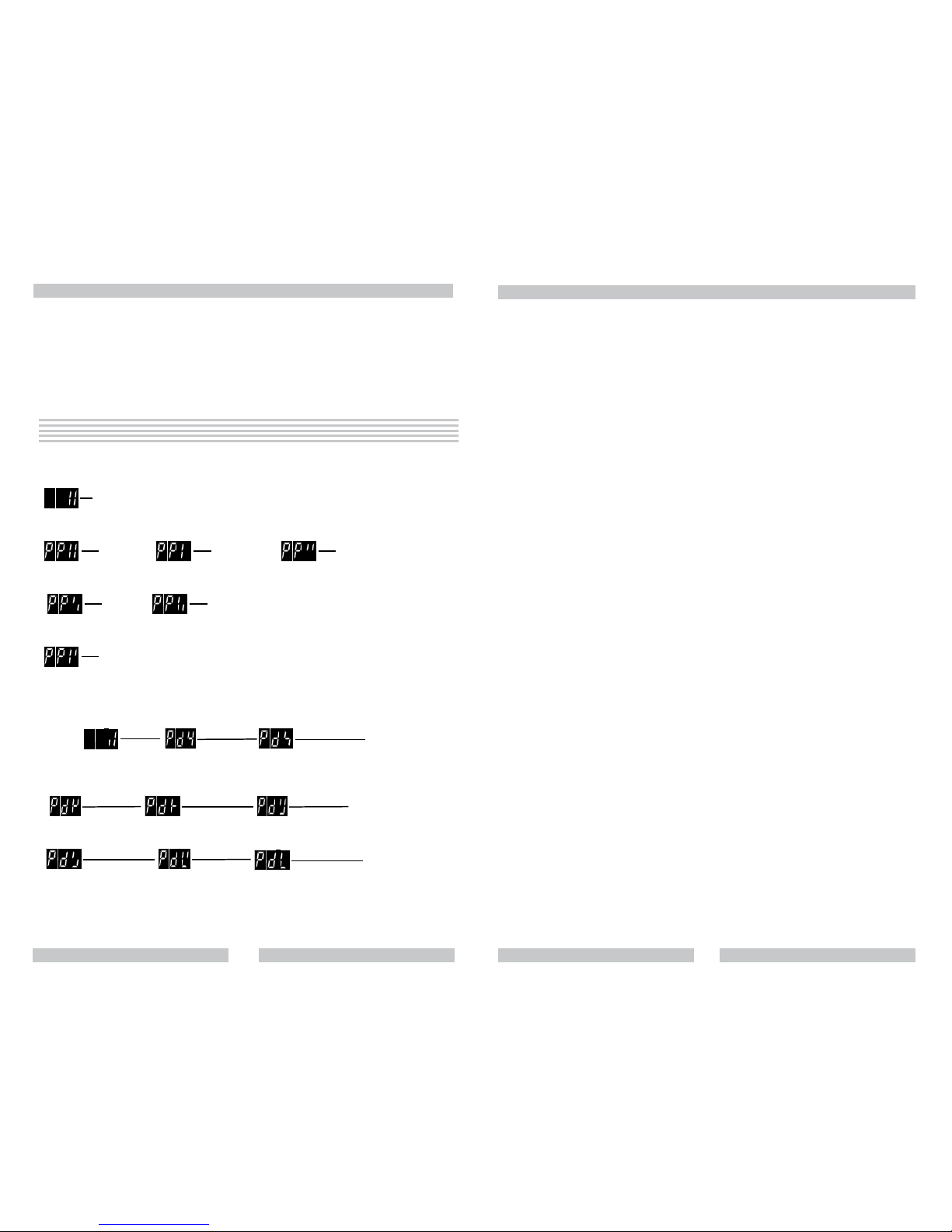
manually controlled. The following are the 4 choices:
Gentle on-off is ON, computer controlled power shut off.
Gentle on-off is ON, operator controlled power shut off.
Gentle on-off is OFF, computer controlled power shut off.
Gnetle on-off is OFF, operator controlled power shut off.
After session select, PPP allows you to also select parameters that take effect in the
manual mode “oPc” if you wish for these parameters to be remembered. When you
press enter after selecting a personal preference session the display will display the first
parameter you can change (FREQ 1). Use the UP and DOWN keys to cycle thru the
choices, press SELECT when the display has the choice you want. The display moves to
the next function that can be changed (the NP 100 will skip parameters that can’t be
changed). Press SELECT when you have made a choice and so on.
Select each parameter in turn that you want to control, and use UPUP
UPUP
UP, DOWNDOWN
DOWNDOWN
DOWN to get the
value that you want. These values take effect in the manual mode. You can cycle thru all
the parameters again with SELECTSELECT
SELECTSELECT
SELECT to be sure everything is the way you want it. Don’t
worry about mistakes, they are easy to correct. Double click PLPL
PLPL
PLAA
AA
AYY
YY
Y when done.
Your
personal preferences will be recorded, and will come up whenever the system is turned
on.
User tipUser tip
User tipUser tip
User tip::
::
: We often receive calls from customers asking if the built in sessions can
be changed via the PPP setting. The answer to that is no, this is what Light & Sound
Designer and the downloading capability are for. Rest assured, you can not change or
damage the built in sessions.
22 7