manuals.online logo
Brands
  1. Home
  2. •
  3. Brands
  4. •
  5. Pioneer
  6. •
  7. Recording Equipment
  8. •
  9. Pioneer BP-780 User manual

Pioneer BP-780 User manual

This manual suits for next models

4

Other Pioneer Recording Equipment manuals
Pioneer H-R99 KCU User manual

Pioneer

Pioneer H-R99 KCU User manual

Pioneer PDR-F10 User manual

Pioneer

Pioneer PDR-F10 User manual

Pioneer H-R100 User manual

Pioneer

Pioneer H-R100 User manual

Pioneer PDR-W37 Elite User manual

Pioneer

Pioneer PDR-W37 Elite User manual

Pioneer PDR-F10 User manual

Pioneer

Pioneer PDR-F10 User manual

Pioneer Elite PRB-19RW User manual

Pioneer

Pioneer Elite PRB-19RW User manual

Pioneer PDR-W739 User manual

Pioneer

Pioneer PDR-W739 User manual

Pioneer RG-9 User manual

Pioneer

Pioneer RG-9 User manual

Pioneer PD-R555RW User manual

Pioneer

Pioneer PD-R555RW User manual

Pioneer GR-408 User manual

Pioneer

Pioneer GR-408 User manual

Pioneer VS-60 User manual

Pioneer

Pioneer VS-60 User manual

Pioneer TORAIZ SP-16 User manual

Pioneer

Pioneer TORAIZ SP-16 User manual

Pioneer PDR-609 User manual

Pioneer

Pioneer PDR-609 User manual

Pioneer PDR-509 Quick start guide

Pioneer

Pioneer PDR-509 Quick start guide

Pioneer EQ-6000 User manual

Pioneer

Pioneer EQ-6000 User manual

Pioneer DEQ-P9 User manual

Pioneer

Pioneer DEQ-P9 User manual

Pioneer GR-555 User manual

Pioneer

Pioneer GR-555 User manual

Pioneer PDR-W839 User manual

Pioneer

Pioneer PDR-W839 User manual

Pioneer BP-880 User manual

Pioneer

Pioneer BP-880 User manual

Pioneer H-R99 KCU User manual

Pioneer

Pioneer H-R99 KCU User manual

Pioneer GR-470 User manual

Pioneer

Pioneer GR-470 User manual

Pioneer PDR-W839 User manual

Pioneer

Pioneer PDR-W839 User manual

Pioneer DC-777Z User manual

Pioneer

Pioneer DC-777Z User manual

Pioneer PD-R555RW User manual

Pioneer

Pioneer PD-R555RW User manual
Popular Recording Equipment manuals by other brands

ThermoFisher Scientific Dionex DRS 600 Installation checklist

ThermoFisher Scientific

ThermoFisher Scientific Dionex DRS 600 Installation checklist

Shure ANIUSB-Matrix user guide

Shure

Shure ANIUSB-Matrix user guide

Nady Audio HE-1 user guide

Nady Audio

Nady Audio HE-1 user guide

AUDAC APM 01 User manual & installation guide
AUDAC

AUDAC APM 01 User manual & installation guide
Teac GF-350 owner's manual

Teac

Teac GF-350 owner's manual

Fractal Audio MFC-101 MARK III owner's manual

Fractal Audio

Fractal Audio MFC-101 MARK III owner's manual

bmcm USB-OI16 manual

bmcm

bmcm USB-OI16 manual

HHB BurnIT CDR-830 Service manual

HHB

HHB BurnIT CDR-830 Service manual

GE VersaMax IC200CPUE05 manual

GE

GE VersaMax IC200CPUE05 manual

IntesisBox MH-RC-MBS-1 user manual

IntesisBox

IntesisBox MH-RC-MBS-1 user manual
Attero Tech unD4l user manual

Attero Tech

Attero Tech unD4l user manual

Sennheiser UI 765 instruction manual

Sennheiser

Sennheiser UI 765 instruction manual

Sony RCD-W1 Operating Instructions  (primary... Service manual

Sony

Sony RCD-W1 Operating Instructions (primary... Service manual

Roland Planet-P  MKS-10 owner's manual

Roland

Roland Planet-P MKS-10 owner's manual

Roland BOSS GT-PRO Turbostart

Roland

Roland BOSS GT-PRO Turbostart

8x8 Inc Valcom V-2001A manual

8x8 Inc

8x8 Inc Valcom V-2001A manual

Waves SUB Align user guide

Waves

Waves SUB Align user guide

Mitsubishi Electric MAC-334IF-E installation manual

Mitsubishi Electric

Mitsubishi Electric MAC-334IF-E installation manual

manuals.online logo
manuals.online logoBrands
  • About & Mission
  • Contact us
  • Privacy Policy
  • Terms and Conditions

Copyright 2025 Manuals.Online. All Rights Reserved.

Service
anual
GRAPHIC
EQUALIZER/AMPLIFIER
p-7
SPECIFICATIONS
Power
source
..........
14.4V
DC
(10.8—15.6V
allowable)
Grounding
system
..........
006
e
ee
eee
eee
ees
Negative
type
Max.
current
consumption
.............
eee
eee
eee
ees
8A
Dimensions
.............+55:
150(W)
X
50(H)
X
150(D)mm
[5-3/8(W)
X
2(H)
X
5-3/8
(D)in.]
Weidhtcic¢sensetecie
erat
ete
ceded
ae
1.3kg
(2.9lbs.)
Continuous
power
output
is
12W
per
channel
min.
into
4
ohms,
both
channels
driven
50
to
20,000Hz
with
no
more
than
5%
THD.
Maximum
power
output
..........
0-0.
eee
eee
20W
X
4
Load
impedance
.............---+-
49
(4—80
allowable)
Frequency
response
...............-.
20—50,000Hz
(+
3dB)
Signal-to-noise
ratio
.........
90dB
(IHF-A
network,
at
1W)
DistOnion:.
osc:
eccecy
et
tan
wet
ees
0.5%
(at
1.5W,
1kHz)
WY)
PIONEER
W19
ORDER
NO.
CRT
-481-0
US,
CA,
ES,
EW
Input
leVel!
ssc.
oereee
eee
wae
Me
COMPO:
7OnV/20k0
LINE
IN:
200m
V/15k.
BOOSTER:
3V/1200
Equalization
frequency
.......
6OHz,
125Hz,
250H:,
500Hz,
1kHz,
3.5kHz,
10kHz
Gall.
6.5.4
eee
con
ees
en
a
ae
Oe
ea
eae
een
a
OdB
Equalization
range
..........
0.6
e
eee
eee
eee
7%,
212dB
These
specifications
were
determined
and
are
presented
in
accordance
with
specification
standards
established
by
the
Ad
Hoc
Committee
of
Car
Stereo
Manufacturers.
Note:
Specifications
and
the
design
are
subject
to
possible
modifi-
cation
without
notice
due
to
improvements.
a
a
SS
eee
es
re
ng
PIONEER
ELECTRONIC
CORPORATION
4-1,
Meguro
1-Chome,
Meguro-ku,
Tokyo
153,
Japan
PIONEER
ELECTRONICS
[USA]
INC.
P.O.
Box
1760,
Long
Beach,
California
90801
U.S.A.
TEL:
(BOO)
421-1404,
(BOO)
237-0424
PIONEER
ELECTRONIC
[EUROPE]
N.V.
Keetbergiaan
1,2740
Beveren,
Belgium
TEL:
03/775:28:08
PIONEER
ELECTRONICS
AUSTRALIA
PTY.
LTD.
178-184
Boundary
Road,
Braeside,
Victoria
3195,
Australia
TEL:
(O03)
580-9911
ET
©
DEC.
1984
Printe#
in
Japan
CONTENTS
NAME
OF
PARTS
and
THE
IR
FUNCTION
oe
SS
SCHEMATIC
CIRCUIT
DIAGRAM
(BP-700/US,
CA;
ES)
oie
aiciiteitietecs:
1.PARTS
LOCATION
NOTE:
@
Heat
Sink
CNR-256
Power
P.C.
Board
Button
(DEFEAT)
ed
*
CAE-064
PARTS
LOCATION
.................cceceeee
enone
CONNECTION
po.
chowciiety
ness
eycan
ta
conceaes
CIRCUIT
DESCRIPTION
.........
eee.
DISASSEMBLY
csrincocdstespreteehoctae
cds:
phate
ices
1
7.
CONNECTION
DIAGRAM
(BP-780/US,
CA,
ES)
......
14
peleeuenetarse
2
8.
SCHEMATIC
CIRCUIT
DIAGRAM
(BP-780/EW)
......
17
Saati
4
9.
CONNECTION
DIAGRAM
(BP-780/EW)
..................
20
BAe
ned
hee
5
10.
EXPLODED
VIEW.
|
side
cdectssacaecauigtusedndeauciatuncehedeys
23
ee
ooeas
es
7
11,
ELECTRICAL
PARTS
LIST...
ec
cseeeeere
eee
20
12.
PACKING
MEHOD
'a
ci
ioe
Sp
essen
eed
seseodececiesareasnaes
29
iieghobeusaes
11
For
your
Parts
Stock
Control,
the
fast
moving
items
are
indicated
with
the
marks
x
x
ands.
|
*
*:
GENERALLY
MOVES
FASTER
THAN
x.
This
classification
shall
be
adjusted
by
each
distributor
because
it
depends
on
model
number,
temperature,
humidity,
etc.
:
aM...
Cord
(BP-780/US,
CA,
ES)
CDK-247
Heat
Sink
CNR-257
Grille
Assy
CXD-702
QUESTIONNAIRE
MODEL
One
Model
per
questionnaire
Dear
Servicer,
Thank
you
for
your
cooperation
in
the
post-sale
service
of
Pioneer
products.
This
questionnaire
is
used
as
a
tool
to
improve
the
serviceability
of
our
products
and
service
manuals.
Please
evaluate
this
model
and
service
manual
by
answering
the
following
questions.
Your
ideas
may
be
realized
in
our
future
products.
Your
answers
will
be
appreciated.
Thank
you.
PIONEER
ELECTRONIC
CORP.
T.
Nakagawa,
Manager,
Service
Section,
International
Division
SERVICING
EVALUATION
Circle
applicable
number:
Disassembly
/Re-assembly:
.
Circuit
Checks:
Replacement
of
Parts:
d.
Adjustment
(s):
1
2
3
£4*4
¥*§
*
If
(4)
or
(5)
was
circled,
please
be
specific.
e.
Your
advice,
opinion
or
ideas
related
to
servicing
this
product.
2.
SERVICE
MANUAL
EVALUATION
a.
Circuit
&
Mechanism
Description
b.
Circuit
Diagram
ae
_
3.
OTHER
|
Please
describe
other
areas
of
servicing
which
you
may
find
difficult.
Completed
by
:
Company
Name
:
Address
:
City/State/Zip
:
Please
send
this
form
filled
to
the
distributor
in
your
country.
Oe
YOU
COUNETY
s.
_
BP-7s0
2.
NAME
OF
PARTS
and
THEIR
FUNCTION
@
Equalizer
Switch
(DEFEAT)
Press
to
activate
the
equalizer
control
function
and
iluminate
the
indicator
on
the
equalizer
control
lever.
©
Lch
Level
Indicator
®
Rch
Level
Indicator
Green,
orange
and
red
indicators
illuminate
corresponding
to
the
left/right
output
levels.
Fig.
2
@
Equalizer
Control
Slides
up
and
down
to
allow
adjustment
to
suit
both
the
music
and
individual
tastes.
Pressing
the
equalizer
switch
causes
each
indicator
to
illuminate.
@
Fader
Control
Raising
the
lever
gradually
decreases
the
volume
of
the
rear
speakers,
while
lowering
it
gradually
decreases
the
volume
of
the
front
speakers.
Adjust
the
volume
of
the
front
and
rear
speakers.
3.CONNECTION
Connect
the
components
correctly
as
shown
in
the
diagram.
@
To
ensure
that
all
components
used
in
combination
with
@
Test-connect
all
components
before
securing
them
into
this
unit
operate
properly,
be
sure
to
wire
the
main
power
place.
Test-operate
your
entire
car
stereo
system
to
supply
cable
(red)
correctly
to
the
respectively
determined
ensure
that
there
are
no
faulty
wiring
connections
be-
points.
Failure
to
do
so
or
errors
in
this
process
will
result
tween
this
unit
and
the
rest
of
your
car
stereo
system.
in
total
inoperation.
@
Be
sure
to
connect
only
a
single
component
as
shown
in
@
Be
sure
to
properly
connect
the
color
coded
leads.
Failure
the
connection
diagram.
If
two
or
more
components
are
to
do
so
can
cause
malfunctions.
connected,
internal
circuitry
may
be
damaged
or
an
acci-
dent
may
occur.
|
Input
Selector
|
@
When
using
this
unit
in
combination
with
a
car
stereo
Be
sure
to
set
the
input
selector
before
wiring.
(Fig.
3)
equipped
with
pin
jacks,
see
the
section
entitled
‘‘When
combined
with
a
car
stereo
with
pin
jacks”.
@
Speakers
connected
to
this
unit
must
be
high
power
type
with
over
20W
maximum
input
power
and
have
impe-
dance
between
4
and
8
ohms.
Be
aware
of
the
fact
that
using
a
speaker
other
than
the
one
specified
can
cause
the
speaker
to
be
damaged.
©
A
special
BPTL
circuit
is
used
to
be
sure
that
you
do
not
connect
the
speaker
directly
to
ground
nor
join
the
left
and
right
speaker
(—)
leads.
@
For
detailed
information
concerning
connections
between
different
components
and
this
unit
consult
their
respective
COMPO:
When
connecting
the
unit
with
a
component
car
instruction
manuals
and
follow
those
recommendations
:
stereo
|
precisely.
BOOSTER:
When
connecting
the
unit
with
a
reguiar
car
@
Be
sure
not
to
remove
the
cap
on
the
red
lead
(female
eteren
plug)
of
this
unit
when
not
in
use
to
prevent
shorting.
PIN
JACK:
When
connecting
the
unit
with
a
car
stereo
with
®
Wire
all
connecting
cords
so
that
they
stay
well
clear
of
pin
jacks
high-temperature
areas
such
as
the
heater
exhaust
port.
Fig.
3
ae.
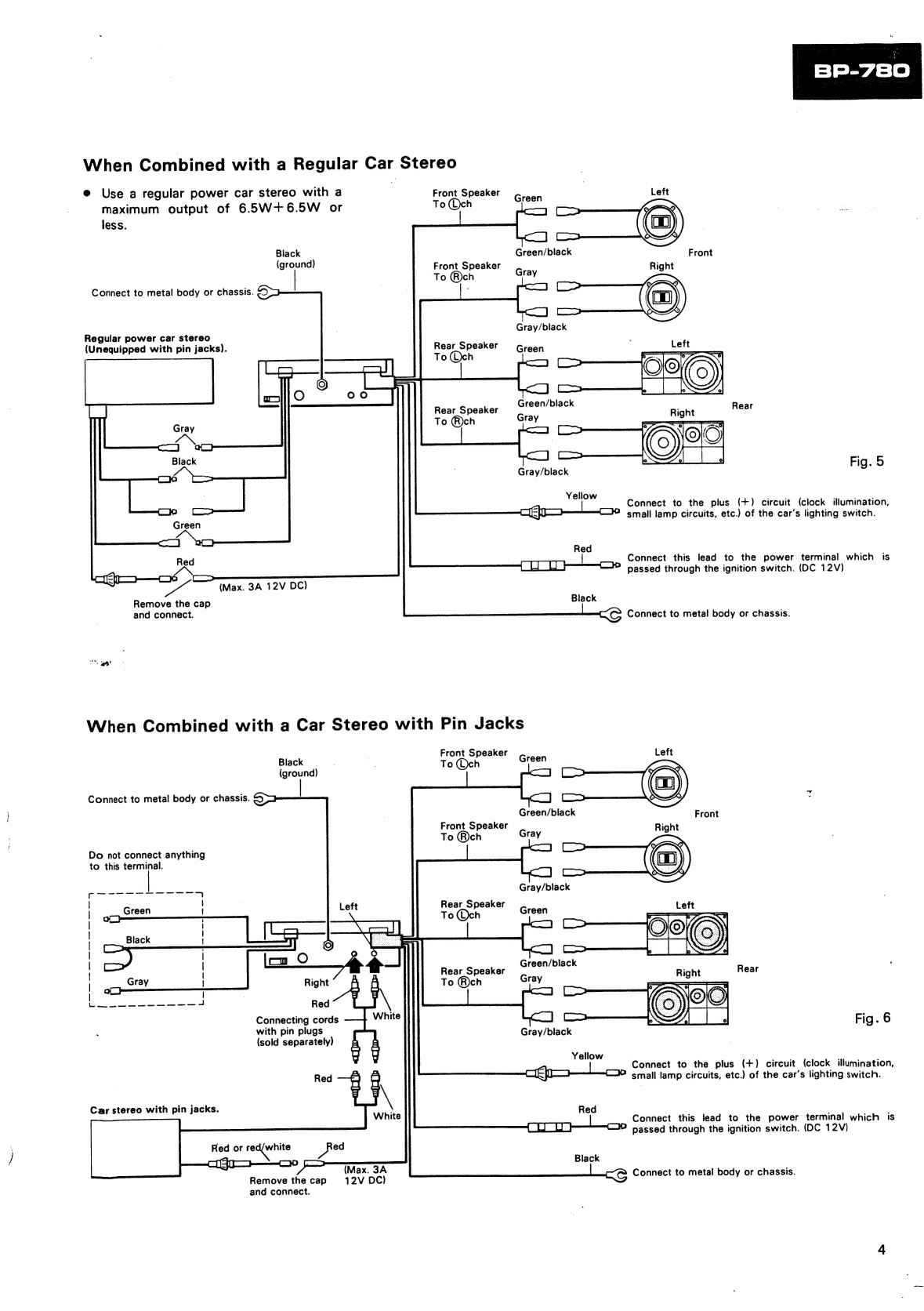
When
Combined
with
a
Component
Car
Stereo
Front
Speaker
Grech
Left
Be
sure
not
to
10
Och
remove
the
cap.
Green/black
Ea
ole
eee
|
Front
Speaker
Gra
Right
fens
|
Red
|
To
@ch
Y
|
es
ed
=
Green
—
J
oo
|
I
|
Black
|
Gray/black
|
Rear
Speaker
|
—_
To
Och
!
|
A
pee
ee
ire
8
|
i
Gray
|
ee
|
|
eg
aa
aes
ellen
[on
2
—
Green/black
*
Rear
Speaker
To
®ch
Gray
Do
not
connect
anything
to
this
terminal.
Gray/black
;
Fag.
4
Component
car
stereo
oad
Connect
to
the
plus
(+)
circuit
(clock
illmiry
ation,
cassette
deck
I
"
smail
lamp
circuits,
etc.)
of
the
car’s
lighting
wit
ch.
Red
.
i
oo
—}y
Connect
this
lead
to
the
power
terminal
which
is
passed
through
the
ignition
switch.
(DC
12V}
Black
>
(ground)
Black
Connect
to
metal
body
or
chassis.
wie
Connect
to
metal
body
or
chassis.
When
Combined
with
a
Regular
Car
Stereo
e@
Use
a
regular
power
car
stereo
with
a
Front
Speaker
maximum
output
of
6.5W+6.5W
or
To
@©ch
less.
Black
(ground)
Front
Speaker
To
®@ch
Connect
to
metal
body
or
chassis.
;
Regular
power
car
stereo
(Unequipped
with
pin
jacks).
Rear
Speaker
To(@ch
Rear
Speaker
To
®ch
>
(Max.
3A
12V
DC)
Remove
the
cap
and
connect.
Front
Fig.
5
Gray/black
Yellow
ae
p
ae
Connect
to
the
plus
(+)
circuit
(clock
illumination,
Cie
C2
small
lamp
circuits,
etc.)
of
the
car’s
lighting
switch.
Red
Beas
oe
=_
Connect
this
lead
to
the
power
terminal
which
is
passed
through
the
ignition
switch.
(DC
12V)
Black
<C
Connect
to
metal
body
or
chassis.
When
Combined
with
a
Car
Stereo
with
Pin
Jacks
Front
Speaker
Black
;
oa
T
h
(ground)
oe
cm
O
Rear
Speaker
ight
To
®ch
Red
Connecting
cords
with
pin
plugs
(sold
separately)
White
Red
Car
stereo
with
pin
jacks.
Red
or
reacertiite
cyas0—
~
ed
Remove
the
cap
and
connect.
(Max.
3A
12V
DC)
Connect
to
metal
body
or
chassis.
Front
Speaker
To
®ch
Do
not
connect
anything
to
this
ae
SaaS
Se
eae
7
:
Green
|
Left
Aba
ti
|
wal
|
|
Vo
|
|
|
|
=
va
Fig.
6
Gray/black
Yellow
Connect
to
the
plus
(+)
circuit
(clock
illumination,
ceo
Cc
smail
lamp
circuits,
etc.)
of
the
car's
lighting
switch.
Red
Connect
this
lead
to
the
power
terminal
which
is
T
ty
ty
:
[0
passed
through
the
ignition
switch.
(DC
12V)
Black
<@
Connect
to
metal
body
or
chassis.
4.CIRCUIT
DESCRITION
e
Block
Diagram
SOE
DI
3inw
|?
i
dWV
Y3MOd
Yuva
1
4c
7
zor
ol
:
|)
8
y3nNV3adS
'
yV3u
OL
,
!
44O1
7
YyaNVads
ie
LNOUS
OL
Noo
|
w—}—
HOLIMS|
!
101
oO}
iv3330|
&
a
Be
é
2s
dWVY
Y3MOd
LNOYS
vOE'COE
ZOE
DI
A882
at
HOLIMS
yl
Ga
SO€JI
Av
vi
HOLIMS
tom
F
OL
6+
80iI0
SoEed
Sp.
LT
NO
JLNW
STE
rept
tee
ey
ZHMOl
*HAGSE
ZHMI
ZHOOS
ZHOSZ
ZHGZI
ZHO9
Y3SZIIVNOS
2
€07'207
102‘
Eol'
ZoOl'IOl
D1
Abovl
8+
HOLIMS
Yt
‘Gaol
|
Ga
Y3SAING
031
YOLVYVdINOD
cOE
JI
dWV
»
Hig.
7
NI4You
—
(S)
NI
¥31S008
HOLIMS
3GOW
IS
se
Ss
acs
Se
oe
ee
a
J
Kuo
lepOW
SA/VYSN
OBL
-ds
e
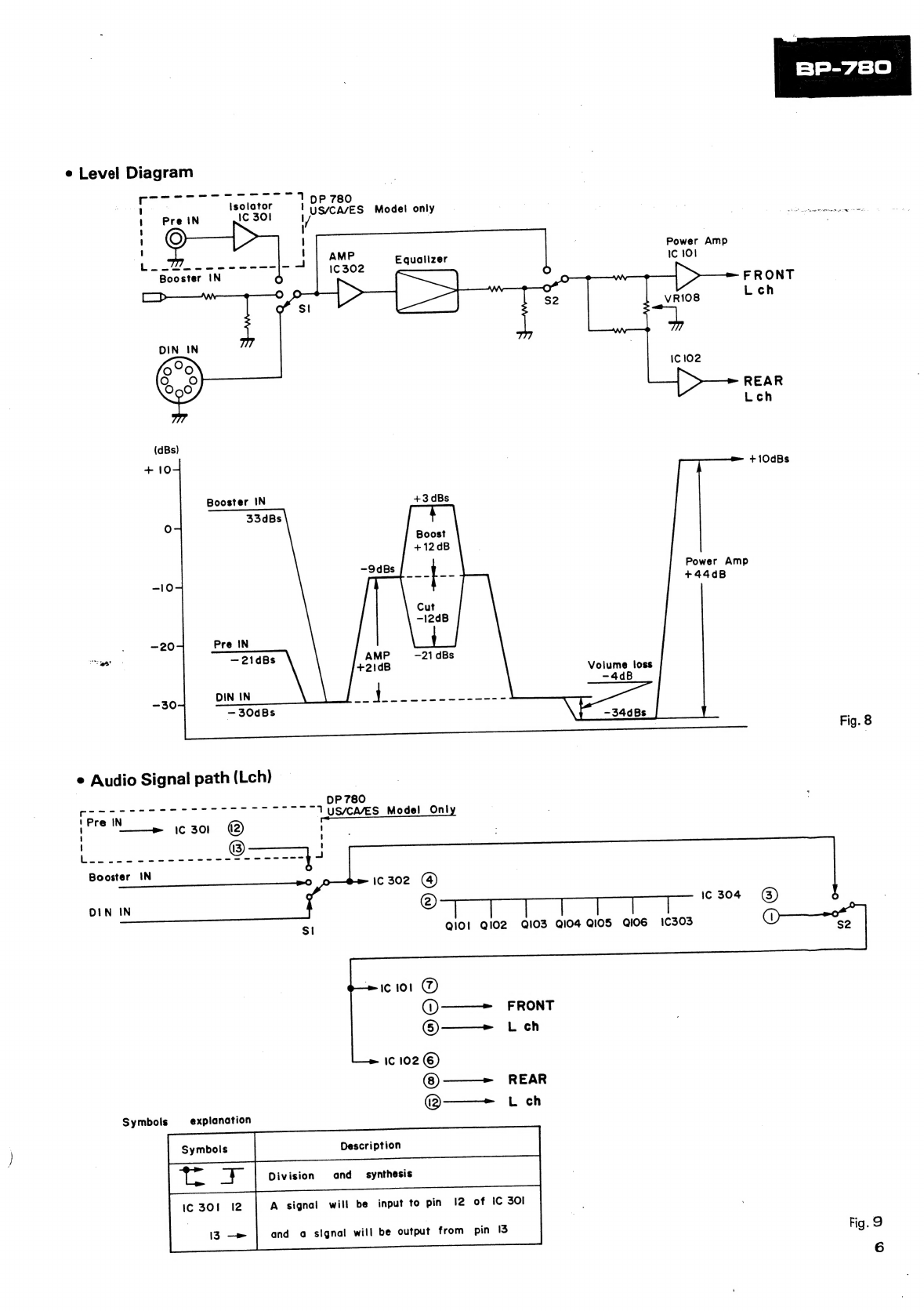
Level
Diagram
——_—ww
ww
wm
wm
eH
KKK
5
s
=
;
Isolator
OP
780
US/CA/ES
Model
only
AMP
|
I
{
cee
Equalizer
Ic
302
Booster
IN
ee
"
=
S|
pe,
DIN
IN
88
O60
(dBs)
+
10
Booster
IN
33dBs
Oo
-9dBs
-10
:
-20
Pre
IN
ant
—21dBs
AMP
°
Audio
Signal
path
(Lch)
©
DP
780
1US/CAVES
Model
Only
Booster
IN
DIN
IN
ic
102
6)
(6)
———>
_
REAR
(2——>
_L
ch
explanation
Division
and
synthesis
A
signal
will
be
input
to
pin
12
of
IC
30l
Symbols
and
a
signal
will
be
output
from
pin
13
QIO!
Q102
QIO3
Qi04
Qi0s
Qi0G
1C303
Power
Amp
IC
101
ae
>
FRONT
S2
VRI08
Loh
Ic
102
Pe.
REAR
Lech
+iOdBs
Power
Amp
+44dB
Volume
loss
B
Fig.
8
Fig.
9
5.DISASSEMBLY
e
Removal
of
Case
1.
The
case
can
be
removed
by
removing
the
four
screws
labled
“A.”
Fig.
10
¢
Removal
of
Chassis
1.
The
Chassis
can
be
removed
by
removing
the
five
screws
labeled
“B”
and
the
two
rivets.
Fig.
11