// 9
ENGLISH / Connecting your subwoofer
We recommend that you read the instruction manual of your stereo amplifier or AV-receiver carefully before
connecting your BassStation.
Please also see Fig. 2 in this instruction manual.
First switch off the amplifier/receiver and all equipment before connecting your BassStation.
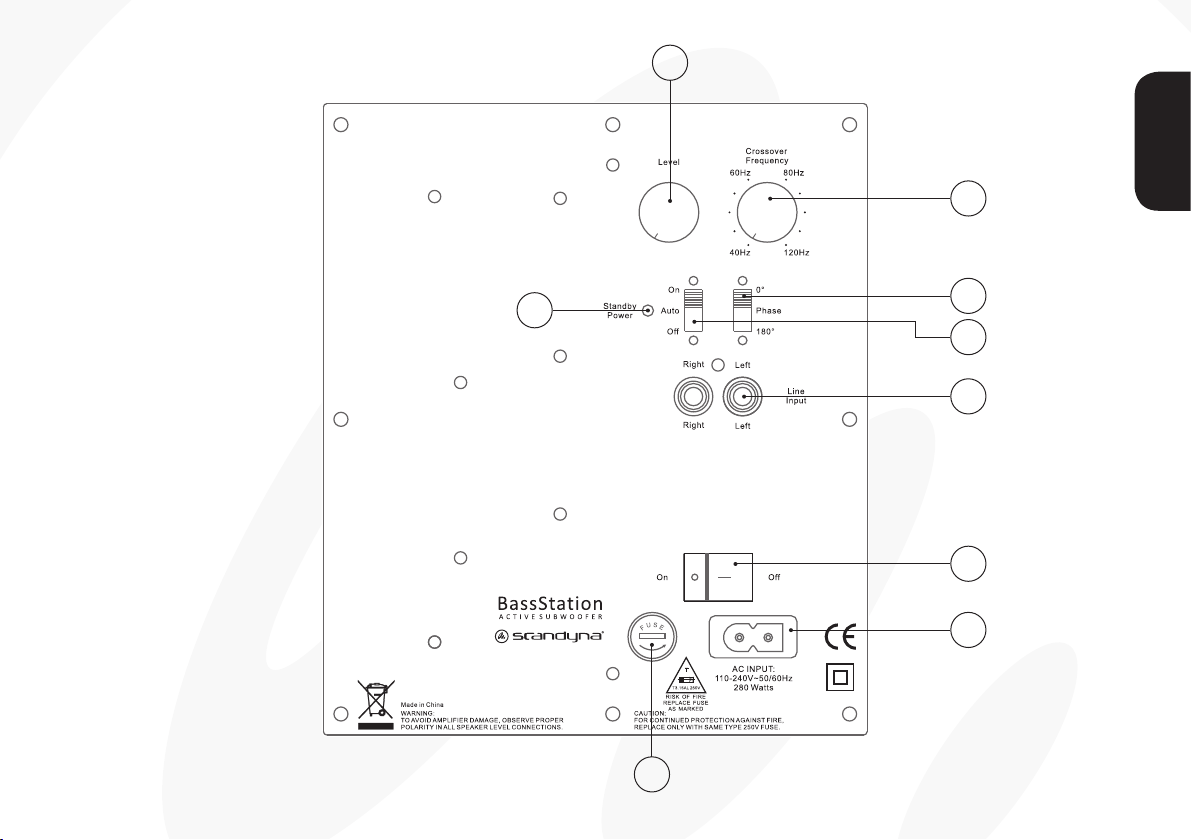
Connect the BassStation mains power cable to the socket (1) and to the mains voltage and push the POWER
ON/OFF button (2) to ON position, the indicator lamp POWER LED (8) will now glow green and the
BassStation is active and ready to be used.
The BassStation has a built-in AUTO STANDBY (4) function.
To activate the AUTO STANDY function, set the switch (4) AUTO and after approximately 5-10 minutes
without any input signal from the amplifier/receiver, the BassStation will automatically switch off and the
indicator lamp POWER LED (8) will glow red.
When an input signal is detected, the BassStation will become active and the indicator lamp POWER LED (8)
will glow green.
Should you wish to bypass the AUTO STANDBY function set the switch (4) to ON position and the
BassStation must now be turned on/off on the power switch (2).
Setting volume, frequency and phase
The volume, frequency and phase (controls 5, 6 & 7) can be adjusted on the rearpanel and we recommend
that you adjust the settings to your liking – try with different music and films. If you want more detailed
information on these control functions, we invite you to visit our homepage; www.podspeakers.dk
ENGLISH