manuals.online logo
Brands
  1. Home
  2. •
  3. Brands
  4. •
  5. Polygroup
  6. •
  7. Artificial Pine Tree
  8. •
  9. Polygroup FL18 User manual

Polygroup FL18 User manual

This manual suits for next models

1

Other Polygroup Artificial Pine Tree manuals

Polygroup Home Heritage TG90M3W92D00 User manual

Polygroup

Polygroup Home Heritage TG90M3W92D00 User manual

Polygroup AR-P17004A User manual

Polygroup

Polygroup AR-P17004A User manual

Polygroup TG90P4826D31 User manual

Polygroup

Polygroup TG90P4826D31 User manual

Polygroup TG76P4751P01 User manual

Polygroup

Polygroup TG76P4751P01 User manual

Polygroup TV40M4F63C03 User manual

Polygroup

Polygroup TV40M4F63C03 User manual

Polygroup TG66EH035S01 User manual

Polygroup

Polygroup TG66EH035S01 User manual

Polygroup TG90P4724D01 User manual

Polygroup

Polygroup TG90P4724D01 User manual

Polygroup TV90M3AHYC00 User manual

Polygroup

Polygroup TV90M3AHYC00 User manual

Polygroup Evergreen Classics TG76P4B26D00 User manual

Polygroup

Polygroup Evergreen Classics TG76P4B26D00 User manual

Polygroup TV70M4G26C02 User manual

Polygroup

Polygroup TV70M4G26C02 User manual

Polygroup TG70CN207C07 User manual

Polygroup

Polygroup TG70CN207C07 User manual

Polygroup TG76M6010X00 User manual

Polygroup

Polygroup TG76M6010X00 User manual

Polygroup TG76M2I41L01 User manual

Polygroup

Polygroup TG76M2I41L01 User manual

Polygroup TGC000NY1L03 User manual

Polygroup

Polygroup TGC000NY1L03 User manual

Polygroup TG66GY039D00 User manual

Polygroup

Polygroup TG66GY039D00 User manual

Polygroup TG76P3793L05 User manual

Polygroup

Polygroup TG76P3793L05 User manual

Polygroup DAP-T-116PA/100CL-B User manual

Polygroup

Polygroup DAP-T-116PA/100CL-B User manual

Polygroup Ashland TG76M4G64D02 User manual

Polygroup

Polygroup Ashland TG76M4G64D02 User manual

Polygroup TG76M4I41X01 User manual

Polygroup

Polygroup TG76M4I41X01 User manual

Polygroup TG90P3693L00 User manual

Polygroup

Polygroup TG90P3693L00 User manual

Polygroup Corona TG50ON041P00 User manual

Polygroup

Polygroup Corona TG50ON041P00 User manual

Polygroup TG70M4D84C03 User manual

Polygroup

Polygroup TG70M4D84C03 User manual

Polygroup TG76M2T20D00 User manual

Polygroup

Polygroup TG76M2T20D00 User manual

Polygroup TV70M3AMGC00 User manual

Polygroup

Polygroup TV70M3AMGC00 User manual

Popular Artificial Pine Tree manuals by other brands
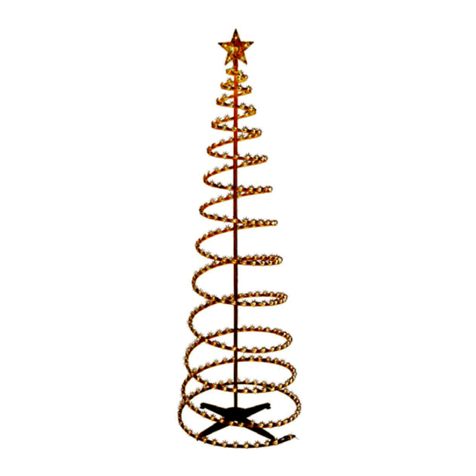
Home Accents Holiday TG76P4C28L00 quick start guide

Home Accents Holiday

Home Accents Holiday TG76P4C28L00 quick start guide

Trim a Home TY-S6-250L owner's manual

Trim a Home

Trim a Home TY-S6-250L owner's manual

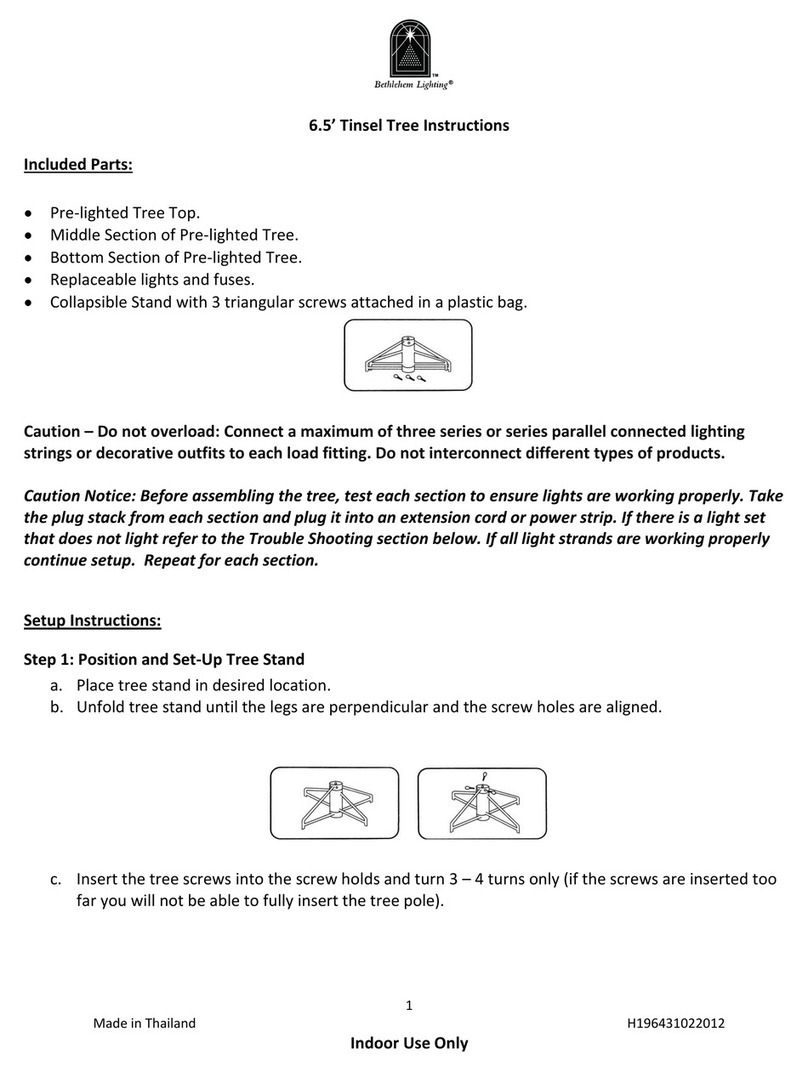
BETHLEHEM LIGHTING 6.5’ Tinsel Tree instructions

BETHLEHEM LIGHTING

BETHLEHEM LIGHTING 6.5’ Tinsel Tree instructions

Home Accents Holiday TG76P3D93L08 manual

Home Accents Holiday

Home Accents Holiday TG76P3D93L08 manual

Costway CM23595US user manual

Costway

Costway CM23595US user manual

Holiday Living TV40EH339C01 manual

Holiday Living

Holiday Living TV40EH339C01 manual

CASARIA DBGB001 instructions

CASARIA

CASARIA DBGB001 instructions

Home Accents Holiday TG76M3W89C00 manual

Home Accents Holiday

Home Accents Holiday TG76M3W89C00 manual

CASARIA 104006 instructions

CASARIA

CASARIA 104006 instructions

Home Accents Holiday TG76P4C15D03 Assembly instructions
Home Accents Holiday

Home Accents Holiday TG76P4C15D03 Assembly instructions

Costway CM24135 user manual

Costway

Costway CM24135 user manual

Home Accents Holiday TV46M2L46L04 quick start guide

Home Accents Holiday

Home Accents Holiday TV46M2L46L04 quick start guide

NSH NORDIC 780-029 manual

NSH NORDIC

NSH NORDIC 780-029 manual

Home Accents Holiday TG66M2AE4L00 quick start guide

Home Accents Holiday

Home Accents Holiday TG66M2AE4L00 quick start guide

Honeywell HW-T12332 user manual

Honeywell

Honeywell HW-T12332 user manual

Costco 1487008 product manual

Costco

Costco 1487008 product manual

Home Accents Holiday TG90P3F28D00 manual
Home Accents Holiday

Home Accents Holiday TG90P3F28D00 manual

Home Accents Holiday TY-S46-C Use and care guide

Home Accents Holiday

Home Accents Holiday TY-S46-C Use and care guide

manuals.online logo
manuals.online logoBrands
  • About & Mission
  • Contact us
  • Privacy Policy
  • Terms and Conditions

Copyright 2025 Manuals.Online. All Rights Reserved.

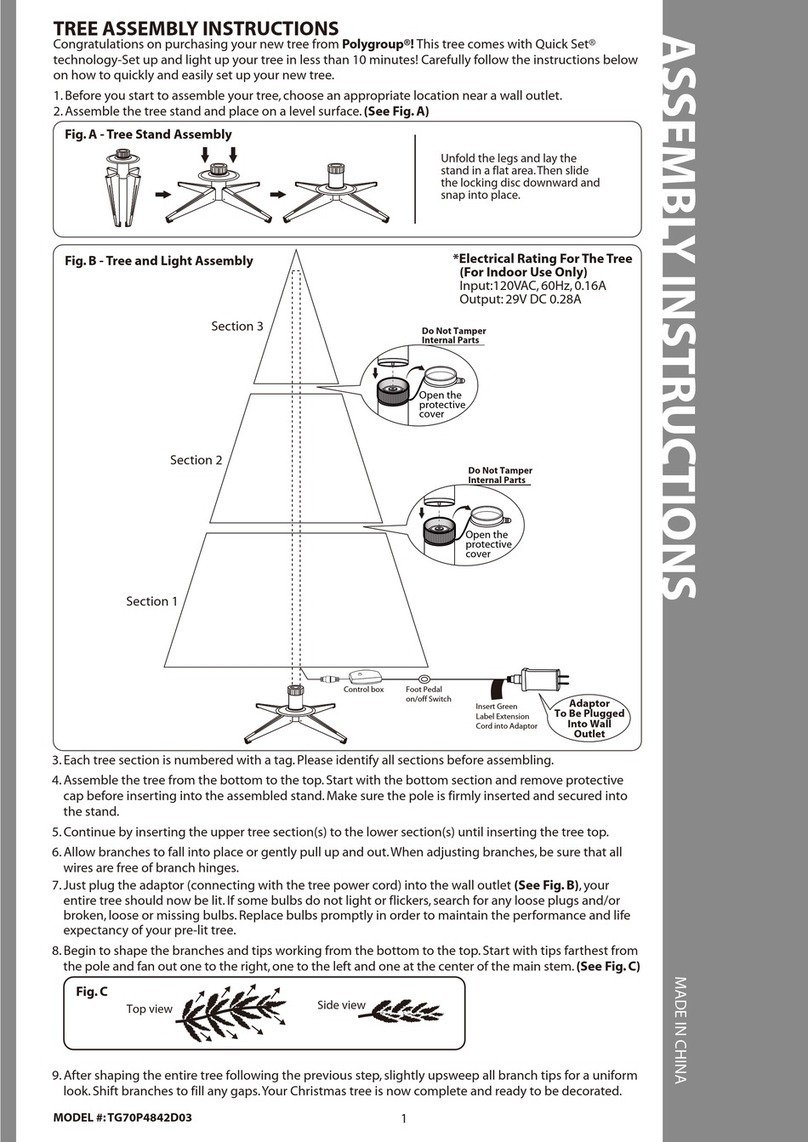
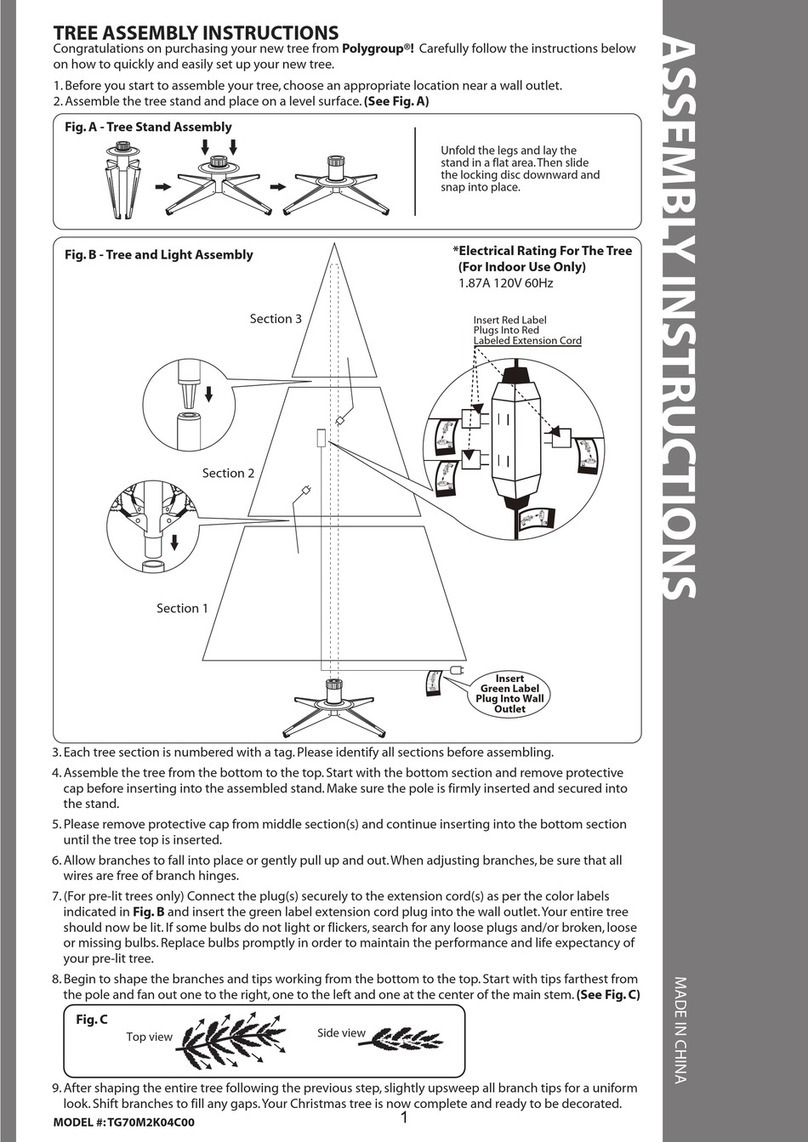
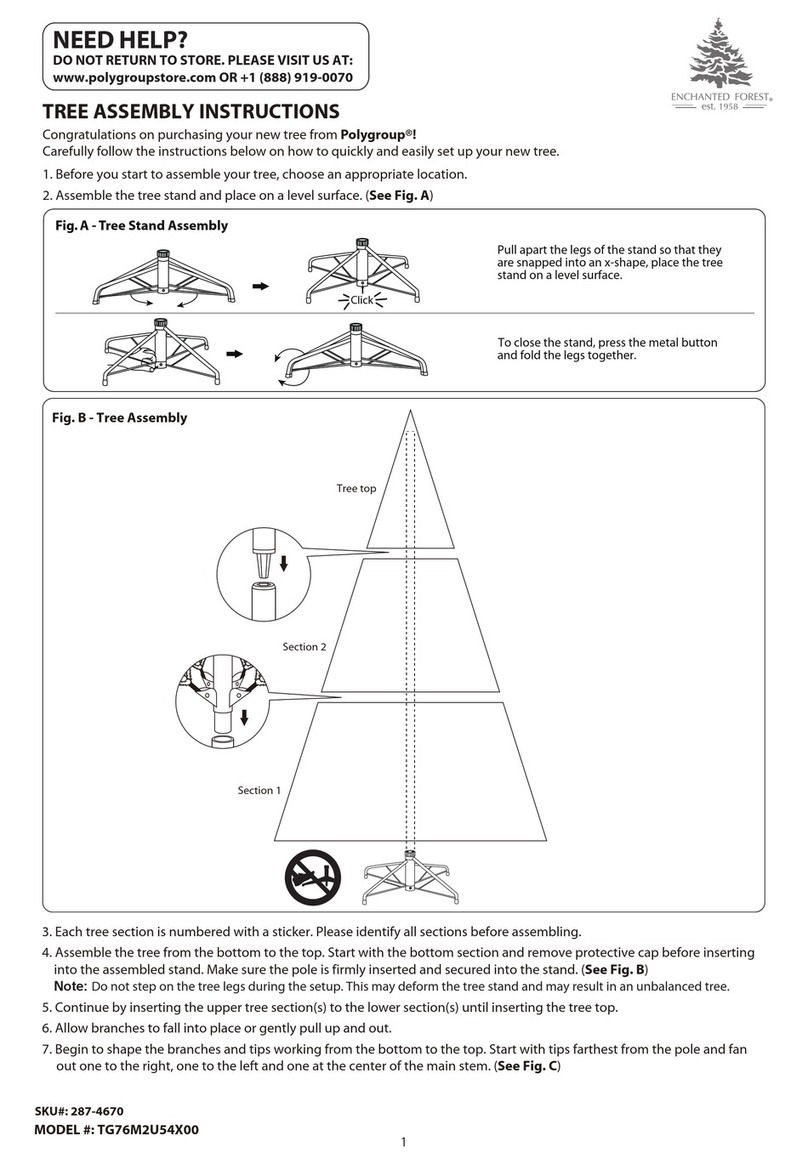
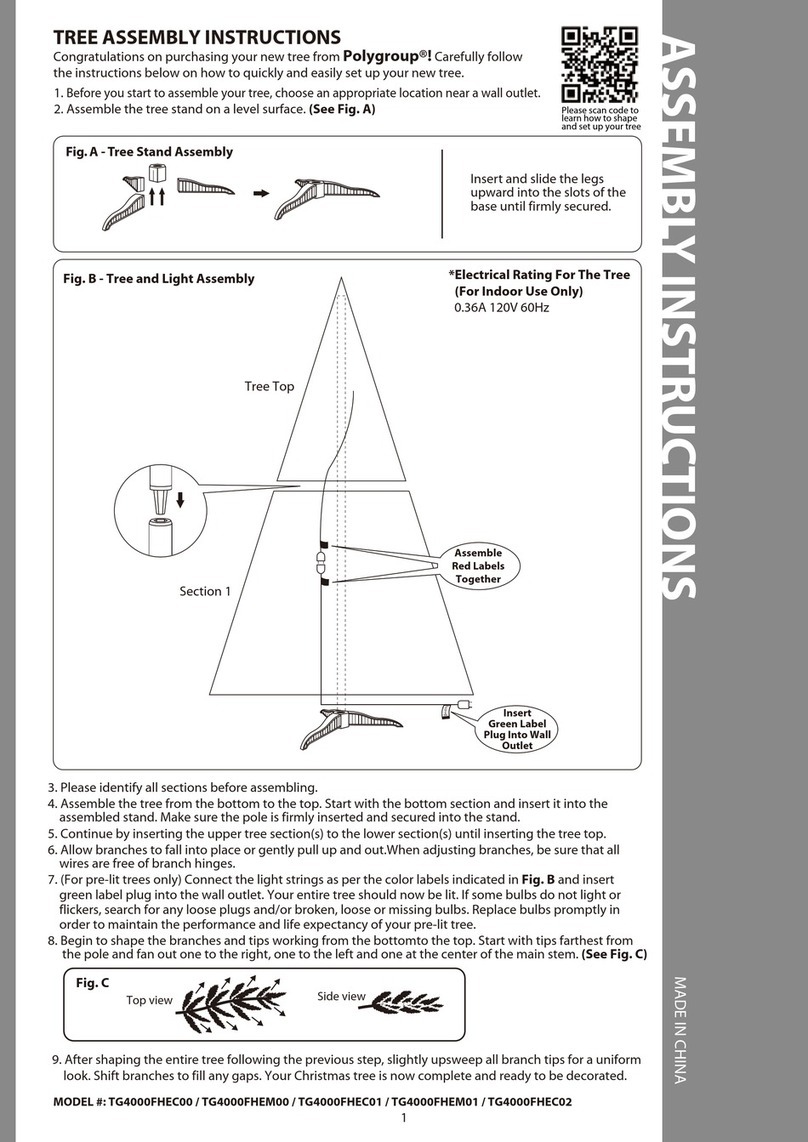
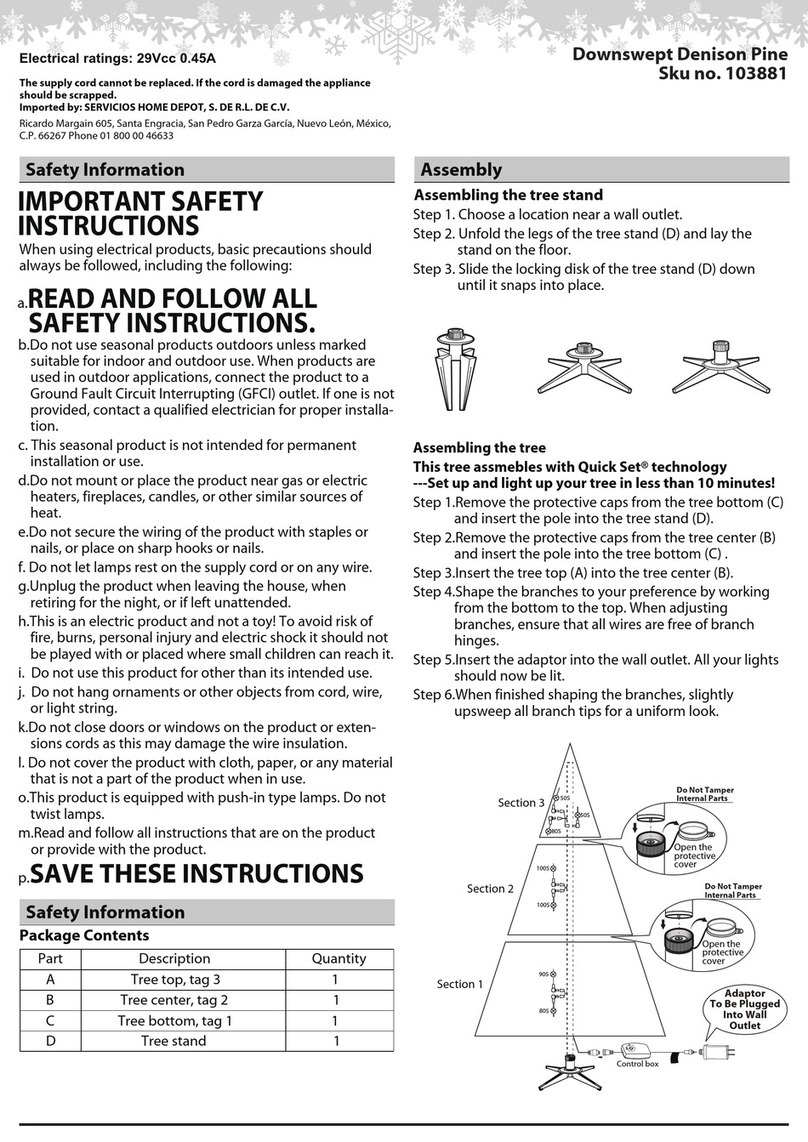
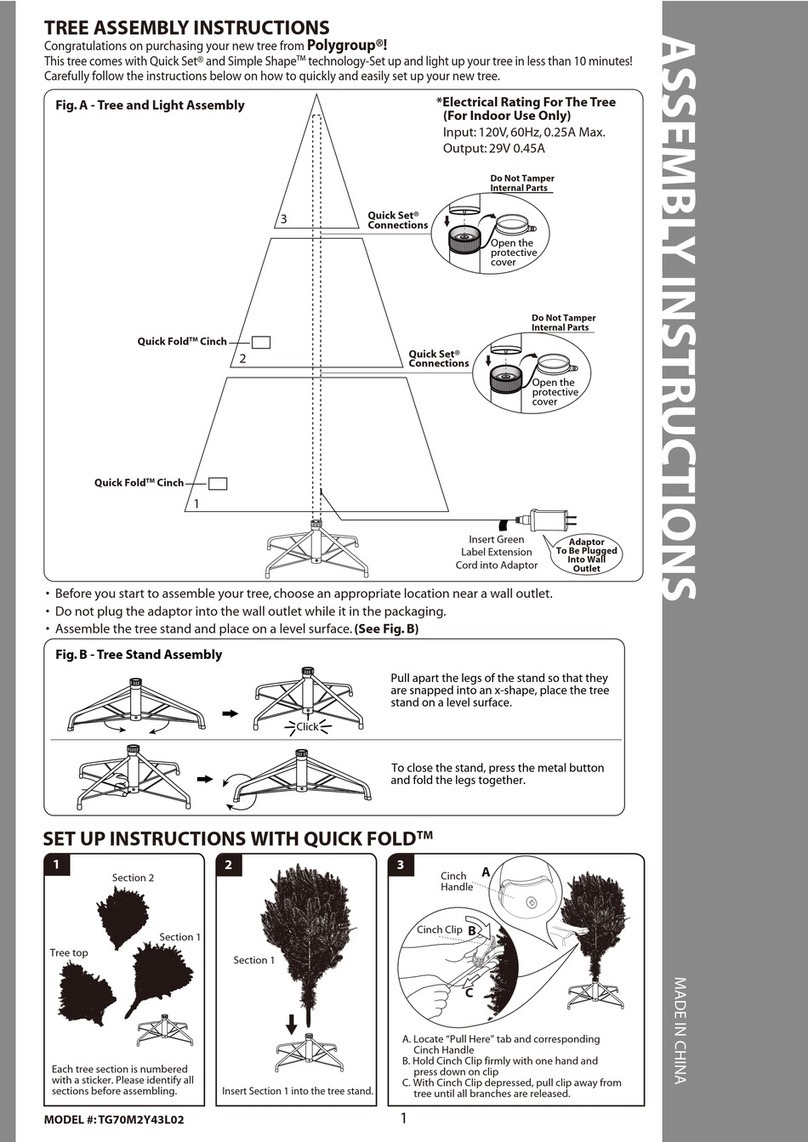
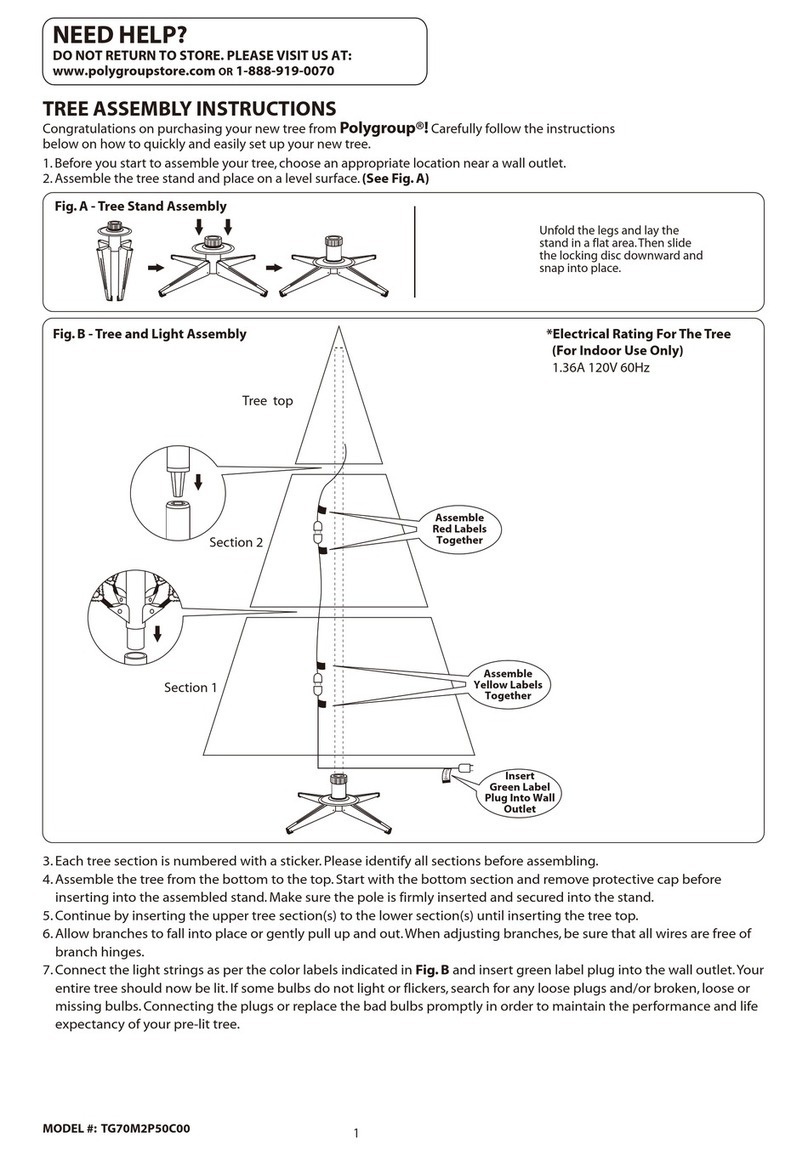
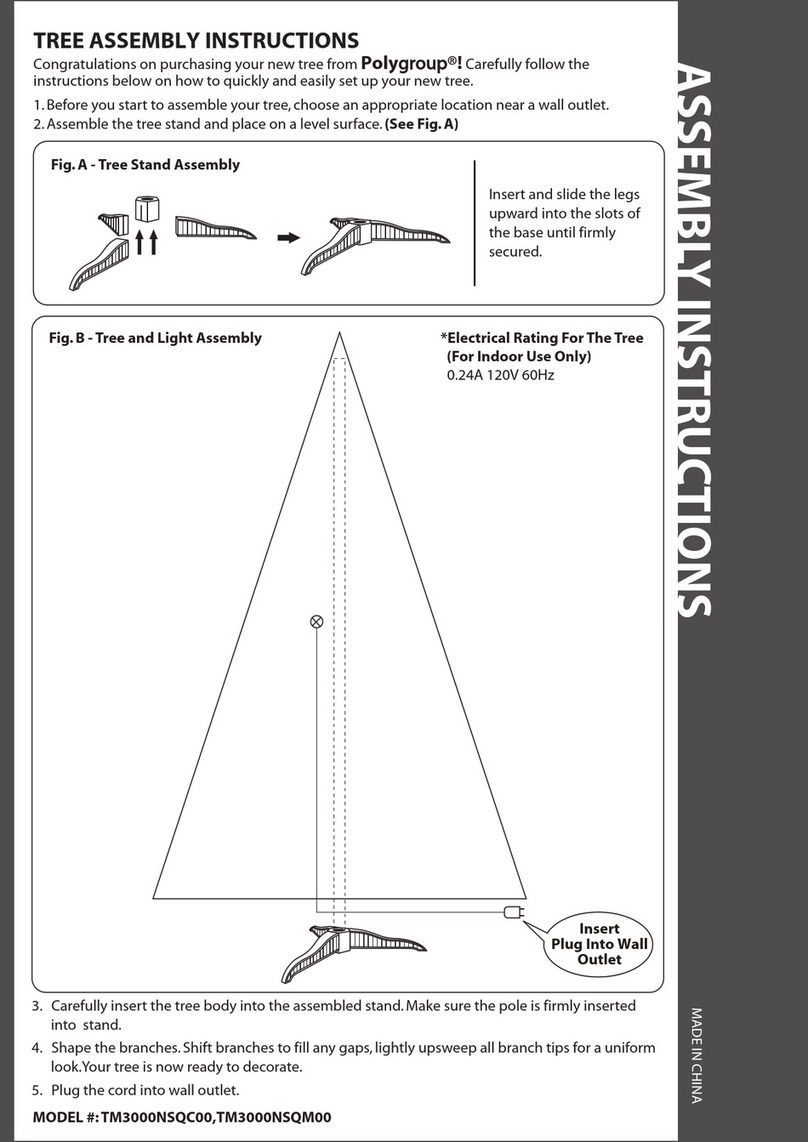
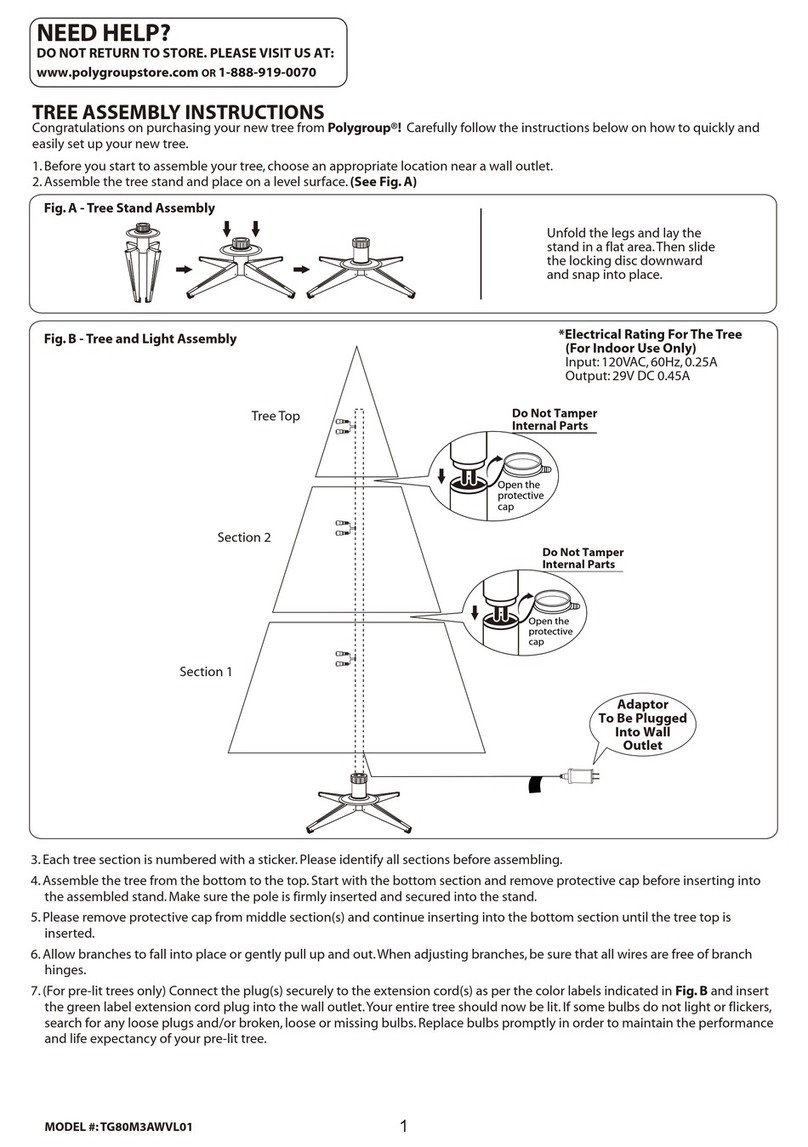
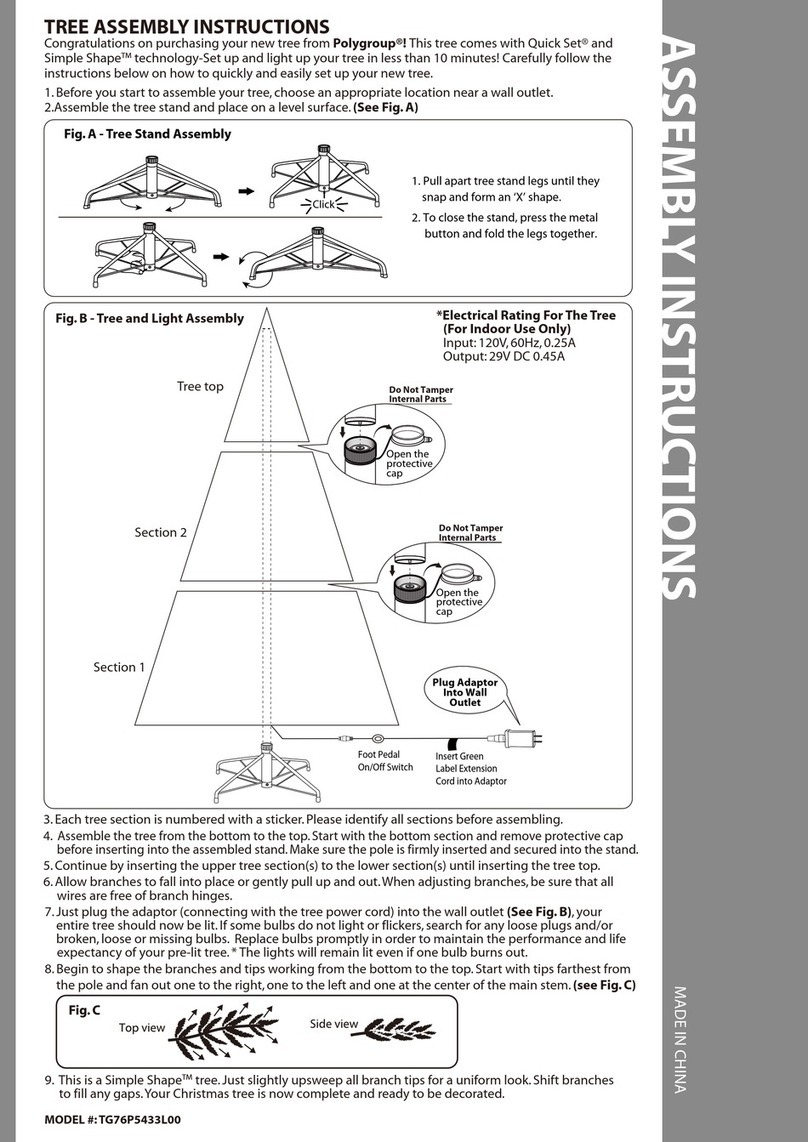
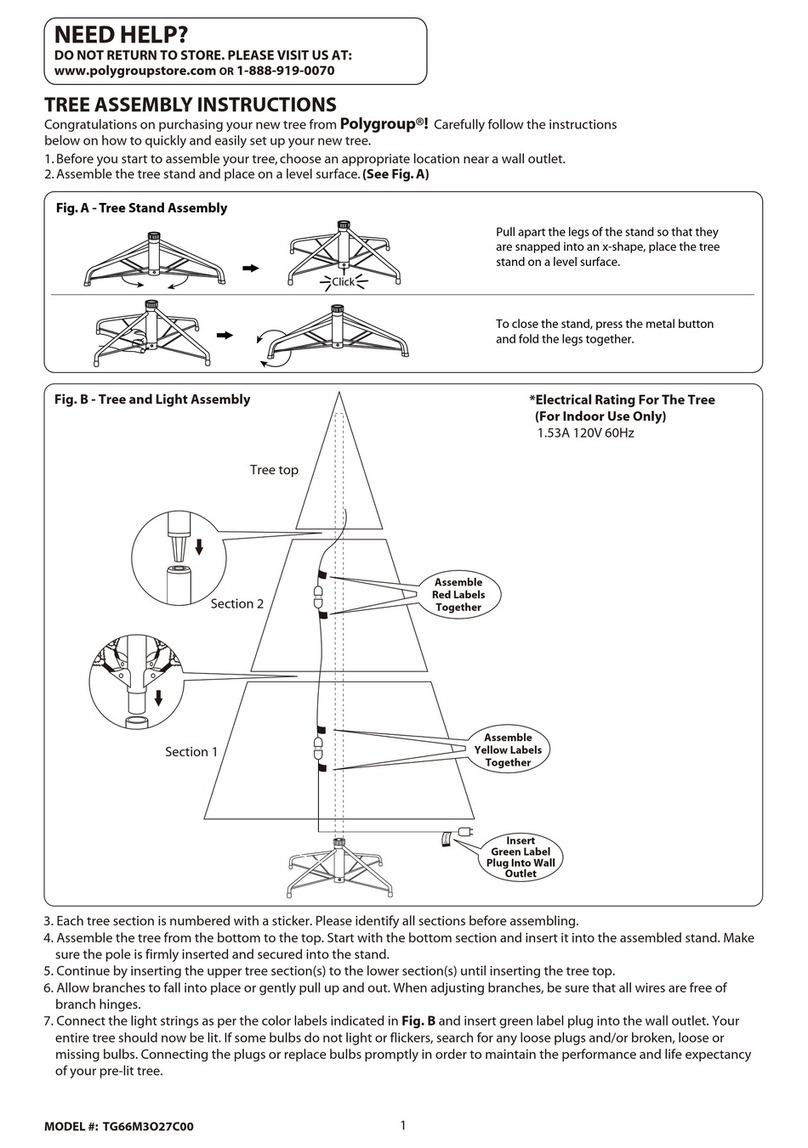
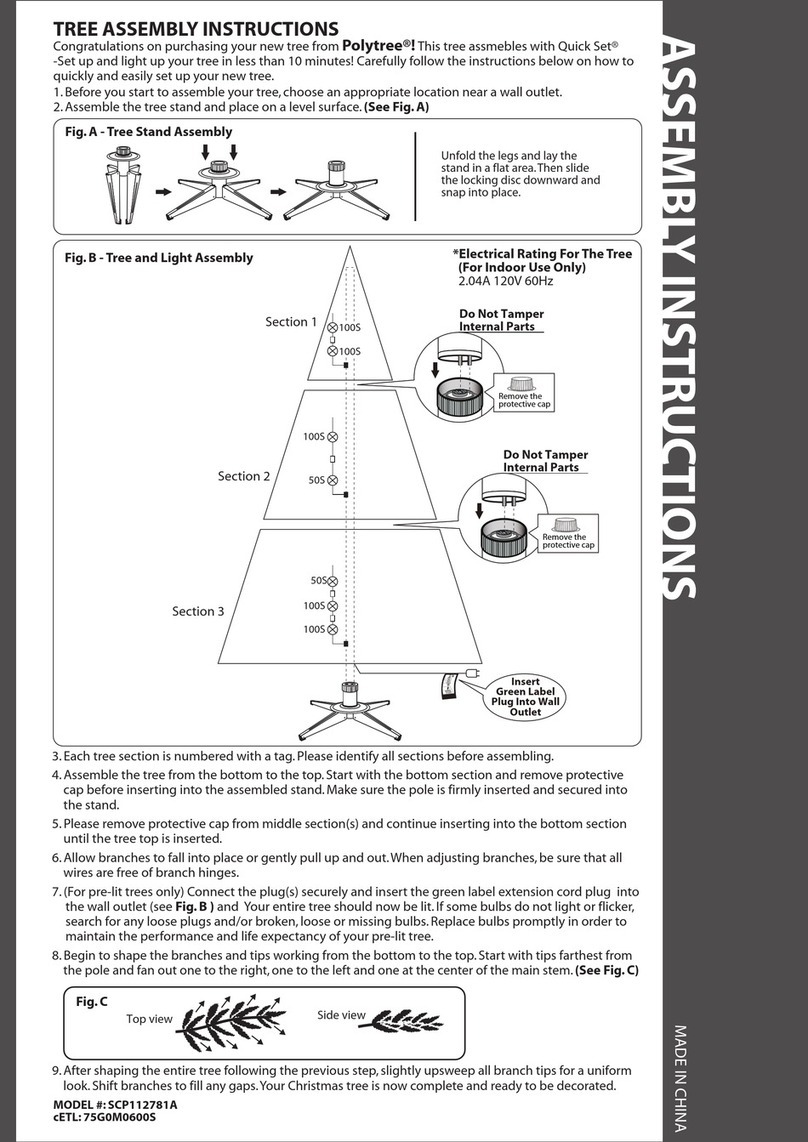
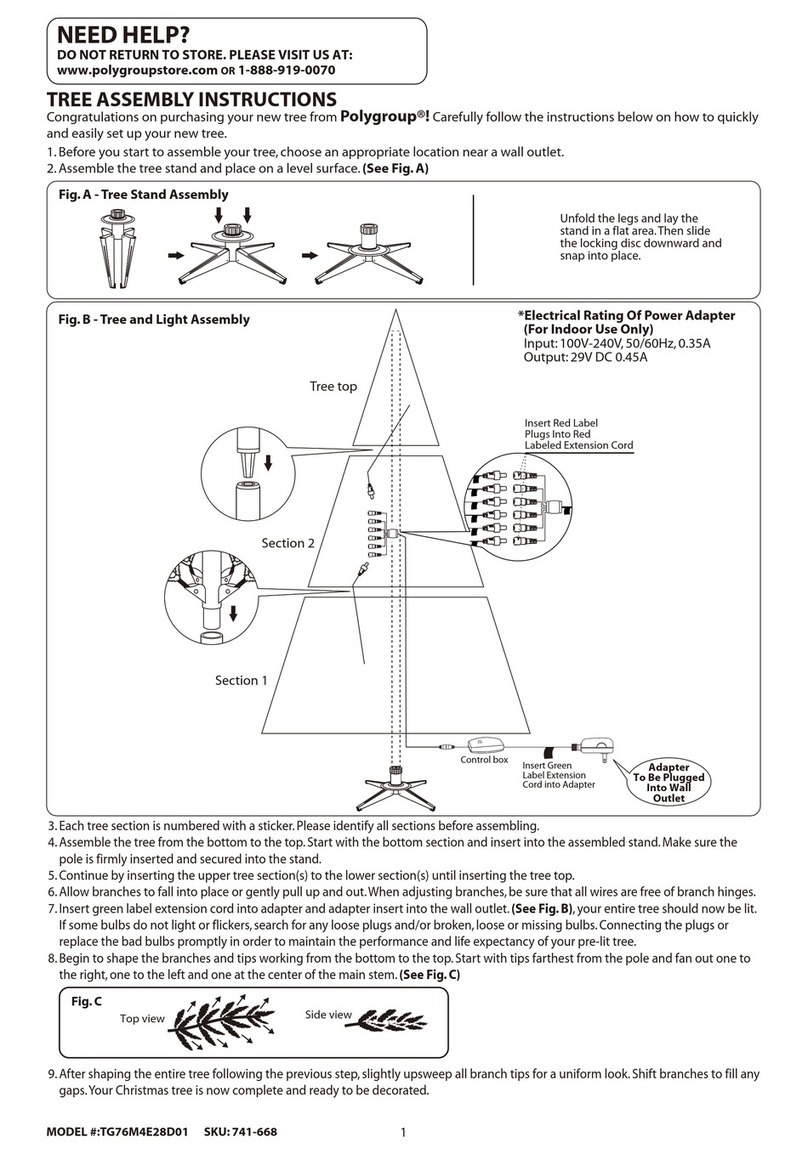
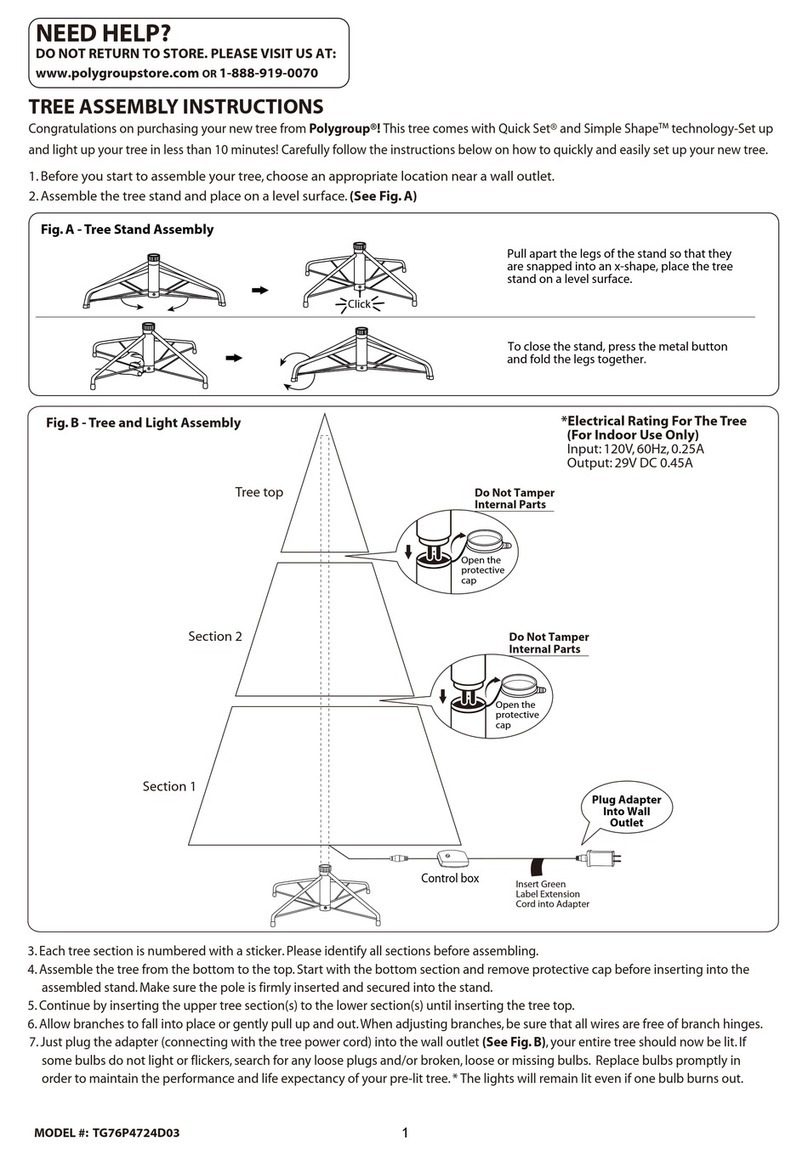
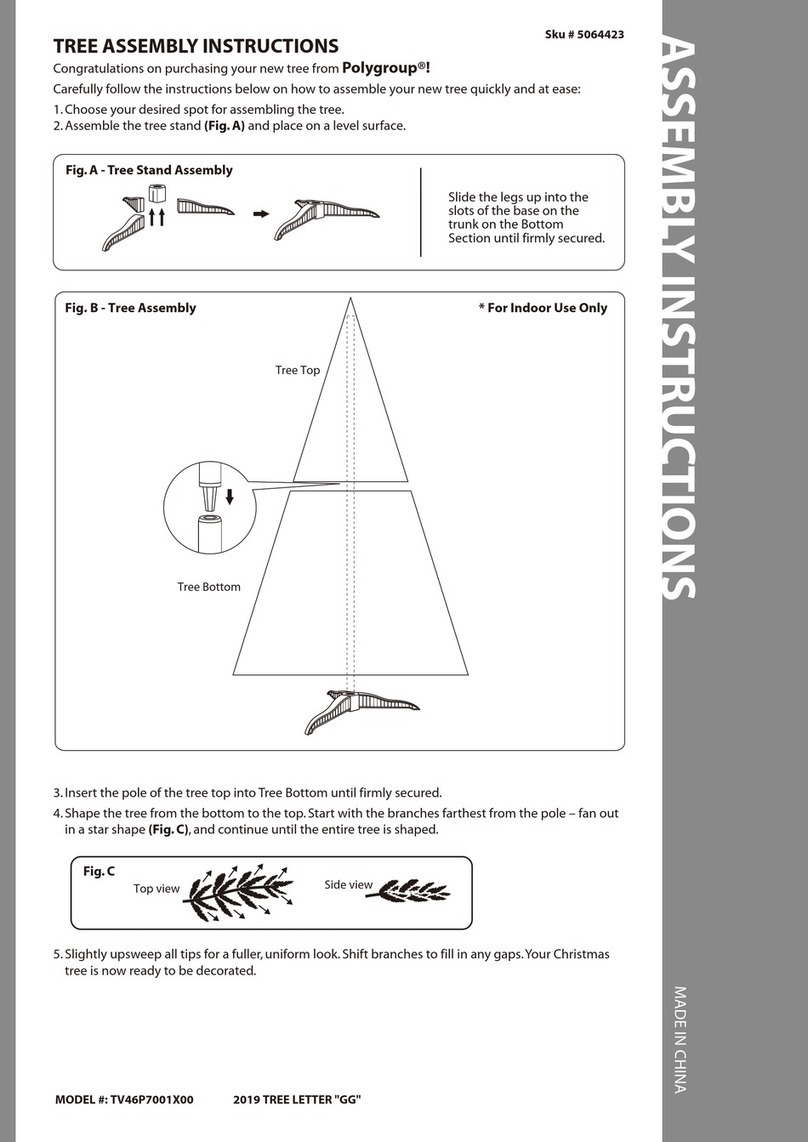
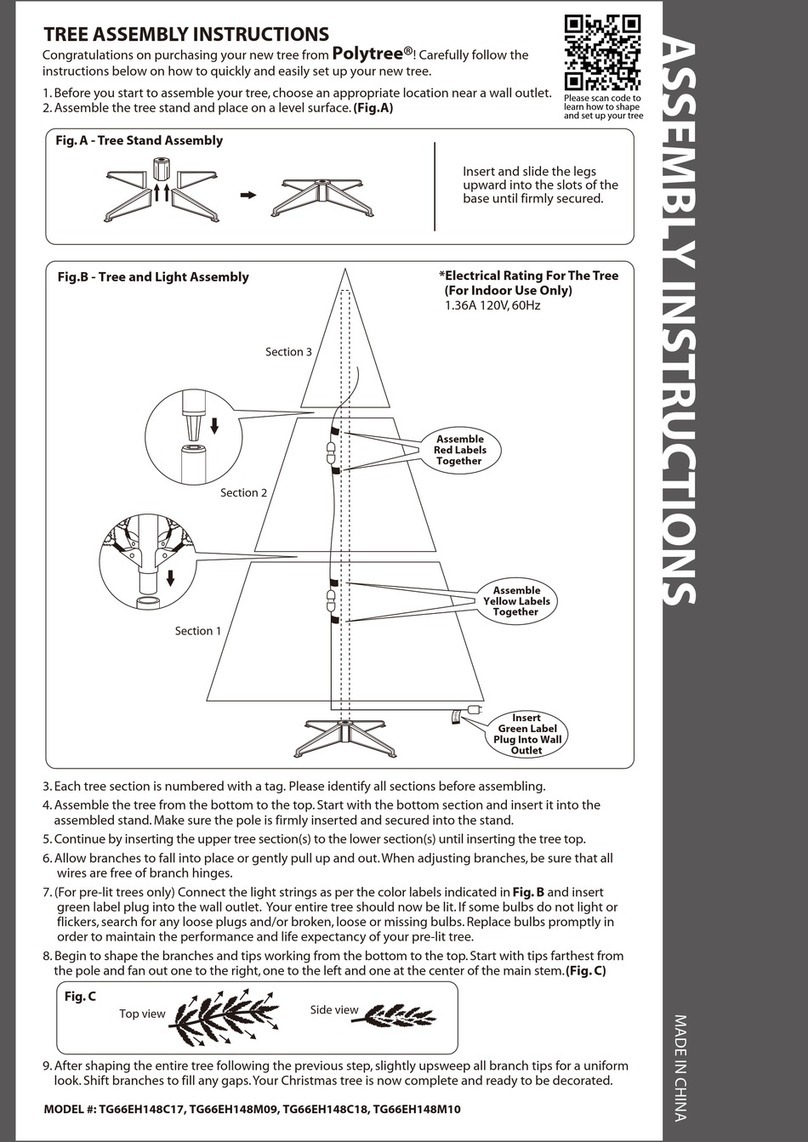
Congratulations on purchasing your new tree from Polygroup®!
Carefully follow the instructions below on how to quickly and easily set up your new tree.
1. Before you start to assemble your tree, choose an appropriate location near a wall outlet.
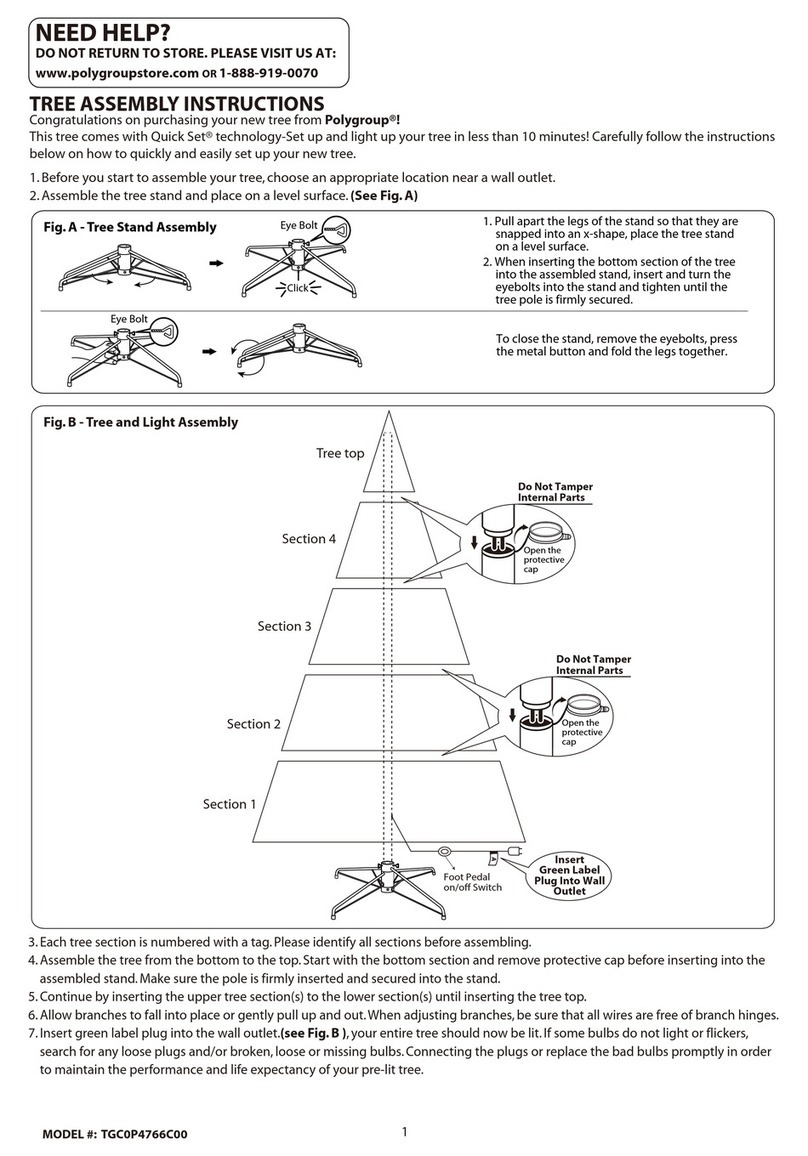
2. Assemble the tree stand and place on a level surface. (See Fig. A)
3. Each tree section is numbered with a tag. Please identify all sections before assembling.
4. Assemble the tree from the bottom to the top. Start with the bottom section and remove protective cap before inserting into the
assembled stand. Make sure the pole is firmly inserted and secured into the stand.
5. Continue by inserting the upper tree section(s) to the lower section(s) until inserting the tree top.
6. Allow branches to fall into place or gently pull up and out. When adjusting branches, be sure that all wires are free of branch hinges.
7. Connect the plug(s) securely to the extension cord(s) as per the color labels indicated in (See Fig. B) and insert the green label adpter
into the wall outlet. Your entire tree should now be lit. If some bulbs do not light or flicker, search for any loose plugs and/or broken,
loose or missing bulbs. Replace bulbs promptly in order to maintain the performance and life expectancy of your pre-lit tree.
8. Begin to shape the branches and tips working from the bottom to the top. Start with tips farthest from the pole and fan out one to the
right, one to the left and one at the center of the main stem. (See Fig. C)
Fig. B - Tree and Light Assembly
Tree top
1. Pull apart the legs of the stand so that they are
snapped into an x-shape, place the tree stand
on a level surface.
2. When inserting the bottom section of the tree
into the assembled stand, insert and turn the
eyebolts into the stand and tighten until the
tree pole is firmly secured.
To close the stand, remove the eyebolts, press
the metal button and fold the legs together.
Fig. A - Tree Stand Assembly Eye Bolt
Click
Eye Bolt
Section 3
Section 4
Section 2
Section 1
DO NOT RETURN TO STORE. PLEASE VISIT US AT:
www.polygroupstore.com OR 1-888-919-0070
NEED HELP?
1
Foot Pedal
on/off switch
Adapter
To Be Plugged
Into Wall
Outlet
Insert Green
Label Extension
Cord into Adapter
*Electrical Rating For The Tree
(For Indoor Use Only)
Input: 120V, 60Hz 0.38A
Output: 28V DC 0.643A
Insert Red Label
Plugs Into Red
Labeled Extension Cord
Insert Blue Label
Plugs Into Blue
Labeled Extension Cord
Insert Yellow Label
Plugs Into Yellow
Labeled Extension Cord
Insert Purple Label
Plugs Into Purple
Labeled Extension Cord
A
A
A
A
A
B
B
B
C
C
C
C
D
D
D
D
A
B
C
TREE ASSEMBLY INSTRUCTIONS
TREE# : FL18
MODEL # : TGC0M4907L00
SKU # : 124304392
2
STORAGE INSTRUCTIONS
1. Remove all ornaments and decorations. First unplug adpter from the wall outlet and then disconnect light extension cord
between each section of the tree.
2. Disassemble the tree from the top to the bottom. Start with the tree top and gently lift straight up to remove from section
below and fold all branches toward the pole.
3. In case of difficulty separating the tree pole (trunk), apply a small amount of lubricant at the joint and rotate the upper pole in
both directions. Lift up the upper pole again.
4. Continue by gently lifting straight up each section(s) from the section below and fold all branches toward the pole until the
bottom section is removed from the tree stand.
5. Carefully place all tree sections into shipping box and tape it shut.
6. When not in use, please store your tree in a cool, dry place away from sunlight. Exposing your tree to excessive heat or humidity
may damage your tree.
Each tree includes hinge pins/washers, and for pre-lit trees spare bulbs are also included.
If extra parts are needed, please contact our customer service center.
SPARE PARTS
For any questions, assistance, or missing parts, Do Not Return To Place Of Purchase. Please contact us at 1-888-919-0070
or visit our website at www.polygroupstore.com. One of our customer service representatives will be happy to assist you.
TREE ID# IS LOCATED ON END PANEL OF BOX. TREE ID# IS REQUIRED WHEN REQUESTING REPLACEMENT PARTS.
CUSTOMER SERVICE FOR CHRISTMAS TREES
Tree ID#:
Tree UPC#:
Store Purchased:
Specify Problem:
Customer Name:
Address:(No P.O. Boxes)
City & State:
Zip Code:
Day Phone:
Date Purchased:
9. After shaping the entire tree following the previous step, slightly upsweep all branch tips for a uniform look. Shift branches to fill
any gaps. Your Christmas tree is now complete and ready to be decorated.
For Pre-lit Trees, If The Tree Does Not Illuminate
1. Please check to make sure that all plugs are properly connected and adapter is plugged into the wall outlet. (If the tree comes
with a foot pedal, try stepping on the on/off button).
2. Check for loose connection between light string plugs and extension cords.
3. Please check for loose, broken or missing light bulbs and replace as needed.
Loose Hinge Pin
1. Extra hinge pins are included for repairing the hinges.
Place the branch into the slot of the bracket.
2. Insert a new hinge pin through the hole and secure
using the retainer washer. (See Fig. D)
TROUBLESHOOTING TIPS
Fig. D
Top view Side view
Fig. C
CAUTION:
To reduce the risk of fire and electric shock:
a) Use only the power supply that was provided with this product.Using a different adapter will damage the lights and may cause
fire, or electrical shock hazards.
b) Do not install on trees having needles, leaves or branch covering of metal or materials which look like metal.
c) Do not mount or support strings in a manner that can cut or damage wire insulation.
d) Do not use near candles, heaters, or other similar sources of heat.
e) Do not use candles on tree. Use only included light string (if present).