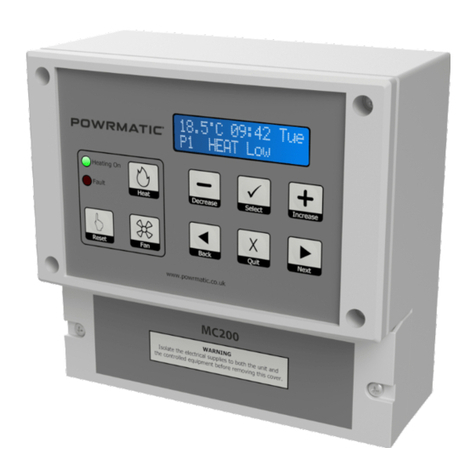
4 User Controls
4.1 Direct Control
If configured during the commissioning stage the User has the following direct control of the heater without using the menu.
- If the Fault LED is on because the heater is at lockout, the user can reset the heater by pressing the Reset button.
- The user can switch on or off heating by pressing the Heat button.
- The user can start or cancel extension time by pressing the Heat button longer than 3 seconds.
- The user can run the fan without heating, by pressing the Fan button.
4.2 User Settings
4.2.1 General
The second line of the display shows what keypad buttons are active.
After changing settings press OK to save the new setting. To return to the normal display press Cancel or do not touch any
keys for 15 or more seconds.
Keys , , –and +will auto-repeat if held down longer than approximately half a second. The +key will automatically wrap
round from the maximum value to the minimum value and the –key will wrap the other way.
4.2.2 Description of User Settings
Temperature
This shows the temperature set by the currently active programme, and it is the target temperature for thermostatic control.
The user can increase or decrease the value to adjust comfort. This will not alter the set temperature associated with the
programme, but it will temporarily alter the target temperature for thermostatic control.
The effect of altering the temperature lasts until the current programme expires or until another programme changes the set
temperature requirement.
Note: the range of adjustment permitted may be limited during commissioning. Temperature adjustment can be disabled by a
setting within the user menu.
Clock Set
Sets the current date and the time of day. The correct date allows the MC200 to know the day of the week, allows for
automatic BST-GMT changeovers, carries out the holiday shutdown function and permits overrride password entry.
Programme Settings
The MC200 has 14 programmes, each of which can be assigned to any day of the week. Each programme can be given an ON
time, an OFF time and a set temperature. The user may organize the programmes in any way that suits. The simplest would be
one programme on in the morning, off at the end of the afternoon, active Monday to Friday.
If two or more programmes are active at the same time, for instance one is on all day and another is on between 11:00 and
13:00, then the set temperature of the second programme will apply between 11:00 and 13:00, and the set temperature of the
first programme will apply during the rest of the working day. Programme times increment in 5 minute steps.
Extension time (if set) applies when all programmes have reached the end of their set period for that day.
Optimum start applies at the beginning of the first programme to switch on and optimum stop applies at the end of the last
programme to switch off.
Holiday date
A future date can be set so that the heating will not operate on that date, and remains “OFF” for a consecutive number of days
from that date. The date includes the year number, ensuring that the holiday shutdown date is not automatically repeated the
following year.
During the holiday period the heater will only operate if the temperature falls below the frost temperature and if frost
temperature operation is selected “ON” in the engineer menu. The night temperature setting is ignored during holidays. During
the holiday period, manual operation of the fan or heater is permitted. Any manual operation still on at midnight will be
automatically cancelled.
Run Mode
The MC200 has three Run modes: WINTER, SUMMER and OFF.
Winter - the heating operates when any programme is in a “Heat On” period. The heating also operates to maintain the Night
Temperature if this has been set. The heating also operates when the temperature drops below the frost temperature.
Note: Summer/Winter mode has no connection with the clock change from GMT to BST.
Summer - the fan operates to circulate air when switched on manually. With certain types of heater or certain types of
installation, Fan-only operation may not be appropriate and the fan control circuit should not be used.
In SUMMER the heating never operates unless the temperature drops below the frost temperature. During
commissioning the frost temperature operation will be set to be on or off. If the frost setting is off, the heater will
not operate under frost conditions in any User mode.
Off - the heater never operates unless the temperature drops below the frost temperature (see above).
2
User Button Permissions
This menu option facilitates the user to enable or disable the following controls separately if it is required to restrict
unauthorized access to user controls. Note: User permissions are only effective when User access to the menu is protected by a
password.
Reset - Allows operation of the reset button
Change temperature - Allows temporary adjustment of the current set temperature
Heat Override - Allows switching ON/OFF and extension of Heat ON time
Fan override - Allows switching ON/OFF of the fan
Set Password
The user may enter a 4-digit password here. Once set, the password must be given before selected user controls may be
accessed or changed. “Set password” cannot be entered unless the password has been given.
As delivered, the MC200 has no User password restrictions, the user password being set to 0000. Entering apassword of 0000
will remove all restrictions.
Extension time
A user can extend the heating to operate beyond the switch-off time of the last programme of the day, in 30minute increments,
by pressing the Heat button. This menu option allows a maximum extension period to be set, in units of 30minutes. If set to 0
minutes, extension is not permitted. Factory default setting: 1hour. Maximum setting 3hours.
Cost Log
This option shows the total hours run and the total cost of running since the log was last cleared. The display will show the
date when it was last cleared. For this option to function it is necessary to enter the fuel cost and heater rating (see Engineer
Menu for the latter). The cost log should be cleared whenever the heater type is changed.
For Hi/Lo heaters, there are two heater power entries and the MC200 will calculate the run cost according to the level of heat
requested. In the case of modulating control heaters, the cost is an estimate based on half the full heater power.
Password
Once a password has been set, the password must be entered at this menu option to allow access to selected user controls.
Once entered the password gives access to the User menu functions for 60 minutes. To re-apply the restrictions before the end
of the 60 minute period, select the ‘Enter password’ option and press OK without entering any digits. The display will show
‘Password CLOSED’.
Service Date
When the MC200 is installed the Commissioning Engineer may have entered a date for when the heating equipment requires
servicing. When this date is reached the MC200 fault indicator will be illuminated and the display will alternate between the
normal display and "Service due, call engineer". The Service Engineer can clear this display by entering a new service date
when the heating equipment has been serviced.
3 Keypad Layout
3.1 User keypad (3 Buttons)
3.4 Programming keypad (6 Buttons)
3.2 Indicators
3.3 Display
The display normally shows
- the current air temperature as measured by the sensor, or the average temperature if two sensors are fitted.
- the time of day using 24-hr notation. The colon flashes once per second to confirm that the clock is running.
- the day of the week. Programmes are associated with individual days of the week or day-groups such as weekday or
weekend.
- the current setting of the heater: ON or OFF, as determined by the internal programmes (the display will say ON even if
the MC200 is not currently calling for heat because the thermostat is satisfied) or
- for High/Low and Modulating burners an indication of the heat demand: HEAT HI or HEAT LO for Hi-Low burners, or a
simple bar-graph display for modulating control heaters where 1 bar is low fire and 10 bars is high fire.
- Pn where n represents the active programme number.
Heating On - Is illuminated when the MC200 is calling for heat (It does not confirm that the heating is actually
working). It shows Red when the heater is a single-stage burner, Green when the heater is a Hi-Low type, and
Yellow when the heater has a Modulating burner.
Fault - Flashes when the burner control is at lockout, solid light when a service call is due (if this has been set) or
when there is a sensor fault. The bottom line of the display will alternate between normal display and type of fault.
Select Button - Press to accept changes.
Select
OK
Back Button - Press to enter User Menu, go
back to previous screen.
Back
Reset Button - Press to reset the burner controls from lockout, (when this facility is available on the heater).
Reset
Heat Button - (Note: this facility may be limited or disabled by the User).
If heating is ON (via programme)
- pressing the Heat button for less than 2 seconds overrides the programme to OFF. Any extension time that has
been set is cancelled.
- pressing the heat button for more than 3 seconds determines that heat will remain on for an extension time after
the programmed off time. The extension timer will increase in 30 minute steps, up to the maximum allowed
period, and then revert to 0 minutes. Release the button when the required extension period is showing.
If heating is OFF (via override)
- pressing the Heat button removes override and reverts to the current programme.
If heating is OFF (via programme)
- pressing the Heat button for less than 2 seconds brings on heating for 30 minutes.
- pressing the heat button for more than 3 seconds will increase the on time in 30 minute steps, up to the maximum
allowed period, and then revert to 0 minutes. Release the button when the required heating period is showing.
Heat
Cancel Button - Press to exit without saving
change values.
Quit
Decrease Button - Press to decrease values.
Decrease
Increase Button - Press to increase values.
Increase
Fan Button -
In WINTER mode and OFF mode, the Fan button has no control over the air heater fan.
In SUMMER mode, the Fan button switches on the fan for air circulation, and another press switches it off. If the
fan is left on, it will be automatically switched off at midnight. If the fan is running because the heating is on and
the fan is in Auto or Const mode, the Fan button cannot switch it off.
If the fan is in On mode, it always runs, in WINTER, SUMMER and OFF. The Fan button cannot switch it off.
Fan
Next Button - Press to to enter User Menu,
go forward to next screen.
Next