4
Privoro uses your location to
facilitate device policy management.
Go anywhere.
Privoro uses notifications to provide
you with important information.
Stay aware.
Privoro uses your camera to pair
the Privoro app with your SafeCase.
Scan and pair.
Next
Grant Access.
We require permissions to ensure
SafeCase operability
42%Privoro 9:41 AM
Privoro uses your location to
facilitate device policy management.
Go anywhere.
Privoro uses notifications to provide
you with important information.
Stay aware.
Privoro uses your camera to pair
the Privoro app with your SafeCase.
Scan and pair.
Next
Grant Access.
We require permissions to ensure
SafeCase operability
42%Privoro 9:41 AM
CHOOSING APP SETTINGS
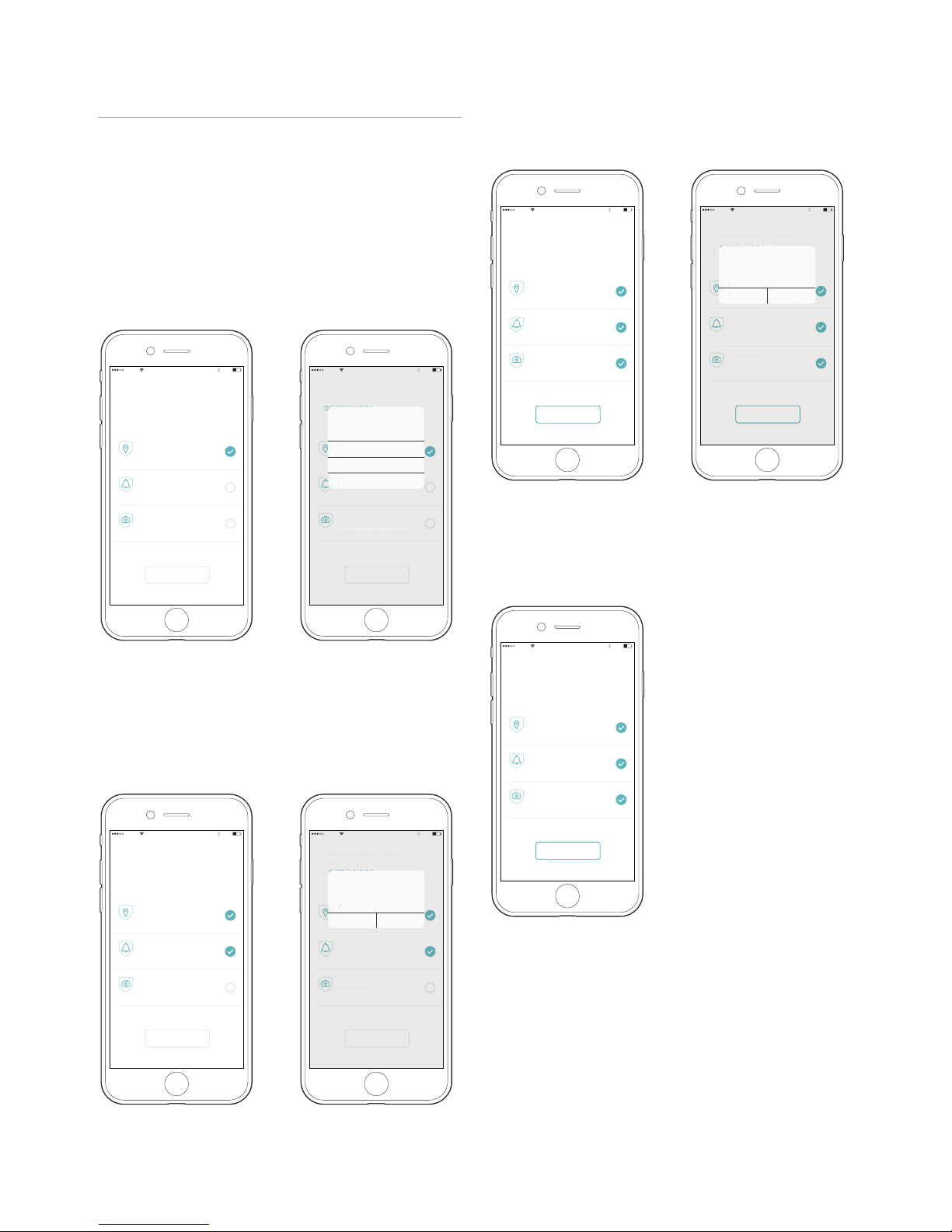
You will then be prompted to grant access to three
iPhone services: location (necessary for facilitating policy
management), notifications (necessary for receiving
administrative notifications) and camera (necessary for
scanning the case’s QR code as part of the SafeCase
TM/
app pairing process). You may change these settings at
any time from the “Settings” app on your iPhone.
• Location settings: First, tap the “Go anywhere” field
(Figure 7). When prompted to allow the app to
access your location, tap the “Always Allow” option
(Figure 8).
(Left) Figure 7: Tap the “Go anywhere” field
(Right) Figure 8: Tap the “Always Allow” option
Figure 13 : Tap the “Next” button
• Notification settings: Next, tap the “Stay aware” field
(Figure 9). When prompted to allow the app
to send you notifications, tap the “Allow” option
(Figure 10).
• Camera settings: Finally, tap the “Scan and pair” field
(Figure 11). When prompted to allow the app to access
your camera, tap the “OK” option (Figure 12).
Give your SafeCase
permissions.
Privoro uses your location to
facilitate device policy management.
Go anywhere.
Privoro uses notifications to provide
you with important information.
Stay aware.
Privoro uses your camera to pair
the Privoro app with your SafeCase.
Scan and pair.
Next
Give your Sa
eCase
r
voro uses not
cat
ons to
rov
e
ou with important information
Privoro uses
our camera to pair
the Privoro app with
our SafeCase
can and
air
ext
ta
aware
Privoro uses
our location to
facilitate device policy management
Go an
where
Always Allow
Dont Allow
Only While Using The App
Privoro uses your location to facilitate
device policy management.
Allow "Privoro" to access
your location.
42%Privoro 9:41 AM
Privoro uses your location to
facilitate device policy management.
Go anywhere.
Privoro uses notifications to provide
you with important information.
Stay aware.
Privoro uses your camera to pair
the Privoro app with your SafeCase.
Scan and pair.
Next
Grant Access.
We require permissions to ensure
SafeCase operability
42%Privoro 9:41 AM
(Left) Figure 9: Tap the “Stay aware” field (Right) Figure 10: Tap the “Allow” option
Give your SafeCase
permissions.
Privoro uses your location to
facilitate device policy management.
Go anywhere.
Privoro uses notifications to provide
you with important information.
Stay aware.
Privoro uses your camera to pair
the Privoro app with your SafeCase.
Scan and pair.
Next
ive your Sa
eCase
Privoro uses notifications to
rovide
ou with important information
ta
aware
Privoro uses
our camera to pair
the Privoro app with
our SafeCase
can and
air
ext
Privoro uses
our location to
facilitate device policy management
Go an
where
AllowDont Allow
Privoro uses notifications to provide
you with important information.
Allow "Privoro" to send you
push notifcations.
42%Privoro 9:41 AM
Privoro uses your location to
facilitate device policy management.
Go anywhere.
Privoro uses notifications to provide
you with important information.
Stay aware.
Privoro uses your camera to pair
the Privoro app with your SafeCase.
Scan and pair.
Next
Grant Access.
We require permissions to ensure
SafeCase operability
42%Privoro 9:41 AM
(Left) Figure 11: Tap the “Scan and pair” field
(Right) Figure 12: Tap the “OK” option
Give your SafeCase
permissions.
Privoro uses your location to
facilitate device policy management.
Go anywhere.
Privoro uses notifications to provide
you with important information.
Stay aware.
Privoro uses your camera to pair
the Privoro app with your SafeCase.
Scan and pair.
Next
Give your Sa
eCase
Privoro uses notifications to
rovide
ou with important information
ta
aware
Privoro uses
our camera to pair
the Privoro app with
our SafeCase
can and
air
ext
Privoro uses
our location to
facilitate device policy management
Go an
where
AllowDont Allow
Privoro uses your camera to pair the
Privoro app with your SafeCase.
Allow "Privoro" to access
your camera.
42%Privoro 9:41 AM
Once access has been granted, tap the “Next” button
(Figure 13).