manuals.online logo
Brands
  1. Home
  2. •
  3. Brands
  4. •
  5. RCA
  6. •
  7. TV
  8. •
  9. RCA Victor 648PTK User manual

RCA Victor 648PTK User manual

This manual suits for next models

1

Other RCA TV manuals

RCA M52732 User manual

RCA

RCA M52732 User manual

RCA P46811 User manual

RCA

RCA P46811 User manual

RCA 20V500T User manual

RCA

RCA 20V500T User manual

RCA P60752 User manual

RCA

RCA P60752 User manual

RCA F27668 User manual

RCA

RCA F27668 User manual

RCA G32710 User manual

RCA

RCA G32710 User manual

RCA F19432TX41R4 User manual

RCA

RCA F19432TX41R4 User manual

RCA F25625YX2AX1 User manual

RCA

RCA F25625YX2AX1 User manual

RCA RLDED3956A User manual

RCA

RCA RLDED3956A User manual

RCA F25443 User manual

RCA

RCA F25443 User manual

RCA Roku TV RTR3265-CA User manual

RCA

RCA Roku TV RTR3265-CA User manual

RCA F35760 User manual

RCA

RCA F35760 User manual

RCA 5inch BLACK & WHITE TVwith CD Player and AM/FM... User manual

RCA

RCA 5inch BLACK & WHITE TVwith CD Player and AM/FM... User manual

RCA F20632SE User manual

RCA

RCA F20632SE User manual

RCA R52WH79 User manual

RCA

RCA R52WH79 User manual

RCA 20F511T User manual

RCA

RCA 20F511T User manual

RCA 14F400T User manual

RCA

RCA 14F400T User manual

RCA F25442 User manual

RCA

RCA F25442 User manual

RCA X20101 User manual

RCA

RCA X20101 User manual

RCA 1512786B User manual

RCA

RCA 1512786B User manual

RCA Scenium D32TF20 User manual

RCA

RCA Scenium D32TF20 User manual

RCA 32GT740YX59CA9 User manual

RCA

RCA 32GT740YX59CA9 User manual

RCA Victor CTC9A Installation instructions

RCA

RCA Victor CTC9A Installation instructions

RCA F32674 User manual

RCA

RCA F32674 User manual

Popular TV manuals by other brands

IKEA UPPLEVA user manual

IKEA

IKEA UPPLEVA user manual

Toshiba 19A20 Service manual
Toshiba

Toshiba 19A20 Service manual
Sony XBR-100Z9D reference guide

Sony

Sony XBR-100Z9D reference guide

Sony Trinitron KV-HR36M90 Service manual

Sony

Sony Trinitron KV-HR36M90 Service manual

JVC AV-14AG16 instructions

JVC

JVC AV-14AG16 instructions

Loewe Table Stand Reference 55 user guide

Loewe

Loewe Table Stand Reference 55 user guide

Panasonic Genus TX-G10 operating instructions

Panasonic

Panasonic Genus TX-G10 operating instructions

Samsung LN26C350D1D Service manual

Samsung

Samsung LN26C350D1D Service manual
BBK LT1516D Service manual

BBK

BBK LT1516D Service manual
Samsung 55S9 B Series Quick setup guide

Samsung

Samsung 55S9 B Series Quick setup guide

Sharp LC-40FI5012E user manual
Sharp

Sharp LC-40FI5012E user manual
Evervue BN185 Operation manual
Evervue

Evervue BN185 Operation manual

North State TV2GO user guide

North State

North State TV2GO user guide

Toshiba CX35F70 owner's manual

Toshiba

Toshiba CX35F70 owner's manual

Magnavox PS1980 owner's manual

Magnavox

Magnavox PS1980 owner's manual

Philips 20HF5335D manual

Philips

Philips 20HF5335D manual

Panasonic QuintrixF TX-29AS1D operating instructions

Panasonic

Panasonic QuintrixF TX-29AS1D operating instructions

Samsung 4 Series Quick setup guide

Samsung

Samsung 4 Series Quick setup guide

manuals.online logo
manuals.online logoBrands
  • About & Mission
  • Contact us
  • Privacy Policy
  • Terms and Conditions

Copyright 2025 Manuals.Online. All Rights Reserved.

295
Model
648PV
Walnut
or
Mahogany
rcaV
ict0R
PROJECTION
TELEVISION,
AM-FM
RADIO,
COMRINATION
MODEL
648PTK
Chassis
Nos.
KCS
24-1,
KRS
20-1,
KRS
21-1
KRK
1-1,
RK-121A
and
RS-123A
PROJECTION
TELEVISION
AM-FM
RADIO
PHONOGRAPH
COMRINATION
MODEL
848P¥
'
Chassis
No.
KCS
24A-I,
KRS
20-1,
KRS
2IA-I
KRK-iA,
RK-I2IA
and
RS-I23B
Mfr.
No.
274
Service
Data
-
1947
No.
12
-
-
1948
No.
T4
-
RADIO
CORPORATION
Of
AMERICA
RCA
VICTOR
DIVISION
CAMDEN,
N.
J.,
U.
S.
A.
GENERAL
DESCRIPTION
Model
648PTK
is
a
forty-eight
tube
Projection
Television,
AM-FM
Radio,
console
combination.
The
television
receiver
em¬
ploys
four
chassis
with
a
total
of
thirty-five
tubes
and
a
five-
inch
projection
kinescope.
A
Reflective
Optical
System
pro¬
vides
a
15"
x
20"
picture
on
the
screen.
Features
of
the
television
unit
are
full
thirteen
channel
cov¬
erage;
FM
sound
system;
improved
picture
brilliance;
picture
A-G-C;
A-F-C
horizontal
hold;
stabilized
vertical
hold;
two
stages
of
video
amplification;
noise
saturation
circuits;
three-
stage
sync
separator
and
clipper;
four
me
band
width
for
pic¬
ture
channel
and
reduced
hazard
high
voltage
supply.
The
radio
receiver
employs
an
eight-tube
tuner
unit
and
a
four-tube
audio-amplifier,
power-supply
unit.
The
radio
chassis
is
provided
with
a
Phono
input
jack
to
permit
the
use
of
an
external
record
player.
Model
648PV
is
.a
forty-eight
tube
Projection
Television,
AM-FM
Radio,
Phonograpn,
console
combination.
The
television
receiver
employs
four
chassis
with
a
total
of
thirty-five
tubes
and
a
five-inch
projection
kinescope.
A
Reflective
Optical
System
provides
a
15"
x
20"
picture
on
the
screen.
Features
of
the
television
unit
are
full
thirteen
channel
cov¬
erage;
FM
sound
system;
improved
picture
brilliance;
picture
A-G-C;
A-F-C
horizontal
hold;
stabilized
vertical
hold;
two
stages
of
video
amplification;
noise
saturation
circuits;
three-
stage
sync
separator
and
clipper;
four
me
band
width
for
pic¬
ture
channel
and
reduced
hazard
high
voltage
supply.
The
radio
receiver
employs
an
eight-tube
tuner
unit
and
a
four-tube
audio-amplifier,
power-supply
unit.
An
automatic
record
changer
of
the
"slicer”
type
is
em¬
ployed
and
features
a
crystal
pickup
with
the
"Silent
Sap¬
phire”
stylus.
ELECTRICAL
AND
MECHANICAL
SPECIFICATIONS
TELEVISION
R-F
FREQUENCY
RANGES
Television
Picture
Sound
Tel.
Rec.
Channel
Channel
Carrier
Carrier
R-F
Osc.
Number
Freq.
Me.
Freq.
Me.
Freq.
Me.
Freq.
Me.
1.
.44-50.
.45.25.
.49.75.
.71
2
.
.54-60.
.
55.25
.
.59.75.
.81
3.
.60-66.
.61.25.
.65.75.
.87
4..
......66-72.
.67.25.
.71.75
.
.§3
5
.
.76-82.
.......77.25.
.81.75.
.103
6.
.82-88.
.83.25.
.87.75.......
..
.
1
09
7.........
....174-180.
.175.25.
.179.75.......
.201
8.
....180-186.
.181.25.
.185.75..:....
.........307
9
.
....186-192.
.187.25.
.191.75.
..213
10
.
....192-198.
.193.25.
.197.75.
.219
11.
....198-204.
.199.25.
.203.75.
.225
12
.
....204-210.
.205.25.
.209.75.
.231
13
.
....210-216.
.211.25.
.215.75.
.237
TELEVISION
FINE
TUNING
RANGE
Plus
and
minus
approximately
800
kc
on
channel
1,
and
plus
and
minus
approximately
1.9
me
on
channel
13.
PICTURE
SIZE
.....................................15"
x
20"
RADIO
TUNING
RANGE
Broadcast
.....
540-1,600
kc
Short
Wave
.
9.2-18
me
Frequency
Modulation
.
88-108
me
Intermediate
Frequency—AM
.
455
kc
Intermediate
Frequency—FM
.
10.7
me
RECEIVER
ANTENNA
INPUT
IMPEDANCE..300
ohms
balanced
Specifications
continued
on
page
3
296
648PTE.
8
4
SPY
TABLE
OF
CONTENTS
Page
Alignment
Procedure
(Television)
Detailed
.........
22
Table
.........
28
Alignment
Procedure
(Radio)
.
44
Antenna
.............
11
Circuit
Description
(Television)
....
12
Circuit
Description
(Radio)
..
33
Drawings
(Major)
Television
Adjustment
Location
(Alignment)
.
30
Adjustment
Location
(Installation)
.
9
R-F,
I-F
Chassis
Views
.
20
Horizontal
Deflection
Chassis
View
..
21
Chassis
Wiring
Diagrams
.
56
Circuit
Schematic
.59-63
R-F
Unit
Wiring
Diagram
.57-61
Radio
Adjustment
Location
.
45
Chassis
Wiring
Diagram
.46-47
Circuit
Schematic
.48-49
Pag®
General
Description
..
1
Interference
............
jj
Installation
Instructions
....._
§
Operating
Instructions
..........
4
Photographs
Cabinet
.
j
Test
Pattern
.
«
Waveform
.
gg
Precautions
Kinescope
Handling
.
2
Ventilation
.
H
Reflections
...
Replacement
Parts
.
05
Service
Suggestions
..
32
Specifications
(Elec.
&
Mech.)
.
1
Test
Equipment
.
22
Tube
Complement
.
g
Voltage
Chart
(Television)
.
42
Voltage
Chart
(Radio)
.
5
q
Warning
(High
Voltage)
.
2
HIGH
VOLTAGE
WARMING
OPERATION
OF
THIS
RECEIVER
OUTSIDE
THE
CABINET
OR
WITH
THE
COVERS
REMOVED,
INVOLVES
A
SHOCK
HAZARD
FROM
THE
RECEIVER
POWER
SUPPLIES.
WORK
ON
THE
RE¬
CEIVER
SHOULD
NOT
BE
ATTEMPTED
BY
ANYONE
WHO
IS
NOT
THOROUGHLY
FAMILIAH
WITH
THE
PRECAUTIONS
NECESSARY
WHEN
WORKING
ON
HIGH
VOLTAGE
EQUIPMENT.
DO
NOT
OPERATE
THE
TELEVISION
RECEIVER
WITH
THE
HIGH
VOLTAGE
COMPARTMENT
SHIELD
REMOVED.
KINESCOPE
HANDLING
PRECAUTIONS
DO
NOT
OPEN
THE
KINESCOPE
SHIPPING
CARTON,
INSTALL,
REMOVE
OR
HANDLE
THE
KINE¬
SCOPE
IN
ANY
MANNER
UNLESS
SHATTERPROOF
GOGGLES
AND
HEAVY
GLOVES
ARE
WORN.
PEOPLE
NOT
SO
EQUIPPED
SHOULD
BE
KEPT
AWAY
WHILE
HANDLING
KINE¬
SCOPES.
KEEP
THE
KINESCOPE
AWAY
FROM
THE
BODY
WHILE
HANDLING.
The
kinescope
bulb
encloses
a
high
vacuum
and,
due
to
its
large
surface
area,
is
subjected
to
considerable
air
pressure.
For
these
reasons,
kinescopes
must
be
handled
with
more
car©
than
ordinary
receiving
tubes.
Th®
large
end
of
the
kinescope
bulb—particularly
that
part
at
the
rim
of
the
viewing
surface—must
not
be
struck,
scratched
or
subjected
to
more
than
moderate
pressure
at
any
time.
In
installation,
if
the
tube
sticks
or
fails
to
slip
smoothly
into
Its
socket,
or
deflecting
yoke,
investigate
and
remove
th©
cause
of
the
trouble.
Do
not
force
the
tube.
Refer
to
the
receiver
Installation
Instructions
section
for
detailed
Instructions
on
kinescope
installation.
All
RCA
kinescopes
are
shipped
in
special
cartons
and
should
be
left
in
the
cartons
until
ready
for
installation
in
the
receiver..
Keep
the
carton
for
possible
future
use.
297
ELECTRICAL
AMD
MECHANICAL
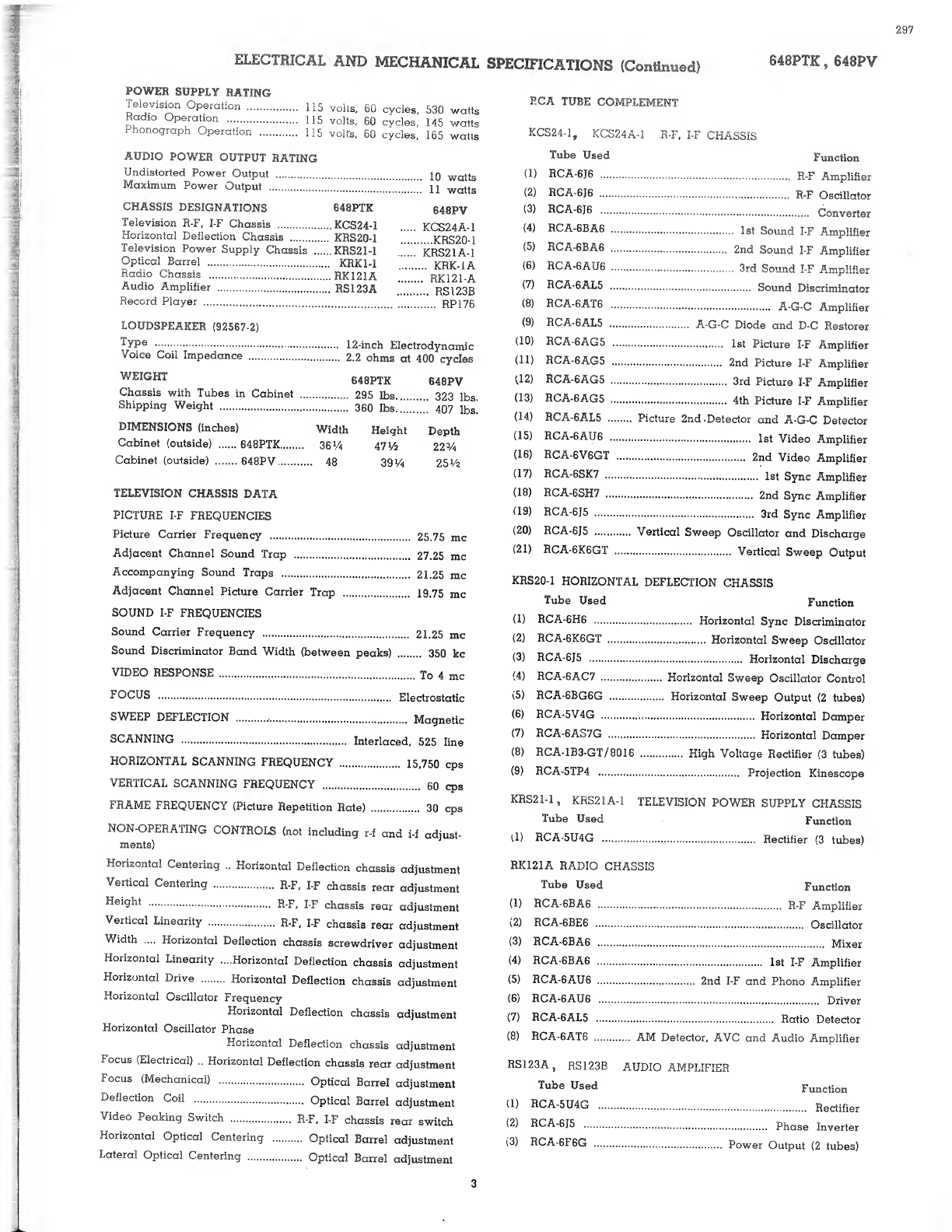
POWER
SUPPLY
BATING
Television
Operation
.
115
volts,
60
cvcles,
530
watts
Radio
Operation
.
115
volts,
60
cycles,
145
watts
Phonograph
Operation
.
115
volts,
60
cycles,
165
watts
AUDIO
POWER
OUTPUT
RATING
Undistorted
Power
Output
....
iq
watts
Maximum
Power
Output
....."
’
’’
n
watts
.CHASSIS
DESIGNATIONS
648PTK
Television
R-F,
I-F
Chassis
.KCS24-1
Horizontal
Deflection
Chassis
.
KRS20-1
Television
Power
Supply
Chassis
.KRS21-1
Optical
Barrel
.
KRK1-1
Radio
Chassis
.RK121A
Audio
Amplifier
.
RS123A
Record
Player
.
648PV
KCS24A-1
....KRS20-1
KRS21A-1
..
KRK-IA
.
RK121-A
...
RS123B
.
RP176
LOUDSPEAKER
(92567-2)
Type
.
Voice
Coil
Impedance
.
WEIGHT
Chassis
with
Tubes
in
Cabinet
Shipping
Weight
.
12-inch
Electrodynamic
2.2
ohms
at
400
cycles
648PTK
648PV
■
•
295
lbs.
323
lbs.
360
lbs
.
407
lbs.
DIMENSIONS
(inches)
Width
Height
Cabinet
(outside)
.
648PTK.
36
%
471/2
Cabinet
(outside)
.
648PV.
48
39
V
4
Depth
22
%
251/2
TELEVISION
CHASSIS
DATA
PICTURE
I-F
FREQUENCIES
Picture
Carrier
Frequency
.
25.75
me
Adjacent
Channel
Sound
Trap
.
27.25
me
Accompanying
Sound
Traps
.
21.25
me
Adjacent
Channel
Picture
Carrier
Trap
.
19.75
me
SOUND
I-F
FREQUENCIES
Sound
Carrier
Frequency
.
21.25
me
Sound
Discriminator
Band
Width
(between
peaks)
.
350
kc
VIDEO
RESPONSE
.
To
4
me
FOCUS
.
Electrostatic
SWEEP
DEFLECTION
...
Magnetic
SCANNING
.
Interlaced,
525
line
HORIZONTAL
SCANNING
FREQUENCY
.
15,750
cps
VERTICAL
SCANNING
FREQUENCY
.
60
cps
FRAME
FREQUENCY
(Picture
Repetition
Rate)
.
30
cps
NON-OPERATING
CONTROLS
(not
including
r-f
and
i-f
adjust¬
ments)
SPECIFICATIONS
(Continued)
648PTK
,
648PV
P.CA
TUBE
COMPLEMENT
KCS24-1,
KCS24A-1
R-F,
I-F
CHASSIS
Tube
Used
Function
(
1
)
RCA-
6
J
6
.....
R-F
Amplifier
(2)
RCA-
6
J
6
.
R-F
Oscillator
(3)
RCA-
6
J
6
.....
Converter
(4)
RCA-
6
BA
6
.
1
s
t
Sound
I-F
Amplifier
(5;
RCA-
6
BA
6
.
2nd
Sound
I-F
Amplifier
(
6
)
RCA-
6
AU
6
..
3rd
Sound
I-F
Amplifier
(')
RCA-6AL5
...
Sound
Discriminator
(
8
)
RCA-
6
AT
6
...
A-G-C
Amplifier
(9)
RCA-6AL5
.
A-G-C
Diode
and
D-C
Restorer
(
1
0
)
RCA-6AG5
.
1
st
Picture
I-F
Amplifier
ul)
RCA-6AG5
.
2nd
Picture
I-F
Amplifier
(.12)
RCA-6AG5
.
3rd
Picture
I-F
Amplifier
(13)
RCA-6AG5
.
4th
Picture
I-F
Amplifier
(14)
RCA-6AL5
.
Picture
2nd
.Detector
and
A-G-C
Detector
(15)
RCA-
6
AU
6
.
1
s
t
Video
Amplifier
(16)
RCA-
6
V
6
GT
.
2nd
Video
Amplifier
(17)
RCA-6SK7
.
1
st
Sync
Amplifier
(18)
RCA-6SH7
.
2nd
Sync
Amplifier
(19)
RCA-6J5
.
3
rd
Sync
Amplifier
(20)
RCA-6J5
.
Vertical
Sweep
Oscillator
and
Discharge
(21)
RCA-
6
K
6
GT
.
Vertical
Sweep
Output
KRS20-1
HORIZONTAL
DEFLECTION
CHASSIS
Tube
Used
Function
(1)
RCA-
6
H
6
.
Horizontal
Sync
Discriminator
(
2
)
RCA-
6
K
6
GT
.
Horizontal
Sweep
Oscillator
(3)
RCA-6J5
.
Horizontal
Discharge
(4)
RCA-6AC7
.
Horizontal
Sweep
Oscillator
Control
(5)
RCA-
6
BG
6
G
.
Horizontal
Sweep
Output
(2
tubes)
(
6
)
RCA-5V4G
.
Horizontal
Damper
(7)
RCA-6AS7G
.
Horizontal
Damper
(
8
)
RCA-1B3-GT/8016
.
High
Voltage
Rectifier
(3
tubes)
(9)
RCA-5TP4
....
Projection
Kinescope
KRS
21-1
,
KRS
21
A
-1
TELEVISION
POWER
SUPPLY
CHASSIS
Tube
Used
Function
(1)
RCA-5U4G
.
Rectifier
(3
tubes)
Horizontal
Centering
..
Horizontal
Deflection
chassis
adjustment
Vertical
Centering
...
R-F,
I-F
chassis
rear
adjustment
....
R-F,
I-F
chassis
rear
adjustment
Vertical
Linearity
.
R-F,
I-F
chassis
rear
adjustment
Width
....
Horizontal
Deflection
chassis
screwdriver
adjustment
Horizontal
Linearity
....Horizontal
Deflection
chassis
adjustment
Horizontal
Drive
.
Horizontal
Deflection
chassis
adjustment
Horizontal
Oscillator
Frequency
Horizontal
Deflection
chassis
adjustment
Horizontal
Oscillator
Phase
Horizontal
Deflection
chassis
adjustment
Locus
(Electrical)
..
Horizontal
Deflection
chassis
rear
adjustment
Focus
(Mechanical)
.
Optical
Barrel
adjustment
Deflection
Coil
.
Optical
Barrel
adjustment
Video
Peaking
Switch
.
R-F,
I-F
chassis
rear
switch
Horizontal
Optical
Centering
.
Optical
Barrel
adjustment
Lateral
Optical
Centering
...
Optical
Barrel
adjustment
RK121A
RADIO
CHASSIS
Tube
Used
Function
(1)
RCA-
6
BA
6
.....
R-F
Amplifier
\2)
PlCA-
6
BE
6
.
Oscillator
(3)
RCA-
6
BA
6
.
Mixer
(4)
RCA-
6
BA
6
.
1st
I-F
Amplifier
(5)
RCA-
6
AU
6
.
2nd
I-F
and
Phono
Amplifier
(
6
;
RCA-
6
AU
6
.
Driver
(7)
RCA-6AL5
.
Ratio
Detector
(
8
)
RCA-
6
AT
6
.
AM
Detector,
AVC
and
Audio
Amplifier
RS123A,
RS123B
AUDIO
AMPLIFIER
Tube
Used
Function
(1)
RCA-5U4G
.
Recti{ier
(2)
RCA-6J5
.
p
hase
i
nverte
r
(3)
R
0
A-
6
F
6
G
.
Power
Output
(2
tubes)
3
298
648PTI,
848PV
RECEIVER
OPERATING
INSTRUCTIONS
TELEVISION
OPERATION
The
following
adjustments
are
necessary
when
turning
the
receiver
on
lor
the
first
time.
1.
Turn
the
radio
FUNCTION
switch
to
Tel.
2.
Turn
the
receiver
"ON"
and
advance
the
sound
VOL¬
UME
control
to
approximately
mid-position.
3.
Set
the
STATION
SELECTOR
to
the
desired
channel.
4.
Turn
the
PICTURE
control
fully
counter-clockwise.
5.
Turn
the
BRIGHTNESS
control
clockwise,
until
a
glow
ap¬
pears
on
the
scieen,
then
counter-clockwise
until
the
glow
just
disappears.
6.
Turn
the
PICTURE
control
clockwise
until
a
glow
or
pattern
appears
on
the
screen.
7.
Adjust
the
FINE
TUNING
control
for
best
sound
fidelity
and
sound
VOLUME
for
suitable
volume.
8.
Adjust
the
VERTICAL
hold
control
until
the
pattern
stops
vertical
measurement.
9.
Adjust
the
HORIZONTAL
hold
control
until
a
picture
is
obtained
and
centered.
10.
Adjust
the
PICTURE
control
for
suitable
picture
con¬
trast.
11.
After
the
receiver
has
been
on
for
some
time,
it
may
be
necessary
to
readjust
the
FINE
TUNING
control
slightly
for
improved
sound
fidelity.
12.
In
switching
from
one
station
to
another,
it
may
be
necessary
to
repeat
steps
number
7
and
10.
13.
When
the
set
is
turned
on
again
after
an
idle
period,
it
should
not
be
necessary
to
repeat
the
adjustments
if
the
posi¬
tions
of
the
controls
have
not
been
changed.
If
any
adjustment
is
necessary,
step
number
7
is
generally
sufficient.
14.
If
the
position
of
the
controls
have
been
changed,
it
may
be
necessary
to
repeat
steps
number
2
through
10.
RADIO
OPERATION
1.
Turn
the
radio
FUNCTION
switch
to
the
desired
band
(BC,
SW
or
FM).
2.
Tune
in
the
desired
station
with
the
TUNING
control.
PUSH-BUTTON
OPERATION
1.
Turn
the
radio
FUNCTION
switch
to
the
desired
band
(BC,
SW
or
FM).
2.
Push
the
appropriate
push
button
to
receive
the
desired
station.
PHONOGRAPH
OPERATION
1.
Turn
the
radio
FUNCTION
switch
to
the
phono
position.
2.
Slide
the
changer
power
switch
to
"ON.
HORIZONTAL
BRIGHTNESS
STATION
SELECTOR
CHANGER
CONTROL
SWITCH
CHANGER
POWER
SWITCH
299
INSTALLATION
INSTRUCTIONS
648PTK,
648PV
MODEL
648PTK
Access
to
the
front
tubes
in
the
r-f,
i-f
chassis
may
be
had
through
the
front
of
the
cabinet
by
raising
the
door
stop
as
shown
in
Detail
A
of
Figure
2
and
then
sliding
the
right
television
door
all
the''way
back.
When
this
check
is
com¬
pleted,
close
the
door
to
its
normal
position
and
drop
the
door
stop
back
in
place.
MODEL
648PV
A
heat
shield
is
placed
over
the
RSI
2
3.
audio
amplifier
to
pre¬
vent
the
rectifier
tube
from
coming
in
contact
with
the
optical
barrel
dust
shield
when
the
cabinet
is
closed.
Care
should
be
taken
to
see
that
this
shield
is
replaced
after
the
cardboard
shipping
shields
have
been
removed
from
the
RSI23
amplifier.
To
get
at
the
optical
barrel
adjustments,
take
out
three
screws
on
each
side
of
the
front
of
the
speaker
grill
and
remove
the
Remove
the
shipping
material
as
shown
in
Figure
2.
Make
sure
that
all
tubes
are
firmly
seated
in
their
sockets.
Untie
the
canvas
dust
cover
for
the
optical
barrel
and
tie
it
off
to
one
side.
Caution:
Handle
the
corrector
lens
with
care.
This
lens
is
made
of
a
plastic
material,
is
soft
and
can
be
easily
scratched
by
improper
handling
or
even
by
rubbing
with
a
cloth.
Do
not
use
cleaning
fluid
on
the
lens
as
it
may
be
attacked
by
some
of
the
chemicals
used
in
such
solutions.
In
short,
the
lens
should
be
given
the
care
due
any
precision
optical
equipment.
Remove
the
corrector
lens
from
the
top
of
the
optical
barrel
by
loosening
the
three
screws
holding
the
clamp
springs
as
shown
in
Figure
4.
Caution:
Do
not
loosen
the
three
screws
holding
the
corrector
lens
mounting
plate.
Figure
2—Removal
of
Shipping
Material
MODEL
648PTK
Figure
2—Removal
of
Shipping
Material
MODEL
648PV
648PTK,
648PV
INSTALLATION
INSTRUCTIONS
Although
the
high
voltage
filter
capacitors
of
a
new
receiver
are
not
likely
to
be
charged,
it
is
a
good
idea
to
form
the
habit
of
discharging
the
optical
barrel
before
making
any
internal
adjustments.
Take
a
clip
lead,
fasten
the
clip
end
to
the
bar¬
rel
and
discharge
the
unit
by
making
repeated
contacts
to
the
kinescope
holder
shown
in
Figure
3.
Clean
the
back
of
the
screen,
the
front
of
the
45°
mirror
and
the
optical
barrel
spherical
mirror
by
"sweeping"
the
surface
with
a
small
camel's
hair
brush.
Any
dust
on
the
spherical
mirror
should
be
swept
into
the
black
center
portion
where
it
can
be
picked
up
with
a
piece
of
scotch
tape.
Caution:
Do
not
touch
the
silvered
portion
of
the
mirrors.
The
mirrors
are
surface
silvered
and
can
be
damaged
by
contact
with
the
moist
hand.
If
the
screen
or
mirrors
require
cleaning,
a
solu¬
tion
of
"Dreft"
and
water
should
be
employed.
Figure
3—Kinescope
Holder
Place
a
type
202—B—1
test
lamp
in
the
kinescope
holder
and
adjust
the
ball
screws
to
center
the
lamp
in
the
holder.
Connect
the
lamp
cord
into
a
110-volt
power
outlet
and
turn
the
lamp
on.
Replace
the
corrector
lens,
taking
care
that
the
arrow
on
the
edge
of
the
lens
points
to
the
rear
of
the
cabinet.
Rotate
the
lamp
so
as
to
produce
a
picture
on
the
screen
in
the
proper
aspect.
Cover
the
center
hole
in
the
corrector
lens
with
a
piece
of
black
cardboard
in
order
to
prevent
light
from
this
source
from
lowering
the
resolution.
Pull
the
dust
cover
down
around
the
barrel.
Observe
the
raster
on
the
screen
by
use
of
a
mirror
placed
in
front
of
the
set.
A
chrome-plated
photographic
ferrotype
tin
is
excellent
for
this
purpose.
Loosen
the
optical
focus
adjustment
lock
screws
and
adjust
the
optical
focus
adjustment
for
the
best
overall
definition
on
the
screen.
The
optical
system
should
show
at
least
900
line
resolution
over
all
the
screen.
If
the
system
shows
less
definition,
it
will
be
necessary
to
make
the
adjustments
under
"Alignment
of
Optical
Barrel."
ALIGNMENT
OF
OPTICAL
BARREL—With
the
test
lamp
in
place
as
described
above,
turn
-the
optical
focus
adjustment
until
the
vertical
and
horizontal
lines
become
double.
When
the
test
lamp
is
properly
centered,
the
lines
are
parallel.
If
the
lines
are
not
parallel,
the
Horizontal
or
Lateral
optical
cen¬
tering
controls
require
readjustment.
Lateral
Optical
Adjustment—If
the
vertical
lines
are
not
par¬
allel,
loosen
the
lateral
adjustment
set
screws
and
turn
the
lateral
adjustment
until
the
vertical
lines
are
parallel.
Tighten
the
adjustment
set
screws.
Horizontal
Optical
Adjustment—-If
the
horizontal
lines
are
not
parallel,
loosen
the
optical
horizontal
centering
lock
screws
and
turn
the
optical
horizontal
centering
adjustment
until
the
lines
are
parallel.
Tighten
the
adjustment
lock
screws.
Corrector
Lens
Centering
—Turn
the
focus
adjustment
until
a
halo
appears
around
the
dot
in
the
center
of
the
test
lamp.
If
the
halo
is
not
symmetrical
around
the
dot,
loosen
the
three
corrector
lens
lock
screws
and
the
three
corrector
lens
mount¬
ing
clip
screws
and
shift
the
lens
until
the
halo
is
symmetrical.
Tighten
the
lens
centering
lock
screws
with
the
lens
in
this
position.
Check
of
Optical
Barrel
Tilt
—Adjust
the
optical
focus
control
to
and
through
the
focus
range.
The
picture
should
go
through
focus
all
over
at
the
same
time.
This
does
not
mean
that
the
definition
will
be
equal
over
all
the
picture,
but
it
should
be
the
best
definition
obtainable.
If
this
is
not
the
case,
the
op¬
tical
barrel
is
not
in
alignment
with
the
cabinet
and
requires
adjustment
as
outlined
in
the
following
paragraph.
Optical
Barrel
Tilt
Alignment
—Turn
the
optical
focus
adjust¬
ment
counterclockwise
until
the
picture
is
out
of
focus
then
clockwise
until
the
picture
begins
to
come
in
focus.
If
one
side
comes
into
focus
before
the
rest
of
the
picture,
it
indicates
that
that
side
of
the
optical
barrel
should
be
raised.
Loosen
the
lock
nuts
and
turn
the
inner
jack
nuts,
shown
in
Figure
4,
to
raise
that
side
of
the
barrel
and
the
other
jack
nut
down
to
lower
the
other
side
of
the
barrel,
until
both
sides
of
the
pic¬
ture
come
into
focus
at
the
same
time.
If
the
top
of
the
picture
comes
into
focus
first
as
the
optical
focus
adjustment
is
turned
clockwise,
it
indicates
that
the
outer
jack
nut
(nearest
the
focus
controls)
should
be
adjusted
to
lower
the
back
of
the
optical
barrel,
until
top
and
bottom
come
into
focus
at
the
same
time.
When
the
barrel
is
properly
adjusted,
the
entire
picture
will
come
into
best
focus
all
over
at
the
same
time
as
the
locus
control
is
rocked
through
the
focus
point.
At
this
point
the
pattern
should
be
in
the
center
of
the
screen.
When
this
condition
of
align¬
ment
is
obtained,
tighten
the
lock
nuts
being
careful
not
to
disturb
the
adjustments.
If
the
optical
barrel
tilt
adjustments
are
made,
it
will
be
necessary
to
recheck
the
adjustments
under
Horizontal
Optical
Ad¬
justments
and
Lateral
Optical
Adjustments.
Loosen
all
the
kinescope
mounting
wing
screws
equally
and
just
sufficiently
to
per¬
mit
removal
of
the
test
lamp.
Figure
4
—Optical
Barrel
Adjustments
6
INSTALLATION
INSTRUCTIONS
S48PTK,
648PV
KINESCOPE
HANDLING
PRECAUTION—
Do
not
open
the
kine¬
scope
shipping
carton,
install,
remove,
or
handle
the
kinescope
in
any
manner,
unless
shatterproof
goggles
and
heavy
gloves
are
worn.
People
not
so
equipped
should
be
kept
away
while
handling
the
kinescope.
Keep
the
kinescope
away
from
the
body
while
handling.
The
shipping
carton
should
be
kept
for
use
in
case
of
future
moves.
INSTALLATION
OF
KINESCOPE—The
kinescope
second
anode
contact
is
a
recessed
metal
well
in
the
side
of
the
bulb.
A
small
brass
clip
(from
the
carton
containing
the
deflection
yoke
and
front
panel
control
knobs)
must
be
placed
in
the
kine¬
scope
anode
contact
and
the
tube
inserted
in
the
holder
as
shown
in
Figure
3.
The
tube
must
be
installed
so
that
the
socket
key
on
the
base
of
the
tube
is
pointed
towards
the
horizontal
deflection
chassis.
Make
sure
that
the
anode
clip
is
horizontal
so
that
it
cannot
protrude
out
of
the
holder.
Tighten
the
three
ball
screws
equally
to
center
the
tube
in
the
support.
Caution:
Do
not
apply
too
much
pressure
to
tightening
the
ball
screws
as
the
tube
can
be
cracked
by
so
doing.
Wipe
the
corrector
lens
clean
with
a
piece
of
lens
tissue
and
replace
on
the
barrel.
Turn
the
lens
mounting
clips
in
place
and
tighten
the
clip
screws.
Turn
the
deflection
yoke
so
that
the
slotted
end
of
the
bakelite
center
tube
is
up
and
slide
the
yoke
down
over
the
neck
of
the
kinescope.
Connect
the
kinescope
socket
to
the
base
of
the
tube.
Slip
the
yoke
cables
out
through
the
cable
sleeve
in
the
op¬
tical
barrel
dust
cover.
The
three-prong
plug
on
the
un¬
shielded
yoke
cable
should
be
plugged
into
the
television
r-f
i-f
chassis
as
shown
in
Figure
5.
The
two-prong
plug
on
the
shielded
yoke
cable
should
be
plugged
into
the
horizontal
de¬
flection
chassis.
The
shield
braid
extension
from
this
cable
should
be
grounded
to
the
chassis
by
means
of
the
screw
pro¬
vided
for
this
purpo^p.
Caution—Do
not
turn
the
television
receiver
on
with
the
deflec¬
tion
yoke
cables
disconnected.
To
do
so
may
cause
the
de¬
struction
of
the
kinescope
screen.
Reconnect
the
speaker.
Check
all
chassis
interconnecting
cables
to
make
sure
that
all
are
plugged
into
the
proper
sockets
as
shown
in
Figure
5.
It
is
possible
to
insert
the
re¬
ceiver
antenna
and
ground
plug
backwards.
The
ground
wire
should
go
to
the
middle
connector
at
the
radio
chassis
as
shown.
Open
the
kinescope
shipping
carton
and
remove
the
tube.
Handle
this
tube
by
the
neck.
Do
not
cover
the
envelope
of
the
tube
with
fingermarks
as
it
will
produce
leakaqe
paths
between
the
high
voltage
rim
near
the
screen
and
the
grounded
coating
on
the
neck.
If
this
portion
of
the
tube
has
inadvertently
been
handled,
wipe
it
clean
with
a
soft
cloth
moistened
with
''dry'
1
carbon
tetrachloride,
which
is
obtain¬
able
at
most
drug
stores.
Wipe
the
kinescope
screen
clean
of
all
dust
or
finger
marks
with
a
soft
cloth
moist¬
ened
with
the
Drackett
Co.'s
"Windex"
or
similar
cleaning
□
gent.
MODEL
648PV
Figure
5
—Chassis
Interconnecting
Cables
302
INSTALLATION
INSTRUCTIONS
848PTK,
648PV
Remove
the
cover
from
the
horizontal
deflection
chassis
and
take
out
the
strings
holding
the
high
voltage
filter
capacitors
in
the
clips
during
shipment.
Replace
the
chassis
cover.
The
antenna
and
power
connections
should
now
be
made.
Turn
the
power
switch
to
the
''on"
position,
the
function
switch
to
television,
the
picture
control
counterclockwise
and
the
brightness
control
clockwise
until
a
glow
appears
on
the
screen.
Adjust
the
electrical
focus
control
R331
on
the
horizontal
de¬
flection
chassis
until
the
raster
lines
are
in
sharpest
focus
as
seen
when
looking
down
into
the
barrel.
If
necessary,
reduce
the
brilliance
control
setting,
and
readjust
the
focus
control.
Pull
the
dust
cover
down
around
the
optical
barrel.
Adjust
the
optical
focus
adjustment
until
the
raster
lines
are
in
focus
on
the
screen.
Turn
the
deflection
yoke
until
the
raster
lines
are
horizontal
on
the
screen
and
tighten
the
yoke
clamp
in
this
position.
Picture
Adjustments—It
will
now
be
necessary
to
obtain
a
test
pattern
picture
in
order
to
make
further
adjustments.
See
step
3
through
step
10
of
the
receiver
operating
instructions
on
page
4.
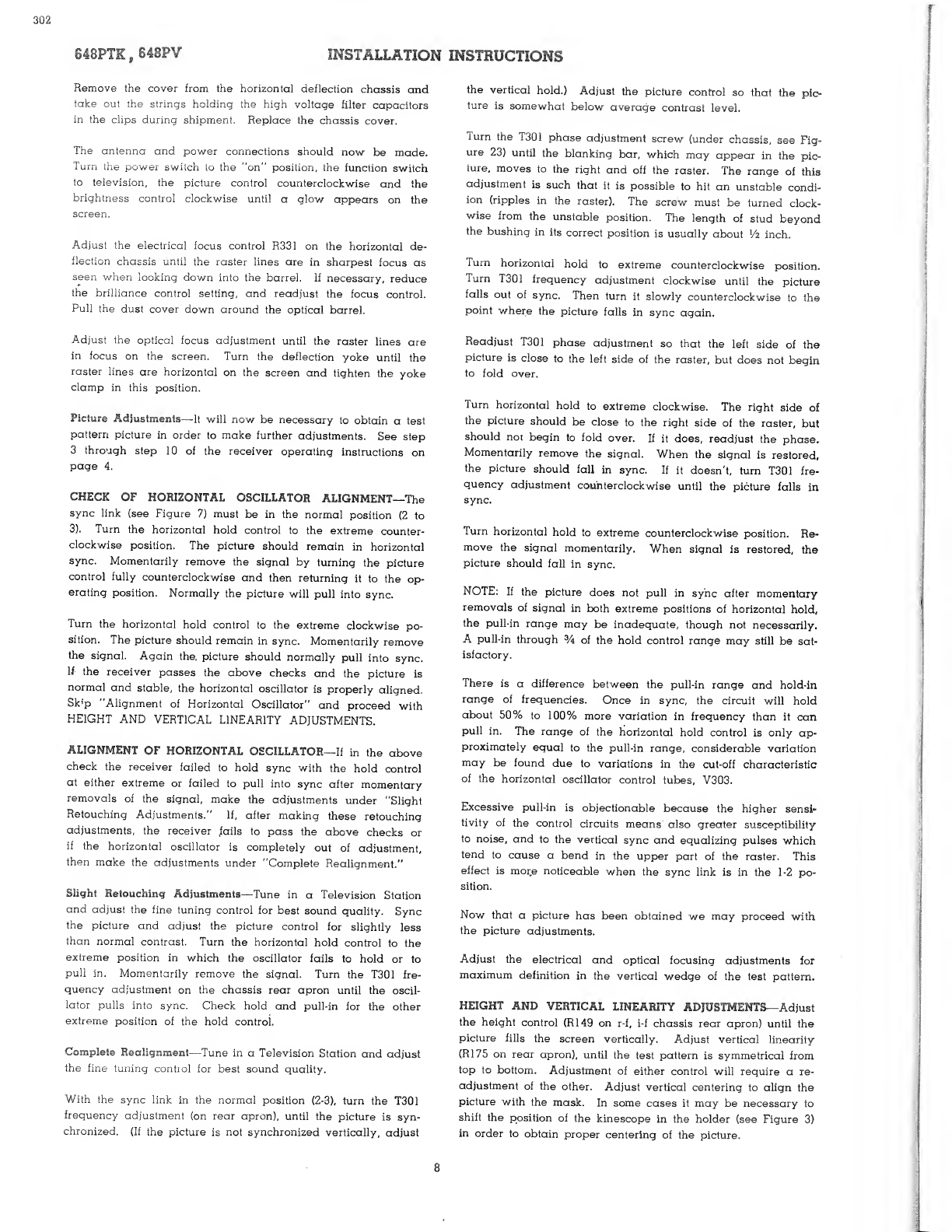
CHECK
OF
HORIZONTAL
OSCILLATOR
ALIGNMENT—The
sync
link
(see
Figure
7)
must
be
in
the
normal
position
(2
to
3).
Turn
the
horizontal
hold
control
to
the
extreme
counter¬
clockwise
position.
The
picture
should
remain
in
horizontal
sync.
Momentarily
remove
the
signal
by
turning
the
picture
control
fully
counterclockwise
and
then
returning
it
to
the
op¬
erating
position.
Normally
the
picture
will
pull
into
sync.
Turn
the
horizontal
hold
control
to
the
extreme
clockwise
po¬
sition.
The
picture
should
remain
in
sync.
Momentarily
remove
the
signal.
Again
the.
picture
should
normally
pull
into
sync.
If
the
receiver
passes
the
above
checks
and
the
picture
is
normal
and
stable,
the
horizontal
oscillator
is
properly
aligned.
Sk
f
p
"Alignment
of
Horizontal
Oscillator"
and
proceed
with
HEIGHT
AND
VERTICAL
LINEARITY
ADJUSTMENTS.
ALIGNMENT
OF
HORIZONTAL
OSCILLATOR—If
in
the
above
check
the
receiver
failed
to
hold
sync
with
the
hold
control
at
either
extreme
or
failed
to
pull
into
sync
after
momentary
removals
of
the
signal,
make
the
adjustments
under
"Slight
Retouching
Adjustments."
If,
after
making
these
retouching
adjustments,
the
receiver
fails
to
pass
the
above
checks
or
if
the
horizontal
oscillator
is
completely
out
of
adjustment,
then
make
the
adjustments
under
"Complete
Realignment."
Slight
Retouching
Adjustments—Tune
in
a
Television
Station
and
adjust
the
fine
tuning
control
for
best
sound
quality.
Sync
the
picture
and
adjust
the
picture
control
for
slightly
less
than
normal
contrast.
Turn
the
horizontal
hold
control
to
the
extreme
position
in
which
the
oscillator
fails
to
hold
or
to
pull
in.
Momentarily
remove
the
signal.
Turn
the
T301
fre¬
quency
adjustment
on
the
chassis
rear
apron
until
the
oscil¬
lator
pulls
into
sync.
Check
hold
and
pull-in
for
the
other
extreme
position
of
the
hold
control.
Complete
Realignment—Tune
in
a
Television
Station
and
adjust
the
fine
tuning
contiol
for
best
sound
quality.
With
the
sync
link
in
the
normal
position
(2-3),
turn
the
T301
frequency
adjustment
(on
rear
apron),
until
the
picture
is
syn¬
chronized.
(If
the
picture
is
not
synchronized
vertically,
adjust
the
vertical
hold.)
Adjust
the
picture
control
so
that
the
pic¬
ture
is
somewhat
below
average
contrast
level.
I
urn
the
T301
phase
adjustment
screw
(under
chassis,
see
Fig¬
ure
23)
until
the
blanking
bar,
which
may
appear
in
the
pic¬
ture,
moves
to
the
right
and
off
the
raster.
The
range
of
this
adjustment
is
such
that
it
is
possible
to
hit
an
unstable
condi-
ion
(ripples
in
the
raster).
The
screw
must
be
turned
clock¬
wise
from
the
unstable
position.
The
length
of
stud
beyond
the
bushing
in
its
correct
position
is
usually
about
Vz
inch.
Turn
horizontal
hold
to
extreme
counterclockwise
position.
Turn
T301
frequency
adjustment
clockwise
until
the
picture
falls
out
of
sync.
Then
turn
it
slowly
counterclockwise
to
the
point
where
the
picture
falls
in
sync
again.
Readjust
T301
phase
adjustment
so
that
the
left
side
of
the
picture
is
close
to
the
left
side
of
the
raster,
but
does
not
begin
to
fold
over.
Turn
horizontal
hold
to
extreme
clockwise.
The
right
side
of
the
picture
should
be
close
to
the
right
side
of
the
raster,
but
should
not
begin
to
fold
over.
If
it
does,
readjust
the
phase.
Momentarily
remove
the
signal.
When
the
signal
is
restored,
the
picture
should
fall
in
sync.
If
it
doesn't,
turn
T301
fre¬
quency
adjustment
counterclockwise
until
the
picture
falls
in
sync.
Turn
horizontal
hold
to
extreme
counterclockwise
position.
Re¬
move
the
signal
momentarily.
When
signal
is
restored,
the
picture
should
fall
in
sync.
NOTE:
If
the
picture
does
not
pull
in
sync
after
momentary
removals
of
signal
in
both
extreme
positions
of
horizontal
hold,
the
pull-in
range
may
be
inadequate,
though
not
necessarily.
A
pull-in
through
%
of
the
hold
control
range
may
still
be
sat¬
isfactory.
There
is
a
difference
between
the
pull-in
range
and
hold-in
range
of
frequencies.
Once
in
sync,
the
circuit
will
hold
about
50%
to
100%
more
variation
in
frequency
than
it
can
pull
in.
The
range
of
the
horizontal
hold
control
is
only
ap¬
proximately
equal
to
the
pull-in
range,
considerable
variation
may
be
found
due
to
variations
in
the
cut-off
characteristic
of
the
horizontal
oscillator
control
tubes,
V303.
Excessive
pull-in
is
objectionable
because
the
higher
sensi¬
tivity
of
the
control
circuits
means
also
greater
susceptibility
to
noise,
and
to
the
vertical
sync
and
equalizing
pulses
which
tend
to
cause
a
bend
in
the
upper
part
of
the
raster.
This
effect
is
more
noticeable
when
the
sync
link
is
in
the
1-2
po¬
sition.
Now
that
a
picture
has
been
obtained
we
may
proceed
with
the
picture
adjustments.
Adjust
the
electrical
and
optical
focusing
adjustments
for
maximum
definition
in
the
vertical
wedge
of
the
test
pattern.
HEIGHT
AND
VERTICAL
LINEARITY
ADJUSTMENTS-
•
Adjust
the
height
control
(R149
on
r-f,
i-f
chassis
rear
apron)
until
the
picture
fills
the
screen
vertically.
Adjust
vertical
linearity
(R175
on
rear
apron),
until
the
test
pattern
is
symmetrical
from
top
to
bottom.
Adjustment
of
either
control
will
require
a
re¬
adjustment
of
the
other.
Adjust
vertical
centering
to
align
the
picture
with
the
mask.
In
some
cases
it
may
be
necessary
to
shift
the
position
of
the
kinescope
in
the
holder
(see
Figure
3)
in
order
to
obtain
proper
centering
of
the
picture.
8
INSTALLATION
INSTRUCTIONS
303
VERTICAL
HEIGHT
VERTICAL
LINEARITY
CONTROL
CENTERING
Figure
6
—
R-F,
I-F
Rear
Chassis
Adjustments
WIDTH
AND
HORIZONTAL
LINEARITY
ADJUSTMENTS—Turn
the
horizontal
drive,
R340,
clockwise
as
far
as
possible
without
causing
crowding
of
the
right
of
the
picture.
Adjust
the
hori¬
zontal
linearity
control,
R351,
until
the
test
pattern
is
sym¬
metrical
left
to
right.
A
slight
readjustment
of
the
horizontal
drive
control
may
be
necessary
when
the
linearity
control
is
used.
Adjust
the
width
control,
L302,
until
the
picture
just
fills
the
screen
horizontally.
Adjust
horizontal
centering
to
align
the
picture
with
the
mask.
In
some
cases
it
may
be
necessary
to
shift
the
position
of
the
kinescope
in
the
holder
in
order
to
obtain
proper
centering
of
the
picture.
Do
not
turn
the
horizontal
drive
control
beyond
approximately
/&
of
its
maximum
clockwise
position.
To
do
so
may
cause
the
output
stage
to
oscillate
and
result
in
the
loss
of
horizontal
sync.
Figure
7—Horizontal
Deflection
Chassis
Adjustments
FOCUS—Adjust
the
focus
control
for
maximum
definition
in
the
test
pattern
vertical
"wedge."
Adjust
the
optical
focus
adjustment
for
best
overall
focus
on
the
screen.
Tighten
all
yoke
and
optical
barrel
lock
screws.
Pull
the
dust
cover
down
around
the
top
of
the
optical
barrel
and
tie
it
securely
in
place.
Tie
the
cable
sleeve
tight
around
the
leads.
These
precautions
are
very
important
for
if
dust
is
permitted
to
enter
and
settle
on
the
corrector
lens,
the
optical
efficiency
of
the
system
will
be
greatly
impaired.
CHECK
OF
R-F
OSCILLATOR
ADJUSTMENTS—Tune
in
all
available
television
stations
to
see
if
the
receiver
r'-f
oscillator
is
adjusted
to
the
proper
frequency
on
all
channels.
If
adjust¬
ments
are
required,
these
should
be
made
by
the
method
outlined
in
the
alignment
procedure
on
page
22
•
The
adjust-
848PTK,
648P¥
ments
for
channels
1
through
5
and
7
through
12
are
available
from
the
front
of
the
cabinet
by
removing
the
station
selector
escutcheon
as
shown
in
Figure
8.
Adjustments
for
channels
6
and
13
are
under
the
chassis.
See
Figure
17.
Figure
8
—
R-F
Oscillator
Adjustments
VIDEO
PEAKING
SWITCH—A
video
peaking
switch
is
pro¬
vided
(see
Figure
6)
to
permit
changing
the
video
response.
Normally
the
switch
should
be
left
open.
However,
if
the
pic¬
tures
from
the
majority
of
stations
look
better
with
the
switch,
closed,
the
switch
should
be
closed.
If
transients
are
produced
on
high
contrast
pictures,
the
switch
should
be
left
open.
ANTENNA
TRAP—A
series
resonant
trap
across
the
r-f
ampli¬
fier
grid
circuit
is
provided
to
eliminate
interference
from
an
FM
station
on
the
image
frequency
of
a
television
station
or
interference
on
channel
6
from
a
station
on
channel
10
or
on
channel
5
from
a
station
on
channel
7.
To
adjust
the
trap
in
the
field,
tune
in
the
station
on
which
the
interference
is
observed.
Tune
both
cores
of
the
trap
for
minimum
interference
in
the
picture.
See
Figure
16
for
the
location
of
the
trap.
Keep
both
cores
approximately
the
same
by
visual
inspection.
Then,
turn
one
core
V
2
turn
from
the
original
position
and
repeak
the
second
for
maximum
rejection.
Repeat
this
process
until
the
best
rejection
is
obtained.
RADIO
OPERATION—Turn
the
receiver
function
switch
to
AM
and
FM
positions
and
check
the
radio
for
proper
operation.
PUSH-BUTTON
ADJUSTMENT—To
adjust
the
radio
push
but¬
tons,
set
the
function
switch
to
the
broadcast
band
position,
tune
the
receiver
to
the
desired
station.
Adjust
the
push
but¬
tons
as
instructed
on
page
81
.
Figure
9
—
Push-Button
Adjustments
Select
the
proper
station
call
letter
tab,
moisten
the
back
of
it
and
insert
in
the
appropriate
recess
in
the
push
button
bezel.
Place
the
tab
cellophane
cover
in
the
recess
over
the
tab.
Replace
the
cabinet
back.
Make
sure
the
screws
which
hold
the
back
in
place
are
tight,
otherwise
it
may
rattle
or
buzz
when
the
receiver
is
operating
at
high
volume.
304
648PTK
,
648PV
INSTALLATION
INSTRUCTION
TABLE
The
following
table
is
provided
as
a
check-off
list
for
use
when
installing
the
receivers.
Step
Nc.
Proceed
as
Indicated
1
Remove
front
of
shipping
carton.
■
Slide
cabinet
out
of
carton.
3
Remove
cabinet
back.
■
Take
off
two
nuts
inside
cabinfei
and
remove
cab¬
inet
from
skid.
■
Unpack
yokes,
knobs,
anode
clip,
and
kinescope
holder
ball
head
screws.
6
Remove
shipping
materials.
■
Remove
radio
brackets.
8
Remove
shipping
tapes.
9
Install
control
knobs.
10
Make
sure
all
tubes
are
firmly
seated
in
their
sockets.
11
Remove
optical
barrel
dust
cover.
12
Remove
corrector
lens
and
warning
label.
n
Clean
screen
and
mirrors.
n
Insert
test
lamp
in
kinescope
holder.
15
Replace
corrector
lens,
cover
center
hole.
16
Misadjust
optical
focus.
17
Check
optical,
horizontal
and
lateral
centering.
m
Adjust
centering
if
necessary.
19
Adjust
corrector
lens
centering
if
necessary.
■
Refocus.
H
If
focus
is
uneven,
adjust
optical
barrel
tilt.
22
Repeat
steps
17
through
21
if
necessary
to
obtain
proper
resolution.
23
Remove
corrector
lens.
24
Remove
test
lamp.
25
Unpack
and
clean
kinescope.
H
Insert
kinescope
in
kinescope
holder.
27
Clean
and
replace
corrector
lens.
Step
No.
Proceed
as
Indicated
H
Install
deflection
yoke,
connect
cables
and
kinescope
socket.
B
Check
all
chassis
interconnecting
cables.
Remove
high
voltage
capacitors
shipping
strings.
B
Connect
receiver
to
an
a-c
line
and
antenna.
32
Turn
receiver
on,
function
switch
to
Tel.
33
Tune
in
station
per
Operating
Instructions,
steps
3
through
10.
34
Adjust
electrical
and
optical
focus
control.
35
Check
horizontal
oscillator
for
hold
and
pull-in
with
horizontal
hold
control
at
each
extreme.
36
Align
horizontal
oscillator
(T301)
if
necessary.
37
Rotate
yoke
for
horizontal
pattern,
tighten.
38
Adjust
height
and
vertical
linearity
and
vertical
centering
controls.
39
Adjust
width,
horizontal
drive,
linearity
and
hori¬
zontal
centering
controls.
40
Adjust
focus
control
R331
for
max
definition
of
ver¬
tical
wedge
and
optical
focus
adjustment
for
best
overall
focus.
41
MAKE
SURE
ALL
OPTICAL
ADJUSTMENT
LOCKS
ARE
TIGHT.
B
Replace
optical
barrel
dust
cover.
B
Check
r-f
oscillator
frequency
on
all
channels.
44
Observe
picture
from
all
available
stations.
45
Set
video
peaking
switch
S101
46
Check
radio
for
operation
on
BC,
SW,
and
FM
bands.
47
Set
push
buttons.
48
Adjust
antenna
trap.
U
Insert
station
call
letter
tabs
in
push
button
es¬
cutcheon.
50
Replace
cabinet
back.