Installing a replacement Replus-250/ Replus-250A/B
Disconnecng a Replus-250/ Replus-250A/B from the PV Module
1. Aach the replacement Replus-250/ Replus-250A/B to the PV module rack using hardware
recommended by your module rack vendor. If you are using grounding washers (e.g., WEEB) to
ground the chassis of the Replus-250/ Replus-250A/B, the old grounding washer should be
discarded and a new grounding washer must be used when installing the replacement
Replus-250/ Replus-250A/B. Torque the Replus-250/ Replus-250A/B fasteners to the values
listed below:
1/4” mounng hardware – 45 in-lbs minimum.
5/16” mounng hardware – 80 in-lbs minimum.
2. If you are using a grounding electrode conductor to ground the Replus-250/ Replus-250A/B
chassis, aach the grounding electrode conductor to the Replus-250/ Replus-250A/B ground
clamp.
3. Connect the AC cable of the replacementReplus-250/ Replus-250A/B and the neighboring
Replus-250/ Replus-250A/B to complete the branch circuit connecons.
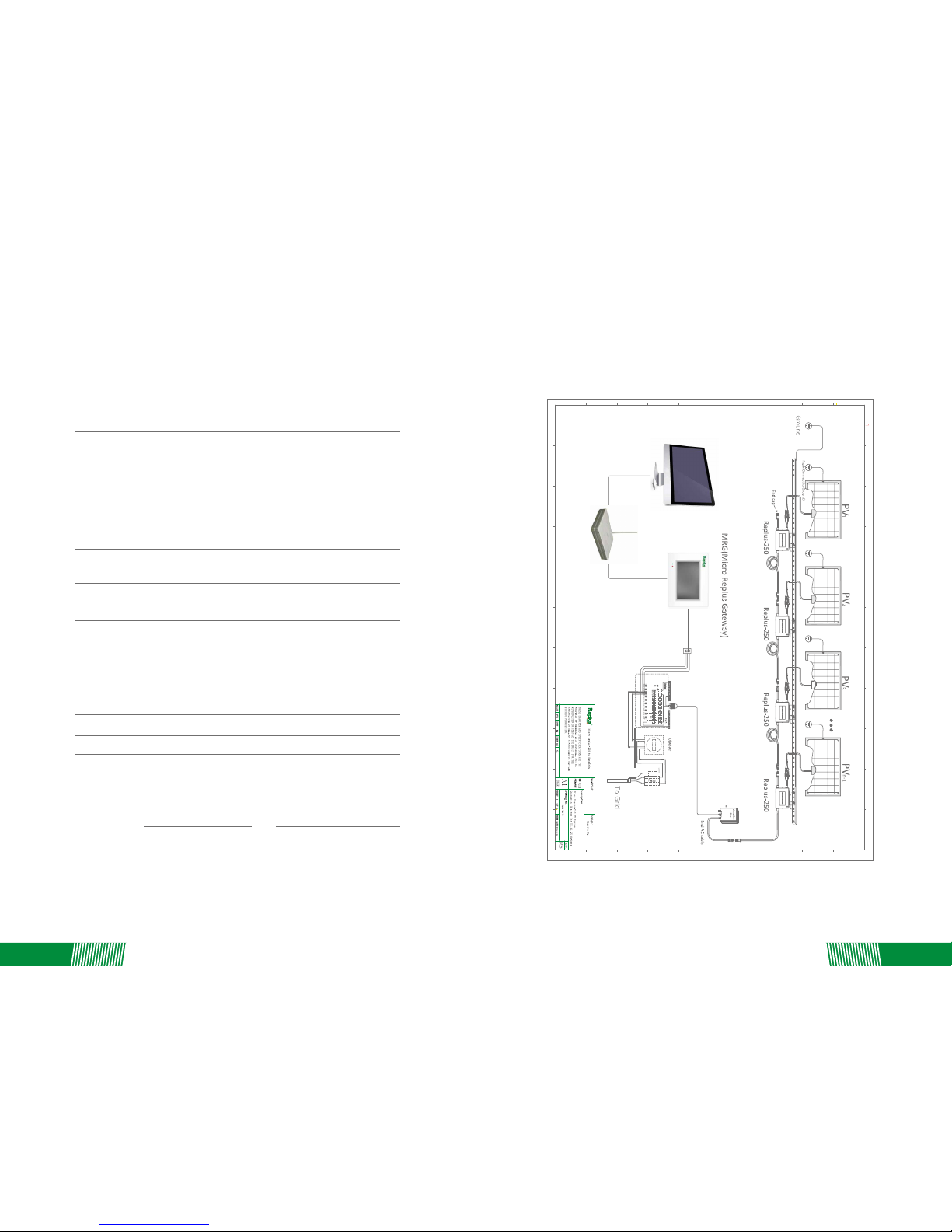
4. Complete the connecon map and connect the PV Modules
1) Complete the connecon map.
2) Each Replus-250/ Replus-250A/B has a removable serial number label located on the
mounng plate. Enter this serial number into the MRG, and correspond it to a number in the
connecon map.
3) Connect the PV Modules.
4) Completely install all Replus-250/ Replus-250A/B and all system inter-wiring connecons
prior to installing the PV modules.
a) Mount the PV modules above their corresponding Replus-250/ Replus-250A/B. Each
Replus-250/ Replus-250A/B comes with one male and one female DC connector.
b) First connect the posive DC wire from the PV module to the negavely marked DC
connector (male pin) of the R Replus-250/ Replus-250A/B. Then connect the negave DC
wire from the PV module to the posively marked DC connector (female socket) of the
Replus-250/ Replus-250A/B.
Repeat for all remaining PV modules using one Replus-250/ Replus-250A/B for each module.
To ensure the Replus-250/ Replus-250A/B is not disconnected from the PV modules under load,
adhere to the following disconnecon steps in the order shown:
1. Disconnect the AC by opening the branch circuit breaker.
2. Disconnect the first AC connector in the branch circuit.
3. Cover the module with an opaque cover.
4. Using a DC current probe, verify there is no current flowing in the DC wires between the PV
module and the Replus-250/ Replus-250A/B.
5. Care should be taken when measuring DC currents, as most clamp-on meters must be zeroed
first and tend to dri with me.
6. Disconnect the PV module DC wire connectors from the Replus-250/ Replus-250A/B.
7. Remove the Replus-250/ Replus-250A/B from the PV array rack.
Warning: Do Not Aempt To Repair The Replus-250/ Replus-250a/b; It Contains No
User-service Able Parts. If Troubleshoong Methods Fail, Please Return The Replus-250/
Replus-250a/b To Your Distributor For Maintenance.
Warning: Never Disconnect The Dc Wire Connectors Under Load. Ensure That No Current Is
Flowing Inthe Dc Wires Prior To Disconnecng. An Opaque Covering Maybe Used To Cover
The Module Prior To Disconnecng The Module.
Warning: Always Disconnect Ac Power Before Disconnecng The Pv Module Wires From
Replus-250/ Replus-250a/b. The Ac Connector Of The First Replus-250/ Replus-250a/b In A
Branch Circuis Suitable As A Disconnecng Means Once The Ac Branch Circuit Breaker In
The Load Center Has Been Opened.
Warning: Replus-250/ Replus-250a/b Is Powered By Dc Power From The Pv Modules. Make
Sure You Disconnect The Dc Connecons And Reconnect Dc Power To Watch For The Six
Short Led Blinks One Minute Aer Dc Is Applied.
LED indicaon of error
• Error report: AC or DC fault
The LED light is on by 4 seconds, and off by 4 seconds.
• Error report: GFDI fault
The LED light stays on.
Troubleshoong an Inoperable Replus-250/ Replus-250A/B
7. TROUBLESHOOTING AND MAINTENANCE
To troubleshoot an inoperable Replus-250/ Replus-250A/B, follow the steps in the order shown:
1. Check the connecon to the ulity grid. Verify that the ulity voltage and frequency are within
allowable ranges shown in the label of the Replus-250/ Replus-250A/B.
2. Verify ulity power is present at the inverter in queson by removing AC, then DC power.
Never disconnect the DC wires while the Replus-250/ Replus-250A/B is producing power.
Re-connect the DC module connectors, and then watch for the LED blinks.
3. Check the AC branch circuit interconnecon harness between all the Replus-250/
Replus-250A/B’s. Verify that each inverter is energized by the ulity grid as described in the
previous step.
4. Make sure that any AC disconnects are funconing properly and are closed.
5. Verify the PV module DC voltage is within the allowable range shown in the label of the
Replus-250/ Replus-250A/B.
6. Check the DC connecons between the Replus-250/ Replus-250A/B and the PV module.
7. If the problem persists, please contact ReneSola customer support.
Warning: Do Not Aempt To Repair The Replus-250/ Replus-250A/B; It Contains No
User-serviceable Parts. If Troubleshoong Methods Fail, Pleasere Turn The Defecve
Replus-250/ Replus-250A/B To Your Distributor For Maintenance.
08 09