2/12
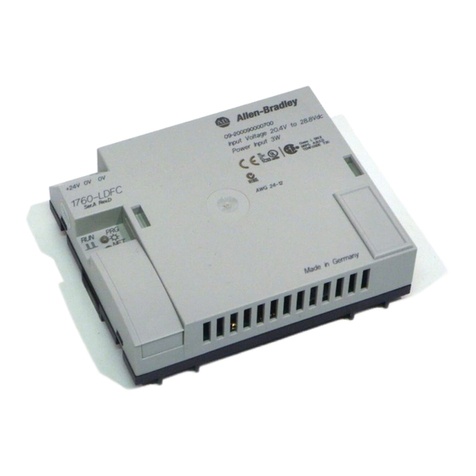
Front view – Frontansicht – Face avant – Vista frontale – Vista de frente
aLCD display
bDEL button
Delete contacts/relays/connections/empty current path/value
cALT button
Draw connection
Toggle between make or break contact
Insert current path
Special functions
dESC button
One menu back
Quit menu, selection, end
e“Mode” button
fCursor buttons: right, left, up, down
Select contacts, relays, value, numbers
P button on: Input P1 -> Cursor left
Input P2 -> Cursor up
Input P3 -> Cursor right
Input P4 -> Cursor down
gOK button
Enter menu, action, accept value
hoptionally programmable LEDs
iVoltage supply
1760-RM 24 V DC
jInterface (with cover)
Terminal for connection cable
aLCD Anzeige
bDEL-Taste
Löschen von Kontakten/Relais/Verbindungen/leerem Strompfad/Wert
cALT-Taste
Verbindungen zeichnen
Umschalter: Kontakt = Schließer oder Öffner
Strompfad einfügen
Sonderfunktionen
dESC-Taste
Ein Menü zurück
Menü, Auswahl verlassen, Abbrechen
eMode-Taste
fCursortasten: rechts, links, oben, unten
Kontakte, Relais, Wert, Nummer wählen
P-Taste an: Eingang P1 = Cursor links
Eingang P2 = Cursor oben
Eingang P3 = Cursor rechts
Eingang P4 = Cursor unten
gOK-Taste
Menü weiterschalten, Aktion, Wert übernehmen
hfrei programmierbare LED’s
iSpannungsversorgung
1760-RM 24 V DC
jSchnittstelle (mit Abdeckung)
Klemme für Geräteanschlussleitung
aAfficheur à cristaux liquides
bTouche DEL
Effacement des contacts(/relais/liaisons/branches de circuit vierges/valeurs
cTouche ALT
Dessiner les liaisons
Passage d’un contact F à un contact O (ou inversement)
Insertion de branches de circuit
Fonctions spéciales
dTouche ESC
Retour au menu précédent
Quitter le menu/la sélection, annuler
eTouche « Mode »
fTouches de direction : droite, gauche, haut, bas
Sélection des contacts, relais, valeurs et numéros
Affectation des touches P : entrée P1 -> flèche « gauche »
entrée P2 -> flèche « haut »
entrée P3 -> flèche « droite »
entrée P4 -> flèche « bas »
gTouche OK
Validation des menus, des actions et des valeurs
hDEL librement programmables
iAlimentation
1760-RM 24 V DC
jInterface (avec capot)
Borne pour câble de raccordement de l’appareil
aVisualizzatore LCD
bTasto DEL
Cancellazione di contatti, relè, collegamenti vuoti, linee vuote, valore
cTasto ALT
Disegno dei collegamenti
Commutatore: contatto = chiusura/apertura
Inserisci circuito
Funzioni speciali
dTasto ESC
Menu precedente
Menu, abbandonare scelta, interrompere
eTasto “Mode”
fTasti cursore, destra, sinistra, su, giù
Selezione contatti, relè, valore, numeri
Tasto P su: lato P1 -> cursore a sinistra
lato P2 -> cursore su
lato P3 -> cursore a destra
lato P4 -> cursore giù
gTasto OK
Menu successivo, azione, acquisizione dati
hLED liberamente programmabili
iTensione di alimentazione
1760-RM 24 V DC
jInterfaccia (con copertura)
Morsetto per cavo di collegamento
aIndicador LCD
bTecla DEL
Borrar contactos/relés/conexiones/circuito de corriente en vacío/valor
cTecla ALT
Diseñar conexiones
Accionamiento del interruptor basculante (toggle)
entre contacto de apertura o de cierre
Insertar circuito de corriente
Funciones especiales
dTecla ESC
Un menú hacia atrás
Menú, abandonar selección, cancelar
eTecla “Mode”
fTeclas de cursor: derecha, izquierda, arriba, abajo.
Selección de contactos, relés, valor, números
gTecla P sobre: Entrada P1 -> Cursor izquierda
Entrada P2 -> Cursor arriba
Entrada P3 -> Cursor derecha
Entrada P4 -> Cursor abajo
hLEDs de libre programación
iTensión de alimentación
1760-RM 24 V DC
jInterface (con tapa)
Borne para cable de conexión al aparato
b
h
a
defg
f
ci
j
Pub_IN012B_0907Brandlabel_AB_AWA2175.FM Seite 2 Montag, 1. Oktober 2007 3:50 15