manuals.online logo
Brands
  1. Home
  2. •
  3. Brands
  4. •
  5. Romet
  6. •
  7. Medical Equipment
  8. •
  9. Romet R210 User manual

Romet R210 User manual

Other Romet Medical Equipment manuals

Romet R355 User manual

Romet

Romet R355 User manual

Romet R200 User manual

Romet

Romet R200 User manual

Romet R700 User manual

Romet

Romet R700 User manual

Romet R310 User manual

Romet

Romet R310 User manual

Popular Medical Equipment manuals by other brands

Itamar Medical WatchPAT Operation manual

Itamar Medical

Itamar Medical WatchPAT Operation manual

PROTEOR 1P650 KNEE Assembling and adjustment instructions

PROTEOR

PROTEOR 1P650 KNEE Assembling and adjustment instructions

Liberate Medical VentFree user manual

Liberate Medical

Liberate Medical VentFree user manual

Dicarre DA20 user guide

Dicarre

Dicarre DA20 user guide

Stryker Medical M Series Operation manual

Stryker Medical

Stryker Medical M Series Operation manual

Invacare ScanBed 750 user manual

Invacare

Invacare ScanBed 750 user manual

Getinge Arjohuntleigh Nimbus 3 Professional Instructions for use

Getinge

Getinge Arjohuntleigh Nimbus 3 Professional Instructions for use

Mettler Electronics Sonicator 730 Maintenance manual

Mettler Electronics

Mettler Electronics Sonicator 730 Maintenance manual

Pressalit Care R1100 Mounting instruction

Pressalit Care

Pressalit Care R1100 Mounting instruction

Denas MS DENAS-T operating manual

Denas MS

Denas MS DENAS-T operating manual

bort medical ActiveColor quick guide

bort medical

bort medical ActiveColor quick guide

AccuVein AV400 user manual

AccuVein

AccuVein AV400 user manual

agiliti NP Trio user manual

agiliti

agiliti NP Trio user manual

Rocket Medical Rocket Digital Oocyte Aspiration Pump Service manual

Rocket Medical

Rocket Medical Rocket Digital Oocyte Aspiration Pump Service manual

Monteris Medical Neuroblate Instructions for use

Monteris Medical

Monteris Medical Neuroblate Instructions for use

Otto Block 8E33 7 manual

Otto Block

Otto Block 8E33 7 manual

ADVANCED HOME CARE Helios Guide

ADVANCED HOME CARE

ADVANCED HOME CARE Helios Guide

NeuLog NUL-208 Guide

NeuLog

NeuLog NUL-208 Guide

manuals.online logo
manuals.online logoBrands
  • About & Mission
  • Contact us
  • Privacy Policy
  • Terms and Conditions

Copyright 2025 Manuals.Online. All Rights Reserved.

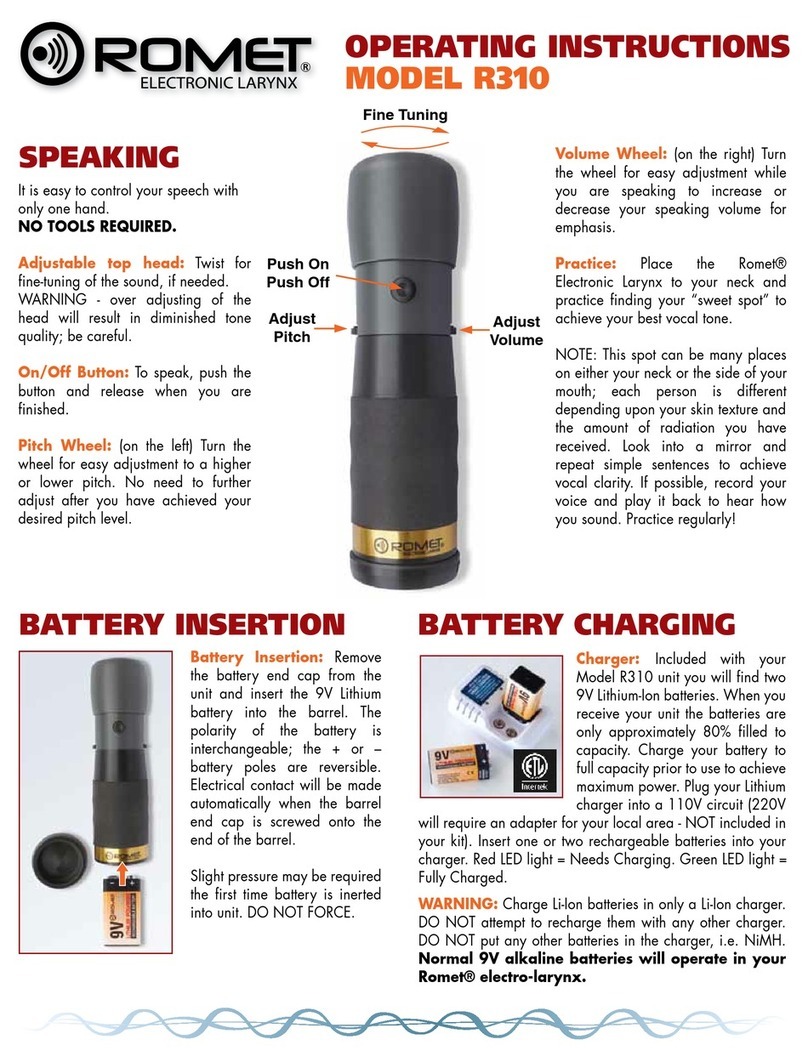
It is easy to control your speech with
only one hand.
NO TOOLS REQUIRED.
Adjustable top head: Twist for
fine-tuning of the sound, if needed.
WARNING - over adjusting of the
head will result in diminished tone
quality; be careful.
On/Off Button: To speak, push the
button and release when you are
finished.
Pitch Wheel: (on the left) Turn the
wheel for easy adjustment to a higher
or lower pitch. No need to further
adjust after you have achieved your
desired pitch level.
Volume Wheel: (on the right) Turn
the wheel for easy adjustment while
you are speaking to increase or
decrease your speaking volume for
emphasis.
Practice: Place the Romet®
Electronic Larynx to your neck and
practice finding your “sweet spot” to
achieve your best vocal tone.
NOTE: This spot can be many places
on either your neck or the side of your
mouth; each person is different
depending upon your skin texture and
the amount of radiation you have
received. Look into a mirror and
repeat simple sentences to achieve
vocal clarity. If possible, record your
voice and play it back to hear how
you sound. Practice regularly!
Adjust
Pitch
Push On
Push Off
Adjust
Volume
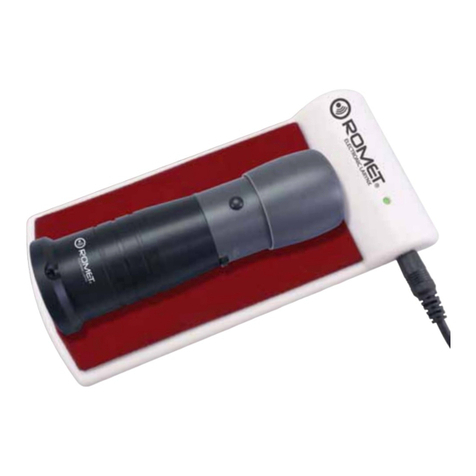
Charger:Included with your
Model R210 unit you will find two
9V Lithium-Ion batteries. When you
receive your unit the batteries are
only approximately 80% filled to
capacity. Charge your battery to
full capacity prior to use to achieve
maximum power. Plug your Lithium
charger into a 110V circuit (220V
will require an adapter for your local area - NOT included in
your kit). Insert one or two rechargeable batteries into your
charger. Red LED light = Needs Charging. Green LED light =
Fully Charged.
WARNING: Charge Li-Ion batteries in only a Li-Ion charger.
DO NOT attempt to recharge them with any other charger.
DO NOT put any other batteries in the charger, i.e. NiMH.
Normal 9V alkaline batteries will operate in your
Romet® electro-larynx.
Fine Tuning
SPEAKING
BATTERY INSERTION BATTERY CHARGING
OPERATING INSTRUCTIONS
MODEL R210
Battery Insertion: Remove
the battery end cap from the
unit and insert the 9V Lithium
battery into the barrel. The
polarity of the battery is
interchangeable; the + or –
battery poles are reversible.
Electrical contact will be made
automatically when the barrel
end cap is screwed onto the
end of the barrel.
Slight pressure may be required
the first time battery is inerted
into unit. DO NOT FORCE.

FOR MORE INFORMATION, CONTACT:
ORAL ADAPTER
INSTRUCTIONS
The oral adapter and tubes provided with your Romet® Elec-
tronic Larynx will enable you to begin speaking while your neck is
healing post surgery.
Firmly place the rubber cap adapter on the top of your Electronic
Larynx (as shown above). Insert a tube into the small hole on the
top of the adapter. Push the tube firmly into the hole. The tube
must be secure in the adapter hole while you are speaking. Place
the end of the tube into the corner of your mouth, pointing the tip
toward the top of your mouth.
Activate the on/off button on your Electronic Larynx. Practice
your speech with simple vowels or short sounds. Try a few
simple sentences.
If possible, speak slowly into a tape recorder and replay
your speech.
The clear tubes provided are fitted with tips to prevvent any
food particles from lodging in the tube while being used.
You can easily remove this tip or shorten the tube with scissors.
After you have finished speaking, rinse the tubes with cool, clear
water. Be sure to clean the top of your Electronic Larynx to remove
any saliva residue or food particles.
14410 Saratoga Pass
San Antonio, TX 78254 USA
888.826.2703 Fax 210.858.9608
inf[email protected] www.romet.us