Synchronizing Twin XL Bases
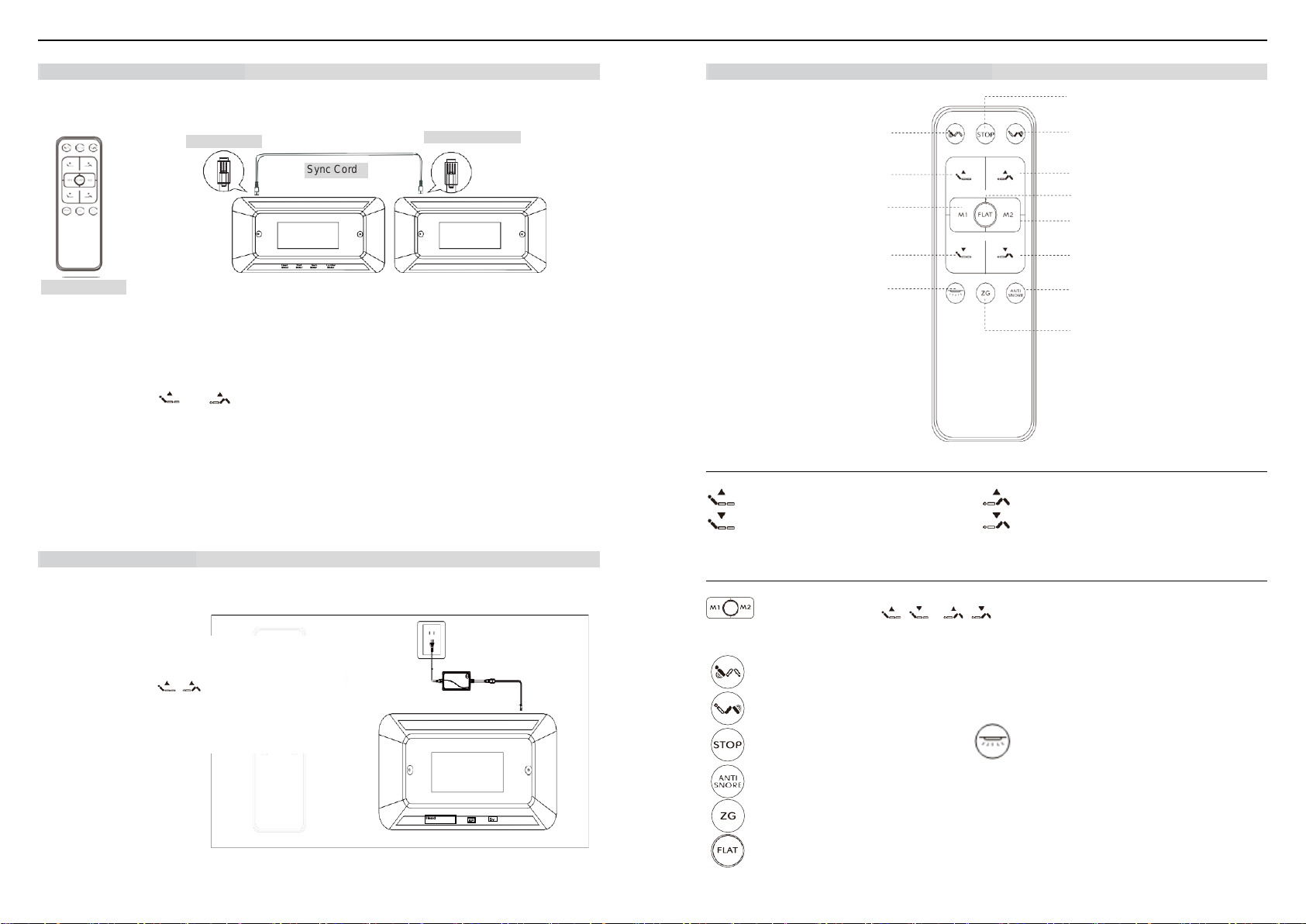
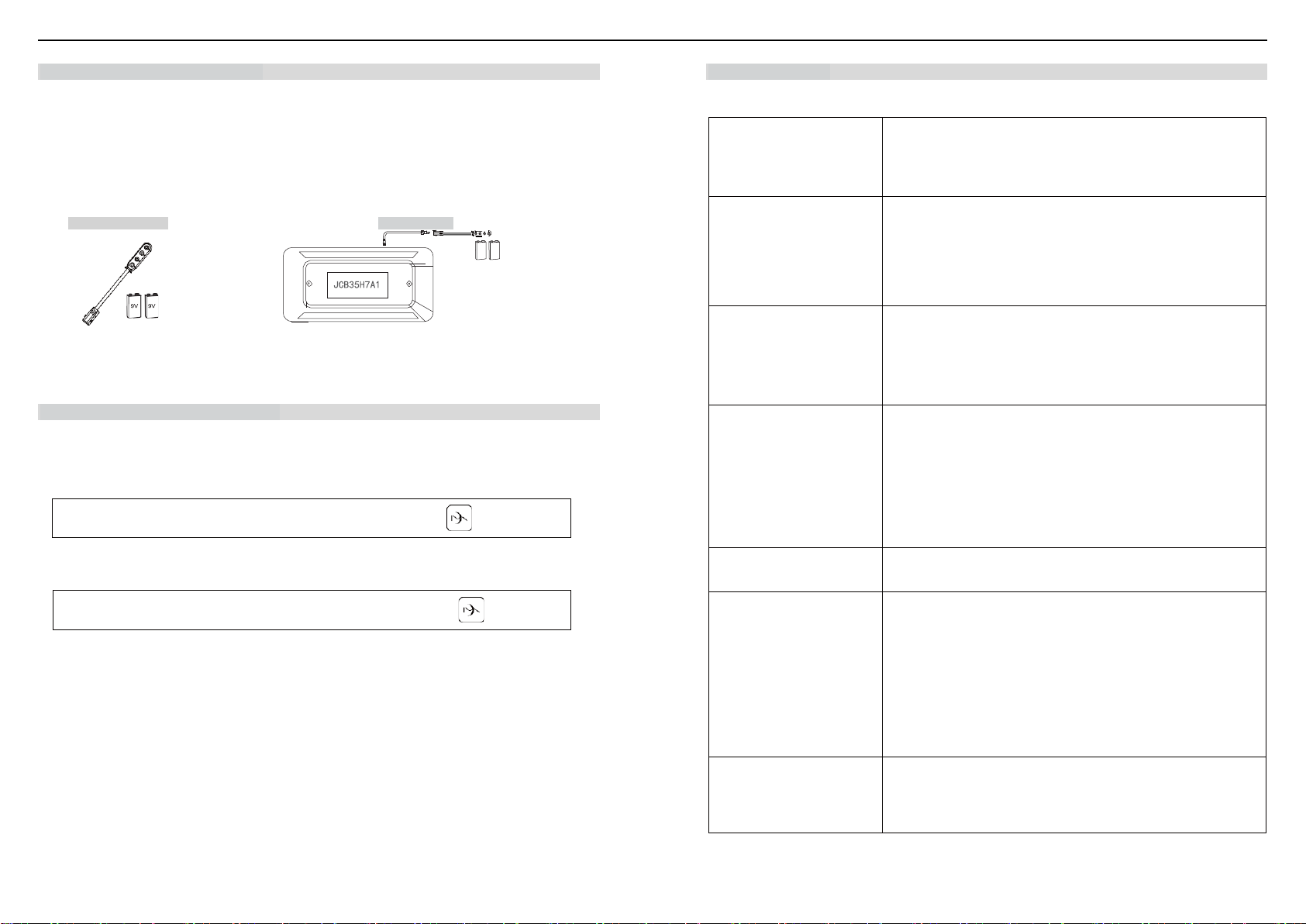
Ifsimultaneousoperationof twotwinXLbasesis desired, use the synchronisation cord toconnect theelectronicsof
both bases together.
STEP 1: Unplug bases from the power source.
STEP 2: Connect the male ends of the sync cord to the female sync plugs of the control boxes (Refer to illustration
above).
STEP 3: Plug bases back into the power source.
STEP 4: Press and hold and buttons; a beep of the buzzer will be heard, and the backlight of the
remote control will flash twice. Open the battery box and toggle the switch to “Central” position first, next
press and hold “FLAT” until you hear a beep from each buzzer on the control box, which means the two
bases can be synchronized with one remote control.
NOTE: To control the two bases separately without removing the sync cord, open the control remote battery box
and flip the switch to the “A” or “B” position.
Attention: (1) If you want to toggle from "A" or "B" to "Central" position to realize sync control, please press and
hold "Flat" again until you reach a flat position. (2) The quadruplex cable is in master control when
synchronizing and the Bluetooth must be plugged in the master control box. (3) The interval must be
more than 4 s between plug in and plug out the sync cord.
Remote Control Pairing
The remote control that comes in the box is already paired to the adjustable base. No further action is required.
If the remote control is not paired with the base, follow the steps below:
1. Unplug the base from the power source then power it on,
defaulting to remote pairing within 30 s.
2. Next, press and hold at the same time.
3. You will hear a beep of the buzzer and the backlight of the
remote control will flash twice, which means pairing is
successful. Release the buttons.
Backlight Wireless Remote Control Guide
Adjustment
HEAD UP/DOWN BUTTONS FOOT UP/DOWN BUTTONS
Press and hold to lift or lower the HEAD section. Press and hold to lift or lower the FOOT section.
One Touch Buttons
Press to adjust the base to "Memory 1" or "Memory 2".
STEP 1: Press and hold to your desired position.
STEP 2: Press and hold "M1" or "M2" for more than 3 s until you hear a beep of the buzzer on the control
box and the backlight of the remote control flashes twice, which means the memory position is saved.
Press to turn on the Head/Foot Massage.
Press the button once to increase one intensity level, there are 3 intensity levels available. When it is in
the 3rd level, press the button again and the massage will turn off. The massage motor will turn off
automatically after 30 min.
Press to turn on the under-bed lighting. The light
will turn off if the button is not pressed within
10 min.
Press to adjust the base to the pre-programmed anti-snore position that lets you get a restful night.
Press to adjust the base to the programmed reclined position for optimum weight distribution.