6
2. BELT REPLACEMENT OF HEAD DRIVE TYPE SCLV MODEL
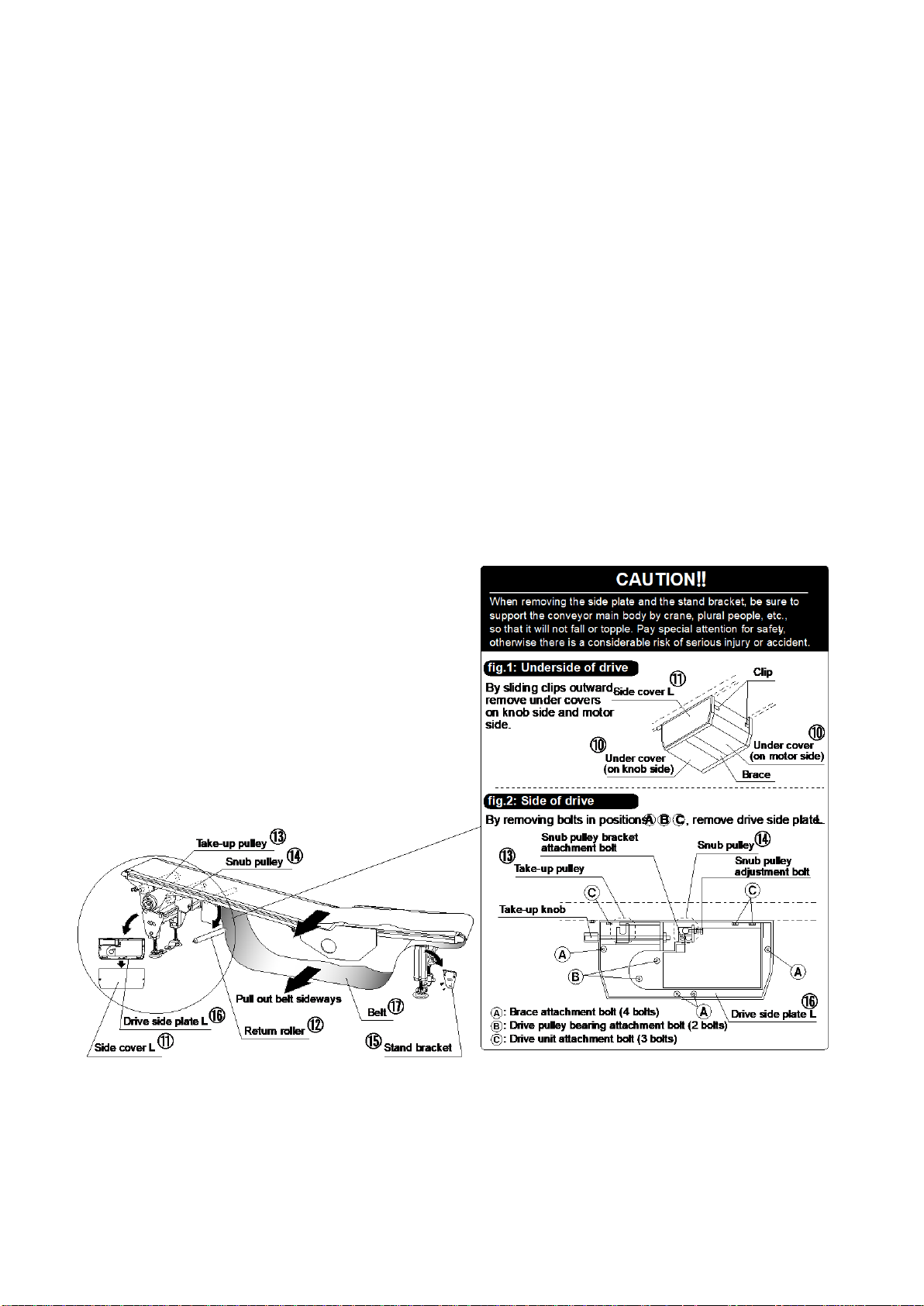
⑩Remove side cover.
⑪Remove side plate in order below:
⑪-A Remove fixing plate attachment bolt (1 bolt on side plate).
⑪-B Remove side plate attachment bolts (2 bolts).
⑪-C Remove brace attachment bolts (2 bolts).
⑪-D Remove stand attachment bolts (2 bolts).
NOTE: For single-support drive or side-mount drive, skip step ⑪ because these
have no side plate.
⑫Remove return roller.
⑬Remove stand bracket. (By steps ⑩ to ⑬, clearance to pull out belt is made.)
⑭Pull out belt sideways, and install replacement belt.
NOTE: When installing replacement belt, confirm direction of belt travel written
on belt undersurface.
⑮Reinstall all the removed parts. Take up the belt and make belt alignment
adjustment, referring to “S-CON®MINI Series Operating and Service
Manual”, p.23-27.