CONTENTS
PARTS NAMES . . . . . . . . . . . . . . . . . . . . . . . . . . . . . . . 3
FRONT PANEL . . . . . . . . . . . . . . . . . . . . . . . . . . . . . . . . . . . 3
REAR PANEL . . . . . . . . . . . . . . . . . . . . . . . . . . . . . . . . . . . . 4
CONNECTION . . . . . . . . . . . . . . . . . . . . . . . . . . . . . . . . 5
BASIC CONNECTIONS . . . . . . . . . . . . . . . . . . . . . . . . . . . . 5
CONNECTIONS TO THE ALARM IN AND
RS232C/RS485 TERMINALS . . . . . . . . . . . . . . . . . . . . . . . . 6
REMOTE CONTROLLER CIRCUIT CONNECTIONS . . . . . 7
BASIC OPERATIONS . . . . . . . . . . . . . . . . . . . . . . . . . . 8
FIELD SWITCHER AND MULTI-VIEWER FUNCTIONS . . . 8
MODE SWITCHING . . . . . . . . . . . . . . . . . . . . . . . . . . . . . . . . 9
SECURITY LOCK FUNCTION . . . . . . . . . . . . . . . . . . . . . . 10
SETTINGS BACKUP FUNCTION . . . . . . . . . . . . . . . . . . . . 10
RESET FUNCTION . . . . . . . . . . . . . . . . . . . . . . . . . . . . . . . 10
FIELD SWITCHER MODE . . . . . . . . . . . . . . . . . . . . . . 11
LIVE PICTURE MODE . . . . . . . . . . . . . . . . . . . . . . . . . . . . 11
FULL SCREEN OPERATIONS . . . . . . . . . . . . . . . . . . . 11
ALARM OPERATION . . . . . . . . . . . . . . . . . . . . . . . . . . . 11
VCR PLAYBACK MODE . . . . . . . . . . . . . . . . . . . . . . . . . . . 12
VCR PLAYBACK MODE OPERATIONS STEPS
ON MONITOR . . . . . . . . . . . . . . . . . . . . . . . . . . . . . . . . . 12
FULL SCREEN OPERATIONS . . . . . . . . . . . . . . . . . . . 13
4 DIVISIONS SPLIT SCREEN OPERATIONS . . . . . . . . 15
MULTI-DISPLAY SCREEN OPERATIONS . . . . . . . . . . 15
ALARM OPERATION . . . . . . . . . . . . . . . . . . . . . . . . . . . 15
MULTI-VIEWER MODE . . . . . . . . . . . . . . . . . . . . . . . . 16
LIVE PICTURE MODE . . . . . . . . . . . . . . . . . . . . . . . . . . . . 16
LIVE PICTURE MODE OPERATIONS STEPS ON
MONITOR . . . . . . . . . . . . . . . . . . . . . . . . . . . . . . . . . . . . 16
FULL SCREEN OPERATIONS . . . . . . . . . . . . . . . . . . . 17
4 DIVISIONS SPLIT SCREEN OPERATIONS . . . . . . . . 19
MULTI-DISPLAY SCREEN OPERATIONS . . . . . . . . . . 19
ALARM OPERATIONS . . . . . . . . . . . . . . . . . . . . . . . . . 20
VCR PLAYBACK MODE . . . . . . . . . . . . . . . . . . . . . . . . . . . 21
VCR PLAYBACK MODE OPERATIONS STEPS
ON MONITOR . . . . . . . . . . . . . . . . . . . . . . . . . . . . . . . . . 21
MENU SETTING MODE . . . . . . . . . . . . . . . . . . . . . . . . 22
MENUS DISPLAYS . . . . . . . . . . . . . . . . . . . . . . . . . . . . . . . 22
LANGUAGE SETTING . . . . . . . . . . . . . . . . . . . . . . . . . . . . 23
CLOCK AND SUMMER TIME SETTING . . . . . . . . . . . . . . 24
VCR SETTING AND EXTERNAL CONTROL
COMMUNICATION SPEED SETTING . . . . . . . . . . . . . . . . 26
ALARM AND SENSOR SETTING . . . . . . . . . . . . . . . . . . . 28
ACTIVE RECORDING AND VIDEO LOSS SETTING . . . . 30
MONITOR SETTINGS . . . . . . . . . . . . . . . . . . . . . . . . . . . . . 32
CAMERA SETTING . . . . . . . . . . . . . . . . . . . . . . . . . . . . . . . 33
SETTING EACH CAMERA DISPLAY POSITION IN
SPLIT SCREEN DISPLAY MODE . . . . . . . . . . . . . . . . . . . . 40
CLOCK AND TITLE DISPLAY SETTINGS . . . . . . . . . . . . 41
ALARM DATA DISPLAY . . . . . . . . . . . . . . . . . . . . . . . . . . 42
ALARMS OPERATIONS . . . . . . . . . . . . . . . . . . . . . . . 43
INTERFACE SPECIFICATIONS . . . . . . . . . . . . . . . . . 45
SPECIFICATIONS . . . . . . . . . . . . . . . . . . . . . . . . . . . . 50
FEATURES
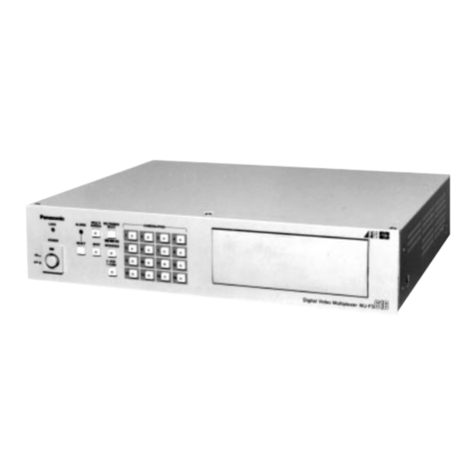
This unit can display live camera images in full screen mode or
in a split screen (4 or 9 divisions). Recorded pictures can also be
displayed in a split screen.
•The field switcher function can, during recording, display the
images full screen or full screen sequentially.
•The multi-viewer function can, during live images mode,
display the images in a split screen and record the images as
displayed.
•High-speed switching (up to single field switching)
•The following operations are possible at each camera
according to the timer settings:
•Programmed recording of certain or all cameras only can be
done according to the day or night periods.
•Different alarm durations of certain or all cameras can be set
according to the day or night periods.
•Live or recorded pictures of certain or all cameras can be
masked so they are not visible according to the day or night
periods.
•Automatic switching delay can be set for each camera
according to the day or night periods.
•Video sensor points areas can be set for each camera.
Trigger can start alarm recording operations in priority.
•If the video signal is interrupted at any of the cameras, the
frozen image just previous to the interruption or test chart can
be displayed (selectable for each camera).
•The unit can be controlled by computer through the RS232C
connection.
•A system controller (sold separately) can be used through the
RS485 (RJ-11) connection.
•Up to 100 alarm entries can be displayed on-screen.
ACCESSORIES
1Power cord x1
2Fixer, Power cord tie x1
2
To mount this unit onto a rack, please use the rack mount
hardware sold separately.
L8FN5/XE (MPX-MS92P GB) 2000. 8. 31
2English