logo
Brands
  1. Home
  2. •
  3. Brands
  4. •
  5. Sanyo
  6. •
  7. TV
  8. •
  9. Sanyo CE28DN7-C User manual

Sanyo CE28DN7-C User manual

This manual suits for next models

1

Other Sanyo TV manuals

Sanyo CR14SR8 User manual

Sanyo

Sanyo CR14SR8 User manual

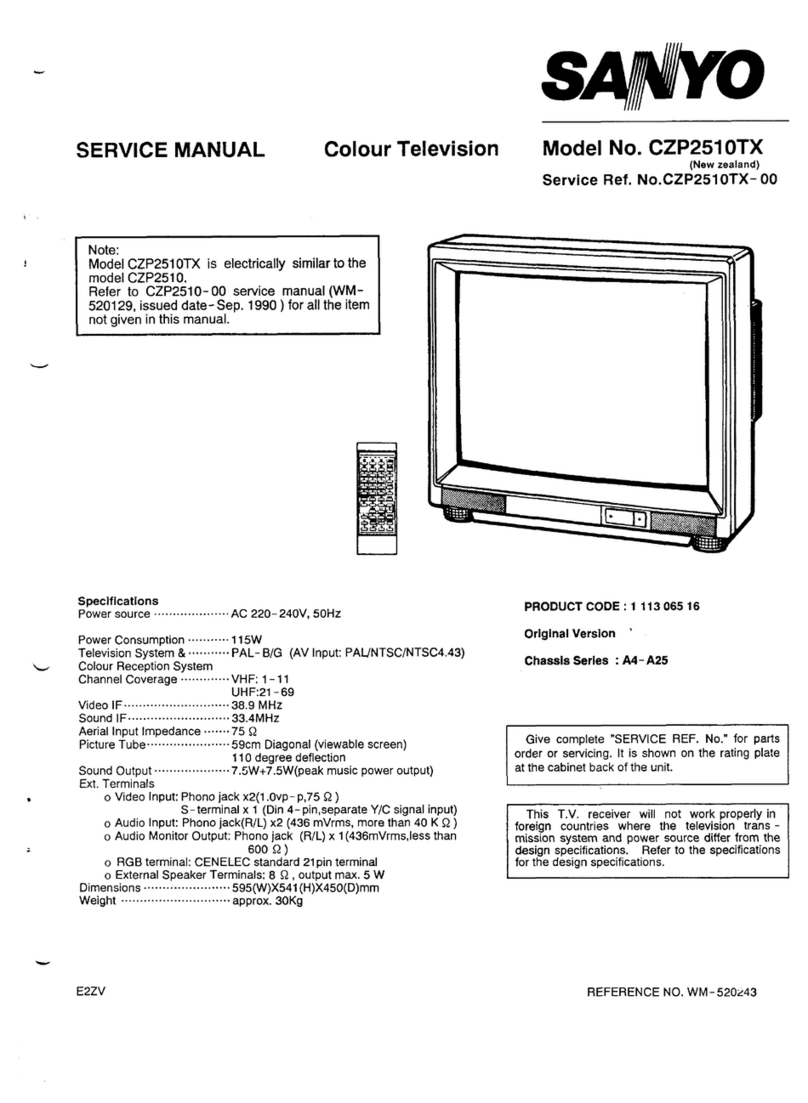
Sanyo CZP2510 User manual

Sanyo

Sanyo CZP2510 User manual

Sanyo CM14SW8S User manual

Sanyo

Sanyo CM14SW8S User manual

Sanyo CE25B4-C User manual

Sanyo

Sanyo CE25B4-C User manual

Sanyo C20LB87B User manual

Sanyo

Sanyo C20LB87B User manual

Sanyo DP19649 - 720p 18.5" LCD HDTV User manual

Sanyo

Sanyo DP19649 - 720p 18.5" LCD HDTV User manual

Sanyo DS25520 User manual

Sanyo

Sanyo DS25520 User manual

Sanyo CP21MF2 User manual

Sanyo

Sanyo CP21MF2 User manual

Sanyo CE25B2-C User manual

Sanyo

Sanyo CE25B2-C User manual

Sanyo CA21KF3 User manual

Sanyo

Sanyo CA21KF3 User manual

Sanyo CE21DN5-C User manual

Sanyo

Sanyo CE21DN5-C User manual

Sanyo LCD-27XA2 User manual

Sanyo

Sanyo LCD-27XA2 User manual

Sanyo 28dn2 User manual

Sanyo

Sanyo 28dn2 User manual

Sanyo CE21D5-C User manual

Sanyo

Sanyo CE21D5-C User manual

Sanyo CZP331 OTX User manual

Sanyo

Sanyo CZP331 OTX User manual

Sanyo CE42FD17-B User manual

Sanyo

Sanyo CE42FD17-B User manual

Sanyo LED-32XR10FH User manual

Sanyo

Sanyo LED-32XR10FH User manual

Sanyo CE32W1-C User manual

Sanyo

Sanyo CE32W1-C User manual

Sanyo CE28FWN6-B User manual

Sanyo

Sanyo CE28FWN6-B User manual

Sanyo DS24424 User manual

Sanyo

Sanyo DS24424 User manual

Sanyo CP21KS2K User manual

Sanyo

Sanyo CP21KS2K User manual

Sanyo DP50741 User manual

Sanyo

Sanyo DP50741 User manual

Sanyo DP19640 - 18.5" Diagonal LCD HDTV 720p User manual

Sanyo

Sanyo DP19640 - 18.5" Diagonal LCD HDTV 720p User manual

Sanyo DP32648 - 31.5" LCD TV User manual

Sanyo

Sanyo DP32648 - 31.5" LCD TV User manual

Popular TV manuals by other brands

Philips 32PFL7403D null

Philips

Philips 32PFL7403D null

Philips 19PFL3403D null

Philips

Philips 19PFL3403D null

Philips 19PFL5403D null

Philips

Philips 19PFL5403D null

Philips 32PFL7605C null

Philips

Philips 32PFL7605C null

Philips 32PFL7603D - annexe 1 null

Philips

Philips 32PFL7603D - annexe 1 null

Haier HS-2190 null

Haier

Haier HS-2190 null

Philips 19PFL3404D null

Philips

Philips 19PFL3404D null

Toshiba 27A10 owner's manual

Toshiba

Toshiba 27A10 owner's manual

Philips 42PF9630A/37 user manual

Philips

Philips 42PF9630A/37 user manual

Hitachi 32FX48B operating guide

Hitachi

Hitachi 32FX48B operating guide

DAEWOO ELECTRONICS DTQ-14V1FC Service manual

DAEWOO ELECTRONICS

DAEWOO ELECTRONICS DTQ-14V1FC Service manual

Changhong Electric uhd55b6000is Operation manual

Changhong Electric

Changhong Electric uhd55b6000is Operation manual

Philips Matchline 21CE7551 operating instructions

Philips

Philips Matchline 21CE7551 operating instructions

Panasonic Genus TX-G10 operating instructions

Panasonic

Panasonic Genus TX-G10 operating instructions

Toshiba 19A20 Service manual

Toshiba

Toshiba 19A20 Service manual

Philips 25PT4523-16 manual

Philips

Philips 25PT4523-16 manual

Sony XBR-100Z9D reference guide

Sony

Sony XBR-100Z9D reference guide

Philips PR0930X3 owner's manual

Philips

Philips PR0930X3 owner's manual

https://manuals.online logo
https://manuals.online logoBrands
  • About & Mission
  • Contact us
  • Privacy Policy
  • Terms and Conditions

Copyright 2026 Manuals.Online. All Rights Reserved.

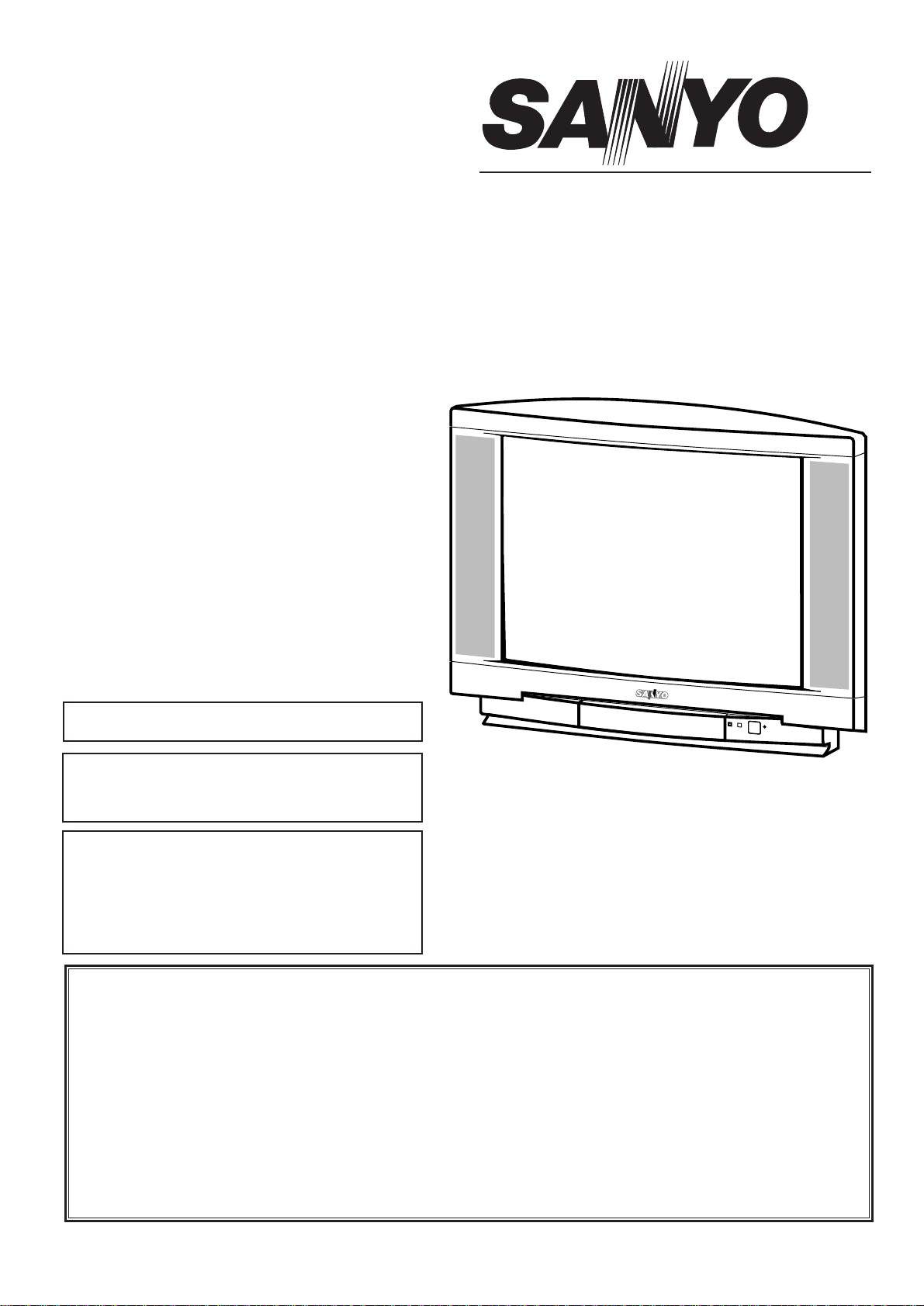
Part No. SKSM0533 C2WYV JANUARY 2001
Colour Television
Service Manual
Model CE28DN7-C
Service Ref. No. CE28DN7-C-00
PRODUCT CODE: 111351318
ORIGINAL VERSION: Chassis No. EB6-B
Give complete "SERVICE REF. NO." for parts
order or servicing, it is shown on the rating sheet
on the cabinet back of the TV set.
Note
This TV receiver will not work properly in foreign
countries where the television transmission
system and power source differ from the design
specifications. Refer to the specifications for the
design specifications
CE28DN7-C
Contents
Safety precautions/Specifications . . . . . . . . . . . . . . . . . . . . . . . . . . . . . . . . . . . . . . . . . . . . . . . . . . 2
Block diagrams . . . . . . . . . . . . . . . . . . . . . . . . . . . . . . . . . . . . . . . . . . . . . . . . . . . . . . . . . . . . . . 3~5
Cabinet Disassembly. . . . . . . . . . . . . . . . . . . . . . . . . . . . . . . . . . . . . . . . . . . . . . . . . . . . . . . . . . . . 6
Adjustment and Repair Procedures . . . . . . . . . . . . . . . . . . . . . . . . . . . . . . . . . . . . . . . . . . . . . . 7~11
CPU Functions . . . . . . . . . . . . . . . . . . . . . . . . . . . . . . . . . . . . . . . . . . . . . . . . . . . . . . . . . . . . . . 12~13
Component Locations . . . . . . . . . . . . . . . . . . . . . . . . . . . . . . . . . . . . . . . . . . . . . . . . . . . . . . . 14~15
IC Block Diagrams . . . . . . . . . . . . . . . . . . . . . . . . . . . . . . . . . . . . . . . . . . . . . . . . . . . . . . . . . 16~20
Pin description of semiconductors . . . . . . . . . . . . . . . . . . . . . . . . . . . . . . . . . . . . . . . . . . . . . . . . . 21
Part Description and reading of schematic diagram . . . . . . . . . . . . . . . . . . . . . . . . . . . . . . . . . . . . 22
Cabinet Parts List . . . . . . . . . . . . . . . . . . . . . . . . . . . . . . . . . . . . . . . . . . . . . . . . . . . . . . . . . . . . . 23
Electric Parts List. . . . . . . . . . . . . . . . . . . . . . . . . . . . . . . . . . . . . . . . . . . . . . . . . . . . . . . . . . 24~31
Please use Schematic Diagram for CE28DN7-C-00.
Part no SKP20350.
-2-
C2WYV
SAFETY PRECAUTION
X-RADIATION PRECAUTION
The primary source of X-RADIATION in the television receiver is the picture tube. The picture tube is specially
constructed to limit X-RADIATION emissions. For continued X-RADIATION protection, the replacement tube
must be the same type as the original including suffix letter. Excessive high voltage may produce potentially
hazardous X-RADIATION. To avoid such hazards, the high voltage must be maintained within specified limit.
Refer to this service manual, high voltage adjustment for specific high voltage limit. If high voltage exceeds
specified limits, take necessary corrective action. Carefully follow the instructions for +B1 volt power supply
adjustment, and high voltage adjustment to maintain the high voltage within the specified limits.
PRODUCT SAFETY NOTICE
SPECIFICATIONS
Product safety should be considered when a component replacement is made in any area of a receiver.
Components indicated by mark in the parts list and the schematic diagram designate components in which
safety can be of special significance. It is particularly recommended that only parts designated on the parts list in
this manual be used for component replacement designated by mark . No deviations from resistance wattage
or voltage ratings may be made for replacement items designated by mark .
!
!
!
1: An isolation transformer should be connected in the
power line between the receiver and the AC line
when a service is performed on the primary of the
converter transformer of the set.
2: Comply with all caution and safety-related notes
provided on the cabinet back, inside the cabinet, on
the chassis or the picture tube.
3: When replacing a chassis in the cabinet, always be
certain that all the protective devices are installed
properly, such as, control knobs, adjustment covers
or shields, barriers, isolation resistor-capacitor networks
etc. Before returning any television to the customer,
the service technician must be sure that it is completely
safe to operate without danger of electrical shock.
Power source AC 220~240V, 50Hz
Television system System BG, DK
Colour system PAL/NTSC4.43 (PAL/NTSC4.43/MTSC3.58 IN AV MODE)
Receiving channel UHF: 21~69
VHF: E2-E12, R1-R12
CATV: X, Y, Z, S1-S41
Aerial input impedance 75ohm
AV terminal
21 Pin SCART Terminal AV1:CENELEC standard with RGB
AV2:CENELEC standard with S-inputs
Front AV AV3:RCA Terminal, Video and Audio (L/R)
Sound output(Music) 8W x 2
Dimensions (WxHxD) 854 x 701 x 601mm
Weight 32 Kg
-3- C2WYV
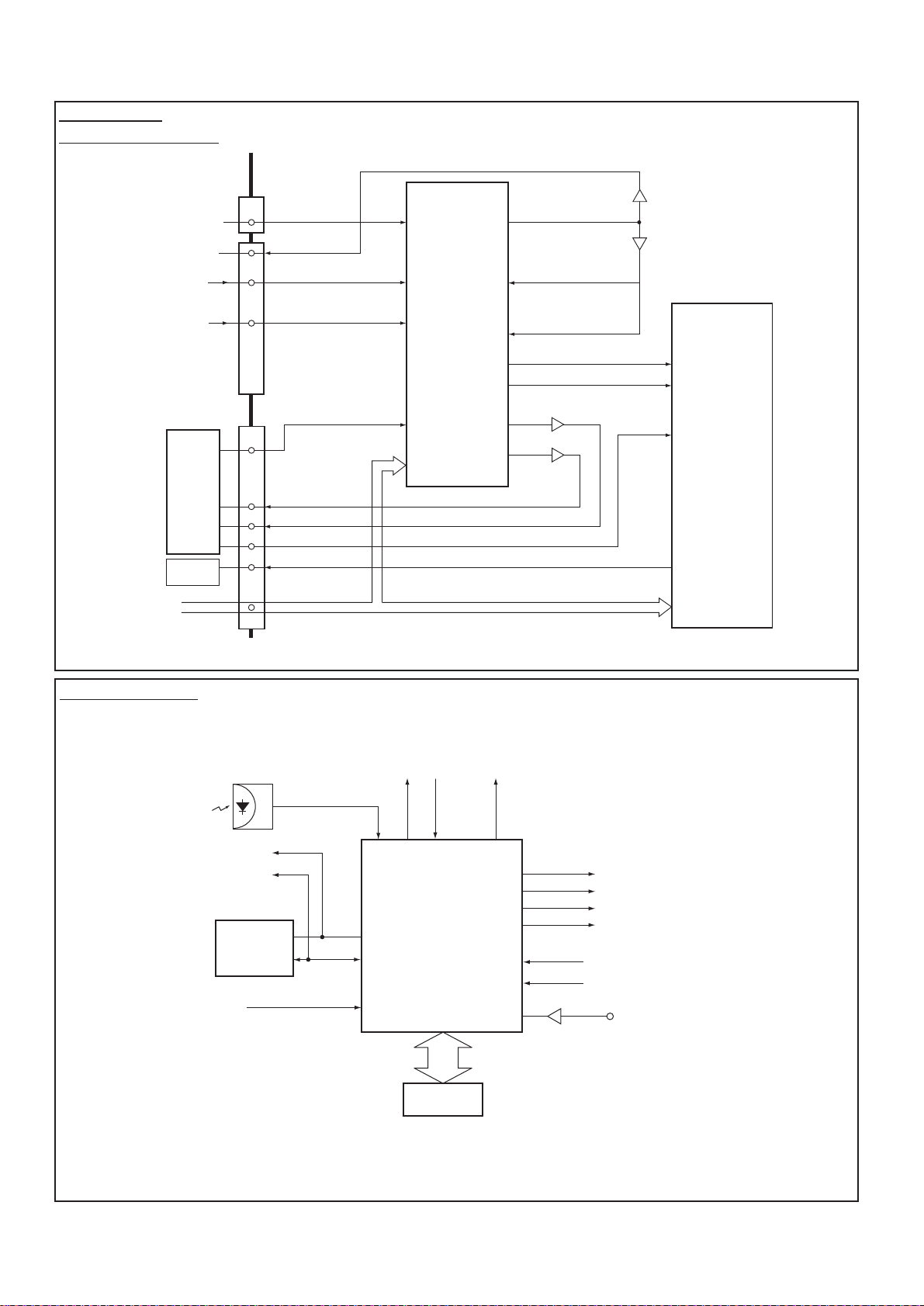
BLOCK DIAGRAM
This is a diagram for all models and therefore differs slightly from the actual block diagram.
IC801
CPU
IC803
MEMORY
SCL
SDA
IC802
ROM
IC201
IF/VIDEO/
CHROMA/
DEF
Q242
Q243
Q244
Q701
Q711
Q721
VIDEO-OUT
CRT
R
G
B
R
G
B
Q121~Q133
TV-OUT
SIF-IN
C-OUT
Y-OUT
13
8
15
18
AV1
AV2
TV-IN SC-1
SC-2
MONTO
-OUT
X132
X131
VIF
SIF
6
7
9
34
35
15
16
17
18
26
T451
FBT
H
V
D.Y
PCC
CONTROL
CS
CONTROL
Q432
Q431
H-OUT
EW-OUT
43
39
40
41
32
3
54
22
21
20
V-OUT IC501
3
6
C
Y
SYNC-IN
BLK
R
G
B
I2C BUS
BLK
B
G
R
CVBS-IN
61
60
47
46
45
44
25 26
24
23
19 1 - 15
80 - 63
T431
PROTECT-IN
PC-IN POWER
Q141
A101
TUNER
Aerial
FOCUS
SCREEN
Refer also
to FIG.-2.
AV SELECTOR
NICAM DECODER
Outline
-4-
C2WYV
IC1201
AV-SELECTOR
<MM1313>
1(V)
2(L)
4(R)
13(V)
14(L)
16(R)
7(V)
8(L)
9(Y)
10(R)
11(C)
41(V)
(V)34
31
8
15
18
8
5,6
10,11
13
29
33
32
37
38
MONITOR-OUT
Q1202
Q1203
Y-IN
C-IN
FRONT AV3
MONITOR-OUT
SC-1
(VIDEO/AUDIO-L/R)
SC-2
(VIDEO/Y/C/AUDIO-L/R)
SC-1
SC-2
K12J
K12M
FRONT-AV
K12H
L-OUT
R-OUT
IC3451
NICAM
&
STEREO
<TDA9875>
37
36
12
60
61
4
5
19
20
C-OUT
Y-OUT
SIF-IN
AUDIO L/R-OUT AUDIO-OUT
IC201
IF/VIDEO/
CHROMA
IC001
AUDIO-OUT
SDA/SCL
(VIDEO)
Y-OUT
C-OUT Q1205
Q1204/1207
I2C BUS
AV Selector
NICAM DECODER
IC801
CPU
25 31 28
24
23
43
61
60
36
46
45
44
1 - 7, 63 - 80
POWER
39
Relay SW
KEY-IN
37
SC1(AV1) 8-pin
SC2(AV2) 8-pin
RC-IN
BLK-OUT
B-OUT
G-OUT
R-OUT
Q806 CVBS
POWER-FAIL
DETECT
SCL
SDA
IC803
MEMORY
I2C BUS
CONTROL
IC802
ROM
System Control
Fig.-2
Fig.-3
-5- C2WYV
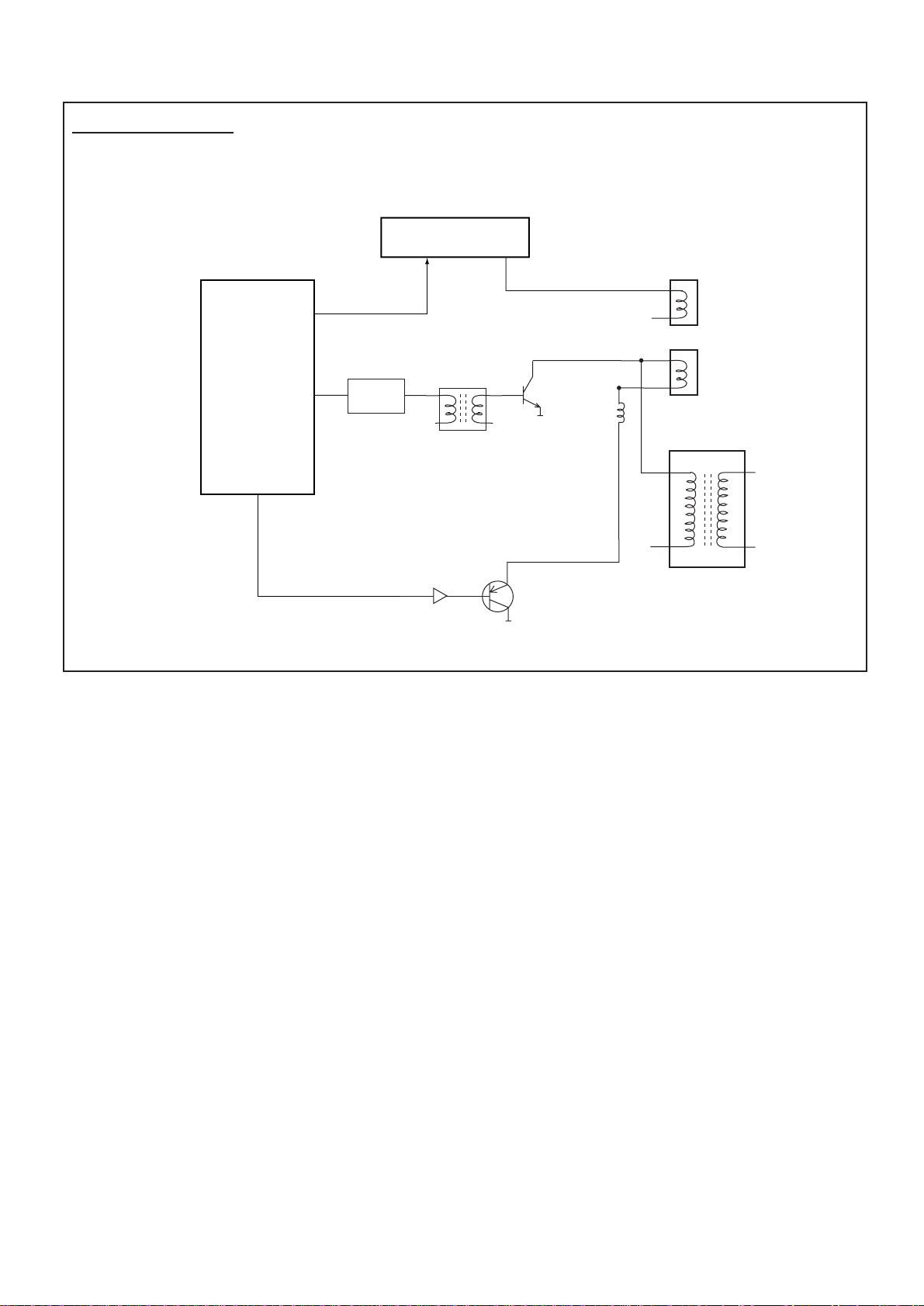
IC201
IF/VIDEO/
DEFLECTION
<TB1251>
26
41
32
V-Drive
H-Drive
Q431
IC501
V-Output<LA7833>
63
Q462
Deflection
Yoke
Horiz.
Coil
Vert.
Coil
T451
FlyBack Trans
Pcc Control
Q461
T431
Q431
H-Output
Drive Trans
L461/L462
EW-Out
Deflection Control
-6-
C2WYV
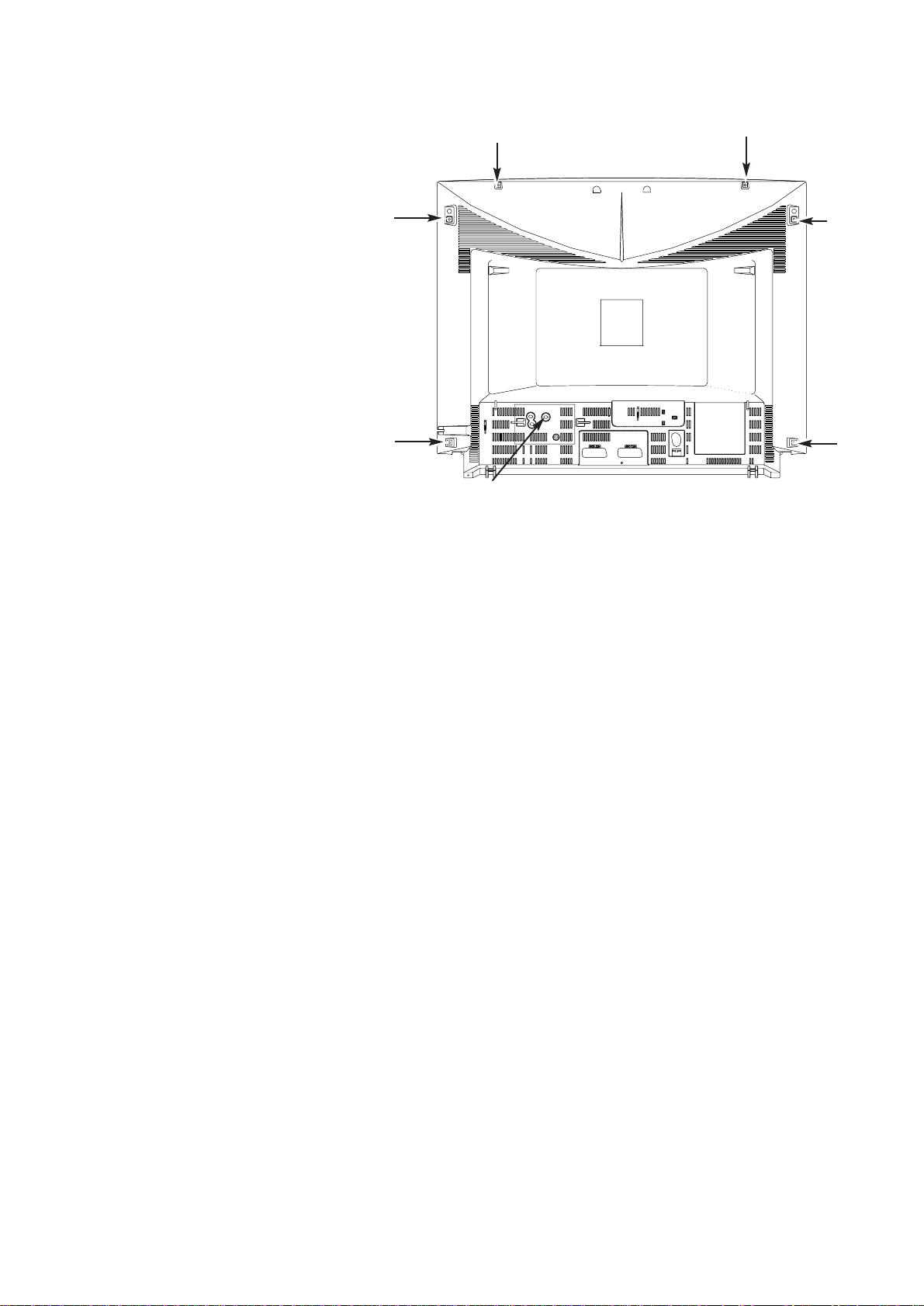
CABINET DISASSEMBLY
CABINET BACK DISASSEMBLY
1. Remove 7 screws(A).
2. Pull out the cabinet back.
(A)
(A)
(A)
(A)
(A)
(A)
(A)
-7- C2WYV
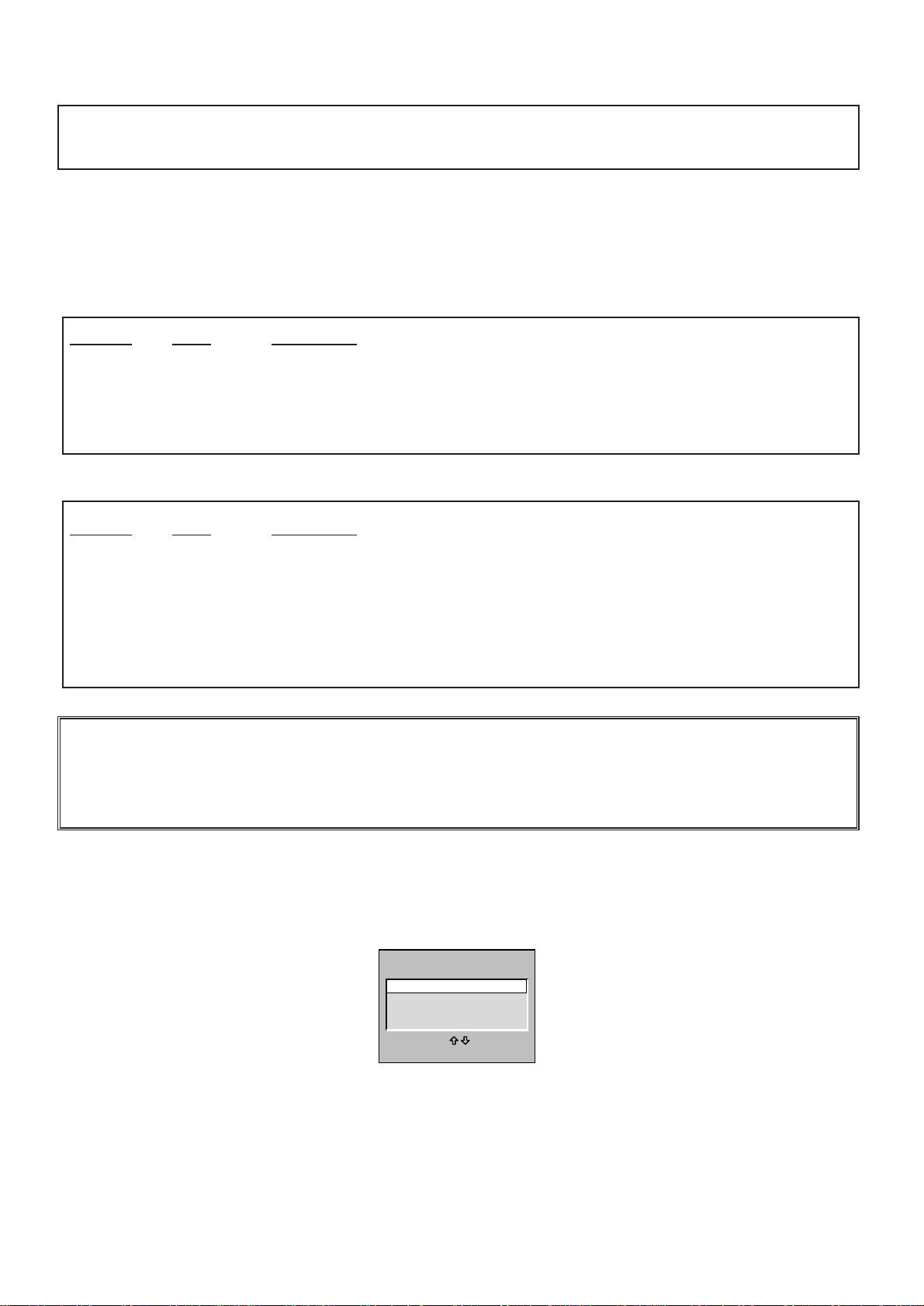
OPTION SETTING
[After replacing the Memory IC (IC803)]
The memory IC, IC803, stores the option data of TV set and service adjustments data for each circuit, therefore,
when the memory IC is replaced, it should be performed following setting and “SERVICE ADJUSTMENT” on next
page.
To enter to the Option Mode
+ Press and hold the F/OK button on the remote control and P▼button on the front panel of the TV. The option
window will appear on the screen. Set the options as shown below.
To set the option mode
+ Highlight the desired option item by using the P▲or P▼ button .
+ To switch the option mode, use the Volume - (LEFT) or Volume + (RIGHT) button.
+ The data which is set in the option mode is stored into the memory IC automatically.
Following table shows the available option items and default setting mode.
Exit from the Service Mode
+ Press the RECALL button.
Option Mode Mode Description & Note
ON-TIMER ON or OFF On-timer available, default “ON”
SORT MODE AUTO TUNE/SORT Tuning mode, default “AUTO TUNING”
or AUTO TUNING
or ATS EURO PLUS
PLUG & PLAY ON or OFF Plug & Play mode, default “ON”
WELCOME TEXT ON or OFF Display message when first set up, default “OFF”
CODE TEST OFF or ON For factory use, default “OFF”
WSS ON or OFF Wide Screen Signaling available, default “ON”
WIDE ON or OFF Wide mode, default “ON”
OPTION 4 or 7 LANGUAGE Language option , default “4 LANGUAGE”
312/313 Mode ON or OFF Teletext mode, default OFF
AV3 OPTION ON or OFF Front AV disable, default ON
3D SURROUND ON or OFF 3D Surround available, default ON
SIF OPTION BG, I, L/L’ or BG or BG/DK Television default system, Default “BG, I, L/L’”
ON-TIMER ON
SORT MODE
AUTO TUNING
PLUG & PLAY ON
WELCOMETEXT ON
CODETEST OFF
OFF
WSS ON
WIDE OFF
OPTION 4LANGUAGE
312/313 Mode ON
AV3 OPTION ON
3D SURROUND ON
SIF OPTION
AUTO VOLUME BG + DK
OPTION
ADJUST : EXIT : RECALL
?
OPTION SETTINGS FOR CE28DN7-C-00
-8-
C2WYV
SERVICE ADJUSTMENTS
[After replacing the Memory IC (IC803)]
The memory IC, IC803, stores the service adjustments data for each circuit, therefore, when the memory IC is
replaced, it should be programmed by using “OPTION SETTING” on previous page.
ADJUSTABLE SERVICE ADJUSTMENT
REGULAR
WIDE
To enter to the Service Mode
+ Press and hold the GREEN button on the remote control and then press the P▼button inside of the door. The
adjustment window will appear on the screen.
REGULAR
WIDE
OTHERS
TB1251
ADJUST
OK
SELECT:
EXIT : RECALL
IMPORTANT NOTICE
Do not attempt to adjust service adjustments not listed above otherwise it may cause loss of
performance and product safety.
Item No. OSD Description
1 P V-P Vertical Centre Adjustment
2 P H-P Horizontal Centre Adjustment
5 P V-S Vertical Size Adjustment
6 P H-S Horizontal Size Adjustment
7 P PCC Pcc Adjustment
8 P TRP Trapezoid Distortion Adjustment
10 P CNR Corner Adjustment
Item No. OSD Description
1 AGC AGC Adjustment
2 CUT Cut-Off Drive Adjustment
3 GRY G-Drive Adjustment
4 GRY B-Drive Adjustment
8 OSD OSD Positioning Adjustment
Note: Some items of the service adjustments for this chassis are controlled by the CPU, IC801, and the
adjustments are carried out by using the RC handset.
-9- C2WYV
To select the mode and service item and change data value
+ Highlight the desired adjustment mode by using the P▲or P▼button and then press the F/OK button.
+ To select the adjustment item, use the P▲or P▼button.
+ To change the service data, use the Volume -(LEFT) or Volume + (RIGHT) button.
+ The data which is set in the service mode is stored into the memory IC automatically.
Exit from the Service Mode
+ Press the RECALL button or turn off the TV set by using the Mains switch.
INITIALISATION OF MEMORY IC
To initialise the memory IC (IC803), press and hold the NORMAL button on the remote control and then press
the P▲button on the front panel of the TV set, and then turn the Mains switch Off and On. Now the initialisation is
completed.
When the memory IC is initialised, all of the service data (option data and service adjustment data) stored in the IC
are reset to the default value. It is necessary to readjust the service adjustments listed on pages 7 & 8.
REGULAR
1, AGC 38
Adjustment No.
and Item name Adjustment Data
WIDE
1. PV-P 1F
Adjustment No.
and Item name Adjustment Data
REGULAR mode WIDE mode
-10-
C2WYV
ADJUSTMENTS
IMPORTANT NOTICE
Do not attempt to adjust the following service adjustments except when adjustments are required in servicing
otherwise it may cause loss of performance and product safety.
1. Receive white raster pattern.
2. Set controls to normal.
3. Connect digital voltmetre to test point TP-B and GND.
4. Adjust voltage to 150 ±0.5V by using VR641.
1. Input and tune an RF signal which is UHF to the clear-
est station.
2. Connect digital voltmetre to test point TP-A and GND.
4. Enter to the service mode and select mode “REGU-
LAR”, and select item no.1 “REGULAR 1, AGC”.
5. Press the LEVEL+ or LEVEL - button to adjust volt-
age to be 3.2Vdc.
By using FOCUS VR, adjust focus control for well
defined scanning lines.
SCREEN ADJUSTMENT

1. Receive black & white pattern.
2. Enter to the service mode and select mode “REGU-
LAR”, and select item no. 2 “REGULAR 2, CUT”. The
horizontal line will appear on the screen.
3. Set the SCREEN VR for one colour to be just visible.
4. Using the numeric buttons shown set each colour to
minimum by decreasing to the point where any further
decrease resets the adjustment to maximum value.
BIAS ADJUSTMENT

5. By using the buttons 1, 2, 4, 5, 7, 8 on the remote
control, adjust the line to be white.
The key allocation is as follows;
Button No. Operation
1 Increase Red
2 Decrease Red
4 Increase Green
5 Decrease Green
7 Increase Blue
8 Decrease Blue
DRIVE ADJUSTMENT

6. Select item no.3 “REGULAR 3, GRY” (G-Drive) or 4
“REGULAR 4, GRY” (B-Drive) and adjust both initially
to 3F.
7. Change data value of each item by using LEVEL + or
LEVEL - button to obtain the proper white balance.
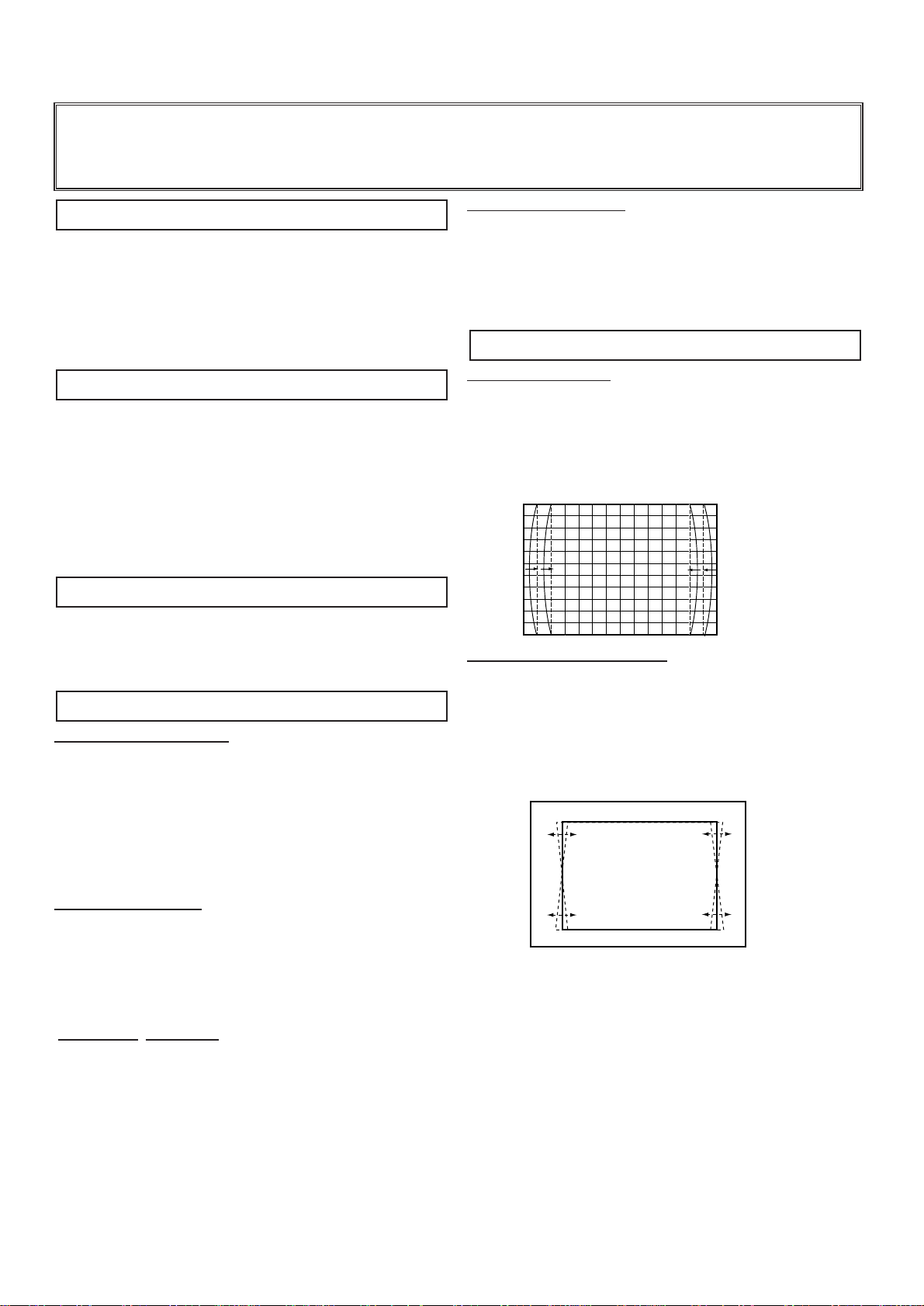
PCC ADJUSTMENT
1. Receive cross hatch pattern and set screen mode to
“FULL”.
2. Enter to the service mode and select mode “WIDE”,
and select item no. 7 “WIDE 7.P PCC”.
3. Press the LEVEL+ or LEVEL - button to adjust the
vertical line to be straight.
TRAPEZOID ADJUSTMENT

1. Receive cross hatch pattern and set screen mode to
“FULL”.
2. Enter to the service mode and select mode “WIDE”,
and select item no. 8 “WIDE 8.P TRP”.
3. Press the LEVEL+ or LEVEL - button to correct the
trapezum distortion of the vertical line.
PCC ADJUSTMENT
GREY SCALE ADJUSTMENT

FOCUS ADJUSTMENT
AGC ADJUSTMENT

+ B VOLTAGE ADJUSTMENT